

Attentionclaw
AttentionClaw turns your app into branded Instagram and TikTok slideshows with AI copy, images, and style in one workflow.
About Attentionclaw
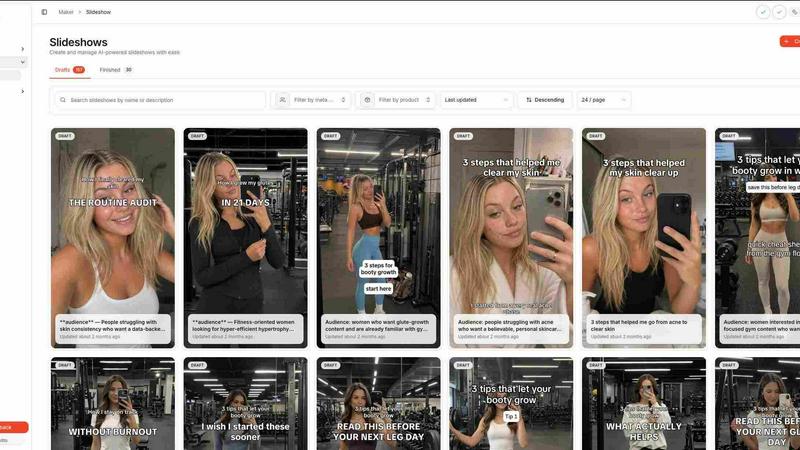
Attentionclaw is basically your new best friend if you're tired of spending hours in Canva trying to make your app or product look fire on social media. It is an AI-powered slideshow maker built specifically for Instagram carousels and TikTok slideshows, and it does all the heavy lifting so you don't have to. You just drop in your product or brand details, pick a visual style that matches your vibe, and boom, the AI writes the hooks, generates the copy, creates custom images, and lays out everything into a complete, on-brand slideshow. No more staring at a blank canvas or wrestling with design tools when you just want to post consistently and grow your audience.
This tool is for everyone who needs to keep their feed popping without hiring a whole creative team. Creators, SaaS founders, app developers, e-commerce brands, agencies, coaches, consultants, and small businesses can all use it to crank out content that looks like it took a designer hours to make. The platform handles layout, typography, image generation, brand styling, and copywriting automatically, so you can focus on your actual business. Teams can upload their own product photos, tweak every generated slide in the editor, batch-create content on higher plans, and even publish directly to Instagram and TikTok from one dashboard. It is built for people who want to post consistently, grow organically, and keep their feed looking fresh without the burnout.
Features of Attentionclaw
AI-Powered Copy and Image Generation
This feature is the real MVP. You just feed Attentionclaw your app name, positioning, target audience, and some product visuals, and the AI writes the hooks, the body copy, and even generates custom images that match your brand. It drafts everything together so you get a complete slideshow that tells a story, not just a random pile of slides. You can review and tweak the copy in the editor before it goes live, so you never have to worry about weird AI nonsense slipping through.
Brand Style Lock-In
Once you set your brand colors, fonts, and visual direction, every single slideshow you generate will match that vibe automatically. No more manually adjusting fonts or hunting down hex codes for every new post. You can choose from three distinct visual styles: Cartoon for bold, illustrated explainers; UGC for photo-style, native-looking product walkthroughs; and Dark Academia for moody, cinematic frames with elegant typography. Set it once, and forget it.
Guided Four-Step Workflow
Attentionclaw keeps things stupid simple with a four-step process that holds your hand the whole way. First, you describe your app and add product visuals. Second, you lock in your brand look with colors and fonts. Third, you choose a topic or let the AI suggest a concept, and it generates the entire slideshow. Fourth, you review the draft in the editor and hit publish. It is basically a content creation assembly line that anyone can run.
Direct Publishing to Instagram and TikTok
You can connect your Instagram and TikTok accounts directly to Attentionclaw and schedule or publish your slideshows from the same dashboard. No more downloading files, switching tabs, or manually uploading. The whole workflow stays focused on the two platforms that actually matter for short-form visual content. Higher plans also give you batch processing, so you can prepare multiple concepts for the same app or a whole portfolio at once.
Use Cases of Attentionclaw
App Feature Explainer Carousels
When you launch a new feature for your app, you need to explain it fast and make it look good. Attentionclaw lets you drop in your app name, the new feature's positioning, and some screenshots, then pick the Cartoon style to generate a playful, story-driven carousel. The AI writes the hook and explains the feature in simple terms, while the illustrated scenes make it easy to follow. You can review and publish directly to Instagram, saving you from spending hours in design tools.
Product Walkthrough TikTok Slideshows
E-commerce brands and app developers can use the UGC style to create native-looking TikTok slideshows that walk viewers through a product or app. Just upload your product photos, set the brand colors, and let the AI generate photo-style slides with text overlays that feel organic, not salesy. The AI writes the copy to keep viewers swiping, and you can schedule the post directly to TikTok from the dashboard. It is perfect for showing off how your product works in real life.
Weekly Content Batch Creation for Agencies
Agencies managing multiple clients or apps can use the Spike or Summit plans to batch-create slideshows for different brands. You set each client's brand style once, then generate multiple slideshow concepts for different topics in one go. The batch processing feature lets you prepare a week's worth of content for Instagram and TikTok without starting from scratch every time. You can review everything in the editor, make adjustments, and schedule posts across accounts from one place.
Organic Growth Content for Coaches and Consultants
Coaches and consultants who want to build their personal brand on social media can use Attentionclaw to create value-packed carousels without a design background. Just input your topic, audience, and some key points, and the AI generates slides with hooks, tips, and images that match your brand. The Dark Academia style works great for a more editorial, sophisticated look. You can post consistently and keep your feed looking professional without hiring a designer or spending hours in Canva.
Frequently Asked Questions
Do I need any design skills to use Attentionclaw?
Nope, not at all. That is literally the whole point. Attentionclaw handles layout, typography, image generation, brand styling, and copywriting automatically. You just provide your app details and choose a visual style, and the AI does the rest. You can still edit every slide in the editor if you want to tweak things, but you can also just hit publish and let it ride.
Can I upload my own product photos and images?
Yes, absolutely. You can upload your own product photos, screenshots, and brand visuals directly into Attentionclaw. The AI will use those images in the generated slideshows alongside any custom images it creates. This is perfect for e-commerce brands and app developers who want to feature their actual products instead of relying solely on AI-generated visuals.
Which social media platforms does Attentionclaw support?
Right now, Attentionclaw focuses on Instagram and TikTok. You can connect your accounts and publish directly to both platforms from the dashboard. The workflow is built specifically for Instagram carousels and TikTok slideshows, so you get optimized formats and specs for each platform. Higher plans let you connect multiple accounts across both platforms.
What happens if I want to cancel my subscription?
You can cancel your subscription anytime from your account settings. There are no long-term contracts or hidden fees. Your plan will stay active until the end of your billing period, and you can still access your generated content. Payment is processed securely through Stripe, so you do not have to worry about sketchy billing practices.
Pricing of Attentionclaw
Attentionclaw offers three monthly plans that scale with your needs. The Spark plan is 29 dollars per month and gives you 10,000 credits, one meta social account, and is perfect for managing a single app. The Spike plan is 59 dollars per month and bumps you up to 20,000 credits, three meta social accounts, and adds batch processing for slideshows, which is ideal for active app teams. The Summit plan is 119 dollars per month and includes 40,000 credits, five meta social accounts, and batch processing, making it the best choice for managing an entire app portfolio. You can upgrade or cancel from your account settings at any time.
Similar to Attentionclaw

Leadeon
AI growth tool for X and LinkedIn: write posts in your voice, schedule at your best times, find leads on X and see what works.


CleanSmart
CleanSmart removes duplicates, fixes formatting, fills gaps, and flags anomalies in one automated pass. No code. No data engineers.

Genjutsu AI
Genjutsu AI turns your ideas into cinematic videos, product ads, social media shorts, and high-quality images in minutes.


TrackMedia
Your Social Media Content Engine That Drives Revenue. Distribute your content to every social media platform and track it in real time. Use Ai agents

Forms Plugin
The #1 Native Form Builder Plugin for Framer - No Code, No Embeds, No External Platforms.