

Browser Notes
Browser Notes is your local-first vibe for notes, boards, and mind maps right in Chrome with zero signup or cloud nonsense.
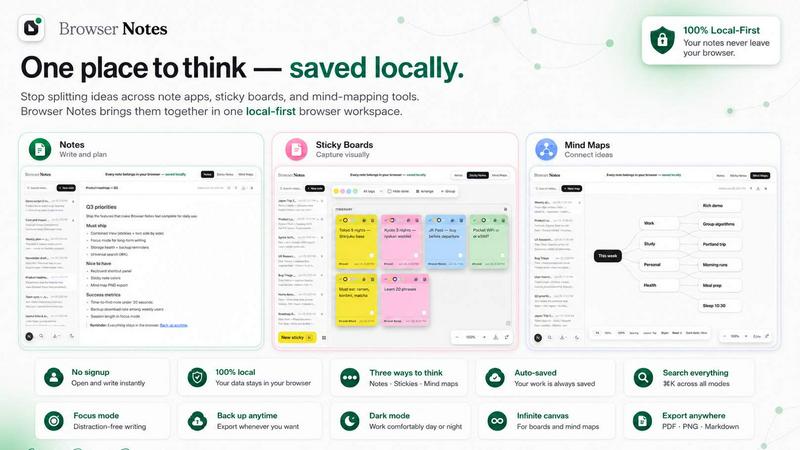
About Browser Notes
Alright, let's be real for a second. Your digital life is probably a hot mess of random notes scattered across a million different apps. You got that one sticky note app for quick thoughts, a separate mind-mapping tool for brainstorming, and maybe even a full-on writing app for longer stuff. And where does it all end up? Probably in some random cloud you didn't even ask to join, tracked and analyzed for data points you never consented to. It's exhausting, right?
Enter Browser Notes. This isn't just another note-taking app that wants your email, your location, and your firstborn child. This is a Chrome extension that says "nah" to all that noise. It brings your notes, sticky notes, and mind maps into one single, local-first workspace that lives entirely in your browser. No account creation, no tracking cookies, no forced cloud sync that breaks your workflow. It works completely offline, stores everything in your browser's local storage, and gives you the power to back up your data whenever you want.
Who is this for? Literally anyone who uses a browser. Students cramming for exams, freelancers juggling multiple projects, writers who hate writer's block, or just your average internet dweller who wants a clean, private space to think. The main vibe here is total ownership and zero friction. You don't need to sign up, you don't need internet, and you don't need to trust a third party with your private thoughts. It's your browser, your notes, your rules. Period.
Features of Browser Notes
Three Ways to Think
Browser Notes gives you three distinct tools to capture your thoughts, and you can switch between them on the fly. Need to write a detailed article? Use the Notes tool with full Markdown support. Brainstorming random ideas for a new project? Open a Sticky Notes board and slap those thoughts onto a free canvas. Want to map out a complex concept? Fire up the Mind Maps tool and branch ideas from a central node. You can even start from a template to skip the blank page anxiety. It's like having a Swiss Army knife for your brain, but way less stabby.
Local-First Privacy
This is the core of the whole operation. Browser Notes doesn't send your data anywhere. It doesn't have a server to store your notes, no cloud account to hack, and no privacy policy that reads like a legal nightmare. Everything you write, draw, or map is stored locally in your browser's storage. That means zero tracking, zero data mining, and zero chance of some corporation reading your private journal entries or your secret business plans. You are the only one who has access. It's the digital equivalent of a lockbox under your bed, except it's in your browser.
Full Offline Functionality
Forget about that "no internet" panic when you have a sudden brilliant idea. Browser Notes works completely offline. You can open the extension, write notes, create sticky boards, and build mind maps without a single byte of data being sent to the internet. This is a game-changer for people on planes, in coffee shops with spotty Wi-Fi, or just anyone who values uninterrupted focus. Your creativity doesn't have to wait for a signal bar to fill up.
Easy Backup and Restore
Just because your data is local doesn't mean it's trapped. Browser Notes gives you full control over your data with a simple backup and restore system. You can export your entire workspace as a backup file anytime you want, storing it on your own hard drive, a USB stick, or even your own private cloud. If you ever need to switch browsers, reinstall Chrome, or just want to start fresh, you can import that backup and all your notes, sticky notes, and mind maps come right back. It's your data, and you decide where it lives.
Use Cases of Browser Notes
Student Study Sessions
Imagine you're cramming for a huge exam. You've got textbook chapters to summarize, key concepts to visualize, and random questions popping into your head at 2 AM. With Browser Notes, you can use the Notes tool to write detailed chapter summaries with Markdown formatting. Then, open a Mind Map to connect those concepts visually, creating a study guide that actually makes sense. And for those random "wait, what was that formula?" moments, slap a sticky note on the canvas. No internet needed, no distractions, just pure study vibes.
Freelancer Project Management
Juggling three clients, two side projects, and a personal blog? It's chaos. Browser Notes helps you keep it all straight without signing up for yet another project management tool that wants your credit card. Use sticky notes to brainstorm content ideas for Client A, then switch to Notes to draft the actual copy. For Client B, use a Mind Map to outline the structure of their new website. Everything is in one place, local, and private. No one is tracking your hourly rate or your client's proprietary info.
Personal Journaling and Reflection
If you're tired of big tech companies reading your diary entries to serve you targeted ads for therapy, Browser Notes is your digital sanctuary. You can write daily journal entries using the Notes tool, complete with Markdown for headers and lists. The best part? It's completely offline and local. You can write about your deepest thoughts, your wildest dreams, or your most embarrassing moments without a single byte being uploaded to a server. It's just you and your browser, having a private conversation.
Creative Brainstorming Sessions
Got a new product idea, a story concept, or a business plan that's brewing? Don't let it slip away. Open a Mind Map in Browser Notes and start branching from a central idea. Let your thoughts run wild, connecting random concepts until something clicks. Then, use sticky notes to capture those "aha!" moments on a free canvas, arranging them visually to see the big picture. And when you're ready to write it all down, the Notes tool is right there. It's a complete creative workflow, all in your browser, all offline.
Frequently Asked Questions
Do I need to create an account to use Browser Notes?
Nope, not at all. That's literally the whole point. Browser Notes is designed to be completely account-free. You don't need to sign up, provide an email, or agree to any terms of service that secretly mine your data. Just install the Chrome extension, and you're good to go. It's that simple.
Is my data safe and private?
Absolutely. Your data never leaves your browser. It is stored locally in your browser's storage, which means no one else has access to it. Not the developers, not Google, not some random hacker on the internet. You are the sole owner and controller of your notes. There is no tracking, no analytics, and no cloud sync unless you choose to manually back up your data and store it somewhere else.
Can I use Browser Notes without an internet connection?
Yes, 100%. Browser Notes works entirely offline. You can write notes, create sticky boards, and build mind maps even when you have zero internet connection. This is perfect for flights, remote areas, or any situation where you want to focus without the distraction of the online world. Your creativity doesn't need Wi-Fi.
How do I back up or restore my data?
It's super easy. Browser Notes has a built-in backup and restore feature. You can export your entire workspace as a backup file at any time and save it to your computer, a cloud drive of your choice, or a USB stick. If you need to restore your data later, just use the "Import backup" option, and everything comes back exactly as you left it. No data loss, no hassle.
Explore more in this category:
Similar to Browser Notes

@fuck.it - email with attitude
Private email. Pure. Secure. Exclusive. No ads, no tracking, no data selling. GDPR compliant, EU-hosted.

FreeVideoGenerator
Free AI video generator: turn text prompts and photos into video clips with Sora 2, Veo 3.1, Wan and more. Free starter credits, no watermark download

Novastart
Apps and files on an infinite canvas where people and AI agents work together.

Panzoe
Panzoe is an all-in-one AI platform for personal productivity, business automation, AI assistants, content creation, and custom AI solutions.

AUTOMATER.ai
A tray helper for every AI coding tool: one searchable library of past sessions, waiting alerts and usage across 9 providers.


AI Email Filter
AI Email Filter sorts incoming mail into folders using plain-language prompts you write. Works with any IMAP mailbox; bring your own LLM if you want.
