

CheckoutReceipt
No signup needed to cook up legit receipts with 100+ templates and instant PNG/PDF downloads.
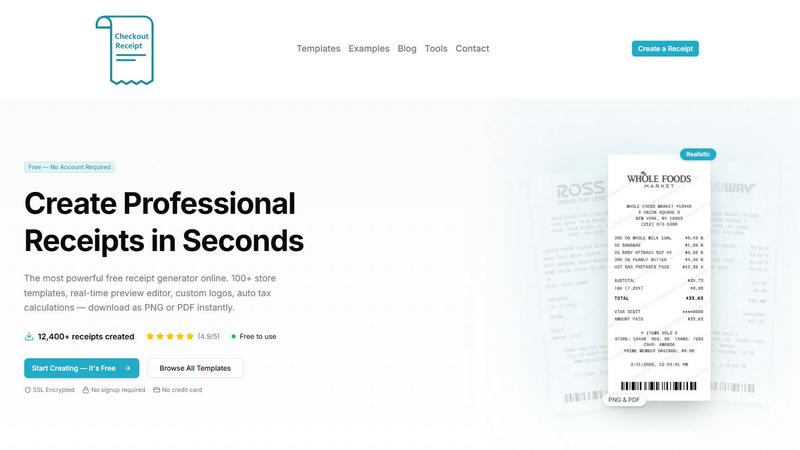
About CheckoutReceipt
Alright, let's get real for a sec. CheckoutReceipt is basically the MVP of receipt generators, and it's completely free. No cap. This tool lets you whip up professional-looking receipts in under 60 seconds, and you don't even need to sign up for anything. We're talking over 100 customizable templates that cover everything from your favorite retail stores like Target and Walmart to restaurants like Subway and Dunkin', plus a whole bunch of service-based templates for mechanics, doctors, and even plumbers.
So who's this for? Honestly, anyone who needs a legit receipt for legitimate business, creative projects, or educational purposes. Maybe you're a small business owner trying to keep your expense tracking on point, a student working on a budgeting project, or a freelancer who needs to send a quick receipt to a client. The tool is built with a real-time preview editor so you can see exactly what you're getting before you download it as a PNG or PDF. You can upload your own logo, auto-calculate taxes, and even add realistic barcodes. It's all SSL encrypted and runs entirely in your browser, so your data stays private and secure. Over 12,400 receipts have already been created, and users are vibing with a 4.9 out of 5 star rating. Just remember, this is for legit use only. No fraud, no deception. Check the Terms of Service if you're unsure.
Features of CheckoutReceipt
100+ Store-Specific Templates
You're not stuck with some generic boring receipt format. CheckoutReceipt has over 100 templates that are specific to actual stores and businesses. Need a Target receipt? There's one for that, including both regular and REDcard formats. What about a Walmart Supercenter or a Home Depot for your DIY projects? They're in there too. We've got grocery stores like Whole Foods and Publix, fast food joints like Subway and Dunkin', and even luxury brands. The templates are designed to look realistic, so whether you're using them for expense reporting or a creative project, nobody's going to question the vibe.
Real-Time Live Preview Editor
This is where the magic happens. As you type in store names, addresses, line items, prices, and tax rates, the live preview updates instantly. You don't have to guess what your receipt is going to look like. You can see every change in real-time, which saves you from having to download a bunch of test versions. It's like having a WYSIWYG (what you see is what you get) editor, but way more satisfying. You can tweak fonts, add paper textures like thermal or aged look, and rearrange sections with drag and drop. It's all modular, so you have full control over the layout.
Auto Barcode Generation and Custom Logo Upload
Let's be real, a receipt without a barcode looks kinda sus. CheckoutReceipt automatically generates realistic barcodes with customizable numbers, so your receipts look authentic. Plus, you can upload your own business logo or use the built-in store logos. You can adjust the sizing and positioning to make it look perfect. This feature is clutch for small business owners who want to brand their receipts without paying for expensive software. It's all done in your browser, no uploads to some sketchy server.
PNG and PDF Export with High Resolution
Once you've customized your receipt to perfection, you need to download it. CheckoutReceipt lets you export as either PNG or PDF, both in high resolution. The text stays crisp no matter how much you zoom in, which is great for printing or sharing digitally. Whether you need a PDF for an email attachment or a PNG for a social media post, you're covered. The downloads are optimized for both print and digital use, so you won't end up with a blurry mess. And it all happens in under 60 seconds.
Use Cases of CheckoutReceipt
Small Business Expense Tracking
If you're running a small business, you know how annoying it is to keep track of every single expense. CheckoutReceipt lets you generate receipts for purchases you've made or services you've rendered. You can create a professional receipt for a client in seconds, complete with your logo, itemized list, and tax calculations. This makes tax season way less painful and helps you keep your books clean. No more scrambling for lost receipts or trying to remember what you spent at the office supply store.
Educational and Training Scenarios
Teachers and trainers, this one's for you. CheckoutReceipt is perfect for creating realistic receipts for educational purposes. Maybe you're teaching a class on personal finance and need examples of different receipt types. Or you're running a mock business simulation and need receipts for the fake transactions. The tool is great for creating realistic examples that students can analyze. Just make sure you're using it for legitimate educational purposes only, as per the terms of service.
Creative Projects and Content Creation
Are you a YouTuber, graphic designer, or content creator? CheckoutReceipt can be a game-changer for your projects. Need a prop for a video where you're unboxing a product? Generate a realistic receipt. Working on a graphic design project that needs a receipt mockup? You can customize every detail to match your vision. The drag-and-drop editor and font options give you total creative control. Plus, the realistic barcodes and paper textures add that extra layer of authenticity that makes your content pop.
Freelancer and Contractor Invoicing
If you're a freelancer or contractor, you need to send receipts to your clients. CheckoutReceipt makes it super easy. You can create a receipt for plumbing services, lawn care, cleaning, or any other service you provide. Just pick the service template, fill in the details, add your logo, and download it as a PDF. You can send it directly to your client via email. It's way faster than using complicated invoicing software, and it's completely free. No signup, no credit card, no fuss.
Frequently Asked Questions
Do I need to create an account to use CheckoutReceipt?
Nope, not at all. That's the whole point. You can start creating receipts immediately without signing up for anything. No email, no password, no credit card. Just go to the website, pick a template, customize it, and download. It's that simple. Your privacy is protected because everything runs in your browser. We don't store any of your data on our servers.
What types of receipts can I create with CheckoutReceipt?
You can create a massive variety of receipts. We have over 100 templates covering retail stores like Target, Walmart, and Best Buy, restaurants like Subway and Dunkin', automotive services like oil changes and car rentals, healthcare receipts for doctors and vets, and even utility bills. There are also templates for donations, rent payments, and professional services like plumbing and electrician work. Basically, if you need a receipt for it, we probably have a template.
Can I use CheckoutReceipt for commercial purposes?
Yes, you can use it for legitimate business purposes like creating receipts for your clients or tracking expenses. However, there's a strict rule: you cannot use it to commit fraud or deceive others. That means no generating fake receipts for insurance claims, tax evasion, or any other shady stuff. CheckoutReceipt is for legitimate business, creative, and educational use only. If you're unsure, check the Terms of Service on the website.
Is my data safe when using CheckoutReceipt?
Absolutely. The whole tool is SSL encrypted, which means your connection is secure. More importantly, everything runs directly in your browser. That means the data you enter (store names, prices, logos) never gets sent to our servers. It stays on your device until you choose to download the receipt. We don't track you, we don't store your information, and we don't sell your data. It's private and secure by design.
Explore more in this category:
Similar to CheckoutReceipt

Kody Tools
Free collection of online developer utilities, code formatters, and digital converters designed to streamline your daily workflow.

Forms Plugin
The #1 Native Form Builder Plugin for Framer - No Code, No Embeds, No External Platforms.

Product Launch Checklist
A free launch checklist for SaaS, apps, AI tools and more. Every step says why it matters and when you can skip it.

HomeAnswerBook
Practical, independent guides to home repairs, maintenance, costs, troubleshooting, and everyday fixes.

BlazePDF
Highlight faster. Study in flow with custom shortcuts and a workflow built around you. Print smarter, or turn any page into a tiled poster.


Build Mode for Mac
Build Mode is a Mac app that turns focused sessions into visible progress, so you can see the work adding up before the results arrive.

Post by FreeSurf
Free, open-source scheduler. Web/mobile/API. Fees.