

About DocuExtractor
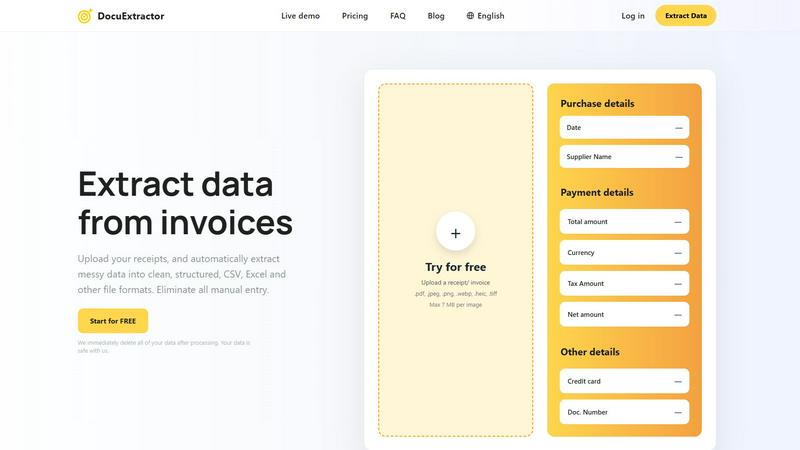
Alright, let's get real. The accounting and bookkeeping grind is a special kind of hell, drowning in a never-ending tsunami of crumpled receipts, cryptic PDF invoices, and bank statements that look like they were designed to torture you. Manual data entry? That's a soul-crushing, error-prone time-suck straight from the dark ages. Enter DocuExtractor, your new digital sidekick built to slay the paperwork dragon and give you your life back. Think of it as a super-powered AI brain that can actually read, understand, and organize any financial document you throw at it. We're talking receipts, invoices, bank statements, you name it. This tool uses a killer combo of advanced OCR, deep learning, and LLM magic (that's fancy talk for really, really smart AI) to instantly pull key deets like dates, supplier names, totals, taxes, and more. It then spits out that messy data as clean, ready-to-use CSV or Excel files. No more copying and pasting. No more typos. Just drag, drop, and watch the magic happen. Built specifically for pros and businesses drowning in docs, it's the no-brainer upgrade your workflow desperately needs. Plus, with a free tier to start and ironclad privacy (we delete your stuff right after processing), you've got nothing to lose but the headache.
Features of DocuExtractor
Drag, Drop, Done Automation
Forget complex setups. DocuExtractor is the definition of "set it and forget it." Just drag and drop your PDFs, JPGs, or PNGs into the workspace, and our fully automated AI takes over. It uses a powerhouse combo of Optical Character Recognition (OCR), Deep Learning, and Large Language Models to read, comprehend, and extract data instantly. No manual tweaking needed. You literally upload, and seconds later, you're ready to download clean data. It's so easy your whole team can be productive in minutes.
99.6% Accuracy with Specialized AI Brains
We don't just use generic scanning tech. DocuExtractor is powered by specialized algorithms fine-tuned for every document type—receipts, invoices, statements—you get the picture. This laser focus means we hit a killer 99.6% accuracy rate on financial docs, pulling out precise totals, tax amounts, dates, and supplier names. No more guessing games or costly typos messing up your books. It's like having a super-precise, caffeine-fueled intern who never sleeps or makes mistakes.
Global Doc Power (45+ Languages)
Your business isn't just local, and neither are your documents. DocuExtractor automatically detects and processes documents in over 45 languages. Got an invoice from a supplier in Japan or a receipt from a conference in Germany? No sweat. Our AI handles the translation and extraction on the fly, breaking down language barriers and making global paperwork a total breeze. Automatic language detection means you don't have to configure a thing.
Fort Knox-Level Data Privacy
We get it—your financial documents are super sensitive. That's why our privacy policy is brutally simple: we immediately delete all of your data right after processing. Your files aren't stored, mined, or used to train our AI. They're processed in a secure environment and then wiped clean. Your data is safe with us, so you can extract with confidence and zero drama about security leaks or privacy nightmares.
Use Cases of DocuExtractor
The Bookkeeper's Time Machine
Imagine reclaiming 3+ hours a week lost to manual entry. For bookkeepers and accountants, DocuExtractor is a literal time machine. Upload batches of client receipts and invoices directly, and get perfectly structured CSV or Excel files out in under a minute. The output is formatted and ready to import directly into your accounting software (like QuickBooks or Xero), eliminating the pre-import cleanup chaos. It turns a full day of data drudgery into a coffee-break task.
AP Team's Error Eraser
For Accounts Payable teams, manual entry is a minefield of typos and mismatched numbers. DocuExtractor automates the entire invoice processing pipeline. Upload vendor invoices, and instantly extract the PO number, due date, line items, and total amount with pinpoint accuracy. This slashes processing time, eliminates costly human errors before payments go out, and gives your AP specialists superhuman efficiency and peace of mind.
Small Biz Owner's Sidekick
If you're a solopreneur or small biz owner wearing all the hats, paperwork is the worst. Stop wasting evenings decoding receipts and organizing expense reports. Just snap a pic of your receipts after a purchase or dump a month's worth of bank statement PDFs into DocuExtractor. Get a clean, organized spreadsheet in seconds, making tax time, expense tracking, and financial reviews shockingly simple and totally painless.
The Auditor's Secret Weapon
Auditors and ops managers need clean, reliable data fast. DocuExtractor is the perfect tool for quickly converting a mountain of historical PDF invoices, receipts, and statements into structured, searchable data. Need to verify transactions or analyze spending patterns? Instead of manually sifting through hundreds of files, extract the key data into a unified format for instant analysis, making audits and reviews faster and far more thorough.
Frequently Asked Questions
Is my data really safe with DocuExtractor?
Absolutely, 100%. We have a zero-retention policy. The moment our AI finishes processing your document and you download your results, we permanently delete the original file and all extracted data from our servers. We don't store it, sell it, or use it to train our models. Your financial docs are in and out, safe and sound.
What file formats and sizes do you support?
We're super flexible! You can upload all the common stuff: PDF files, JPG/JPEG, PNG, WebP, HEIC, and TIFF images. The max size per file is 7 MB, which is plenty for even high-res scans. And you can upload in batches, so processing a whole folder of documents at once is totally doable.
How accurate is the data extraction?
Wildly accurate. Our specialized AI algorithms are fine-tuned specifically for financial documents, which lets us boast a 99.6% accuracy rate on fields like totals, dates, and supplier names. For the tiny fraction of cases where something looks off, you can easily review and make quick edits right in the interface before downloading.
Can I try it before I pay anything?
You bet! We offer a completely free tier to get you started. You can upload documents, experience the magic of instant extraction, and download your results without entering a credit card. It's the perfect way to see how many hours (and sanity points) you'll save before committing to a paid plan.
Pricing of DocuExtractor
DocuExtractor offers a free tier to get you started, allowing you to test the core extraction features. For high-volume needs and advanced capabilities, they have scalable paid plans. You can find all the detailed info on tiers, credits, and costs on the dedicated "Pricing" page on their website. They're built for businesses of all sizes, from solo freelancers to large enterprises.
Explore more in this category:
Similar to DocuExtractor

@fuck.it - email with attitude
Private email. Pure. Secure. Exclusive. No ads, no tracking, no data selling. GDPR compliant, EU-hosted.

FreeVideoGenerator
Free AI video generator: turn text prompts and photos into video clips with Sora 2, Veo 3.1, Wan and more. Free starter credits, no watermark download


Novastart
Apps and files on an infinite canvas where people and AI agents work together.


Panzoe
Panzoe is an all-in-one AI platform for personal productivity, business automation, AI assistants, content creation, and custom AI solutions.

Hishab
All-in-one POS, inventory, accounting and HR software for Bangladeshi SMEs — real-time sales, stock and finance in one place.

AUTOMATER.ai
A tray helper for every AI coding tool: one searchable library of past sessions, waiting alerts and usage across 9 providers.