

Dreamflow
Dreamflow is your AI copilot that builds real apps crazy fast using prompts, visuals, or code.
About Dreamflow
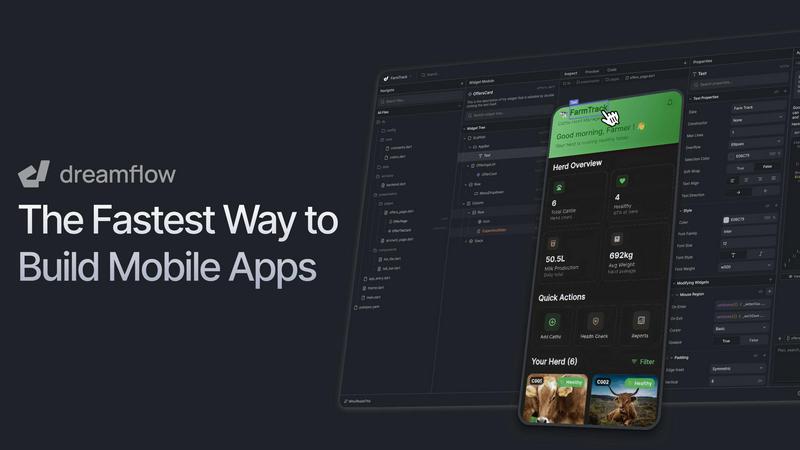
Alright, let's cut through the noise. Dreamflow is the visual AI builder that finally lets you ship production-ready mobile apps without wanting to yeet your laptop out a window. Built by the absolute legends behind FlutterFlow, it's designed to obliterate "prototype purgatory" – that awful place where your cool idea gets stuck in a tool that can't actually launch to the app stores. Dreamflow is your all-access backstage pass to building real software. You start by just vibing with an AI agent, literally telling it your app idea in plain English like you're explaining it to a friend. It doesn't just give you a generic skeleton; it scaffolds out features that actually make sense. Then, you've got options: hop into a slick, drag-and-drop visual editor to fine-tune every pixel, or go full god-mode and dive straight into the clean, full Flutter code. The secret sauce? The AI prompt, visual canvas, and raw code are all perfectly synced. No more spaghetti-code monsters or useless prototypes. It's the holy trinity of dev: AI speed, visual clarity, and code-level power, with zero lock-in. Build for any screen, connect to backends like Firebase or Supabase in a click, and deploy to the App Store, Google Play, or web instantly. This isn't a toy. It's for founders, indie devs, and pro teams who are done with the old ways and want to move at light speed without sacrificing quality or ownership of their work.
Features of Dreamflow
Tri-Surface Editing
This is the core magic. You can fluidly switch between chatting with the AI agent, dragging and dropping in the visual canvas, and writing raw Flutter code. Everything stays perfectly in sync in real-time. Make a change in the code? It updates the visual builder. Tweak a button visually? The code stays clean. It means you're never trapped in one mode and your work never gets lost in translation between a "prototype" and the real deal.
AI-Powered, Context-Aware Generation
This isn't your dumb, copy-paste AI. Dreamflow's AI understands app development patterns and best practices. When you describe your feature, it scaffolds it out the right way, thinking about state management, navigation, and structure. It's like having a senior dev partner who instantly whiteboards your idea into a solid, editable starting point, saving you hours of boilerplate setup.
Build & Deploy for Any Screen
Powered by Flutter, everything you build is automatically responsive and ready for any device size – phone, tablet, or web. When you're done, shipping isn't a nightmare. With literally a few clicks, you can deploy your app to the Apple App Store, Google Play Store, or as a live web app. It takes the terrifying "deployment" phase and turns it into a simple button press.
Backend Integrations Out of the Box
Dreamflow gets that real apps need data. It has first-class, one-click integration with Firebase and Supabase, so you can set up authentication, databases, and storage without ever leaving the platform. You can build a full-stack, scalable application from day one without juggling a dozen different services and config files.
Use Cases of Dreamflow
The Solo Founder's MVP Machine
You're a founder with a killer idea but no $50k for a dev agency. You hop on Dreamflow, describe your app concept to the AI, and within hours (not months) have a working, presentable prototype. You can tweak it visually, test it on real devices, and deploy it to gather user feedback and validate your business idea before writing a single line of code manually.
The Indie Dev's Speed Hack
You're a skilled developer who knows that writing every UI screen from scratch is a time-sink. You use Dreamflow to rapidly generate the UI and basic app flow with the AI and visual tools, then dive straight into the exported Flutter code to add complex, custom logic and features. It supercharges your workflow, letting you focus on the hard, interesting problems.
The Agency's Prototyping Power Tool
Your agency needs to quickly mock up client ideas for presentations and user testing. Instead of spending weeks on non-functional Figma mockups or expensive coded prototypes, your team uses Dreamflow to build fully interactive, high-fidelity app prototypes that look and feel real. You get client sign-off faster and have a massive head start if the project moves to full development.
The Pro Team's Bridge Builder
Your team has Flutter developers and product designers. Dreamflow acts as the perfect collaboration bridge. Designers can fine-tune the UI in the visual editor while developers simultaneously work on the business logic in the code view, with no merge conflicts or "it looked different in the design file" arguments. It keeps everyone perfectly synced.
Frequently Asked Questions
Is Dreamflow just another "walled garden" prototype tool?
Absolutely not. That's the whole point. While you can build and deploy entirely within Dreamflow, you have full code export at the Hobby tier and above. You own the clean, standard Flutter code it generates. You can take it, run it locally, edit it in VS Code, and host it yourself. No lock-in, no vendor prison.
How smart is the AI really? Can it build a full app?
It's scarily context-aware. It won't autonomously build the next TikTok, but it's incredibly powerful for scaffolding features, generating UI components, and setting up app structure based on your descriptions. You provide the vision and guidance, and it does the heavy lifting of turning "a login screen with email, Google sign-in, and a forgot password flow" into a working, editable feature.
Do I need to know Flutter or how to code?
Not at all to get started. You can go incredibly far just using the AI prompt and visual editor. However, knowing Flutter unlocks the full "god-mode" potential, letting you tweak and add anything you imagine. It's designed to be accessible for beginners but infinitely powerful for experts.
What's the catch with the "credits" system?
Credits are used for AI generation tasks (like asking the agent to build a new feature). The Free plan gives you a one-time starter pack to explore. Paid plans include monthly credits (100 for Hobby, 500 for Pro). It ensures the AI resources are used for active development. Visual editing, code editing, and deployment don't use credits.
Pricing of Dreamflow
Dreamflow keeps it simple with a clear tier system. Start for free, pay when you're ready to launch.
Free ($0/month): Perfect for exploring. Get private projects, visual + code editing, backend integrations, web deployment, and a one-time pack of AI credits to test the agent.
Hobby ($20/month): For building and launching real apps. Includes everything in Free, plus 1-click deployment to Apple and Google app stores, full code export, running on simulators/devices, and 100 AI credits per month.
Pro ($90/month): The production workflow. Everything in Hobby, plus version control (Git), priority access to premium AI models, and 500 credits/month for teams who iterate fast.
Enterprise (Custom): For teams using Dreamflow as a core platform. Includes dedicated support, onboarding, advanced controls, bringing your own AI models, SLAs, and private cloud deployment.
Explore more in this category:
Similar to Dreamflow

Posy
A link-in-bio page that looks hand-made. Pick a look, add your links and publish in a minute. Free, open source, and your AI can edit it for you.


HeyPolo
HeyPolo is a family and friends location-sharing app from the team behind Surfshark. Instead of tracking constantly, it lets each person choose when t

Snapkin
Snapkin is a calorie tracker you use by photographing your plate.

Forms Plugin
The #1 Native Form Builder Plugin for Framer - No Code, No Embeds, No External Platforms.


New AI Blog
Explore AI apps, agents and automation with New AI Blog. Read practical guides covering features, pricing, privacy and everyday workflows.