

Fallom
Fallom is your AI's sidekick, giving you real-time visibility into every LLM call and cost.
About Fallom
Alright, let's break it down. Fallom is like the ultimate control room for your AI chaos. If you're building with LLMs or AI agents, you know the vibe: stuff works in dev, then you ship to production and suddenly it's a black box of mystery calls, weird latencies, and surprise bills from OpenAI. Fallom fixes that. It's an AI-native observability platform built from the ground up to give you X-ray vision into every single LLM call happening in your apps. We're talking full end-to-end tracing that shows you the prompts, the outputs, the tool calls, the tokens, the latency, and even the exact per-call cost. It's designed for devs, product managers, and data science teams who are tired of flying blind and need a single source of truth for their AI ops. With a slick dashboard that serves up context by session, user, or customer, you can debug weird agent behavior in seconds, monitor live usage, and see exactly who or what is burning through your API budget. Plus, it's built on OpenTelemetry, so you can instrument your stack in, like, five minutes flat. And for the enterprise crowd sweating compliance? Fallom's got your back with audit trails, logging, model versioning, and consent tracking to keep you chill with regulations like GDPR and the EU AI Act. In short, it's your wingman for building reliable, cost-controlled, and high-performance AI applications.
Features of Fallom
End-to-End LLM Call Tracing
Get the full, unedited story of every interaction. Fallom captures the complete lifecycle of each LLM call, showing you the exact prompt that went in, the response that came out, any tool or function calls the agent made (with arguments and results), token counts, latency at every step, and the calculated cost. It's like having a DVR for your AI, so you can replay any moment to see what really happened when that customer got a bizarre answer.
Real-Time Cost Attribution & Dashboards
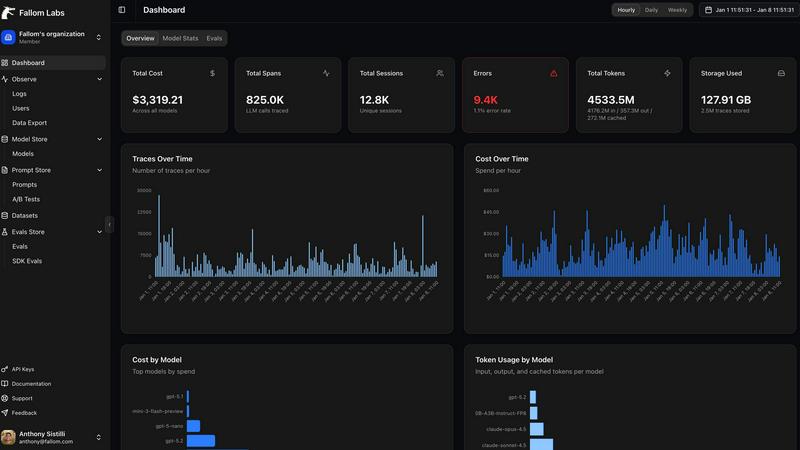
Stop the budget panic. Fallom breaks down your AI spending in real-time, showing you costs per model, per user, per team, or per customer. The live dashboard gives you an at-a-glance view of usage and spend, so you can spot a runaway agent or an unexpectedly expensive model before your CFO spots it on the bill. Allocate costs, set up chargebacks, and optimize for efficiency without the spreadsheet nightmares.
Enterprise Compliance & Privacy Controls
Built for the real world where rules matter. Fallom comes packed with features to keep you compliant and secure. That includes full, immutable audit trails for every LLM interaction, detailed input/output logging, model version tracking, and user consent records. Need to handle sensitive data? Flip on Privacy Mode to redact content or log only metadata, keeping your telemetry without capturing confidential info.
Session & User-Level Context Grouping
Debug with the full picture, not just isolated errors. Fallom automatically groups traces by user, session, or customer. This means you can see everything a specific user did in one flow—from their initial question through all the agent's tool calls and LLM hops—making it infinitely easier to understand complex issues and reproduce bugs. It turns a pile of random traces into a coherent user story.
Use Cases of Fallom
Debugging Complex AI Agent Workflows
When your multi-step agent gets stuck or gives a nonsense answer, finding the root cause is a needle-in-a-haystack problem. With Fallom's timing waterfall and tool call visibility, you can instantly see which step in the chain (e.g., an LLM call, a database query, a function) failed or was too slow. You get the full context to squash bugs fast and keep your users happy.
Controlling and Optimizing AI Spend
AI costs can spiral faster than a meme coin. Teams use Fallom to get crystal-clear visibility into which features, models, or customers are driving their API bills. By tracking cost per model and per team, you can make data-driven decisions to optimize prompts, switch models for certain tasks, or implement usage quotas, directly protecting your bottom line.
Ensuring Compliance for Regulated Industries
If you're in finance, healthcare, or any field with strict regulations, deploying AI can be scary. Fallom acts as your compliance co-pilot, automatically generating the detailed audit trails, consent records, and model lineage reports you need to prove adherence to standards like SOC 2, GDPR, or the EU AI Act during audits.
Monitoring Production Performance & Reliability
You can't improve what you can't measure. Fallom's real-time dashboard and live tracing let you monitor the health and performance of your AI features in production. Spot latency spikes, track accuracy metrics with built-in evals, and perform safe A/B tests on new models or prompts—all to ensure a smooth, reliable experience for your end-users.
Frequently Asked Questions
How difficult is it to integrate Fallom into my existing app?
It's stupid easy. Fallom is built on the OpenTelemetry standard, so you just install one lightweight SDK. The website boasts you can get "OTEL Tracing in Under 5 Minutes." You add a few lines of code, and it automatically starts capturing traces from your LLM calls, regardless of whether you use OpenAI, Anthropic, Google, or others. No major refactoring needed.
Does Fallom store all my prompt and response data?
You have control. Fallom is designed to capture the full telemetry for observability. However, for sensitive applications, you can enable "Privacy Mode." This lets you redact specific data or run in a metadata-only logging configuration, where you still get all the timing, cost, and structural info without storing the actual content of prompts and responses.
Can I use Fallom to compare different LLM models?
Absolutely! Fallom is built for this. The platform lets you run A/B tests by splitting traffic between different models (like GPT-4o and Claude 3.5). You can then compare their performance side-by-side in the dashboard—looking at cost, latency, and even custom evaluation scores—to make informed decisions about which model to use for each task.
What if my team is small and just starting with AI?
Fallom is for you, too. The platform offers a free tier to get started, which is perfect for small teams or projects. You can start tracing your agents, see costs, and debug issues without an upfront commitment. It scales with you, so as your AI usage grows into enterprise-level, the compliance and advanced features are already there.
Explore more in this category:
Similar to Fallom

Ecommerce Data API
Amazon product, keyword and market data via REST API and MCP for developers and AI agents.

ROIpad
ROIpad delivers dynamic competitive positioning intelligence for SaaS. Reveal high-converting messaging gaps and outmaneuver rivals with live data.

SightRadar
Face recognition API, a drop-in replacement for AWS Rekognition. Index, search, compare and detect faces, billed per photo with no subscription.

Orlyn
Privacy-first, cookieless web analytics that ties your traffic and channels directly to real Stripe revenue.


Luminus Tools
A fast, privacy-first suite of online calculators, financial desks, health trackers, and developer utilities running completely in your browser withou

Sprite Sheet Maker
A free browser-based toolkit for creating, cutting, converting, and previewing sprite sheet animations.
