

GIF Face Swap
Swap your face into any GIF in seconds, no skills needed just upload a photo and a loop and watch the magic happen.
About GIF Face Swap
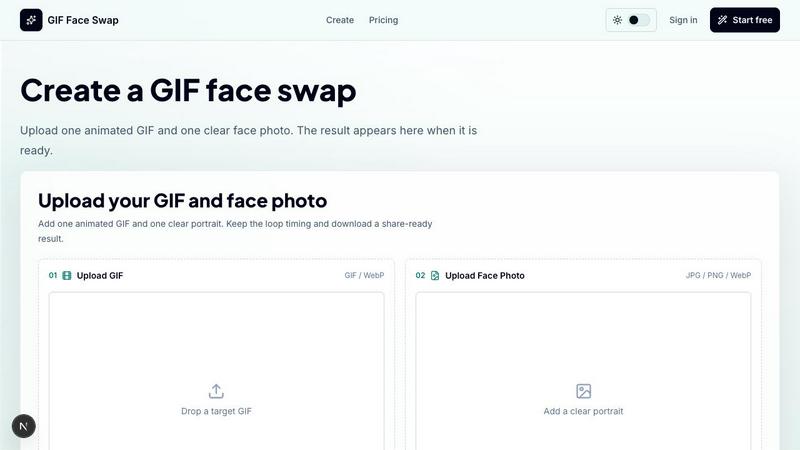
GIF Face Swap is basically the internet's easiest way to turn yourself into a meme. No cap. This online tool lets you take any short animated GIF or WebP, slap your face onto it, and boom - you've got a personalized reaction loop that's ready to send to your group chat or post on socials. No need to learn some complicated video editing software or watch a 20-minute tutorial. Just upload a GIF, add one clear face photo, and let the AI do its thing.
It's built for the chaotic energy of modern internet culture. Meme creators who need to strike while the iron is hot, social media users who want their reactions to hit different, community managers trying to keep engagement high, and friend groups that thrive on inside jokes. The whole workflow is stupid simple: pick your animation, upload your face, hit generate, and download when it's ready. That's it. No BS, no steep learning curve.
The tool keeps the original animation timing intact, so your face-swapped GIF still flows like the original. It focuses on short loops because that's what works best for reactions and memes. You can test the waters with a free watermarked version before you commit, then grab credits when you need more generations or want to ditch the watermark. They're also big on keeping things ethical - only upload stuff you have permission to use, and definitely get consent before sharing face-swapped content of other people. It's all about having fun without being a jerk about it.
Features of GIF Face Swap
Built for Animated GIFs
This tool lives and breathes animated GIFs and WebP files. It's not trying to be some all-purpose video editor - it's laser-focused on short loops that work for reactions, memes, and quick social moments. The AI keeps the original loop timing, expression energy, and that share-ready feel that makes reaction GIFs actually hit. You don't lose the vibe when you swap faces. The animation still flows naturally, the timing stays crisp, and your face just slides into the moment like it was always there.
Cleaner Face Results
The secret sauce is starting with a clear source face. When you upload a sharp, front-facing portrait with good lighting, the AI can lock onto your facial features way better. This means less blur, fewer weird frame glitches, and a more natural swap that doesn't look like a horror movie. No more of those janky face swaps where half the frames look busted. The tool prioritizes quality over speed, so you get results that actually look good enough to post without people asking "what happened to your face?"
Private by Default
Privacy is actually a big deal here. Your uploads and finished GIFs stay private unless you choose to share them. Guest download links expire after a while, so your face isn't just floating around the internet forever. You don't need to create an account just to try it out, and when you do sign up, your data isn't getting sold or plastered all over some gallery. It's your face, your meme, your control. No sketchy data harvesting vibes.
Fast First Try
You can go from zero to a face-swapped GIF in like two minutes without even signing up. Just upload one GIF and one face photo, hit start, and you'll get a watermarked result to preview. This lets you test the quality, see how your face looks in the loop, and decide if you want to upgrade. No commitment, no credit card, no "sign up to see your result" nonsense. Just a quick, honest try-before-you-buy experience that respects your time.
Use Cases of GIF Face Swap
Meme Makers and Social Creators
This is the bread and butter. You see a reaction GIF trending, you want to insert yourself into the joke, and you need it done before the moment passes. GIF Face Swap lets you turn familiar reaction loops into fast posts, comments, group-chat replies, and short-form jokes while the trend is still hot. No more being late to the party because you're stuck figuring out After Effects. Just swap, post, and collect the likes.
Fandom Editors
You're deep in your fandom - anime, movies, sports, gaming - and you want to put your friend's face or a creator's face into an iconic scene. Instead of opening a full editing suite and spending hours on keyframes, you can just grab a loop from your favorite show or game moment, upload a face, and let the AI handle the heavy lifting. It's perfect for those "what if X was in Y" edits that your Discord server will absolutely lose it over.
Indie Filmmakers and Previs Artists
Before you commit to expensive rendering or complex compositing, you can use GIF Face Swap to test quick expressions, scene beats, and character reactions. It's a lightweight way to visualize how a face might look in a specific animated moment without burning hours on heavier video work. Great for rough drafts, storyboard tests, or just figuring out if a joke lands before you shoot the real thing.
Marketing Teams and Brands
When your brand needs to stay relevant in real-time conversations, speed is everything. Marketing teams can create lightweight campaign replies, launch reactions, mascot moments, and internal celebration loops using approved source files. No need to loop in a video editor for every single post. Just grab a reaction GIF, drop in a team member's face or a mascot, and have a share-ready asset in minutes. It's perfect for those "we won" moments or quick replies to trending topics.
Teams and Communities
Private joke loops are the lifeblood of any good team or community. Whether it's celebrating a win, roasting a colleague on their birthday, or reacting to a retro moment, GIF Face Swap lets you make those moments personal. Speed matters more than perfection here - you want a quick, funny loop that lands in the chat before the moment fades. It's the digital equivalent of a quick inside joke that only your crew gets.
Frequently Asked Questions
What file types and sizes does GIF Face Swap support?
You can upload GIF and WebP animations as your target loop, with a max file size of 20MB. Short loops work best because the AI handles them cleaner. For your face photo, you need a JPG, PNG, or WebP file that's max 8MB. The key is using a clear, front-facing portrait with good lighting - that's what gives you the best results. Avoid blurry selfies or group shots where the AI might get confused about which face to use.
Can I try GIF Face Swap for free before paying?
Absolutely. You can start with one free face swap that includes a watermark on the result. This lets you test the quality, see how your face looks in the loop, and decide if the tool works for you. No sign-up required, no credit card needed. If you dig the results and want watermark-free downloads or more generations, you can upgrade to a credit plan. It's a no-pressure way to see if the tool vibes with what you're trying to do.
Is my privacy protected when I use this tool?
Yes, privacy is a core feature. Your uploaded images and the finished GIFs stay private by default. Guest download links expire after a set period, so your content isn't lingering online forever. The tool doesn't automatically share your creations in a public gallery or use your face data for training without permission. That said, you should still only upload content you have the rights to use, and always get consent from anyone whose face you're swapping into a GIF.
What makes a good face photo for the best results?
The golden rule is clarity and simplicity. Use a sharp, front-facing portrait where the face is well-lit and not obstructed by hair, glasses, or weird angles. Selfies with good lighting work great. Avoid group photos, blurry shots, or images where the face is tiny in the frame. The cleaner your source photo, the more natural the swap will look. The AI needs clear facial features to map onto the animation correctly, so give it the best possible input for the best possible output.
Pricing of GIF Face Swap
GIF Face Swap operates on a simple credit-based system. You can start with one free face swap that includes a watermark on the output. When you need more generations or want to remove the watermark, you can purchase credit packs. The pricing is straightforward - you only pay for what you use, and there are no confusing monthly commitments or hidden fees. Upgrading gives you access to watermark-free downloads and the ability to generate more swaps as needed. For creators who need batch editing capabilities, there are options to prepare multiple GIF ideas faster when working on sets of reactions or campaign loops.
Similar to GIF Face Swap

FreeVideoGenerator
Free AI video generator: turn text prompts and photos into video clips with Sora 2, Veo 3.1, Wan and more. Free starter credits, no watermark download

ImageGenerator
Create and edit AI images online with multiple models, text-to-image, image-to-image, background removal, and upscaling.

Ideogram 4.5
AI image generation and editing with precise typography, native 2K output, and localized edits.

nanobanana 21
Fast, simple AI image studio for creating and editing high-quality images with readable text, consistent characters, and up to 14 reference images.

AIPetGen
AIPetGen turns a photo of your dog, cat, or other pet, or a written description, into a new picture or a short animation.

Genjutsu AI
Genjutsu AI turns your ideas into cinematic videos, product ads, social media shorts, and high-quality images in minutes.

ImageGPT
ImageGPT is an all-in-one AI creative platform for generating, editing and transforming images and videos using AI.

AI Album Cover Maker
Create release-ready album covers from a prompt or photo. Generate, refine, and export art for singles, EPs, mixtapes, and playlists.