

HypeShare
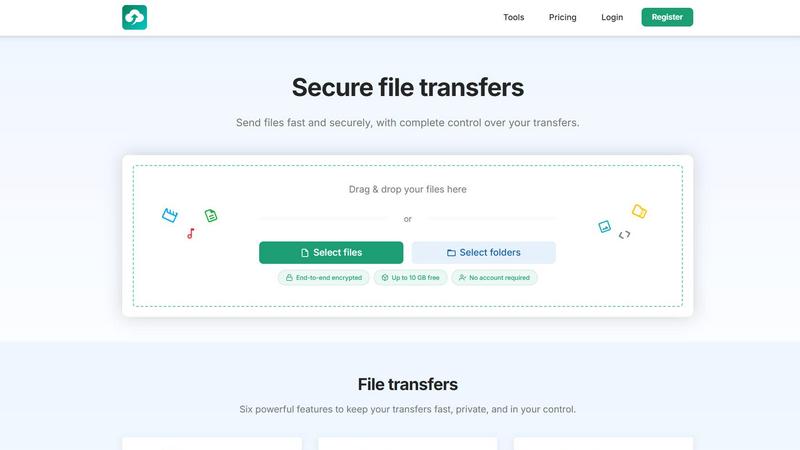
HypeShare lets you send huge files fast with end-to-end encryption and zero signup, keeping your transfers totally in your control.
About HypeShare
HypeShare is the file transfer platform that actually gets it. No more dealing with bloated, slow, and confusing tools that make you jump through a million hoops just to send a file to your buddy or client. This thing is built for speed, privacy, and pure convenience. You can send files up to 10GB without even making an account. Yeah, seriously. Just drag, drop, and send. But if you want to level up, signing up for a free account gets you 20GB of storage, encrypted transfers, custom expiry links, and file request pages that let other people upload directly to you. And here is the best part: the person sending you a file does not need an account. Like, at all. They just click your link and boom, it is done. HypeShare is for freelancers, agencies, and teams who are tired of the old-school, clunky file-sharing nonsense. It is a no-friction, high-speed alternative that puts control back in your hands. You can set passwords, expiration dates, and even limit how many times a file can be downloaded. Plus, the Pro plan unlocks bigger transfers, download notifications so you know when your stuff gets picked up, and priority support if you ever run into a snag. Whether you are sending wedding photos, client deliverables, or giant video files, HypeShare keeps it fast, private, and ridiculously easy. It is the file transfer tool you did not know you needed, but now you cannot live without.
Features of HypeShare
End-to-End Encryption
Every single transfer you make on HypeShare is locked down with end-to-end encryption. This means your files are scrambled from the moment they leave your device until they land on the recipient's end. No one, not even HypeShare, can peek at your stuff. It is like sending a secret message in a super secure envelope, but for your digital files. Whether it is a sensitive contract, private photos, or top-secret project files, you can rest easy knowing your data is safe from prying eyes. This is a big deal for freelancers and agencies who handle confidential client info on the regular.
Custom Expiry Links
Tired of your files floating around the internet forever? With HypeShare, you can set an automatic expiration date on every single transfer link you create. Just pick a time and date, and once that hits, the link is dead. Poof. Gone. No more worrying about someone stumbling across a link from three years ago. This gives you total control over your data's lifespan and is perfect for time-sensitive projects or when you only want someone to have access for a limited window. It is like a self-destruct button for your files, but way less dramatic.
File Request Pages
This feature is an absolute game-changer. You can create a custom upload page with a unique link, and then share that link with anyone. They click it, upload their files, and those files land straight in your HypeShare dashboard. And the best part? They do not need to create an account. None. Zero. Zilch. This is perfect for collecting client assets, wedding photos from guests, or project submissions from a team. You can even set an expiry date for the request and get email notifications every time someone uploads. It is like having your own personal drop box, but way more flexible and way less sketchy.
Password Protection and Download Limits
You get to be the gatekeeper of your own files. HypeShare lets you add a password to any transfer, so only people with the secret code can access it. This is clutch for sharing sensitive stuff with a specific client or team member. But wait, there is more. You can also set a limit on how many times a transfer can be downloaded. So if you only want someone to download a file once, you can lock it down. This prevents your files from being shared all over the place and gives you total control over distribution. It is like having a bouncer for your digital content.
Use Cases of HypeShare
Freelancers Sending Client Deliverables
You just finished a huge project for a client. It is a massive video file or a giant PDF. Instead of wrestling with email attachment limits or clunky cloud storage, you just drag and drop it into HypeShare. You set a password, add an expiration date for next week, and send the link. Your client clicks it, downloads the file, and you get a notification when they do. No account needed on their end. It is clean, professional, and makes you look like a tech wizard. Plus, you know your work is secure and won't be floating around forever.
Creative Agencies Collecting Assets from Clients
You are a design agency and you need raw photos, logos, and brand guidelines from a new client. Instead of sending a million emails back and forth, you create a single File Request page on HypeShare. You share the custom link with your client, and they upload everything in one go. The files land directly in your dashboard, organized and ready to use. You get notified the second they upload. No account needed for them, no confusion, no chaos. It is the smoothest way to handle asset collection for any project.
Teams Collaborating on Large Projects
Your team is spread out across the globe, and you need to share huge project files, like video edits, 3D models, or massive spreadsheets. HypeShare handles files up to 10GB for free, and even more with Pro. You can create transfer links with custom aliases so everyone knows what they are downloading. Set expiration dates so old versions don't clutter things up, and use passwords for sensitive internal documents. It is a fast, private way to keep your team on the same page without bogging down your workflow.
Anyone Sharing Personal Files with Family and Friends
You just got back from an epic vacation and you have hundreds of high-res photos and videos to share with your family. Instead of texting them one by one or using a sketchy free service, you use HypeShare. You drag and drop your whole folder, create a link, and send it to the group chat. They can all download the files at their own pace, and you can even set a download limit so your cousin doesn't send the link to the whole world. It is perfect for sharing memories without the headache.
Frequently Asked Questions
Do I need to create an account to send a file on HypeShare?
Nope, not at all! You can send files up to 10GB completely for free without ever signing up. Just drag your files, set your options, and generate a link. It is that simple. However, if you want perks like 20GB of storage, file request pages, or longer data retention, you will want to grab a free account.
Can people send me files without making an account?
Yes, and this is one of the best features. When you create a File Request page, you get a unique link. Anyone with that link can upload files directly to you without needing to sign up for HypeShare. It is perfect for collecting stuff from clients, family, or anyone who just wants to send you a file quickly.
How secure are my files on HypeShare?
Super secure. All transfers are protected with end-to-end encryption, meaning your files are scrambled from your device until they reach the recipient. You can also add an extra layer of security with a password and set an expiration date for the link. HypeShare takes your privacy seriously, so your data stays yours.
What happens to my files after they are sent?
You have total control. You can set an automatic expiration date for your transfer links, so the files are no longer accessible after a certain time. You can also set a download limit, so the link stops working after a specific number of downloads. For free accounts, data is retained for 30 days, and Pro accounts get unlimited retention. This way, your files don't just hang around forever unless you want them to.
Pricing of HypeShare
HypeShare keeps it real with a pricing model that works for everyone, from casual users to power senders. You can start as a Guest with zero commitment, or grab a Free account to unlock more features. When you need the big guns, the Pro plan is there for you.
Guest (No Account Required): 5 transfers per month, 10 files per transfer, no storage, 10GB per transfer, 100 downloads per transfer, 5 emails per transfer, file encryption, custom alias, 7 days data retention, no ads. Perfect for the "once in a while" sender.
Free: 10 transfers per month, 10 files per transfer, 20GB storage, 10GB per transfer, 100 downloads per transfer, 5 emails per transfer, file encryption, custom alias, 30 days data retention, download notifications, no ads, file requests, and transfer analytics. The sweet spot for most users.
Pro ($8.99 / month): Unlimited transfers, unlimited files, 1000GB storage, 200GB per transfer, unlimited transfer downloads, 50 emails per transfer, file encryption, custom alias, 5 domains, unlimited data retention, data export, API, download notifications, no ads, file requests, transfer analytics, branded downloads, and priority support. For the heavy hitters who need it all.
Similar to HypeShare

ROIpad
ROIpad delivers dynamic competitive positioning intelligence for SaaS. Reveal high-converting messaging gaps and outmaneuver rivals with live data.

Product Launch Checklist
A free launch checklist for SaaS, apps, AI tools and more. Every step says why it matters and when you can skip it.

Whop Trends
Whop Trends helps you spot hot products fast, giving you the edge to boost your income with smart market insights.

Blueberry
Blueberry is your AI-native Mac workspace that merges your editor, terminal, and browser so your AI sees everything.

Shrinkpad
Shrinkpad crushes your bloated media files in bulk, saving you space and time like a boss.

Skene
Stop pasting black box snippets and start shipping growth straight from your code.

Yellow Systems
Yellow Systems builds custom software and AI solutions that supercharge growth for startups and enterprises alike.

MVPable
MVPable helps you launch your MVP fast with tailored tools and expert guidance, no fuss, just results.