

JustPDF
JustPDF is your go-to, privacy-first PDF toolkit that works right in your browser, so your files never leave your computer.
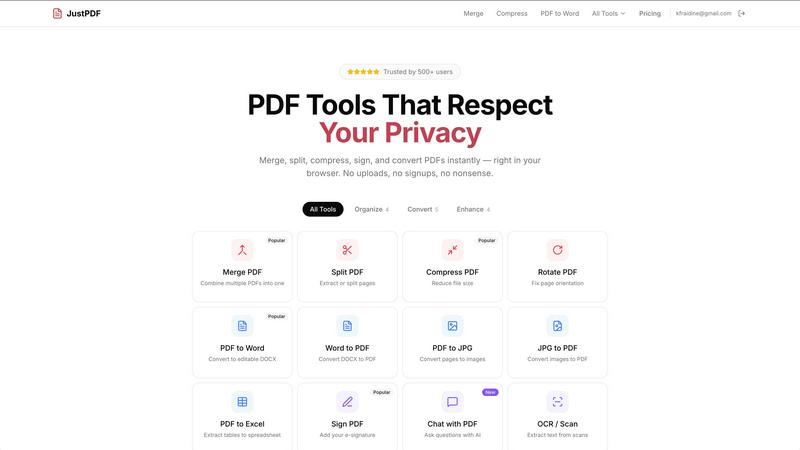
About JustPDF
Alright, let's cut through the noise. JustPDF is the PDF tool that actually respects your privacy. Think of it as the anti-Smallpdf. While other services are sneakily uploading your sensitive documents (tax forms, contracts, that weird fanfic) to who-knows-where servers, JustPDF does all the heavy lifting right inside your browser. That's right, zero uploads. It uses fancy tech like JavaScript and WebAssembly to process everything locally on your device. You can literally check the Network tab in your browser's DevTools and see nothing gets sent out. It's a game-changer for anyone who's side-eyeing cloud-based tools. Got 17 pro-grade tools? Check. Need to merge, compress, convert, sign, or even chat with your PDF using AI? It's all here. No account needed to start (you get 3 free ops a day), and it's FERPA-compliant for students and teachers. It's fast, free for light use, and your files never leave your digital doorstep.
Features of JustPDF
100% Browser-Based Processing
This is the main event, the whole vibe. JustPDF runs entirely in your browser using JavaScript and WebAssembly. Your PDFs are processed locally on your computer or phone. No secret uploads to remote servers, no waiting for files to travel the internet. It's the digital equivalent of doing your taxes in a locked room versus shouting your social security number in a crowded cafe. You can verify the privacy yourself by opening your browser's developer tools.
Massive Suite of 17+ Tools
JustPDF isn't playing around with just one trick. It's got a full arsenal. Need to organize? Merge, split, compress, rotate. Need to convert? Go from PDF to Word, JPG, Excel, or even convert niche formats like WebP and HEIC images to PDF. There's also unlocking, flattening, adding e-signatures, and making PDFs grayscale. The new-school AI "Chat with PDF" tool lets you ask your document questions, and the OCR/Scan feature can pull text from images. It's basically a Swiss Army knife for PDF headaches.
No-Account Free Tier
Zero commitment, zero spam. You can rock up to the JustPDF website and start using most tools immediately without signing up for anything. They give you 3 free operations per day, which is perfect for the occasional user who just needs to quickly compress a file or merge two documents. No watermarks, no nonsense. Just drag, drop, and get your result without handing over your email.
Offline Functionality & Pro Power
Once you load the website, many of the core tools can keep working even if your internet connection dips out. This is huge for working on planes, trains, or in spots with sketchy Wi-Fi. And when you're ready to level up, the Pro plan starts at a measly $4/month for unlimited access to everything. No more counting your three daily uses—go ham on those PDFs.
Use Cases of JustPDF
The Student Handing In Assignments
A student needs to combine their essay draft, scanned textbook pages, and a chart into one PDF for submission. They can merge, compress to meet file size limits, and even use the OCR tool to make scanned text searchable—all without ever uploading their work to a server, keeping their intellectual property safe and FERPA-compliant.
The Freelancer Sealing the Deal
A freelancer gets a contract from a client. They need to sign it and send it back fast. Instead of printing, signing, scanning (the dark ages), they use JustPDF's e-sign tool to add their signature digitally. They can also flatten the final document to lock everything in place, all while knowing the confidential contract never left their computer.
The Office Admin Organizing Chaos
An admin is drowning in reports, forms, and image files. They use JustPDF to batch convert a pile of JPG and HEIC images into a neat PDF portfolio, split a massive PDF into individual chapters for the team, and compress a huge presentation file to email-able size before the 5 PM deadline. All done quickly and privately at their desk.
The Researcher Analyzing Documents
A researcher has a lengthy PDF report and needs to extract specific data points and tables. Instead of manually scrolling, they use the "Chat with PDF" AI feature to ask questions like "What were the key findings in Q3?" or use the PDF to Excel converter to pull tables into a spreadsheet for analysis, streamlining hours of work.
Frequently Asked Questions
Is JustPDF really free?
Yes, for real! You get 3 free operations per day across all tools without needing to create an account or give any payment info. No watermarks, no sneaky limits on file size for the free tier. If you find yourself using it more heavily, the Pro plan starts at $4/month for unlimited use.
How do I know my files are private?
You can literally prove it to yourself. Open your web browser's Developer Tools (usually F12), go to the "Network" tab, and use any JustPDF tool. You'll see no file uploads to external servers. All processing happens locally on your device using your computer's own power. Your files never leave your browser.
What's the "Chat with PDF" feature?
It's an AI-powered tool that lets you interact with your PDF document. You can upload a PDF and ask it questions like "Summarize this," "List the main points from page 5," or "Find all mentions of 'budget.'" It reads the text in your document and gives you answers, making it super useful for studying or digesting long reports.
Do I need to install anything?
Nope! JustPDF is a web app. You just need a modern web browser (like Chrome, Firefox, Edge, or Safari) and an internet connection to load the site. After that, many core tools will even work offline. There's nothing to download or install on your computer.
Pricing of JustPDF
JustPDF operates on a freemium model. The Free Tier gives you 3 free operations per day with no account required. For power users, the Pro Plan unlocks unlimited use of all 17+ tools. It starts at $4 per month (billed annually) or a slightly higher monthly rate. This subscription removes the daily limit and gives you full, unrestricted access to everything, including the AI Chat and OCR tools.
Explore more in this category:
Similar to JustPDF

Novastart
Apps and files on an infinite canvas where people and AI agents work together.

Panzoe
Panzoe is an all-in-one AI platform for personal productivity, business automation, AI assistants, content creation, and custom AI solutions.

AUTOMATER.ai
A tray helper for every AI coding tool: one searchable library of past sessions, waiting alerts and usage across 9 providers.

AI Email Filter
AI Email Filter sorts incoming mail into folders using plain-language prompts you write. Works with any IMAP mailbox; bring your own LLM if you want.

Kody Tools
Free collection of online developer utilities, code formatters, and digital converters designed to streamline your daily workflow.

Forms Plugin
The #1 Native Form Builder Plugin for Framer - No Code, No Embeds, No External Platforms.

Product Launch Checklist
A free launch checklist for SaaS, apps, AI tools and more. Every step says why it matters and when you can skip it.

HomeAnswerBook
Practical, independent guides to home repairs, maintenance, costs, troubleshooting, and everyday fixes.