

Online Audio Converter
Convert your audio and video files to MP3, WAV, FLAC and more for free online with no signups or watermarks.
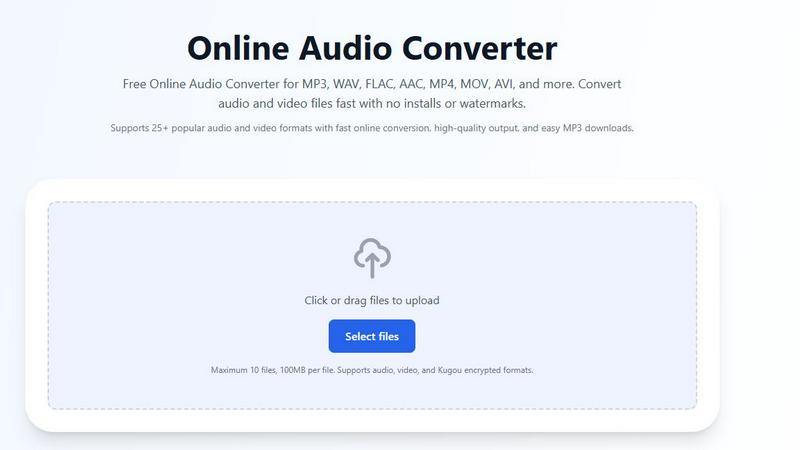
About Online Audio Converter
Yo, ever been stuck with an audio file that just won't play nice with your device? Maybe you've got a sick MP4 video but all you need is the audio for a meme, or you downloaded a track from Kugou and it's in some weird encrypted format that's basically useless outside their app. That's where the Online Audio Converter comes in clutch. This is a completely free, browser-based tool that lets you convert audio and video files into whatever format you need, no downloads, no signups, no nonsense.
Think of it as your one-stop shop for audio conversion. It handles over 25 popular formats including MP3, WAV, FLAC, AAC, OGG, M4A, and even video formats like MP4, MOV, AVI, and MKV. But here's the real flex: it also supports those annoying Kugou encrypted files like KGM, KGG, KGMA, and VPR. You just upload them, and the tool decrypts and converts them on the fly. It's perfect for anyone from casual listeners who just want to rip audio from a YouTube video to audio nerds who need lossless FLACs for their collection. The whole process is fast, secure with HTTPS encryption, and your files get automatically deleted from their servers after conversion. No watermarks, no quality restrictions, no hidden fees. Just drag, drop, convert, and download. Simple as that.
Features of Online Audio Converter
Supports 25+ Formats Including Kugou Encrypted Files
This isn't your basic converter that only does MP3 and WAV. We're talking a full roster of popular audio formats like MP3, WAV, FLAC, AAC, OGG, M4A, WMA, AIFF, OPUS, and AMR. Plus, it handles video formats like MP4, MOV, AVI, MPEG, MKV, and WEBM so you can extract audio straight from your videos. But the real MVP feature is support for Kugou encrypted files like KGM, KGG, KGMA, and VPR. You can upload those weirdly named files (sometimes they look like .kgm.flac) and the converter will decrypt them, detect the real audio stream, and convert it to a standard format like MP3. No other free online tool does that.
100% Free With No Hidden Strings
Let's be real, most "free" online tools are just bait-and-switch scams that hit you with a paywall after one conversion or plaster watermarks all over your files. Not this one. The Online Audio Converter is genuinely free. No signups, no subscriptions, no credit card required, no limits on how many files you convert. You can upload up to 10 files at once (100MB per file) and convert them all without paying a single cent. The output files are clean with no watermarks, no quality degradation, and no restrictions. It's the kind of tool that makes you wonder how they're even paying for the servers.
Advanced Settings for Custom Conversions
You're not stuck with some generic preset. When you upload a file, you get full control over the output. You can adjust the bitrate, sample rate, resolution, and quality settings to get exactly what you need. Want a high-bitrate MP3 for your DJ set? Crank it up. Need a low-bitrate file to save space on your phone? Turn it down. Converting to video? You can tweak the resolution too. This level of customization is usually reserved for desktop software, but here it's all right in your browser. It's perfect for power users who know their settings and want that precise control.
Secure and Private With Auto-Deletion
Nobody wants their personal audio files floating around on some random server. That's why this converter uses advanced HTTPS encryption for all file transfers, so your data is protected while uploading and downloading. But here's the best part: all files are automatically deleted from their servers after the conversion is complete. They don't keep your stuff, they don't analyze it, they don't sell it. It's a one-and-done deal. You upload, convert, download, and your files are gone from their end. This is huge for privacy-conscious users or anyone dealing with sensitive audio content.
Use Cases of Online Audio Converter
Extracting Audio from Video Files for Podcasts or Edits
You've got a killer video clip from your phone or a downloaded MP4, but you only need the audio for a podcast intro, a sound effect, or a meme. Instead of firing up a full video editor, just upload the video file to the Online Audio Converter, select MP3 or WAV as your output, and boom. The tool extracts the audio track and converts it in seconds. No quality loss, no complicated steps. It's perfect for content creators who need clean audio files without the bloat of video editing software. You can even batch convert multiple videos at once if you're working on a big project.
Converting Kugou Encrypted Files to Standard Formats
If you're a Kugou music user, you know the pain of downloading tracks that come in weird encrypted formats like KGM, KGG, KGMA, or VPR. These files are basically locked to the Kugou app and useless anywhere else. But with this converter, you can upload those encrypted files directly. The tool decrypts them during processing, detects the real audio stream, and converts the result to a standard format like MP3 or FLAC. This is a game-changer for anyone who wants to move their Kugou library to another device or music player. No more being stuck in one ecosystem.
Creating High-Quality Audio Files for Professional Use
Musicians, audio engineers, and podcasters often need specific formats for their workflows. Maybe you recorded in WAV but need to send a FLAC to a collaborator, or you got a track in OGG but your DAW only likes AIFF. The Online Audio Converter handles all these professional formats with customizable settings. You can adjust the bitrate and sample rate to maintain lossless quality or compress for file size. The fact that it's online means you can do this from any computer, even if you're at a friend's studio or using a public terminal. No need to install bulky software.
Saving Space on Your Phone or Device
Your phone is full of high-bitrate audio files that are eating up storage like crazy. Or maybe you downloaded a bunch of FLACs for your hi-fi setup but now you need portable versions for your commute. Just upload those files to the converter and choose a lower bitrate MP3 or AAC output. You can shrink a 50MB FLAC down to a 5MB MP3 without losing too much perceptible quality. It's a lifesaver for anyone with a 64GB phone who refuses to pay for cloud storage. Plus, you can batch convert up to 10 files at once, so you can clear up space in one go.
Frequently Asked Questions
Is the audio converter really free?
Yes, for real. No hidden charges, no subscriptions, no limits, no watermarks. You can convert as many files as you want, as often as you want, completely for free. The only catch is a 100MB per file limit and a max of 10 files per upload, but that's plenty for most people. They don't ask for your email, they don't try to upsell you, and they don't degrade quality on free conversions. It's one of the rare genuinely free online tools that actually works.
How long does audio conversion take?
Most conversions are super fast, usually just a few seconds for standard audio files. Larger files or video conversions might take a bit longer, but the tool processes everything on their servers, so your browser doesn't get bogged down. You can just upload, hit convert, and go grab a coffee or scroll TikTok while it works. Once it's done, you get a download link. The speed depends on your file size and the server load, but it's generally quick enough that you won't be waiting around.
What formats are supported for conversion?
The converter supports over 25 formats including popular audio like MP3, WAV, FLAC, AAC, OGG, M4A, WMA, AIFF, OPUS, and AMR. It also handles video formats like MP4, MOV, AVI, MPEG, MKV, and WEBM for audio extraction. And the unique part is support for Kugou encrypted formats including KGM, KGG, KGMA, and VPR. So basically, if you have an audio file or a video with audio, chances are this tool can handle it.
Are my files safe and private on this website?
Absolutely. All file transfers use advanced HTTPS encryption, so your data is protected while uploading and downloading. More importantly, all files are automatically deleted from their servers after the conversion is complete. They don't store, share, or analyze your files. It's a completely private process. This is especially important if you're converting sensitive audio like personal recordings or unreleased music. You can use it with confidence knowing your files won't be lingering around.
Explore more in this category:
Similar to Online Audio Converter


AI Image Remover
AI Image Remover is a free browser tool for erasing people and objects from photos. Upload an image, brush a mask over the distraction


InstaSong - AI song and beat maker
Turn your wildest text ideas into full-blown songs with beats, vocals, and cover art in seconds, no credit card needed.

MusicAny AI Music Generator
MusicAny lets you turn text into fire songs, beats, and video-ready audio for free, no cap.

cleanvideoaudio.com
CleanVideoAudio wipes out fan hum and room tone from your clips so you actually sound crisp without paying for a subscription.

AI Music Generator
Type a vibe and get a banger in 60 seconds, royalty-free and yours to keep forever.