

Open User Map
Open User Map lets your visitors add spots to a map without coding or API keys, and you approve everything before it goes live.
About Open User Map
Alright, let's break it down. Open User Map is basically the chillest WordPress plugin for slapping an interactive, user-powered map on your site without breaking a sweat. Forget about needing to be a coding wizard or getting your hands dirty with a Google Maps API key. This thing is all about letting your visitors drop pins, share locations, and build a community-driven map that's actually useful. Think of it as a super customizable, no-drama way to let your users contribute content directly, all while you keep the reins with approval workflows. It's perfect for anyone running a WordPress site who wants to add a layer of user-generated goodness, whether that's for a local business directory, an event map, a travel blog, or even a community project. The vibe is simple: you set it up in minutes, your people add their spots, you approve the ones that are fire, and boom, you've got a living, breathing map. It's got a solid 5-star rating and over 15,000 active installs, so you know it's not some janky experiment. It's the real deal for making your site way more interactive without the headache.
Features of Open User Map
Frontend Location Submissions and Edits
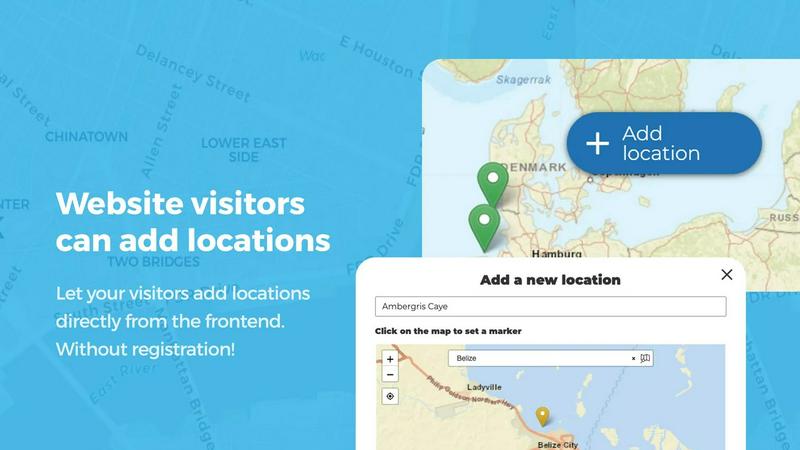
This is the core sauce. Your visitors can click "Add location" right on the map, place a marker wherever they want, and fill in all the deets. But you're not just letting randos run wild. Every submission goes into an approval queue, so you get to decide what goes live. Plus, users can come back and edit their own locations, which means your map stays fresh and accurate without you having to do all the grunt work. It's like crowd-sourcing your map data, but with a bouncer at the door.
Marker Categories and Advanced Filtering
Stop having a messy map that looks like a digital dumpster fire. With this feature, you can group your markers into categories, each with its own unique icon. This makes your map look clean and organized. The real power move is that visitors can then filter the map by these categories, so if they only want to see coffee shops or hiking trails, they can do that instantly. And the best part? A single location can belong to multiple categories, so nothing gets left out. It's all about giving users the power to find exactly what they're looking for.
Lines, Areas, and Custom Image Maps
Go way beyond just dropping pins. Open User Map lets you draw routes, paths, zones, and regions directly on the map. Perfect for highlighting a hiking trail, a service area, or a construction zone. It even calculates distances and area sizes automatically, so you get useful measurements without any extra work. And if a real map isn't your vibe, you can upload any image and turn it into a fully interactive map. Think floor plans, event layouts, seating charts, or campus guides. Users can place markers on that image just like a regular map, making it insanely versatile.
Advanced User Feedback: Upvotes, Likes, and Star Ratings
Let your community do the talking. You can turn on a feature that lets visitors upvote or like locations. This is clutch for highlighting the best spots or flagging content that's a little sus. But if you want to get even more granular, you can enable a full 1-5 star rating system. This lets your community rate places and automatically surface the top-rated spots. It's like Yelp, but built right into your own map, and it's perfect for building a sense of community and trust around the locations your users are adding.
Use Cases of Open User Map
Community-Driven Local Business Directory
Imagine a local foodie site where users can add their favorite taco trucks, hidden bakeries, and cool coffee shops. With Open User Map, you can let your visitors drop pins on these spots, add descriptions, and even include opening hours. You approve the best ones, and suddenly you have a killer, up-to-date directory that your community curates. The star rating and upvote features make it easy to see which places are the real MVPs, creating a go-to resource for anyone in town looking for something good to eat or do.
Interactive Event and Festival Maps
Planning a music festival, a comic con, or a huge block party? Forget handing out paper maps that get lost in the first five minutes. Use Open User Map to create a digital map of the event grounds. You can draw areas for stages, food vendors, and restrooms. Even better, let attendees add their own pins for meet-up spots or unofficial after-parties. The custom image map feature is perfect for this, letting you upload the event layout and let people place markers directly on it. It's a total game-changer for attendee experience.
Travel Blog and Trip Planning Hub
If you run a travel blog, you know the struggle of telling people about all the cool spots you found. With Open User Map, you can create a map of your adventures and let your readers contribute their own hidden gems. You can categorize markers by "Best Views," "Cheap Eats," or "Off the Beaten Path." Users can filter by what they're into, and the approval workflow means you keep the quality high. It turns your blog from a one-way street into a collaborative travel guide that keeps getting better as more people chip in.
Campus and Facility Guides for Schools or Offices
Got a massive university campus or a sprawling office complex? Open User Map is perfect for creating an interactive guide. You can map out buildings, parking lots, dining halls, and key landmarks. Use the Lines & Areas feature to show walking paths or shuttle routes. For a more specific use, upload a floor plan of a building and let students or employees add markers for study rooms, meeting spaces, or the best vending machine. It's a super practical tool for helping people navigate a large space without getting totally lost.
Frequently Asked Questions
Do I need any coding skills to set this up?
Nope, not at all. The whole point of Open User Map is to be a no-code solution. You install it like any other WordPress plugin, and you can get a map up and running in minutes. The settings are all visual and straightforward, so you can tweak colors, markers, and fields without touching a single line of code. It's designed for the average person who just wants a cool map, not a developer who wants to build one from scratch.
Do I need a Google Maps API key?
Absolutely not. This is one of the biggest selling points. Open User Map uses its own mapping system, so you don't have to deal with the headache of getting a Google Maps API key, setting up billing, or worrying about usage limits. You just activate the plugin, and the map works. It's that simple. No hidden fees, no technical hoops to jump through.
How do I handle spam or inappropriate content from users?
You've got full control. Every location that a user submits goes into a moderation queue before it's published on the map. You can review the details, check the marker placement, and approve or trash it. Plus, the upvote and like features let your community flag the good stuff and the bad stuff. You can also set up custom fields to require specific information, making it harder for bots to just spam your map with garbage.
Can I customize how the map looks and what information is collected?
For sure. Open User Map is all about customization. You can change the map's colors, the marker icons for different categories, and even the map's starting zoom level. More importantly, you can create custom fields for the submission form. Need a text box for a phone number? A dropdown for a location type? A checkbox for "Has WiFi"? You can add all of that. This lets you collect exactly the data you need for your specific project, making the map as useful as possible.
Similar to Open User Map

Built2WinWeb AI Strength Scanner
Custom PHP websites, AI Indexing Pack ($599 one‑time), and WebAgentScan SaaS ($9/mo). MCP, A2A, llms.txt, full ownership.

Unifyca
Unifyca is your agency's all-in-one hub for slapping client WordPress sites into shape with docs, audits, and backups.

Shadcn Examples
Shadcn Examples gives you ready-to-go React and Tailwind UI kits so you can build web apps without starting from scratch.

i18.dev
i18.dev lets AI agents auto-extract, review, and pull translations so your workflow stays lit and your strings never break.

Webleadr
Webleadr helps you find and contact businesses without websites in a snap, turning leads into loyal clients from anywhere you are.

Idearium
Idearium builds websites that actually get you noticed and grow your biz, no cap.

FilexHost
FilexHost makes file sharing a breeze—just drag, drop, and get a shareable link in seconds, no sweat!.

Crawlkit
Crawlkit turns the web into your data playground, scraping any site with a single API call for all your info needs.