

Prompt Builder
Stop wasting hours and tokens rewriting prompts for different AIs, just build, test, and reuse them in one place.
About Prompt Builder
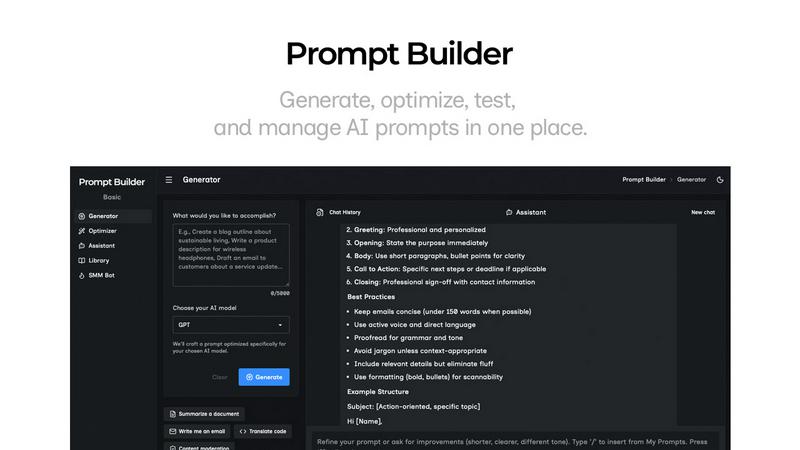
Alright, let's cut the fluff. You know that feeling when you're trying to get an AI to do something cool, but your prompts are whack and you're just burning tokens on garbage outputs? Yeah, we've all been there. Prompt Builder is your new digital bestie that fixes all that. It's basically a full-stack prompt engineering playground. You start by just vibing in plain English—like, "yo, write a sick email to get more beta testers"—and it instantly crafts a pro-level prompt tuned specifically for the AI model you're using, whether that's GPT, Claude, Gemini, or like a dozen others. No more copy-pasting and rewriting the same thing for different bots.
But it's not just a one-trick generator. This is your all-in-one workspace. You get a built-in chat (the "Assistant") to test and refine your prompts in real-time, an "Optimizer" to level up your existing prompts, and a "Library" to save all your greatest hits so you're not losing that golden version in a messy chat history. It's for anyone who's tired of the prompt struggle—content creators, developers, marketers, students—anyone who wants to stop guessing and start getting consistent, fire results from their AI. Stop spending hours crafting; start shipping in seconds.
Features of Prompt Builder
Prompt Generator
This is your main squeeze. You just describe your task in normal human words, pick which AI model you're targeting (like Gemini, Claude, or GPT), and bam—it gives you a solid, structured first draft of a prompt that actually speaks that model's language. It's like having a cheat code. You can then jump straight into the chat to tweak it, save the best versions, and never start from scratch again. It's the fastest way to go from a half-baked idea to a ready-to-run prompt.
Prompt Assistant
Stop tab-hopping like a maniac. The Assistant lets you run and test your prompts right inside Prompt Builder. Got a prompt from the Generator or your Library? Fire it up here. You can have full conversations, iterate with follow-ups, and keep everything organized in a clean chat thread. It supports a bunch of models (Grok, DeepSeek, etc.) so you can test cross-platform. All your best chat results can be pinned and saved, so your genius isn't lost in the void.
Prompt Optimizer
Got a prompt that's kinda mid? Paste it in here (or grab one from your Library), and the Optimizer will remix it into a better version. It focuses on adding clarity, nailing down constraints, fixing the output format, and throwing in examples. You get a history of all your optimizations and can pin your favorites. One click lets you send the upgraded prompt straight to the Assistant to see if it slaps. It's like a prompt editor on steroids.
Prompt Library & Community
This is your personal hall of fame for prompts. Every prompt you generate, optimize, or save from a chat lives here, searchable and filterable. But it's also a treasure trove of Community Prompts—pre-made templates from other users that you can snag and adapt for your own projects. Find a banger for writing LinkedIn carousels? Save it to your Library and run it anytime. It turns your random prompt wins into a reusable, scalable asset.
Use Cases of Prompt Builder
Content Creation & Social Media
Drowning in content calendars? Use the SMM Bot feature. Feed it a brief, tell it the platform (like TikTok or LinkedIn), and get platform-ready posts, hooks, and hashtags. Refine the tone in chat, save your winning formula to your Library, and never stare at a blank "What should I post?" screen again. It's a cheat code for social managers and creators.
Rapid Prototyping & Ideation
Need to brainstorm 10 startup names, outline a blog post, or draft product specs? Jot down your messy idea in the Generator, get a structured prompt, and use the Assistant to rapidly iterate. You can cycle through different AI models to get varied perspectives, save every interesting output, and build a library of creative starters. Perfect for entrepreneurs and product folks.
Technical Prompt Engineering
For devs and power users who need precise, reliable outputs for coding, data analysis, or system prompts. Use the Optimizer to tighten up your technical instructions, add strict constraints and output formats, then test them rigorously in the Assistant. Save your perfected, model-specific prompts in the Library to ensure your AI tools perform consistently every single time.
Learning & Skill Development
Trying to get better at prompt engineering itself? Prompt Builder is the ultimate training wheel. See how a simple idea gets transformed into a model-tuned prompt. Use the Community Library to reverse-engineer successful prompts from others. Test the same task across different models in the Assistant to learn their quirks. It's a hands-on lab to level up your AI communication skills fast.
Frequently Asked Questions
What AI models does Prompt Builder work with?
It works with basically all the big players and then some. We're talking GPT (OpenAI), Claude (Anthropic), Gemini (Google), Llama (Meta), Mistral, DeepSeek, Grok (xAI), Perplexity, and Cohere. The Generator tailors prompts for each one, and the Assistant lets you run chats with many of them directly. So you're covered.
Is there a free plan?
Heck yes! You can start for free with 25 Assistant requests per month, no credit card needed. This lets you try the Prompt Generator, test drives in the Assistant, and explore the Library. It's a solid way to see if it vibes with your workflow before you commit to a paid plan.
How is this better than just using ChatGPT or Claude directly?
Great question. Using a raw AI chat is like freehand drawing. Prompt Builder gives you the stencils, rulers, and undo button. It structures your chaos into effective prompts from the start, saves every version so you don't lose work, and lets you test across models without juggling 10 tabs. It's about consistency, reuse, and saving you hours of "uh, how do I word this?" frustration.
Can I use it with my team?
While the provided context focuses on individual use, features like the shareable Prompt Library are a gateway to team use. Saving optimized, model-specific prompts to a shared library means your whole squad can use the same high-quality prompts, ensuring consistent output quality and saving everyone from reinventing the wheel. It's a force multiplier.
Similar to Prompt Builder


amaze.directory
A directory of AI tools where a person used each one first.

Speechyou
AI transcription for voice notes, meetings, and audio files in 1,700 languages, with AI summaries and subtitle export and unlimited chat ai usage.

ProspectHalo
AI sales agent that finds qualified leads, runs outreach, follows up automatically, creates content, and helps book more meetings.

benchmark.directory
An AI tools directory that turns down money. 146 listings, 20 categories, no sponsored placement and no affiliate ordering.

connect machine
ConnectMachine is a privacy-first, AI-powered contact management platform designed to solve the critical flaw of modern professional networking