

SeeDance Ai
SeeDance AI transforms your text, images, and sounds into stunning videos, making video creation as easy as a few clicks.
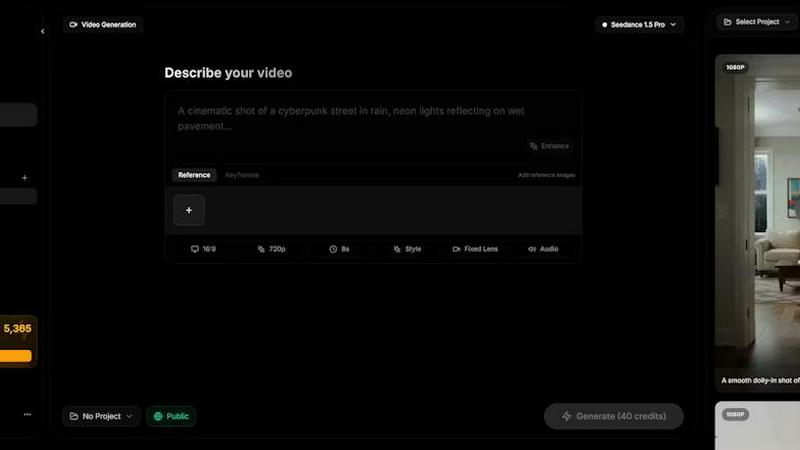
About SeeDance Ai
SeeDance AI is your go-to platform for creating killer videos that pop off the screen. Whether you're a marketer, content creator, or just someone who loves storytelling, this powerful AI video generator takes your ideas and transforms them into slick, cinematic experiences. With SeeDance, you can throw in text prompts, images, audio, and even existing video references to create multi-shot videos that look professionally made, all without needing a fancy studio setup. The magic lies in its advanced motion-transfer system, which ensures that characters move smoothly and realistically, adhering to the laws of physics. This means you can produce high-quality dance videos, marketing clips, and social media content that truly stand out. Plus, with options like SeeDance 2.0, you get director-level control, allowing for a seamless workflow that keeps your creative juices flowing. Say goodbye to awkward animations and hello to videos that feel alive with motion and sound.
Features of SeeDance Ai
Multimodal Input System
Forget about the hassle of using just text prompts. With SeeDance AI, you can upload up to 12 reference files—images, videos, and audio clips—and tag them in your prompts. This makes your instructions super clear, allowing the AI to work its magic without leaving anything to chance.
Synchronized Audio and Video
SeeDance doesn't just create silent clips and slap on sound later. It generates audio and video simultaneously, ensuring that every sound effect and piece of dialogue syncs perfectly with the action on screen. It's like having a full production team wrapped up in one tool.
Consistent Character Design
One of the biggest headaches in AI video is character drift—where a character's appearance changes between shots. SeeDance tackles this with a cross-attention reference system, keeping facial features and clothing consistent across all scenes, making your content look polished and professional.
Precise Camera Control
Want to replicate a specific camera move? Just upload a reference video! SeeDance can mimic the exact camera behavior, whether it's tracking shots or handheld shakes, making it super easy to capture the vibe you want without fumbling around in post-production.
Use Cases of SeeDance Ai
Marketing Campaigns
Crafting eye-catching marketing clips is a breeze with SeeDance AI. Use text prompts and visual references to create dynamic ads that grab attention and engage your audience. Elevate your brand's storytelling with high-quality visuals that resonate.
Social Media Content
In a world where content is king, SeeDance helps you produce viral-worthy videos for platforms like TikTok and Instagram. Generate multi-shot clips that stand out in feeds, complete with synced sound and smooth transitions that keep viewers hooked.
Dance and Choreography Videos
Are you a dancer or choreographer? Use SeeDance to bring your dance routines to life. Capture complex movements and choreography in stunning detail, allowing you to showcase your skills and creativity in a way that feels real and captivating.
Storytelling and Narrative Projects
Whether it's a short film or a web series, SeeDance AI empowers storytellers to bring their visions to life. With the ability to create consistent characters and engaging scenes, you can weave narratives that resonate with audiences and make an impact.
Frequently Asked Questions
What types of media can I use with SeeDance AI?
You can use a mix of text, images, audio, and video references. Upload up to 12 files to create dynamic and engaging videos that capture your vision.
Is SeeDance AI easy to use for beginners?
Absolutely! Even if you're new to video creation, SeeDance's user-friendly interface and multimodal input system make it easy to generate professional-quality videos without a steep learning curve.
How does SeeDance ensure audio syncs with video?
SeeDance generates audio and video together in one go, which means everything from footsteps to dialogue is perfectly synchronized, eliminating the hassle of post-production audio editing.
Can I create videos with multiple shots?
Yes! SeeDance AI intelligently breaks down your prompts into distinct, connected shots, allowing you to create intricate storytelling sequences that flow seamlessly from one scene to the next.
Similar to SeeDance Ai

hotel-lobby
Two-person AI video concepts with warm, natural call-and-response scenes.

Reelslaunch
AI video platform for faceless Reels: cinematic clips with native audio and auto-posting

AIEnhancer
Enhance photos, create images, and generate videos with an all-in-one AI enhancer.


LTX 2.3 Free
LTX 2.3 prompts, workflows, demos, and practical AI video guidance.


TryKlingAI
Create Kling AI videos from text, images, audio, and motion references with Kling 3.0, Motion Control, Lip Sync, and API access.

Happy Horse AI
AI video generation from text, images, and references with 720P/1080P output, optional audio, task tracking, downloads, and API workflows.