

Subclip
Subclip is your all-in-one AI video editor that creates, captions, and dubs your content in multiple languages, saving you time and hassle.
About Subclip
Subclip is the ultimate AI-powered video editing tool that’s shaking up the game for creators, marketers, and educators alike. Imagine editing your videos like you would a document—just drag a transcript and start cutting! With Subclip, you can easily clone your voice to re-record segments, zap away silences and filler words with a single click, and automate the generation of precise subtitles for your content. Want to reach a global audience? No problem! Subclip allows you to dub your videos into multiple languages while keeping the background music intact. Whether you're a YouTuber, podcaster, or part of a content team, Subclip revamps your entire video production workflow. It's designed for speed and simplicity, cutting through the old-school complexity of traditional video editors and replacing it with slick, intuitive, AI-driven features that save you hours. Plus, it offers a freemium model with a free tier and budget-friendly paid plans, making it accessible for everyone!
Features of Subclip
AI Clipping
Subclip’s AI Clipping feature scans your videos for high-energy moments, punchlines, and emotional shifts, automatically identifying the best clips for you. Say goodbye to endless scrubbing through footage—let the AI do the heavy lifting!
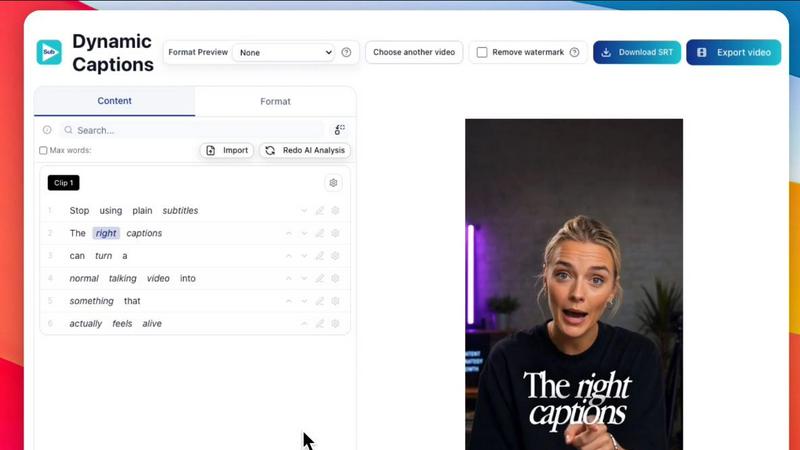
One-Click Unlimited Captions
With Subclip, generating subtitles is a breeze. You can create unlimited captions in 48+ languages with just one click, ensuring that your content is accessible to everyone. Customize text and styles to match your vibe before hitting publish!
AI Dubbing with Voice Clone
This feature takes your content global! Subclip allows you to translate your voice into over 21 languages while maintaining your original tone and emotion. Dubbing has never been this easy or effective, letting you reach audiences far and wide.
Enhance Voice & Remove Silences
Polish your audio like a pro with Subclip's noise removal and silence trimming features. Clean up background noise, enhance vocal clarity, and make your recordings sound studio-ready—all with just a click of a button.
Use Cases of Subclip
For Creators & Podcasters
Creators can easily clip long-form videos into engaging short clips, boosting viewership without breaking a sweat. Podcasters can enhance audio quality and add captions, making their episodes more engaging and accessible.
For Coaches
Coaches can transform their recorded courses into multiple languages using their own voice, allowing them to reach a broader audience and maximize the impact of their teachings without additional recording sessions.
For Vloggers
Vloggers can add captions, B-Roll, and audio enhancements seamlessly. With Subclip, exporting videos is as easy as clicking a button, ensuring that your content looks and sounds top-notch without the hassle.
For Agencies & Freelancers
Agencies can ramp up their output without increasing editing hours. With unlimited transcription, collaboration tools, and quick exporting features, teams can work together more efficiently and deliver high-quality content faster.
Frequently Asked Questions
How does Subclip's AI Clipping work?
Subclip uses advanced AI algorithms to analyze your video content and identify the most engaging clips. It scans for high-energy moments and key emotional shifts, making it super easy to create dynamic short clips.
Can I use Subclip for multi-language dubbing?
Absolutely! Subclip's AI dubbing feature allows you to translate your voice into 21+ languages while keeping your original tone and emotion intact. It's an excellent way to reach a global audience.
Are there limits on caption generation?
Nope! You can generate unlimited captions for your clips without any restrictions. You can also customize the text and formatting to match your style, making it a breeze to create engaging subtitles.
How do I collaborate with my team using Subclip?
Subclip enables seamless collaboration by allowing you to share projects with your team. Everyone can provide feedback and work together in one workspace, making teamwork easy and efficient.
Similar to Subclip

EasyInterview
AI recruiter that phone-screens every applicant in 11 Indian languages and returns a ranked shortlist.


Oravaa
Oravaa is your AI sidekick that handles calls like a pro, snagging leads and support 24/7 with a human vibe.

Hush Touch | Voice-to-Text for MacOS
Hush Touch turns your voice into text on Mac, learning your lingo offline for a flawless, no-subscription dictation.

Glossa
Break language barriers with Glossa's fast AI translations for your church services in over 100 languages, no hardware.

ATOZAITOOLS
ATOZAITOOLS is your ultimate hub for discovering rad AI tools that supercharge productivity and simplify your life.

Bantr: Offline & Unlimited TTS for Mac
Bantr is your private, unlimited text-to-speech app for Mac that works offline forever.

KaiCalls
KaiCalls is your 24/7 AI phone agent that answers calls and captures leads while you sleep.