
About SubtitlesFast
Yo, creators! Tired of subtitle hell? Spending hours transcribing, syncing, and styling just to get your vids ready for the 'Gram or TikTok? That's a major vibe kill. Enter SubtitlesFast, your new secret weapon for slapping fire, accurate subtitles on your content in, like, literal minutes. This ain't some clunky, overpriced software that needs a PhD to operate. It's a slick, browser-based app built for the daily grind—think vloggers, educators, marketers, and anyone who needs to pump out polished videos without the editing drama. The whole deal is stupidly simple: you upload your clip, the AI auto-transcribes it in over 50 languages, you customize the look with dope animated styles, and you export a ready-to-post video. No watermarks on the free trial, no app downloads, just pure, unadulterated speed. It's built by a dev who actually posts daily, so it cuts all the bloated features you don't need and focuses on what matters: getting your content seen, accessible, and engaging AF. Stop letting subtitles be your bottleneck.
Features of SubtitlesFast
AI-Powered Auto-Transcription
This is the magic sauce. Dump your video file into SubtitlesFast, and its AI gets to work instantly, transcribing your speech into text with scary accuracy. It handles over 50 languages, so whether you're speaking English, Spanish, or something else, you're covered. It even does word-level highlighting, making your subs pop in time with the audio. Forget manual typing; this feature alone saves creators like an hour per video.
30+ Animated Subtitle Styles
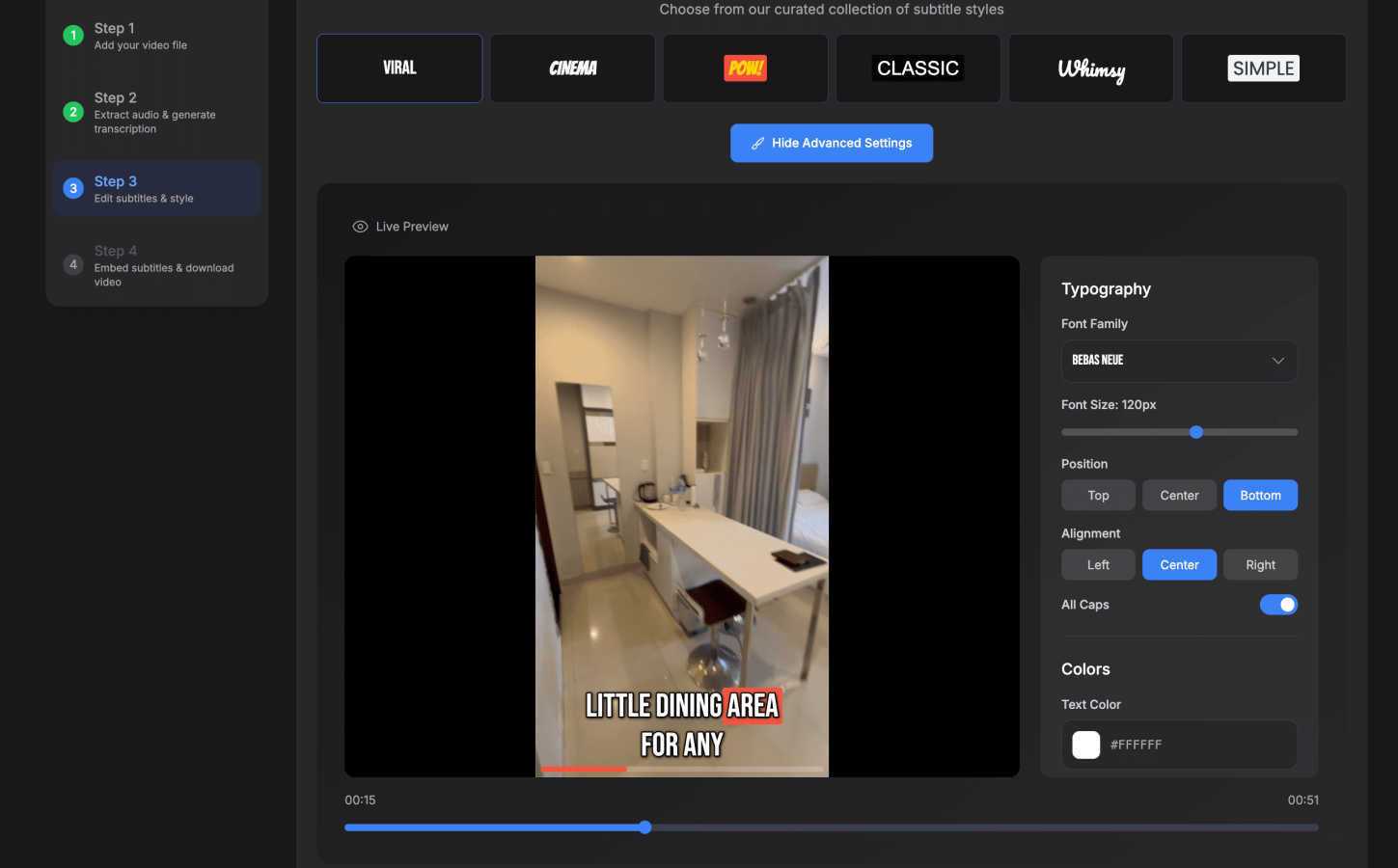
Boring, static subtitles are for boomers. SubtitlesFast lets you cook with style. Choose from a library of 30+ animated styles to make your text bounce, fade, or typewriter onto the screen. You can fully customize the fonts, colors, and positioning to match your brand's aesthetic perfectly. It's what makes your content look pro and keeps viewers' eyes glued to the screen.
One-Click, Watermark-Free Export
The grand finale. Once your subs are styled and perfect, you hit one button. SubtitlesFast burns the subtitles directly into your video file, rendering a final MP4 that's primed for any platform—TikTok, YouTube, Instagram Reels, you name it. The best part? Even the free trial lets you export without any gross watermarks plastered all over your hard work. It's the ultimate "no-fuss" finish.
Simple, Built-In Video Editor
Need to do more than just subs? No sweat. SubtitlesFast comes with a clean, intuitive editor that lets you trim your clips, add background music, and throw in extra text or images right on the timeline. It's designed with zero learning curve, so you're not wasting time figuring out a complicated interface. It's everything you need, nothing you don't.
Use Cases of SubtitlesFast
The Daily Vlogger / Short-Form Creator
If you're posting vlogs, day-in-the-life clips, or skits daily on TikTok/Instagram, speed is everything. SubtitlesFast is your bestie. Record a clip on your phone, upload it, burn in some stylish animated subs, and post—all in under 5 minutes, maybe even from your phone on the toilet (as one user famously noted). It turns content creation from a chore into a seamless, fast-paced workflow.
The Educator & Course Creator
Making tutorials, online courses, or explainer videos? Accessibility and clarity are key. SubtitlesFast ensures your lessons are accessible to everyone, including non-native speakers and viewers in sound-off environments. The accurate AI transcription and easy editing mean you can produce professional, accessible educational content without needing an audio engineering degree.
The Hustling Social Media Marketer
Promoting a brand or product on social? You need engagement, and subtitles deliver. Over 80% of videos are watched on mute. With SubtitlesFast, you can quickly add eye-catching, branded subtitles to your ads and promo videos, ensuring your message is seen and absorbed even without sound. It boosts retention and makes your content look legit.
The Privacy-Conscious Creator
Worried about uploading your raw, unedited videos to some random server? SubtitlesFast runs right in your browser, offering a much cleaner and more private experience than many cloud-based editors. You get fast, high-quality results without your content being processed through a bunch of external servers you don't trust.
Frequently Asked Questions
Is there really no watermark on the free trial?
For real, no cap. You can use SubtitlesFast for free and export your finished videos without any SubtitlesFast logo or watermark slapped on them. We want you to see the full value and create legit content from day one. The trial lets you test the entire workflow with zero strings attached.
How does it compare to tools like CapCut or VEED?
Straight up, it's built for speed and simplicity where those tools can be bloated. As users say, it's "faster, cleaner, better than CapCut" for subtitles. We focus on being the best at one thing: incredibly fast, stylish subtitles. We have a simpler UI, no mandatory app download, and a price that doesn't make you weep. Check the comparison table on the site—we stack up pretty well.
What video formats and platforms does it support?
You can upload common video files (like MP4, MOV) and export a final MP4 that's optimized for all the major platforms: TikTok, YouTube, Instagram Reels, X (Twitter), and more. The burned-in subtitles mean they'll play everywhere, no separate SRT file nonsense required.
Do I need to install any software?
Nope! Zero. Zilch. Nada. SubtitlesFast is a 100% browser-based application. You just go to the website, upload your video, and start editing. It works on your phone, tablet, or computer. No downloads, no updates, no eating up your storage space.
Similar to SubtitlesFast

@fuck.it - email with attitude
Private email. Pure. Secure. Exclusive. No ads, no tracking, no data selling. GDPR compliant, EU-hosted.

FreeVideoGenerator
Free AI video generator: turn text prompts and photos into video clips with Sora 2, Veo 3.1, Wan and more. Free starter credits, no watermark download

Leadeon
AI growth tool for X and LinkedIn: write posts in your voice, schedule at your best times, find leads on X and see what works.


Genjutsu AI Video Editor
AI video-to-video editing for character, outfit, object and visual-style changes guided by your original clip.

Novastart
Apps and files on an infinite canvas where people and AI agents work together.


Panzoe
Panzoe is an all-in-one AI platform for personal productivity, business automation, AI assistants, content creation, and custom AI solutions.