

URL to Any
Transform any webpage into shareable content in seconds with URL to Any's free and easy conversion tools.
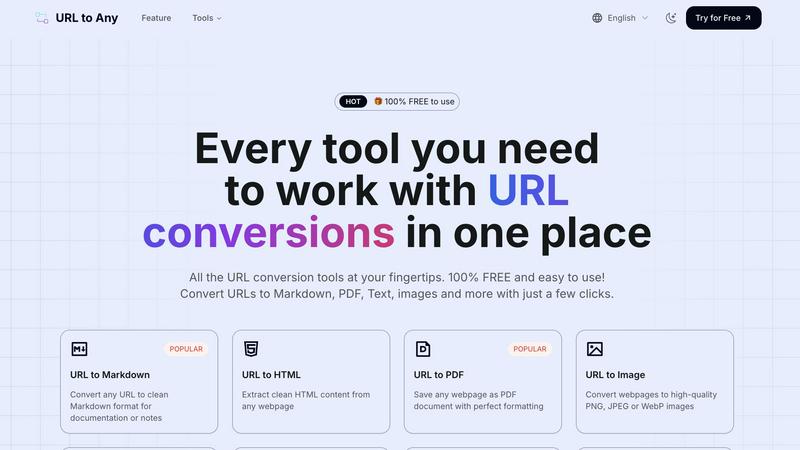
About URL to Any
Alright, folks, let’s dive into the magic that is URL to Any. This nifty tool is your go-to buddy for transforming any boring ol' webpage into a bunch of cool formats, making it super easy to save and share content without all that clutter. Whether you’re a casual web surfer looking to grab a recipe sans the annoying sidebar ads or a developer needing to scrape content, URL to Any has got your back. Picture this: you find an epic article or a dope tutorial, and with just a few clicks, you can convert it into a sleek PDF, a clean Markdown file for your notes, or even a stripped-down text file. No sign-ups, no annoying premium trials, and best of all, it's completely free! With tools designed for everyone—from content creators drowning in open tabs to students needing concise notes—URL to Any turns chaotic web content into exactly what you need, instantly. It’s all about simplifying your digital life, so you can focus on what really matters.
Features of URL to Any
URL to Markdown
Need your web content in Markdown format? This feature does the trick, turning any webpage into clean, structured Markdown that’s perfect for documentation, notes, or even blog posts. Just paste your URL, and voilà, your content is ready to go.
URL to PDF
Say goodbye to print screens and messy screenshots. With the URL to PDF feature, you can save any webpage as a beautifully formatted PDF document. It’s perfect for archiving important articles or sharing resources without losing any formatting.
URL to Image
Want to capture that sweet webpage design? Use the URL to Image feature to convert any site into high-quality images like PNG, JPEG, or WebP. Whether it’s for presentations or social media, you’re covered with stunning visuals.
URL to JSON
For developers and data enthusiasts, the URL to JSON feature transforms webpage content into structured JSON format, making it easy to work with data in your apps or projects. Just input the URL and get your data organized in a snap.
Use Cases of URL to Any
Saving Articles for Later
Ever stumble upon a must-read article but don’t have time to engage? Use URL to Any to convert it into a PDF or Markdown to save for later. You can read it anytime, anywhere, without the original webpage's distractions.
Quick Data Extraction
If you’re a developer needing to extract and manipulate data, URL to JSON or URL to XML are lifesavers. Quickly convert webpage content into manageable data formats for your coding projects, saving you tons of time.
Sharing Content Effortlessly
Need to share a webpage with friends or colleagues without sending them the clutter? Generate a clean PDF or an image of the page using URL to Image or URL to PDF, making sharing super convenient and professional.
Extracting Meta Tags for SEO
For those in the digital marketing world, the new URL Meta Tags Extractor lets you analyze meta tags from any URL. This is essential for checking SEO, Open Graph, and Twitter Cards, helping you optimize your web presence effortlessly.
Frequently Asked Questions
How do I convert a URL?
It’s a breeze! Just copy the webpage URL you want to convert, paste it into the URL to Any tool, choose your preferred format, and hit convert. Your content will be ready in seconds.
Is URL to Any really free?
Absolutely! URL to Any is 100% free to use. No hidden fees, no sign-ups, just straightforward conversion tools at your fingertips.
What formats can I convert to?
You can convert URLs to a variety of formats including Markdown, PDF, Text, images, JSON, XML, and even MP3. It’s a one-stop shop for all your conversion needs.
Is my data safe?
You bet! Your data is processed securely and is never stored on our servers. Privacy is a top priority, so you can use URL to Any with peace of mind.
Similar to URL to Any

screenRIG
Signage and kiosk infrastructure for AI agents. Your agent publishes images, video, streams, web pages and apps to screens via one plugin.screenRIG is

AUTOMATER.ai
A tray helper for every AI coding tool: one searchable library of past sessions, waiting alerts and usage across 9 providers.

Luminus Tools
A fast, privacy-first suite of online calculators, financial desks, health trackers, and developer utilities running completely in your browser withou


amaze.directory
A directory of AI tools where a person used each one first.

Speechyou
AI transcription for voice notes, meetings, and audio files in 1,700 languages, with AI summaries and subtitle export and unlimited chat ai usage.