

What Time
What Time is your go-to tool for effortlessly comparing time zones and scheduling meetings across the globe like a pro.
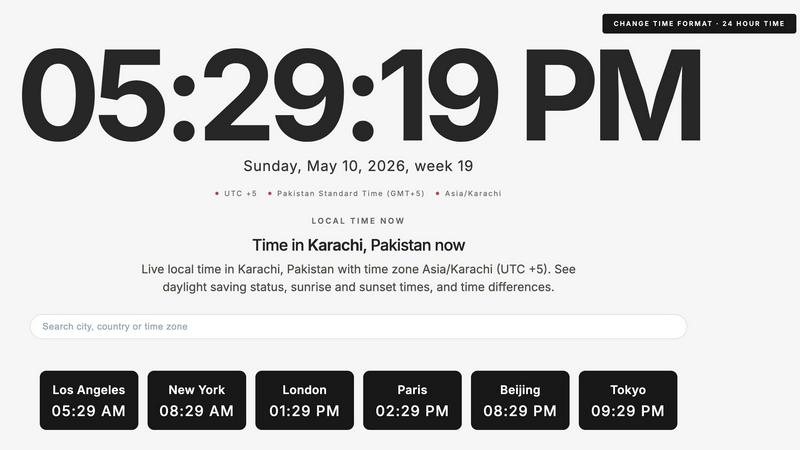
About What Time
WhatTime.dev is your go-to time zone platform, designed for the modern age of remote work and international collaboration. Whether you're a freelancer hustling to meet deadlines, a developer coding with teams across continents, or a business owner juggling clients in multiple time zones, this tool has got your back. WhatTime.dev simplifies the chaos of time zone differences, allowing you to compare time zones, check UTC and GMT offsets, and view local times around the world with just a few clicks. Forget about the headache of daylight saving time changes or manual calculations; this platform streamlines everything for you. Plus, its powerful meeting planner feature helps you find overlapping working hours, making it a breeze to schedule international calls. With a clean, distraction-free interface optimized for speed and usability, WhatTime.dev enhances your productivity while giving you the confidence to coordinate effectively across borders.
Features of What Time
Time Zone Comparison
Easily compare time zones between different cities and countries with just a few clicks. This feature helps you visualize how time varies across the globe, eliminating confusion when scheduling meetings and planning events.
UTC and GMT Offset Lookup
Quickly check UTC and GMT offsets for any location worldwide. This tool makes it simple to understand how local times align with these universal time standards, ensuring you're always in the loop when working with clients or teams in different regions.
Meeting Planner for Remote Teams
Our powerful meeting planner takes the guesswork out of scheduling. It helps you find overlapping working hours between various locations, making it way easier to set up international calls and collaborate with remote teams without the hassle.
Fast, Mobile-Friendly Interface
WhatTime.dev boasts a sleek and fast interface designed for mobile and desktop use. The clean UI provides quick access to all features, allowing you to check times and plan meetings on the go, without any clutter or unnecessary setup.
Use Cases of What Time
Coordinating with Clients
When you're working with clients in different time zones, WhatTime.dev helps you quickly find a suitable meeting time. No more awkward scheduling; just streamlined coordination that keeps everyone on the same page.
Managing Distributed Teams
For managers overseeing remote teams spread across various locations, this platform simplifies the process of finding common working hours. You can efficiently plan team meetings, ensuring that everyone can participate without playing calendar tag.
Trading Global Markets
If you're into trading or investing in global markets, knowing the local times of major exchanges is crucial. WhatTime.dev allows you to check market hours and plan your trading activities accordingly, giving you an edge in the fast-paced financial world.
Planning International Events
Organizing an international event? Use WhatTime.dev to easily coordinate with participants from different countries. The platform's time zone comparison and meeting planner features make it a breeze to finalize schedules and ensure everyone can attend.
Frequently Asked Questions
How do I use the meeting planner feature?
Using the meeting planner is simple! Just enter the cities or countries of the participants, and the tool will display overlapping working hours, allowing you to choose the best time for your meeting.
Is there a mobile app for WhatTime.dev?
Currently, WhatTime.dev is optimized for mobile browsers, so you can access all features seamlessly on your smartphone. Just visit the website, and you're good to go!
Does WhatTime.dev account for daylight saving time changes?
Absolutely! WhatTime.dev automatically adjusts for daylight saving time changes, ensuring that you're always getting accurate local times, no matter the season.
Can I convert time zones for specific dates and times?
Yes, WhatTime.dev allows you to check time zone conversions for specific dates and times. This feature is incredibly useful for planning events or meetings far in advance, taking into account any future time changes.
Similar to What Time

SightRadar
Face recognition API, a drop-in replacement for AWS Rekognition. Index, search, compare and detect faces, billed per photo with no subscription.

Hishab
All-in-one POS, inventory, accounting and HR software for Bangladeshi SMEs — real-time sales, stock and finance in one place.


SnitchFeed
SnitchFeed is an agentic social listening tool that surfaces high-intent conversations on LinkedIn, X, Hackernews, and more for GTM and product teams.


AIEnhancer
Enhance photos, create images, and generate videos with an all-in-one AI enhancer.

LTX 2.3 Free
LTX 2.3 prompts, workflows, demos, and practical AI video guidance.