

xyOps
xyOps is an open-source, self-hosted job scheduler and operations platform with visual workflows, fleet monitoring, and contextual alert response.
About xyOps
xyOps connects scheduled work to the infrastructure that runs it. Teams can launch scripts and plugins on one server or across a fleet, using calendars, intervals, webhooks, custom triggers, or demand. Queues, priorities, and resource limits help shape execution, while live logs and progress make running jobs observable.
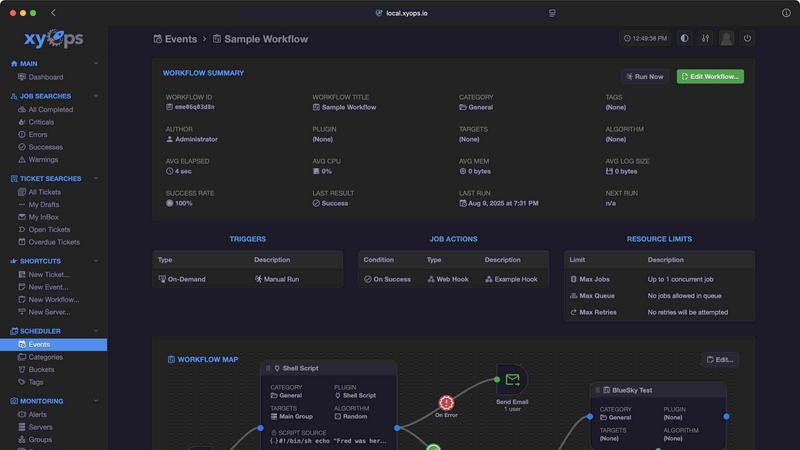
For workflows with multiple steps, the visual editor supports conditional execution, parallel branches, joins, human approval, replay, and data passing. Operators can monitor servers and jobs together, inspect processes and connections, and use snapshots to preserve machine state. An alert can be tied to a snapshot and followed by a ticket, notification, webhook, or remediation action.
xyOps is self-hosted and fully open source under BSD 3-Clause. The product page says there are no feature gates or telemetry. The trade-off is that the team operates its own installation. The software itself is the same across plans; paid tiers are for additional support. Cronicle data import and compatible plugins are available for teams moving to this successor.
Features of xyOps
- Schedule scripts and plugins with calendars, intervals, webhooks, priorities, queues, and resource limits.
- Build workflows that branch, run tasks in parallel, pause for approval, and replay.
- Monitor servers and jobs together, including metrics, processes, and network connections.
- Preserve alert-time context in snapshots and connect it with tickets or remediation.
Use Cases of xyOps
- Operate recurring or event-triggered jobs across a server fleet.
- Coordinate operational processes with conditional paths and approval checkpoints.
- Investigate alerts using snapshots that retain relevant system and job state.
- Transition Cronicle schedules and compatible plugins to a newer platform.
Frequently Asked Questions
How can jobs be triggered?
The listed options include calendars, intervals, webhooks, custom triggers, and demand.
Can xyOps run workflows as well as scheduled jobs?
Yes. The visual editor supports branching, parallel execution, joins, approvals, replay, and data passing.
Is support included with the free software?
The free tier includes community support. Private ticket support and additional response and guidance options are available on paid tiers.
Pricing of xyOps
The self-hosted software is free with community support. Professional is $200 per month or $2,000 yearly; Enterprise is $1,000 per month or $10,000 yearly. Prices are in USD.
Similar to xyOps

CADCraft
CADCraft is open-source 2D CAD software with an MCP server, JSON control channel and headless CLI for automating drawing tasks.

robodocxs
robodocxs provides AI agents for ERP-connected document workflows, email support, and employee knowledge capture.

AI Email Filter
Sort Gmail and IMAP inboxes with natural-language categories, reviewable results, and multi-action rules while keeping your existing email client.

Orbitype
Orbitype helps growth teams qualify companies and uncover buying signals and decision-makers for customer acquisition and expansion.

amaze.directory
Browse a human-screened directory of AI tools with category search, pricing labels, and daily link checks.

EasyInterview
EasyInterview helps high-volume hiring teams screen applicants through multilingual AI calls, structured interviews, and ranked reports.

saasgrow.ai
A curated directory helping founders and operators discover screened SaaS growth tools across categories such as writing, analytics, and marketing.

Tools Network
Browse and compare AI tools across categories, with listings that identify pricing models to help narrow your search.