

Yume Comic
Yume Comic turns your wildest story ideas into full manga or webtoon pages in minutes, no drawing skills needed.
About Yume Comic
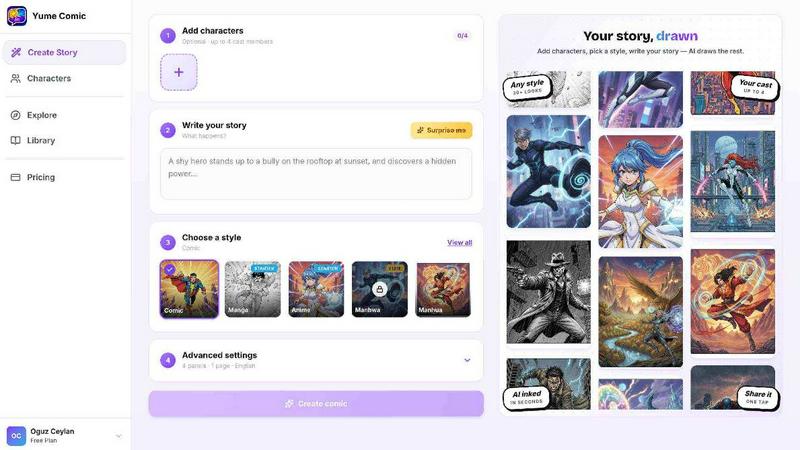
Yume Comic is basically your new best friend if you've ever wanted to create sick comic-style art but can't draw to save your life. It's an AI-powered comic creation tool that takes your wildest story ideas and turns them into actual manga pages, webtoon strips, or comic panels in minutes. No joke. You just type out what's happening in your head, and the AI does all the heavy lifting. It's perfect for storytellers, creators, social media addicts, manga fans, and anyone who's ever thought, "Man, that scene would look so cool as a comic." The tool supports multiple styles like classic shonen manga, moody manhwa, bright webtoon vibes, and even noir aesthetics. You can switch between them with one click, which is insane for experimenting with different looks. The best part? Your characters stay consistent across every panel. That's right, no more weird face changes or random outfit swaps between scenes. Yume Comic handles that so you can focus on the plot and dialogue. It's free to start, works right in your browser, and you don't need any fancy tablets or expensive software. Whether you're crafting a high-energy action sequence, a soft emotional moment, or a neon sci-fi world, this tool lets you be the director and writer at the same time. Your imagination is literally the only limit here.
Features of Yume Comic
Prompt to Page Magic
This feature is the core of Yume Comic. You literally just type a few lines about your character and what's happening next, and the AI reads your prompt, understands the scene, and builds a full multi-panel page with dialogue bubbles and cinematic angles. No sketching, no perspective nightmares, no frustration. You drop in your idea, hit the button, and watch your first draft come to life in seconds. It's like having a whole manga studio in your pocket.
Character Consistency Across Panels
One of the biggest headaches in making a series is keeping your main character looking the same from panel to panel. Yume Comic handles that for you completely. Once you define your protagonist, their hair, outfit, face, and overall vibe stay perfectly on model throughout your entire webtoon or manga. This means you can focus on writing the plot and creating killer dialogue while the AI makes sure your hero doesn't suddenly look like a completely different person.
One-Click Style Switching
Why commit to one look when you can try them all? Yume Comic lets you switch between classic shonen manga, moody noir, vibrant vertical manhwa, and bright webtoon styles with a single click. It's perfect for testing different vibes for your characters or your world. You can see how your hero looks in a gritty action scene versus a soft romance setting instantly. It's like having a whole studio of artists ready to work on your script.
Free Browser-Based Creation
Forget about expensive tablets or complicated software that takes years to learn. Yume Comic works right in your browser on your phone or laptop. There's nothing to download, no subscriptions to worry about for basic use, and no learning curve. You just open the site, type your idea, and start creating. It's designed so that anyone with an internet connection can jump in and start making professional-looking comic pages immediately.
Use Cases of Yume Comic
Turning Story Ideas into Full Manga Pages
You know that epic scene playing in your head right now? The dramatic rainy standoff or the cozy cafe meeting? With Yume Comic, you don't have to wait years to learn how to draw it. Just describe the action, choose your style, and watch your story jump onto the page. This is perfect for writers who want to visualize their scripts or fans who want to see their favorite characters in new scenarios without needing any artistic skills.
Creating Social Media Comic Strips
Social media creators can use Yume Comic to pump out engaging comic strips for Instagram, Twitter, or TikTok in minutes. Whether it's a funny meme, a short story, or a character introduction, the tool's speed and consistency make it ideal for content creators who need to post regularly. You can maintain a consistent art style across all your posts without hiring an artist or spending hours on each panel.
Prototyping Webtoons and Manga Series
Aspiring webtoon and manga artists can use Yume Comic to prototype their entire series before committing to a final art style. You can experiment with different aesthetics, test character designs, and even generate sample pages to see how the flow works. This is a game-changer for creators who want to pitch their ideas to publishers or just want to see if their story works visually before investing time and money.
Educational and Personal Storytelling
Teachers, students, and hobbyists can use Yume Comic to create visual stories for presentations, projects, or personal journals. Imagine turning a history lesson into a manga page or creating a visual diary of your travels. The tool's accessibility means anyone can tell their story in a visually compelling way, making it a powerful tool for communication and self-expression beyond just entertainment.
Frequently Asked Questions
Do I need any drawing skills to use Yume Comic?
Nope, zero drawing skills required. That's literally the whole point. Yume Comic is designed for people who have great ideas but can't draw. You just type your prompt, and the AI handles all the visual stuff. It's perfect for writers, storytellers, and anyone who's ever felt held back by a lack of artistic ability.
Can I keep my characters looking the same across multiple pages?
Absolutely. One of the biggest selling points of Yume Comic is character consistency. Once you define your protagonist's look, the AI makes sure their hair, outfit, face, and overall style stay the same from panel to panel and page to page. You don't have to worry about your hero suddenly looking like a different person halfway through your story.
What styles can I choose from?
Yume Comic offers a bunch of styles including classic black-and-white shonen manga, moody noir, vibrant vertical manhwa, bright webtoon styles, and more. You can switch between them with one click, so you can experiment until you find the perfect vibe for your story. It's like having a whole studio of artists at your fingertips.
Is Yume Comic really free to use?
Yes, the basic tool is free to use. You can start creating comic pages right in your browser without paying anything. There's no need to download software or sign up for a paid plan to get started. Just go to the site, type your idea, and hit create. It's that simple.
Similar to Yume Comic

ImageAgent
Create and edit AI images through conversation, using text or reference images and refining results in chat.

Rhinobird
AI video ads, UGC-style videos, and product visuals for cross-border sellers and e-commerce brands.

GenX
All-in-one AI workspace to generate images, videos, and audio with multiple leading AI models.

AppIconGenerator
Generate iOS and Android app icons from any image and export all platform sizes for free.

picttool
Create and edit images with a collection of easy-to-use AI tools


Design.com AI Image Generator
Turn text prompts into polished, copyright-safe visuals that plug directly into branded templates

Nano AI
Create and edit AI images, generate videos, and compare models in one creative workbench.