
BabyVideo.ai vs One More Shot AI
Side-by-side comparison to help you choose the right AI tool.

BabyVideo.ai
Create super cute AI baby videos from your photos in seconds and capture magical moments like never before!.
Last updated: March 1, 2026

One More Shot AI
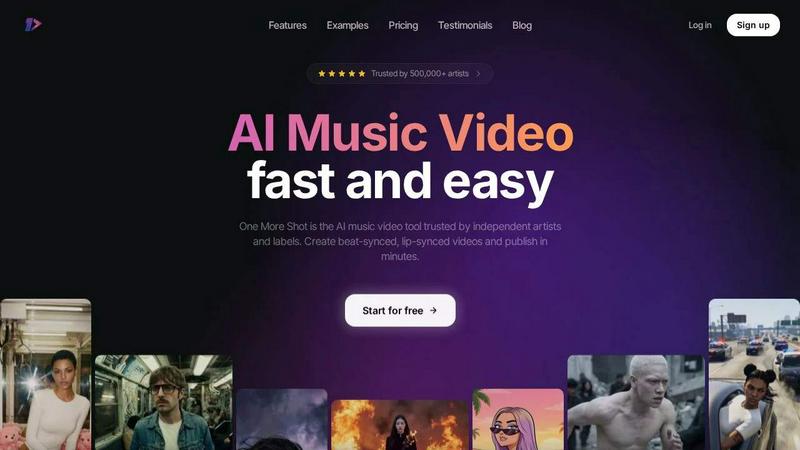
Stop stressing about music videos, our AI turns your tracks into fire visuals with perfect lip-sync in minutes.
Last updated: April 4, 2026
Visual Comparison
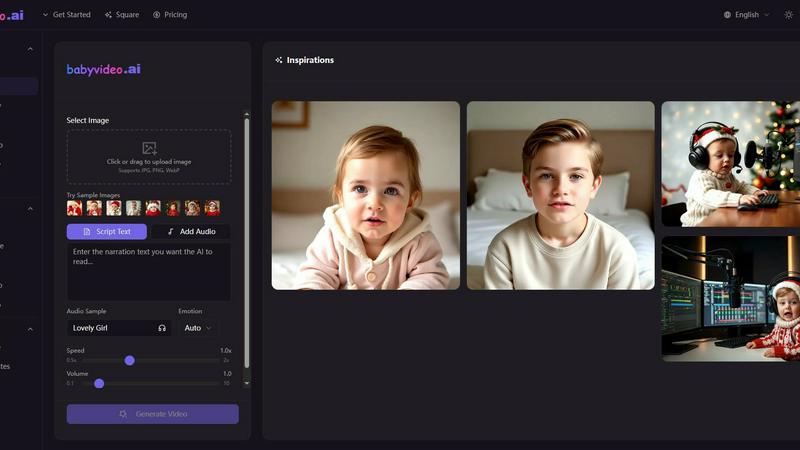
BabyVideo.ai
One More Shot AI
Feature Comparison
BabyVideo.ai
Baby AI Video Generator
This feature allows you to transform your uploaded photos into adorable baby videos within seconds. Choose from a variety of templates—think sleeping, smiling, crawling, and growing up scenes—that make your memories even sweeter. It’s your one-stop shop for creating those precious moments that you’ll cherish forever.
AI Baby Podcast
Ever wanted to see a baby talking? With the AI Baby Podcast feature, you can create talking baby videos that come to life with AI-powered text-to-speech. Upload a baby photo, add your own script or audio, and choose from over 100 voice styles in 17 languages to create engaging podcast-style content that will leave your audience giggling.
Dancing Baby Videos
This feature lets you take any character photo and turn it into a dancing baby! Upload a dance reference video, select your character, and watch as BabyVideo.ai goes to work, creating a TikTok-ready dance video. It’s super easy to use, and you can download and share your creations instantly.
Baby Singing Videos
Transform any baby photo into a singing sensation! Upload your favorite baby pic, add an audio clip—be it a nursery rhyme or a full-blown jam—and let the AI generate a vertical singing video that’s perfect for social media. This feature guarantees adorable, clearly singing results that will make everyone smile!
One More Shot AI
Your AI Artist & Crew
Stop worrying about casting calls or hiring actors. This feature lets you create a virtual artist straight from a photo or even just a text description. Once you've got your digital star, the platform keeps their look consistent across every scene and every video. It's like having a dedicated, always-available frontperson for your brand. Plus, the "Auto Videos" mode acts like your AI production crew, taking your song and a photo and handling the entire video creation process from start to finish, no micromanaging needed.
Beat-Synced Visuals & Top-Tier Lip-Sync
Nothing kills a music video faster than visuals that are off-beat or lips that don't match the words. One More Shot AI's core tech analyzes your track's audio waveform to generate visuals that pulse, cut, and transition in perfect sync with the rhythm. And for those crucial singing scenes? They host the best lip-syncing model around (they just dropped Seedance 2.0 for even better sync) to make sure every syllable matches perfectly. It looks so natural, your fans will swear it was filmed live.
Precise Project Mode Editing
For the control freaks and creative visionaries, Auto Mode is just the start. Dive into Project Mode for granular, frame-by-frame control. Want to change a specific shot, adjust the timing of a transition, or tweak the AI prompt for just one scene? This is your playground. You can start from a blank slate or take an auto-generated video and remix it to perfection. It’s the perfect balance of AI speed and human creative direction.
Multi-Format Output for the Feed
The internet is a fragmented place. One platform wants vertical, another wants square, your YouTube wants horizontal. Creating separate videos for each is a nightmare. One More Shot AI bakes that flexibility right in, letting you export your final video in vertical (9:16), horizontal (16:9), or square (1:1) formats from the same project. Shoot once, publish everywhere. It's the ultimate tool for dominating your social media feed and music promotion across all channels.
Use Cases
BabyVideo.ai
Create Personalized Gifts
Want a unique gift for a baby shower or birthday? Use BabyVideo.ai to create custom baby videos that capture the essence of the little one. These personalized creations make for unforgettable keepsakes that parents will treasure forever.
Share on Social Media
Influencers and content creators can leverage BabyVideo.ai to create viral, shareable content. Whether it's a dancing baby video or a talking baby podcast, these cute clips are perfect for grabbing attention on platforms like TikTok, Instagram, and Facebook.
Document Family Memories
Capturing family moments just got a whole lot cuter! Use BabyVideo.ai to generate adorable baby videos that document your child’s growth and milestones. These engaging videos create lasting memories that you and your family can look back on with joy.
Fun for Family Gatherings
Bring some laughter and fun to family gatherings! Use BabyVideo.ai to create hilarious baby videos that can be shared during family get-togethers. Everyone will love watching their relatives as adorable babies, sparking joy and lots of laughs!
One More Shot AI
The Independent Artist's Visual Debut
You're an indie musician with a fire new track on Suno or Udio, but zero budget for a video. This tool is your golden ticket. Upload your song, a cool pic for vibe reference, and get a professional, engaging music video in minutes. It lets you compete with major label visuals and gives your song a fighting chance to get noticed on streaming platforms and social media, all without breaking the bank.
Social Media Content Machine
Artists need to feed the algorithm constantly. Use One More Shot AI to create a ton of visual content from a single track. Make a vertical clip for TikTok/Reels, a horizontal version for YouTube, and square snippets for Instagram. You can even generate short, hook-focused videos for promotion or behind-the-scenes style clips featuring your AI artist, keeping your audience engaged and your content fresh daily.
Lyric Video & Visualizer on Steroids
Static lyric videos are so 2010. Transform your MP3 into a dynamic, AI-generated visual experience that reacts to the music. It's the perfect middle ground between a simple audio visualizer and a full narrative video. Great for showcasing your songwriting on platforms like YouTube or for creating immersive background content for live performances or listening parties.
Building a Consistent Artist Brand
Creating a recognizable look is key. Use the AI Artist feature to build a virtual persona that appears in all your visuals, from music videos to social posts. This builds brand identity and makes your work instantly recognizable in a crowded feed. It's like having a digital mascot or alter-ego that represents your sound and aesthetic 24/7.
Overview
About BabyVideo.ai
Yo, welcome to BabyVideo.ai, your ultimate playground for turning ordinary photos into heart-melting, baby-themed wonders! This rad AI tool is all about giving your pics a super adorable twist that makes everyone go "aww." Whether you're curious about what your future baby might look like or just want to see a baby version of yourself, BabyVideo.ai has you covered! You can whip up animated baby videos or even cute cartoon baby art in no time. The platform boasts cutting-edge face modeling and image-to-video tech that effortlessly delivers high-quality results without any hassle. No editing skills? No sweat! With an intuitive interface and straightforward guidance, anyone can jump in and start creating precious memories. It's perfect for couples, parents, families, influencers, or anyone looking to sprinkle a little AI magic into their creative content. Get ready to unlock a world of digital cuteness!
About One More Shot AI
Yo, what's good? Let's talk about the biggest headache for any musician or creator: making a dope music video. Traditional production? That's a whole circus - crews, budgets, timelines that drag on forever. It's enough to kill your vibe. Enter One More Shot AI, your new digital production squad. This ain't just another filter app; it's a full-blown web and mobile platform that uses AI to turn your tracks into straight-up visual fire. Think of it as your personal AI director, editor, and VFX team rolled into one.
Built for the grinders - independent artists, content creators, and music marketers - it's all about skipping the boring, expensive stuff and getting to the magic. You feed it a song, and its brain analyzes the rhythm, energy, and mood. Then, whether you just wanna hit "go" with a reference pic and a prompt, or get deep in the weeds with scene-by-scene control, it cooks up a full music video faster than you can say "encore." With over half a million artists already trusting it, this tool is the secret weapon for getting pro-looking, beat-synced, lip-synced videos out into the world (TikTok, Instagram, YouTube, you name it) without selling a kidney. It's your one more shot to stand out.
Frequently Asked Questions
BabyVideo.ai FAQ
How does BabyVideo.ai work?
BabyVideo.ai utilizes advanced AI technology to analyze your uploaded photos and generate adorable baby-themed content. Just upload, select templates, and let the AI do its magic!
What types of videos can I create?
You can create a variety of videos, including animated baby videos, dancing baby clips, and talking baby podcasts. The possibilities are endless with the creative templates available!
Is it easy to use for beginners?
Absolutely! BabyVideo.ai is designed with a clean interface and step-by-step guidance, making it super easy for anyone—regardless of skill level—to create magical baby moments.
Can I share my creations on social media?
Yes! Once you generate your videos, you can easily download and share them across all major social media platforms like TikTok, Instagram, and Facebook. Get ready to spread the cuteness!
One More Shot AI FAQ
Do I need video editing skills to use this?
Nope, zero skills required! The whole point is to democratize video creation. The Auto Video mode is designed to be a one-click wonder - just add your song and a reference image. If you wanna get fancy, the more advanced controls are intuitive and built for musicians, not Hollywood editors. You'll be making vids in no time.
How good is the AI lip-sync really?
It's legit. They specifically host what they call "the best lip-syncing model available," and with the recent Seedance 2.0 update, it's even more precise. It analyzes the vocal track and animates the mouth movements to match, making singing scenes look natural and in-sync. It's one of their flagship features for a reason.
Can I use it with my music from anywhere?
Totally. It works seamlessly with AI music platforms like Suno and Udio, but you can also upload your own MP3s from any source - whether you made it in FL Studio, Ableton, exported from Spotify (if you own it), or recorded it in your closet. If it's an audio file, it can probably become a video.
What's the catch? Is there a free plan?
They have a "Start for free" option, which is common for these tools. This usually means you can test the core features with some limitations, like a watermark, shorter video length, or lower resolution. To get the full, unlimited, watermark-free experience with all the pro features, you'd move to a paid plan. Always check their latest pricing page for the exact deets.
Alternatives
BabyVideo.ai Alternatives
Yo, welcome to the world of BabyVideo.ai, where your ordinary photos get a super adorable upgrade! This next-gen AI tool is all about transforming your pics into baby-themed masterpieces that tug at your heartstrings. Users often find themselves on the hunt for alternatives for various reasons like pricing, extra features, or specific platform compatibility. Maybe you’re looking for something that fits your budget better, or perhaps you need a tool that offers different customization options. When searching for the right alternative, keep an eye out for user-friendly interfaces, quality output, and a variety of creative features that can help you bring your vision to life. No matter what your creative goals are, finding the right tool can make all the difference. Make sure to consider what features matter most to you—whether it's ease of use, the variety of templates, or the ability to create unique content for your social feeds. You want something that not only meets your needs but also inspires you to unleash your creativity!
One More Shot AI Alternatives
So you've heard about One More Shot AI, the tool that lets artists and creators whip up AI music videos from their tracks. It's a total game-changer in the AI content creation space, letting you skip the whole expensive, time-consuming video shoot and just vibe with an AI that gets your song's mood and rhythm. But hey, maybe the price point isn't your jam, or you need a feature it doesn't have yet. Maybe you're just a curious cat who wants to see what else is cookin' in the AI video kitchen. That's totally valid. People shop around for all sorts of reasons—budget, specific creative needs, or just wanting to test different platforms. When you're on the hunt for something similar, think about your non-negotiables. Do you need insane lip-sync accuracy? How much control do you want over each scene? Is it for quick social clips or a full-blown visual project? Getting clear on your own workflow will help you find the perfect fit.