
BudgetSheet vs Portfolio Genius
Side-by-side comparison to help you choose the right AI tool.

BudgetSheet
BudgetSheet makes it super easy to auto-import your bank data into Google Sheets, no more manual hassle needed!.
Last updated: February 28, 2026

Portfolio Genius
Your AI sidekick manages your investments so you can just vibe.
Last updated: March 1, 2026
Visual Comparison
BudgetSheet

Portfolio Genius
Feature Comparison
BudgetSheet
Live Bank Transactions
With BudgetSheet, you can import your bank transactions live into Google Sheets. No more waiting for monthly statements or manually entering data; your financial activity will be updated automatically, providing you with real-time insights into your spending and saving habits.
Easy Setup and Integration
Setting up BudgetSheet is as easy as 1-2-3! Just enable the add-on in your Google account, link your bank accounts, and you’re good to go. The user-friendly interface guides you through the process, ensuring that even the least tech-savvy folks can get started without a hitch.
Secure Bank Connections
BudgetSheet uses Plaid to connect securely to your bank accounts, meaning your data is in safe hands. You won’t have to worry about handling sensitive login information; BudgetSheet only stores an encrypted token necessary to fetch your transactions, ensuring maximum privacy and security.
Customization and Automation
One of the coolest features of BudgetSheet is its ability to let you customize your spreadsheets with your own formulas and layouts. Plus, with the Autofetch option, you can set it to automatically grab your new bank transactions every night. This means you’ll wake up to a freshly updated sheet, ready for your review without lifting a finger!
Portfolio Genius
24/7 AI Portfolio Analyzer
This is the core engine. It's not just a basic tracker; it's a full-on AI brain that constantly monitors your holdings against live market data, financial news, and global events. It's always on, so while you're sleeping, streaming, or touching grass, it's scanning for opportunities or red flags in your portfolio. It gives you a real-time health check, so you're never caught off guard.
Smart Trade Suggestions & Reasoning
Forget random stock tips from internet randos. Portfolio Genius serves up specific trade ideas (buy/sell/hold) backed by detailed, data-driven reasoning. It'll tell you why a move might be smart based on your risk profile and current market conditions. It's like getting the analyst report without the boring 50-page PDF.
Natural Language AI Chat
Can't be bothered with complex menus and filters? Just ask. Chat with your AI advisor like you would text a friend. Type stuff like "hey, why is my tech ETF down today?" or "find me some stable dividend stocks" and get instant, understandable insights. It makes getting answers feel casual, not like a homework assignment.
Portfolio Leaderboards & Social Proof
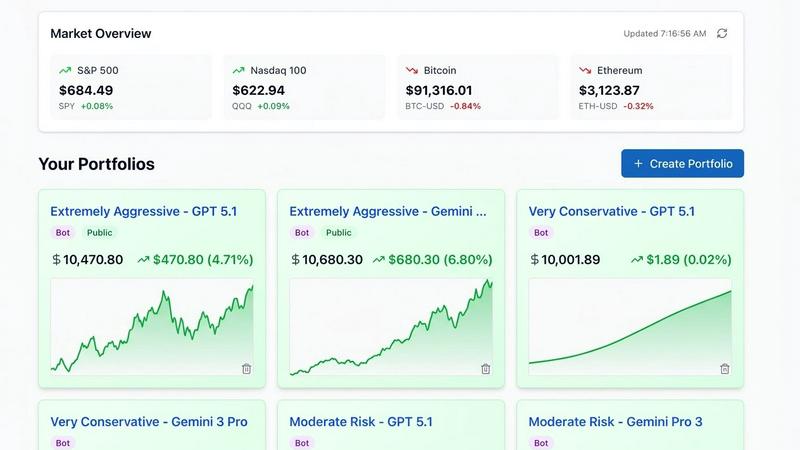
Get out of your own bubble and see how you stack up. Watch AI-managed portfolios with different strategies (Aggressive, Moderate, Conservative) compete in real-time on public leaderboards. It's a genius way to compare tactics, get inspired, and see what's actually working in the current market vibe.
Use Cases
BudgetSheet
Automating Monthly Budgeting
Imagine this: you set up your personalized budget tracking sheet once, and then BudgetSheet does the work for you! By automatically fetching your latest transactions, you can focus more on analyzing your spending rather than the tedious task of entering data.
Tracking Multiple Accounts
If you have accounts spread across different banks, BudgetSheet is your best bud. It allows you to pull in data from various checking, savings, and credit card accounts into one central Google Sheet, making it easy to monitor your overall financial health without hopping between apps.
Creating Personalized Reports
With all your transactions in Google Sheets, you can create custom reports and charts that suit your unique financial needs. Want to see where you spend the most? Or maybe analyze your savings trends? The power is in your hands to visualize your financial story.
Collaborating with Your Partner or Family
BudgetSheet is perfect for couples or families who want to manage finances together. You can share your Google Sheet, and both parties can access the latest transactions, making discussions about budgeting and spending a breeze. No more confusion or miscommunication!
Portfolio Genius
The Beginner Just Getting Started
You've got some cash and FOMO but zero clue where to start. Portfolio Genius helps you build a first portfolio based on your interests and a hypothetical amount, no sign-up needed. Then, its AI breaks down the why behind everything, acting as a 24/7 tutor to help you learn the ropes without losing your shirt.
The Active Trader Seeking an Edge
You're already in the game making moves, but you need more firepower. Use the tool to get advanced analytics on your trading patterns, win rates, and real-time alerts on your holdings. The AI's deep news and data scans help you spot opportunities or risks you might have missed, giving you a legit competitive advantage.
The Hands-Off Long-Term Investor
You believe in the "set it and forget it" life but still want to know it's optimized. Let the AI be your watchful guardian. It provides daily or weekly reviews of your portfolio's health, checks your diversification, and only alerts you when something actually needs your attention, so you can live your life stress-free.
The Strategy Geek & Learner
You love testing theories and learning from others. Dive into the public Portfolio Leaderboards to dissect the performance of different AI-managed strategies. See what's crushing it in the Aggressive category or what the Conservative playbook looks like. It's a live lab for investment ideas.
Pricing Comparison
BudgetSheet
Try BudgetSheet for free for 15 days. NO credit card required. No strings attached. After the 15-day free trial, BudgetSheet starts at $59 per year. If you want to upgrade to a paid plan of BudgetSheet, you can upgrade from the BudgetSheet Addon menu. All prices are in USD.
Portfolio Genius
Portfolio Genius keeps it simple with three straight-up plans, all with a 7-day free trial and a money-back guarantee. No sneaky fees here.
Lite - $10/month
The starter pack. Get your feet wet with AI tracking for up to 3 portfolios, basic weekly reviews, and 10 AI trade suggestions a month. Perfect if you're just testing the waters.
Premium - $20/month (Most Popular)
The full send. This unlocks everything: unlimited portfolios, daily reviews, all AI models, unlimited trade suggestions, and even integration with Alpaca brokerage to execute trades. You also get priority support and early access to new features.
Premium Annual - $200/year (Best Value)
The smart money move. This gets you all the Premium features but for a yearly price that saves you $40 (which is like getting 2 months free). You also score some exclusive annual member perks.
Overview
About BudgetSheet
BudgetSheet is a super handy tool that connects your bank accounts directly to Google Sheets, making it a breeze to manage your finances without the hassle of manual exports or tedious copying and pasting from CSV files. Whether you're a budgeting newbie or a finance guru, this add-on is designed to put you in the driver's seat of your money management game. You can easily import transactions from over 10,000 financial institutions, including checking accounts, savings accounts, credit cards, and even investment accounts. By leveraging the power of Plaid, BudgetSheet ensures that your financial data is secure while giving you the flexibility to customize your spreadsheets as you see fit. With BudgetSheet, you can ditch cluttered apps like Mint and seamlessly bring your bank data into your existing Google Sheets, allowing for greater automation and control over your budgeting process. It's time to take charge of your money and budget your way!
About Portfolio Genius
Alright, listen up. Portfolio Genius is basically your 24/7 AI hype-man for your money. Think of it as that super-smart friend who actually knows what they're talking about when it comes to stocks, ETFs, and crypto, but without the condescending vibe. This tool is for anyone with skin in the game, whether you're a total newbie just YOLO-ing your first hundred bucks or a seasoned trader looking for that extra data edge to absolutely crush it. Its whole deal is to take the chaos of the market—the endless news, the confusing charts, your random collection of holdings—and translate it into straight-up actionable intel. It crunches insane amounts of data to serve you smart trade ideas with clear reasons why, so you're not just blindly following a signal. You can even just chat with your AI advisor in plain English, no finance-bro jargon required. The value prop is simple: stop guessing and start making moves based on cold, hard analysis. It's like having a pocket-sized hedge fund quant, making portfolio management smarter, easier, and way less stressful for your unique style.
Frequently Asked Questions
BudgetSheet FAQ
How does BudgetSheet ensure my data is secure?
BudgetSheet uses Plaid for secure bank connections and does not store any sensitive login information. It only keeps a read-only access token, which is encrypted to ensure your data remains private and secure.
Can I try BudgetSheet for free?
Absolutely! You can try BudgetSheet free for 15 days with no credit card required. Dive in, explore the features, and see if it fits your budgeting style before committing to a subscription.
What financial institutions are supported?
BudgetSheet supports over 10,000 financial institutions, including major banks, credit unions, and investment accounts. You can check the full list of supported banks on the BudgetSheet website to see if yours is included.
Is BudgetSheet easy to set up?
Yes! Setting up BudgetSheet is straightforward. Just enable the add-on in your Google account, link your bank accounts, and you’re all set. The intuitive interface guides you through the process to make it as smooth as possible.
Portfolio Genius FAQ
Do I need to sign up to try it?
Nope! You can literally go to the site right now and use the "Create a Portfolio" demo tool without giving an email or anything. It lets you describe your investment goals and play with a hypothetical amount to see the AI analysis in action. Your demo portfolio will be public, but it's a zero-commitment way to test the vibe.
Does Portfolio Genius give official financial advice?
Absolutely not. Let's be crystal clear: Portfolio Genius is a tracking and analytics platform, not a registered advisor. It provides educational insights, data analysis, and suggestions based on algorithms. You are still the captain of your own financial ship, and all final investment decisions are 100% your responsibility.
What can the AI actually analyze?
This thing is hooked up to a ton of data feeds. It looks at real-time prices, company financials and fundamentals, market-moving news (with sentiment analysis), and even scours the web for the latest research and analyst reports. It smashes all that info together to give you a comprehensive picture of your portfolio's situation.
Is my financial data safe with you?
For sure. They use bank-grade, enterprise-level security to encrypt and protect your data. Your info isn't just floating around; it's locked down tight. You can focus on your portfolio performance without worrying about your data getting yeeted into the wrong hands.
Alternatives
BudgetSheet Alternatives
BudgetSheet is that nifty tool you didn’t know you needed, rocking the personal finance scene by effortlessly importing live bank transactions straight into Google Sheets. No more wrestling with manual exports or tedious CSV copying—just pure, unadulterated convenience! People often seek out alternatives to BudgetSheet for various reasons, like pricing concerns, feature sets that align better with their needs, or compatibility with different platforms. When on the hunt for an alternative, keep an eye out for user-friendly interfaces, integration capabilities, and whether the tool can sync with your specific bank or financial institutions. Make sure it’s flexible enough to adapt to your unique financial journey, because let’s be real—everyone’s money management style is a little different!
Portfolio Genius Alternatives
So you've heard the buzz about Portfolio Genius, that slick AI sidekick that's all about making your investing life a breeze. It's part of a whole new wave of AI-powered investment tools that act like a 24/7 trading buddy, analyzing markets and suggesting moves so you can, well, just chill. It's a vibe for anyone wanting to level up their portfolio game without the constant screen-staring. But let's be real, no single app is everyone's perfect match. Maybe the subscription fee is a bit steep for your budget, or you're looking for a specific feature it doesn't have. Perhaps you need it to play nice with a different broker, or you just want to shop around and see what else is out there before you commit. It's totally normal to explore your options. When you're on the hunt for something similar, think about what matters most to you. Is it rock-bottom pricing, or are you willing to pay for premium features? Do you need hands-off auto-trading, or just smart insights? Check what platforms it works on and make sure it connects to your existing accounts. The goal is to find your own personal finance hype-man that fits your style and wallet.