
Caller vs Dokta
Side-by-side comparison to help you choose the right AI tool.

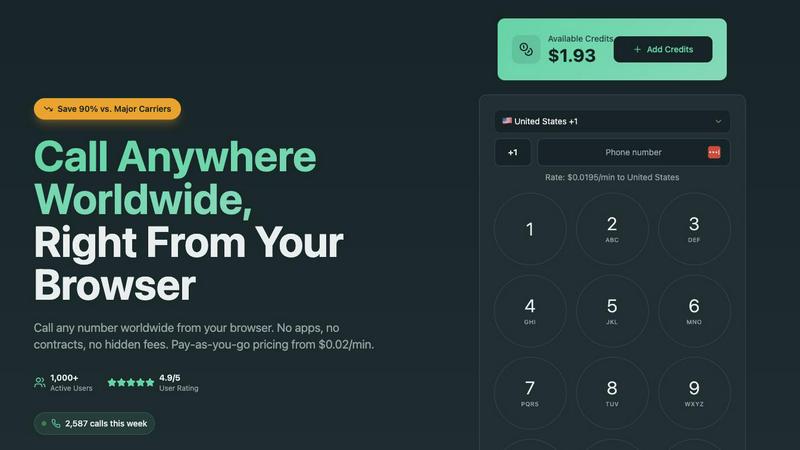
Call any number worldwide from your browser for cheap, no apps or hidden fees.
Last updated: March 1, 2026

Stop chasing payments, Dokta's AI automates your invoices and docs so you can focus on your grind.
Last updated: April 4, 2026
Visual Comparison
Caller
Dokta

Feature Comparison
Caller
Browser-Based, Zero-Install Magic
Ditch the downloads forever. Caller runs directly in your web browser, which means you can start calling from your laptop, desktop, or even your tablet in literal seconds. No more waiting for apps to update or fighting with system permissions. It's as easy as opening a new tab. This also means you're never tied to a single device—your calling power goes wherever your browser does.
Pay-As-You-Go, No-Subscription Freedom
This is the anti-contract. You only pay for the call minutes you actually use, with rates starting from an almost-too-good-to-be-true $0.02/min. There are zero monthly fees, no hidden charges, and no sneaky subscriptions that auto-renew. You simply add credit to your account (any amount you want) and it sits there until you need it, never expiring. Total financial clarity and control.
Global Reach with Crystal Clear HD Voice
Caller isn't playing around with coverage. You get access to over 200 countries worldwide, hitting both landlines and mobile phones. And these aren't scratchy, laggy connections—we're talking enterprise-grade infrastructure pumping out HD voice quality so clear, you'll forget you're on an international call. It's the audio equivalent of switching from standard def to 4K.
Dedicated Phone Numbers On-Demand
Level up your pro game by snagging your own dedicated phone number. Choose from local numbers in places like the US or UK, toll-free lines, or mobile numbers. Use it as your caller ID to look legit, or give it out as your business contact. Numbers start from $1.99/month and activate instantly, no paperwork or waiting period required.
Dokta
AI Document Analysis in <60s
Stop manually typing data like it's 1999. Just drag and drop a photo, scan, or PDF of any invoice, quote, or contract. Dokta's AI engine goes to work, using OCR and smart classification to read the doc, figure out what it is, and extract key info like amounts, due dates, and client details in less than a minute. It's like having a super-fast, hyper-accurate intern who never sleeps.
Automated Invoicing & Smart Quotes
Creating invoices and quotes is a drag. Dokta makes it stupid simple. Generate professional docs in a few clicks. For the freelance devs and consultants, set up day-rate contracts with automatic monthly invoicing so you get paid on autopilot. Plus, send quotes with a slick online acceptance link and convert them to an invoice with one click when the client says yes. Easy money.
Real-Time Cash Flow Dashboard
Forget spreadsheets. Dokta gives you the big picture instantly. See your billed revenue, what's actually been paid, what's still outstanding, and your VAT situation all in one glance. It even shows a sweet 12-month graph so you can track your financial glow-up (or identify a slump before it's a problem). Know your numbers, always.
Anomaly Detection & Client Intel
Dokta's got your back. Its AI doesn't just read; it watches for shady stuff. It'll flag if a client's IBAN suddenly changes, spot duplicate invoices, catch inconsistent VAT, or notice missing numbering. It also auto-enriches client info with SIRET data and even does payment scoring, so you know who pays on time and who's a bit of a headache.
Use Cases
Caller
The Globetrotting Freelancer or Digital Nomad
You're working from Bali but your biggest client is in Toronto. Instead of racking up insane roaming charges or relying on flaky cafe Wi-Fi for a VoIP app, you just hop on UseCaller in your browser. You get a professional connection to discuss the project, pay pennies on the dollar for the call, and keep your business moving smoothly without any geographic headaches.
Remote and Hybrid Team Coordination
Your team is scattered across four different time zones. Daily stand-ups or quick sync calls become a financial nightmare with traditional services. With Caller, everyone can jump on a call directly from their browser during work hours. It's a unified, cost-effective tool that eliminates the "which app are we using today?" chaos and keeps the focus on collaboration.
The International Family & Friends Lifeline
Keeping in touch with loved ones abroad shouldn't cost a fortune. Whether it's a weekly catch-up with parents in another country or checking in on a friend studying overseas, Caller makes it affordable and stupidly simple. No need for your relatives to download a special app—you call their regular phone number directly, with HD quality that makes it feel like they're right next door.
Conquering Overseas Customer Service & Business
We've all been there: you need to call a bank, an airline, or a government office in another country, and the prospect of the phone bill gives you chills. Caller is your secret weapon. Get through to international helplines, confirm bookings, or handle overseas business inquiries without the fear of a shocking monthly statement. It turns a stressful cost center into a manageable, pay-per-minute task.
Dokta
The Freelance Developer / Consultant
You're crushing code or strategy, not admin. Set up a recurring day-rate contract in Dokta, and it automatically generates and sends your invoices every month. It tracks payments and sends polite, pro reminders for you. You get to focus on deep work while Dokta handles the billing paperwork, ensuring you actually get paid for all those hours.
The Creative Freelancer (Designer, Photographer)
Your workflow from pitch to payment is messy. Dokta cleans it up. Send a visually appealing quote via a link, get client acceptance online, and with one click, turn that accepted quote into a finalized invoice. Manage project-based billing seamlessly, track which clients have paid for your latest masterpiece, and automate follow-ups without the awkwardness.
The Auto-Entrepreneur / Micro-Business
You need simple, compliant tools without the fuss. Dokta creates URSSAF-friendly invoices, tracks your income against the micro-entrepreneur ceiling so you don't stress at declaration time, and sends you alerts for upcoming tax deadlines. It’s the straightforward, no-headache system to keep your solo venture organized and above board.
The Growing Small Business
As your team or client list grows, the document chaos multiplies. Dokta becomes your central command. Dump all incoming bills and outgoing invoices into it. Get a crystal-clear, real-time view of company cash flow, automate payment reminders to improve collection, and have a secure, searchable database for every client and supplier interaction.
Overview
About Caller
Alright, let's get this straight. Caller from UseCaller is what happens when your dusty old phone concept gets a full digital glow-up and decides to live its best life inside your browser. It's the ultimate side-step around all the traditional calling nonsense. We're talking no SIM card scavenger hunts, zero app downloads clogging up your precious storage, and absolutely no need to become a certified VoIP engineer just to make a call. The whole vibe is pure simplicity: you, your favorite browser (Chrome, Safari, Firefox—we don't judge), and a phone number anywhere on the map. Click. Boom. Connected. The value proposition is absolutely cracked—you can make international calls for up to 90% less than those legacy telecom giants try to charge you. It's built for literally anyone with Wi-Fi: the digital nomad calling a client in Berlin, the remote team doing a sync-up across time zones, the traveler checking in with family back home without that bill-induced panic attack, or just someone who needs to finally call that overseas customer service line. You pay only for the minutes you actually talk, with crystal-clear HD audio that makes it feel like they're in the next room. This isn't your grandpa's phone service; it's calling, fully optimized for the digital-first, no-BS world we actually live in.
About Dokta
Alright, solo hustlers and small biz squads, listen up. Tired of your Sunday nights being devoured by invoice drama and chasing down payments? Meet Dokta, your new AI-powered sidekick that's basically a brain transplant for your document chaos. This ain't your grandpa's filing cabinet. Dokta is a slick, AI-driven platform built for the grinders: freelancers, solo-preneurs, auto-entrepreneurs, and SMBs who'd rather be doing the work than managing the paperwork. Here's the vibe: you drag and drop any document - invoice, quote, contract, a napkin sketch, whatever - and Dokta's AI (powered by Claude from Anthropic, no less) reads, classifies, and pulls out all the crucial deets in under 60 seconds. Boom. It then takes that intel and automates your entire document lifecycle. Create pro invoices and quotes, track payments, send automated "hey, remember me?" reminders for late invoices, manage contracts and deadlines, and even spins up tasks from your docs. It builds your client database automatically, gives you a real-time cash flow dashboard so you know exactly how you're eating, and exports everything to CSV for your accountant. With a free tier (15 docs/month, no card needed) and plans from €9, it's a no-brainer. Your docs, managed by AI, so you can get back to the stuff that actually makes you money.
Frequently Asked Questions
Caller FAQ
Do I really not need to download anything?
Nope, not a single thing! Caller is 100% browser-based. As long as you have a modern web browser (like Chrome, Safari, or Firefox) and an internet connection, you're good to go. Just head to the website, sign in, and start calling. It's that easy. No software to install, no updates to manage.
How does the pricing actually work? Are there hidden fees?
It's super straightforward, we promise. You pay only for the calls you complete. First, you add funds (as little or as much as you want) to your account balance. Then, when you make a call, the cost per minute is deducted from that balance. Rates start at $0.02/min and are clearly listed. There are NO monthly subscriptions, NO minimum fees, and NO hidden charges. You only pay for talk time.
Can I get my own phone number for caller ID?
Absolutely! You can rent a dedicated phone number from UseCaller (starting from $1.99/month) and use it as your outbound caller ID. This is perfect for freelancers or small businesses who want to display a professional local number when calling clients internationally, instead of a random or blocked ID.
What if I don't use all my account credit?
Your credit just chills in your account until you need it. It never expires. So you can top up $20 and use it over weeks or months—whatever works for you. There's no "use it or lose it" policy here. You're in complete control of your balance and your spending.
Dokta FAQ
How fast is the AI analysis really?
It's legit fast. We're talking under 60 seconds from the moment you drop a document until Dokta's AI has read it, figured out if it's an invoice or a contract, and pulled out all the key details like the total amount, due date, and who it's from. It uses Claude AI and advanced OCR to make it happen at lightning speed.
Is my data secure with Dokta?
Absolutely. They take this super seriously. Your data is 100% GDPR compliant and is hosted on servers in Europe (AWS Paris). Everything is encrypted with AES-256, which is bank-level security. Your documents and client info aren't being sold or used to train random AI models; they're kept safe and sound.
What's the deal with the free plan?
The free "Découverte" plan is a great way to kick the tires. You get 15 document analyses per month (docs up to 5 pages), access to the free invoice generator, and an unlimited client database. No credit card required to start. It's perfect for testing if Dokta fits your workflow before committing to a paid plan.
Can Dokta handle documents in different languages?
While the primary focus from the provided info is on the French market (SIRET enrichment, URSSAF), the AI's ability to read and extract data isn't limited to one language. It can analyze documents in various languages, but for specific regional features like tax form automation, it's optimized for the systems it mentions (like French auto-entrepreneur rules).
Alternatives
Caller Alternatives
Alright, so you've heard about Caller, the slick browser-based move that lets you call any number worldwide from a simple web tab. It's basically the ultimate productivity hack for killing international phone bills without the app clutter. It lives in that sweet spot of tools that just make digital life smoother. People hunt for alternatives for all the usual reasons. Maybe they need a specific feature Caller doesn't have, or they're on a super tight budget and are hunting for a free tier. Sometimes it's about platform—needing a dedicated mobile app or deeper integration with other work software. It's all about finding the right tool for your specific vibe. When you're scrolling through options, keep your eyes on the prize. Think about what matters most to you: Is it crystal-clear call quality, the absolute cheapest per-minute rate, having a permanent number, or maybe needing to receive calls too? Don't just chase the shiniest logo; make sure the features actually match your real-life calling habits.
Dokta Alternatives
So you're vibing with the whole "AI does my boring paperwork" thing but wondering what else is out there? You're not alone. Dokta is a total game-changer for freelancers and small crews, an AI doc wrangler that automates your invoices, quotes, and contracts so you can stop drowning in PDFs. It's like having a robot intern who actually knows what they're doing. People hunt for alternatives for all sorts of reasons. Maybe the pricing feels a bit steep for your current hustle, or you need a feature that's just not in the deck yet. Sometimes it's about platform loyalty—you live and breathe in a specific ecosystem and need everything to plug right in. Or perhaps you've just outgrown the starter plan and need more firepower. When you're scrolling through the options, keep your non-negotiables front of mind. Think about your budget, the specific document types you battle with daily, and how much automation magic you really need. Don't sleep on data security and where your info is stored, especially if you're dealing with client deets. It's all about finding the right tool that fits your workflow, not the other way around.