
Caller vs WA Reminders
Side-by-side comparison to help you choose the right AI tool.

Call any number worldwide from your browser for cheap, no apps or hidden fees.
Last updated: March 1, 2026

WA Reminders
Stop forgetting to text and automate your WhatsApp messages to send themselves, saving you major time and hassle.
Last updated: April 4, 2026
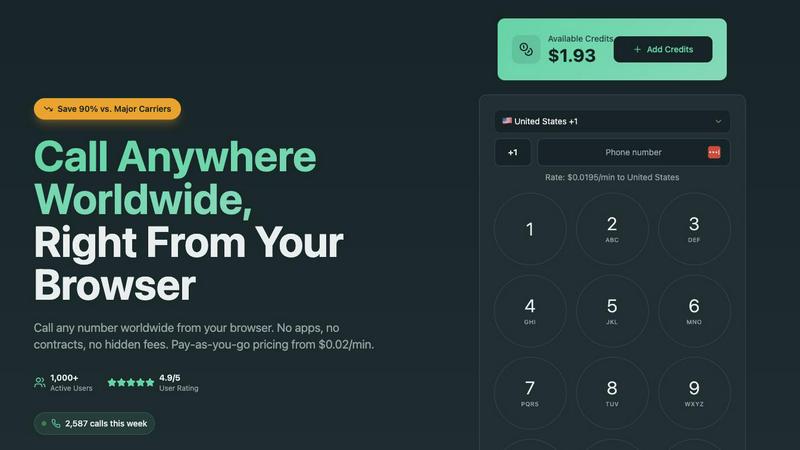
Visual Comparison
Caller
WA Reminders

Feature Comparison
Caller
Browser-Based, Zero-Install Magic
Ditch the downloads forever. Caller runs directly in your web browser, which means you can start calling from your laptop, desktop, or even your tablet in literal seconds. No more waiting for apps to update or fighting with system permissions. It's as easy as opening a new tab. This also means you're never tied to a single device—your calling power goes wherever your browser does.
Pay-As-You-Go, No-Subscription Freedom
This is the anti-contract. You only pay for the call minutes you actually use, with rates starting from an almost-too-good-to-be-true $0.02/min. There are zero monthly fees, no hidden charges, and no sneaky subscriptions that auto-renew. You simply add credit to your account (any amount you want) and it sits there until you need it, never expiring. Total financial clarity and control.
Global Reach with Crystal Clear HD Voice
Caller isn't playing around with coverage. You get access to over 200 countries worldwide, hitting both landlines and mobile phones. And these aren't scratchy, laggy connections—we're talking enterprise-grade infrastructure pumping out HD voice quality so clear, you'll forget you're on an international call. It's the audio equivalent of switching from standard def to 4K.
Dedicated Phone Numbers On-Demand
Level up your pro game by snagging your own dedicated phone number. Choose from local numbers in places like the US or UK, toll-free lines, or mobile numbers. Use it as your caller ID to look legit, or give it out as your business contact. Numbers start from $1.99/month and activate instantly, no paperwork or waiting period required.
WA Reminders
QR Code WhatsApp Linking
Linking your account is stupid easy. Just scan a QR code with your phone, just like you do for WhatsApp Web. No complicated passwords or logins. In seconds, your account is hooked up and ready to start scheduling. It's the smoothest onboarding process, so you can get to the good stuff (like actually getting paid) faster.
Schedule Directly from Google Calendar
This feature is a total game-changer for the calendar-obsessed. You live in Google Calendar? Cool, stay there. Just add an internationally formatted phone number to any event's title or description, and WA Reminders will automatically schedule a reminder from that event. It's like giving your calendar superpowers to text for you.
Full Contact List Auto-Sync
Stop manually typing in numbers, you're not a robot. When you schedule from the WA Reminders app, it automatically pulls in your full contact list from your phone. This means you can select clients in a tap, avoiding typos and saving you from that "wait, what's their number again?" panic. It's seamless integration.
Recurring Message Scheduling
Got weekly appointments or monthly payment reminders? Set it and forget it. WA Reminders lets you schedule recurring messages for WhatsApp, both from its own app and via recurring Google Calendar events. This is a massive time-saver, automating your most repetitive nudges so your team doesn't have to manually remember every single week.
Use Cases
Caller
The Globetrotting Freelancer or Digital Nomad
You're working from Bali but your biggest client is in Toronto. Instead of racking up insane roaming charges or relying on flaky cafe Wi-Fi for a VoIP app, you just hop on UseCaller in your browser. You get a professional connection to discuss the project, pay pennies on the dollar for the call, and keep your business moving smoothly without any geographic headaches.
Remote and Hybrid Team Coordination
Your team is scattered across four different time zones. Daily stand-ups or quick sync calls become a financial nightmare with traditional services. With Caller, everyone can jump on a call directly from their browser during work hours. It's a unified, cost-effective tool that eliminates the "which app are we using today?" chaos and keeps the focus on collaboration.
The International Family & Friends Lifeline
Keeping in touch with loved ones abroad shouldn't cost a fortune. Whether it's a weekly catch-up with parents in another country or checking in on a friend studying overseas, Caller makes it affordable and stupidly simple. No need for your relatives to download a special app—you call their regular phone number directly, with HD quality that makes it feel like they're right next door.
Conquering Overseas Customer Service & Business
We've all been there: you need to call a bank, an airline, or a government office in another country, and the prospect of the phone bill gives you chills. Caller is your secret weapon. Get through to international helplines, confirm bookings, or handle overseas business inquiries without the fear of a shocking monthly statement. It turns a stressful cost center into a manageable, pay-per-minute task.
WA Reminders
Reducing Clinic & Therapy No-Shows
For physios, dentists, and therapists, empty slots are a total vibe-killer. Automatically send a WhatsApp reminder 24 hours before an appointment, and another a few hours before. It comes from the clinic's known number, so clients can confirm or reschedule right there. This simple nudge dramatically cuts down on last-minute cancellations and ghosts.
Automating Client Payment Follow-ups
Freelancers and small biz owners, feel the pain of chasing invoices. Schedule polite payment reminder messages to go out a few days after an invoice is sent, and again if it's overdue. Since it's from your personal number, it feels professional but not spammy. Get paid faster without the awkward chase.
Managing Small Shop Appointments
For salons, tattoo parlors, or personal trainers, your day is blocks of time. Sync your booking system (like Calendly) to Google Calendar, and let WA Reminders handle the confirmations and reminders. Clients get a personal touch via WhatsApp, which they're way more likely to see than an email, keeping your schedule packed.
Streamlining Team Reminders for Managers
If you manage a small team of providers or field staff, use WA Reminders to send out shift reminders, meeting times, or important daily task lists via WhatsApp groups or individual messages. It ensures everyone is on the same page, directly on the app they use all day anyway.
Overview
About Caller
Alright, let's get this straight. Caller from UseCaller is what happens when your dusty old phone concept gets a full digital glow-up and decides to live its best life inside your browser. It's the ultimate side-step around all the traditional calling nonsense. We're talking no SIM card scavenger hunts, zero app downloads clogging up your precious storage, and absolutely no need to become a certified VoIP engineer just to make a call. The whole vibe is pure simplicity: you, your favorite browser (Chrome, Safari, Firefox—we don't judge), and a phone number anywhere on the map. Click. Boom. Connected. The value proposition is absolutely cracked—you can make international calls for up to 90% less than those legacy telecom giants try to charge you. It's built for literally anyone with Wi-Fi: the digital nomad calling a client in Berlin, the remote team doing a sync-up across time zones, the traveler checking in with family back home without that bill-induced panic attack, or just someone who needs to finally call that overseas customer service line. You pay only for the minutes you actually talk, with crystal-clear HD audio that makes it feel like they're in the next room. This isn't your grandpa's phone service; it's calling, fully optimized for the digital-first, no-BS world we actually live in.
About WA Reminders
Alright, let's break it down. WA Reminders is basically your new bestie for not getting ghosted by clients. It's a slick app that lets you schedule WhatsApp messages to go out later, like setting a timer for your most important texts. Think of it as your personal time-travel assistant for customer communication. You can set it up from their own app or, get this, straight from your Google Calendar. Just pop a phone number into an event and bam, reminder scheduled. It works with both your regular WhatsApp and WhatsApp Business, so no need to switch up your whole vibe. The magic is that messages go out from YOUR actual phone number, so the convo stays personal and you can jump right back in. This is the ultimate tool for solo hustlers, clinics, therapists, and small shops who run on appointments and are tired of no-shows blowing up their schedule. If your time is money and you're done with people forgetting, this app is your plug.
Frequently Asked Questions
Caller FAQ
Do I really not need to download anything?
Nope, not a single thing! Caller is 100% browser-based. As long as you have a modern web browser (like Chrome, Safari, or Firefox) and an internet connection, you're good to go. Just head to the website, sign in, and start calling. It's that easy. No software to install, no updates to manage.
How does the pricing actually work? Are there hidden fees?
It's super straightforward, we promise. You pay only for the calls you complete. First, you add funds (as little or as much as you want) to your account balance. Then, when you make a call, the cost per minute is deducted from that balance. Rates start at $0.02/min and are clearly listed. There are NO monthly subscriptions, NO minimum fees, and NO hidden charges. You only pay for talk time.
Can I get my own phone number for caller ID?
Absolutely! You can rent a dedicated phone number from UseCaller (starting from $1.99/month) and use it as your outbound caller ID. This is perfect for freelancers or small businesses who want to display a professional local number when calling clients internationally, instead of a random or blocked ID.
What if I don't use all my account credit?
Your credit just chills in your account until you need it. It never expires. So you can top up $20 and use it over weeks or months—whatever works for you. There's no "use it or lose it" policy here. You're in complete control of your balance and your spending.
WA Reminders FAQ
Do you offer a free plan?
Nah, we don't have a free plan, but hear us out. Running servers to reliably send your messages on time costs real money. Instead of a janky free tier, we offer a solid 14-day money-back guarantee on all plans. If it's not your thing, just ask for a refund, no drama, no questions. It's a risk-free way to test the whole shebang.
Can I send reminders directly from Google Calendar?
Yes, 100%! This is one of our killer features. Just add a phone number (with the country code, like +1...) to the title or description of any Google Calendar event. Our system will spot it and schedule a WhatsApp reminder based on that event time. You literally never have to leave your calendar workflow.
Do you have a Calendly integration?
For sure! We integrate with Calendly through Google Calendar. Just connect your Calendly to your Google Calendar (which it does easily). Then, when an appointment is booked, it creates a calendar event. WA Reminders will see that event and can send the reminder. It's a perfect, automated duo.
How will my WhatsApp reminder messages look?
The messages come directly from your linked WhatsApp number, so they look exactly like any other message you send personally. There's no "Sent via WA Reminders" label or anything sketchy. It's your name, your profile pic. The client gets it and can reply straight back to you, keeping the conversation natural.
Alternatives
Caller Alternatives
Alright, so you've heard about Caller, the slick browser-based move that lets you call any number worldwide from a simple web tab. It's basically the ultimate productivity hack for killing international phone bills without the app clutter. It lives in that sweet spot of tools that just make digital life smoother. People hunt for alternatives for all the usual reasons. Maybe they need a specific feature Caller doesn't have, or they're on a super tight budget and are hunting for a free tier. Sometimes it's about platform—needing a dedicated mobile app or deeper integration with other work software. It's all about finding the right tool for your specific vibe. When you're scrolling through options, keep your eyes on the prize. Think about what matters most to you: Is it crystal-clear call quality, the absolute cheapest per-minute rate, having a permanent number, or maybe needing to receive calls too? Don't just chase the shiniest logo; make sure the features actually match your real-life calling habits.
WA Reminders Alternatives
So you're all about that WA Reminders life – scheduling your WhatsApp messages so your clients don't ghost you. It's a total game-changer for appointment-based hustles, right? But hey, maybe you're scoping out the scene. Totally get it. Sometimes you need different features, a different price point, or a tool that plays nicer with your other apps. The search for the perfect sidekick is real. When you're on the hunt for something new, you gotta know what's non-negotiable for your grind. Think about your budget, obviously. But also, how automated do you need things to be? Does it need to live inside your calendar, or are you cool with a separate app? And crucially, how many "are we still on for today?" messages do you need to fire off without losing your mind? Getting clear on that stuff is key. It's a whole ecosystem of productivity tools out there, from simple schedulers to full-blown CRM beasts. Your mission, should you choose to accept it, is to find the one that fits your workflow like a glove—without overcomplicating things or breaking the bank. Let's be real, you just want fewer no-shows and more hours back in your day.