
Code Word Solver - Missing Words Finder vs PseudoRun
Side-by-side comparison to help you choose the right AI tool.

Code Word Solver - Missing Words Finder
Unlock your codeword puzzles with our easy-to-use solver—just enter what you know and let the magic happen!.
Last updated: February 28, 2026

PseudoRun
Your free, no-ads sidekick for mastering IGCSE pseudocode with instant feedback.
Last updated: March 1, 2026
Visual Comparison
Code Word Solver - Missing Words Finder

PseudoRun
Feature Comparison
Code Word Solver - Missing Words Finder
Single Pattern Solving
This feature allows you to input one word pattern and get a list of matching word candidates. It’s perfect for when you have a partial clue and want to see all the possible words that fit the bill. Just plug in your known letters and let the solver do the heavy lifting for you. No more guesswork—just straight-up answers!
Multi-Pattern Solving
Ever found yourself stuck with two interlinked words? This feature lets you enter two patterns at the same time, helping you solve those tricky side-by-side relationships. It’s super helpful when the same letter-number pairings are scattered across different words, making sure your logic stays consistent throughout the puzzle.
Flexible Input for Patterns
The tool simplifies the pattern input process with a clever use of symbols. You can use dots (.) or question marks (?) for letters you haven’t figured out yet. Plus, you can input numbers for repeated unknown letters, ensuring that the solver maintains the integrity of letter patterns. For example, entering 112.2 can yield words like “llama,” making it easier to narrow down your options.
Customizable Difficulty Dictionaries
Not all puzzles are created equal, and neither are the players tackling them. Choose from three different dictionary sizes tailored to your skill level: Hard (260k words), Normal (115k words), or Easy (20k words). This ensures that you’re always working with a word list that matches your challenge level, making the puzzling experience more enjoyable.
PseudoRun
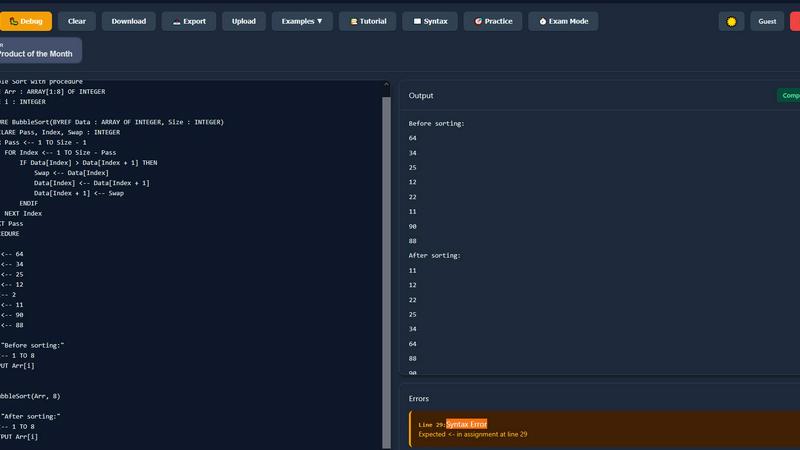
IGCSE Exam-Focused Editor
This isn't some generic coding playground. The editor speaks pure Cambridge IGCSE pseudocode fluently. It's 100% aligned with the official exam specs, so you're practicing the exact syntax and structures the examiners want to see. No more guessing if you're writing it "right." It's like having the exam board's answer key built into your practice, ensuring every line of code you write is building legit exam muscle memory.
Real-Time Validation & Error Checking
Say goodbye to staring at your code for hours wondering why it's broken. PseudoRun's got your back with instant, on-the-fly syntax checking. The moment you typo a keyword or mess up a structure, it gently (or not-so-gently) points it out. It's like having that super-smart friend looking over your shoulder, catching mistakes before they become bad habits, so you can write perfect, exam-ready pseudocode faster.
Step-by-Step Debugger Wizard
This feature is an absolute game-changer for understanding the flow of your algorithms. Hit play and watch your code execute line-by-line in slow motion. You can track how every single variable changes its value, see which path an IF statement takes, and follow loops as they iterate. It turns abstract logic into a visual story, making complex concepts like trace tables and algorithm tracing feel intuitive instead of intimidating.
Free Cloud Storage & IGCSE Practice Bank
Never lose your work again! Save unlimited pseudocode programs directly to the cloud and pull them up on any device, anywhere. Plus, get instant access to a massive vault of 50+ IGCSE-style practice problems and examples. Stuck on arrays? There's a module for that. Struggling with procedures? We've got you. It's your entire revision library, pre-loaded and ready to grind.
Use Cases
Code Word Solver - Missing Words Finder
Quick Puzzle Assistance
When you’re knee-deep in a codeword puzzle and just can’t seem to crack a word, use the single pattern solving feature to quickly find potential matches. It’s like having a helpful buddy who knows all the answers, giving you the boost you need to keep going.
Solving Complex Interlinked Puzzles
For those challenging puzzles where words are intertwined, the multi-pattern solving feature is your go-to. Enter the patterns of two related words, and watch as the tool helps you uncover the connections, making the whole puzzle feel less daunting.
Enhancing Your Puzzle Skills
If you’re looking to up your game, using the Code Word Solver can help you learn common letter pairings and word structures. By analyzing the suggested words, you’ll start to see patterns and improve your own puzzle-solving skills over time.
Contributing to the Community
Got a word that’s not in the database? Use the community-powered feature to submit new words or definitions. Not only does this help enhance the tool’s coverage, but you also become part of a growing community of puzzle enthusiasts contributing to a shared resource.
PseudoRun
Last-Minute IGCSE Exam Cram
The exam is tomorrow, and panic is setting in. Instead of re-reading notes for the 100th time, fire up PseudoRun. Use the Exam Mode Timer to simulate real pressure, run through the practice problems, and use the step-by-step debugger to cement your understanding of tricky algorithms. It's the most effective, high-intensity cram session you can get, turning anxiety into actionable practice.
Building Algorithm Intuition from Scratch
If terms like "bubble sort" sound like a dishwasher setting, start here. PseudoRun lets you experiment fearlessly. Write a simple loop, run it, break it, and see what happens. The real-time feedback prevents frustration, and the visual debugger shows you the "why" behind the code. It's the perfect, low-stakes environment to build that foundational logic brain.
Teachers Creating Interactive Lessons
Educators, stop spending hours creating static pseudocode examples! Use PseudoRun in class to demonstrate algorithms live. Show the step-by-step execution on a projector, let students predict the next variable state, or assign specific practice modules. It transforms passive learning into an engaging, interactive experience that students actually remember.
Perfecting Pseudocode Syntax for Top Marks
You understand the logic, but are you losing marks on formatting? PseudoRun's exam-focused editor is your precision tool. Practice writing procedures, functions, and input/output statements with the exact syntax the mark scheme requires. The validation ensures every OUTPUT and ENDIF is in the right place, securing those easy, often-dropped syntax marks.
Overview
About Code Word Solver - Missing Words Finder
If you’re diving deep into the world of codeword puzzles and hitting a wall, the Code Word Solver - Missing Words Finder is here to be your ultimate sidekick. This nifty tool is your secret weapon for cracking those tricky code-cracker puzzles without the guesswork that usually leaves you scratching your head. By leveraging the patterns you’ve already deciphered, this solver helps you pinpoint potential answers with laser-like precision, making your puzzle-solving experience smoother and way more fun. Whether you’re a casual player looking to enhance your skills or a hardcore codeword enthusiast, this tool has got you covered. It’s designed for anyone who loves word puzzles and wants to decode them faster and more efficiently. With its community-driven approach, you can also contribute to expanding its word database, so it's not just a tool; it's a growing resource for puzzle lovers everywhere.
About PseudoRun
Alright, listen up, future coding legends! PseudoRun isn't just another boring study tool; it's your ultimate cheat code for conquering IGCSE Computer Science. Think of it as the ultimate training simulator where you can level up your pseudocode skills without the stress of a real programming language's weird syntax. This is the #1 free, no-BS platform built specifically to smash your IGCSE exams. It's the perfect digital playground for students who are tired of getting wrecked by confusing theory and need a hands-on way to practice. Whether you're a total newbie trying to figure out what a "FOR loop" even is, or you're grinding last-minute revision, PseudoRun gives you a clean, ad-free zone to write, test, and debug IGCSE-specific pseudocode. It bridges the gap between scribbling notes and actually understanding how algorithms run. With real-time feedback and a step-by-step debugger, you can see exactly where your logic goes sideways, turning "aha?" moments into "AHA!" moments. No login walls, no sneaky premium paywalls, just pure, focused practice to make you exam-ready. It's basically your personal IGCSE pseudocode sensei, available 24/7.
Frequently Asked Questions
Code Word Solver - Missing Words Finder FAQ
How does the pattern input work?
You can enter known letters along with dots (.) or question marks (?) for letters you don’t know. Additionally, use numbers to indicate repeated unknown letters, ensuring the solver keeps those consistent.
Can I solve multiple words at the same time?
Absolutely! The multi-pattern solving feature allows you to input two patterns at once, helping you tackle interconnected words in a single go.
What dictionary sizes can I choose from?
You have three options: Hard (260k words), Normal (115k words), and Easy (20k words). Pick the one that matches your puzzle-solving style!
How can I contribute to the word database?
If you encounter a word that’s missing from the database, you can submit it along with a definition. This helps improve the coverage of the tool, making it even more useful for everyone in the community.
PseudoRun FAQ
Is PseudoRun really completely free?
YES, and we mean actually free. No hidden tiers, no "premium features," and absolutely ZERO ads. Forever. We built this because we hated paywalled learning tools as students. Our mission is IGCSE success, not your wallet. All features, from the debugger to cloud saves, are free for everyone.
Do I need to create an account to use it?
Nope! You can hit "Try Now without Login" and start coding immediately. No email, no password, no hassle. If you want to save your programs to access later on different devices, you can create a free account, but it's totally optional to get started. We keep it simple.
How is this different from a normal Python or Java editor?
Great question! Normal code editors are for writing actual programs. PseudoRun is built for one thing only: Cambridge IGCSE Pseudocode. It uses the specific keywords, structures, and conventions from your syllabus that general editors don't recognize. It validates and runs your exam pseudocode, not a programming language.
Can I use it on my phone or tablet?
Totally! PseudoRun works on any device with a web browser. The interface is designed to be clean and usable on smaller screens. So whether you're on a laptop in the library or on your tablet on the bus, you can squeeze in some quick pseudocode practice anytime.
Alternatives
Code Word Solver - Missing Words Finder Alternatives
Code Word Solver - Missing Words Finder is your go-to tool for cracking those tricky codeword puzzles that can leave even the best puzzle enthusiasts scratching their heads. It falls under the category of puzzle-solving aids, designed to help users decode grids by narrowing down possible answers based on the patterns they already have. Many users seek alternatives for reasons like pricing, specific feature sets, or the compatibility of the tool with their preferred devices or platforms. When browsing for alternatives, it's crucial to consider the ease of use, the size of the word database, and the flexibility of solving options to ensure a smooth puzzle-solving experience. --- [{"question": "What is Code Word Solver - Missing Words Finder?", "answer": "Code Word Solver - Missing Words Finder is an online tool designed to help users solve codeword puzzles by narrowing down possible answers based on known patterns."}, {"question": "Who is Code Word Solver - Missing Words Finder for?", "answer": "This tool is for anyone who enjoys codeword puzzles and wants to solve them more efficiently, from casual players to serious enthusiasts."}, {"question": "Is Code Word Solver - Missing Words Finder free?", "answer": "Yes, Code Word Solver - Missing Words Finder is a free tool that users can access to enhance their puzzle-solving skills."}, {"question": "What are the main features of Code Word Solver - Missing Words Finder?", "answer": "The main features include single and multi-pattern solving, customizable difficulty dictionaries, and community-powered word coverage."}]
PseudoRun Alternatives
Yo, so you've found PseudoRun, the ultimate free gym for your IGCSE pseudocode skills. It's that interactive, real-time platform that makes learning to code feel like a game, not a chore, perfect for students and teachers in the education scene. But hey, maybe you're looking for something else. Maybe you need a tool that runs on a different device, or you're hunting for extra features beyond IGCSE, or maybe you just wanna see what else is out there. Totally valid! The search for the perfect coding sidekick is real. When you're checking out other options, keep your eyes peeled for a few key things. Does it vibe with your exam board's style? Can it give you instant feedback when you mess up? Look for a clean, easy-to-use interface that won't make your brain hurt. And, of course, check if it fits your budget—because free is always a major flex.