
Collab Chain vs Mp3ToMidi
Side-by-side comparison to help you choose the right AI tool.

Collab Chain turns your royalty statements into unbreakable receipts for splits and credits.
Last updated: February 28, 2026

Mp3ToMidi
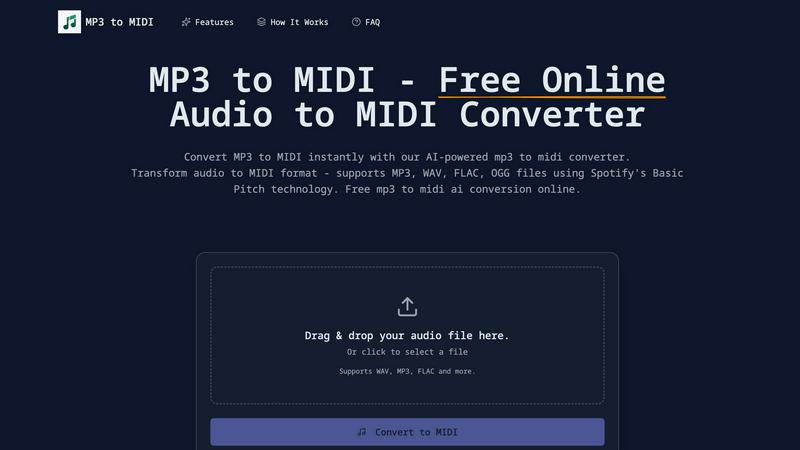
Transform your MP3s, WAVs, and more into MIDI magic for free with our AI-powered converter—easy and instant!.
Last updated: March 4, 2026
Visual Comparison
Collab Chain

Mp3ToMidi
Feature Comparison
Collab Chain
Official Statement Snapshotting
We don't mess with your original data. You upload your official PDF or CSV statements from platforms like DistroKid or SoundExchange, and Collab Chain preserves that file forever. It then creates a deterministic snapshot—a verifiable, tamper-evident digital fingerprint of that exact moment. This means the proof can be verified anytime, by anyone, against that original upload. No guesswork, no "he-said-she-said," just immutable receipts.
Split Confirmation Guardrails
Tired of accidentally forgetting to add your co-writer? Our track-level split status has your back. Each song shows a clear status: Complete, Incomplete, or Not Set. You literally cannot finalize and lock a proof until every single track's splits add up to a clean 100%. It's idiot-proof (in the best way), preventing those "oops, my bad" moments that cost you money and friendships.
Shareable, Read-Only Proof Links
Stop handing out your login deets like candy. Once a proof is locked, you can generate a secure, read-only link. Send it to your manager, your label, your lawyer, or your collaborator's sketchy cousin. They can view the entire verified proof summary without needing an account and without any ability to edit a single thing. It's transparency without the vulnerability.
Supporting Evidence Lockers
Sometimes platforms are stingy and won't let you download a proper statement. No sweat. You can upload screenshots as Supporting Evidence. We clearly label these as "Not an Official Statement" so everyone knows the deal, and we never use them for calculations. They live in a separate section of the proof for extra context, keeping your audit trail legit and organized.
Mp3ToMidi
AI-Powered Technology
This bad boy uses Spotify’s Basic Pitch AI to convert your audio files to MIDI with precision. It detects notes, rhythms, and instruments with killer accuracy, ensuring you get the best results for your music projects.
Multi-Format Audio Support
No need to stress about file formats. Mp3ToMidi supports a variety of audio formats including MP3, WAV, FLAC, and OGG. Upload any of these files and watch the magic happen as they get transformed into MIDI tracks seamlessly.
Instant MIDI Download
After your audio is processed, you can download your MIDI file instantly, no waiting around. This means you can jump right into editing and creating in any DAW like Ableton, FL Studio, or Logic Pro.
Accurate Note Detection
With industry-leading accuracy, Mp3ToMidi captures every note, chord, and melody from your audio recordings. This feature is a game changer for those who want to create professional-grade music without the hassle.
Use Cases
Collab Chain
The Producer Securing Their Points
You just produced a fire beat for an artist. Instead of trusting a verbal agreement that gets fuzzy later, you use Collab Chain. When their distributor statement drops, you get them to upload it, confirm your 5% producer points, and lock the proof. Now you have an unchangeable record to send to your manager, ensuring you get paid what you're owed, every single quarter, no questions asked.
The Band Avoiding Internal Drama
Your band has four members with different writing contributions across an EP. Royalty time is usually a spreadsheet nightmare. With Collab Chain, one member uploads the statement, and you all confirm the pre-agreed splits per song right in the platform. Once locked, everyone gets a shareable link to the same verified truth. No more side conversations or accusations—just one source of financial truth for the whole squad.
The Songwriter Building a Publishing Portfolio
As a songwriter, your credits are your resume and your paycheck. Collab Chain lets you gather every royalty statement that features your work, confirm your writing splits, and lock them into a verifiable portfolio. When it's time to negotiate with a publisher or a new collaborator, you can show proven, historical earnings and credit accuracy, boosting your leverage and professional rep.
The Manager Organizing a Roster's Paperwork
Managing multiple artists means a flood of statements from different sources. Collab Chain becomes your central command hub. You upload each artist's statements, work with them to confirm splits, and lock proofs for every release. This creates an organized, verifiable archive for your entire roster, making accounting, audits, and settling disputes between collaborators smooth and professional.
Mp3ToMidi
Quick Transcription for Musicians
Musicians can use Mp3ToMidi to quickly transcribe their favorite songs into MIDI. This allows them to edit and play around with the notes in their DAW, making music creation faster and more efficient.
Sampling for Producers
Producers can easily extract melodies from audio samples using this tool. Whether you're remixing a track or creating a mashup, Mp3ToMidi simplifies the sampling process, making it essential for any music producer.
Educational Tool for Students
Teachers and students alike can benefit from the converter. Educators can create sheet music from recordings, allowing students to practice songs they love, making music education more engaging and fun.
Composing Original Tracks
Composers can utilize Mp3ToMidi to take their audio ideas and convert them into editable MIDI files. This makes arranging and orchestrating original tracks a breeze, helping bring creative visions to life.
Overview
About Collab Chain
Let's be real, the music industry's financial side is a hot mess. You're drowning in PDFs from a zillion different apps, having "we'll sort the splits later" chats that never happen, and constantly side-eyeing your royalty statements wondering if the math is mathing. Collab Chain is here to cut through the chaos. Think of it as the ultimate credit locker and truth serum for your career. This isn't another distributor trying to skim your cash or some sketchy tool guessing your streams. Nah, it's built for one thing: turning your messy royalty paperwork from Spotify, Apple Music, DistroKid, or your PRO into clean, unchangeable, verifiable proof of who owns what. For artists, producers, songwriters, and their teams, it's about replacing sketchy handshake deals with rock-solid, shareable trust files. You upload your official statements, confirm the splits with your crew, and lock it all down into a single source of truth. No more disputes, no more foggy memories from that 3 AM studio session—just crystal-clear, defensible records that make audits, negotiations, and actually getting paid correctly way less of a headache. Your data stays yours; we just help you prove it.
About Mp3ToMidi
Mp3ToMidi is your new best friend in the music production game, offering a totally free, online, AI-powered tool that converts your audio files into editable MIDI tracks in a snap. Whether you're rocking MP3, WAV, FLAC, or OGG formats, this platform harnesses the cutting-edge AI technology from Spotify's Basic Pitch to meticulously analyze melodies, harmonies, and rhythms, transforming them into high-quality MIDI files in mere seconds. Say goodbye to the tedious task of manual transcription! This tool is a must-have for music producers, composers, educators, and anyone who loves to jam. No software installation is needed; just upload your audio file, let the AI work its magic, and download your MIDI file ready to be edited in any Digital Audio Workstation (DAW). Fast, intuitive, and completely free — Mp3ToMidi is your gateway to unleashing creative possibilities in your music projects.
Frequently Asked Questions
Collab Chain FAQ
Does Collab Chain pull my live streaming data or send payments?
Absolutely not. We are not a distributor, a payment processor, or a data scraper. Collab Chain works entirely off the official statements you choose to upload. We don't connect to your streaming accounts to pull live data. We take the paperwork you already get, help you structure it, and turn it into a verifiable proof. You handle payments through your normal channels; we just make sure everyone agrees on the numbers.
What if a platform doesn't let me download a statement?
We got you. While official exports (PDF/CSV) are the gold standard for creating the most robust proof, some platforms are annoying. For those, you can upload screenshots as "Supporting Evidence." These are clearly labeled as not being official statements and are never used for calculations. They sit alongside your official docs to provide extra context, keeping your paper trail as complete as possible.
Can someone alter a proof after I share the link?
Nope, that's the whole magic. Once a proof is "finalized and locked," it's set in digital stone. The system runs server-side validation to check everything, then creates a tamper-evident record. The shareable link you send out is strictly read-only. Recipients can view the verified snapshot but cannot edit, alter, or delete any part of it. The original uploaded files are also preserved forever.
What happens if I make a mistake while setting up splits?
No stress, you can't accidentally lock it in wrong. The platform won't let you finalize a proof until every track's splits are confirmed and add up to 100%. You can edit and adjust all you want during the setup process. Only when everything is complete can you hit the finalize button. And if something goes wrong during that final step, a transactional rollback ensures no partial or messed-up records are saved.
Mp3ToMidi FAQ
How does the Mp3ToMidi converter work?
Mp3ToMidi uses advanced AI technology from Spotify's Basic Pitch to analyze your audio files. It detects notes, rhythms, and instruments, converting them into MIDI files with high accuracy.
What audio formats does Mp3ToMidi support?
You can upload MP3, WAV, FLAC, and OGG files for conversion. This multi-format support ensures that you can work with the audio files you already have.
Is Mp3ToMidi really free to use?
Yes! Mp3ToMidi is completely free. You can convert audio files to MIDI without any hidden fees or watermarks. Enjoy unlimited conversions without breaking the bank!
Can I use my converted MIDI files in any DAW?
Absolutely! The MIDI files you download from Mp3ToMidi are compatible with all major DAWs, including Ableton Live, FL Studio, Logic Pro, GarageBand, and more, making your workflow super smooth!
Alternatives
Collab Chain Alternatives
Alright, so you've heard about Collab Chain. It's basically the digital bouncer for your music splits, a productivity tool that takes your messy royalty statements and turns them into unbreakable, verifiable proof so everyone gets paid right. It's for anyone tired of the "trust me, bro" method of music biz accounting. People peek at alternatives for all the usual reasons. Maybe the price tag doesn't vibe with your current budget, or you need something that plays nicer with a specific platform you're locked into. Sometimes a team just needs a different set of features or a simpler workflow. When you're shopping around, don't just look at the sticker price. Dig into what "proof" actually means for them—can you verify it later, or is it just their word? Check how they handle your sensitive data and if they make split errors literally impossible to lock in. Your goal is to find the tool that kills the royalty drama for good, whatever that looks like for your crew.
Mp3ToMidi Alternatives
Mp3ToMidi is a slick online tool that converts your audio files into MIDI tracks, making it a go-to for music producers, composers, and anyone looking to dive into the world of music transcription. It’s all about taking those MP3, WAV, FLAC, or OGG files and letting AI work its magic to create editable MIDI files in a snap. But hey, sometimes what you need might not fit the bill perfectly, which is why peeps often look for alternatives. When searching for another option, you want to consider things like pricing—hey, free is always cool, but what about features? Maybe you need a specific platform compatibility, or you want more advanced editing tools. So, keep an eye out for user-friendliness, the quality of the conversions, and any extra features that could level up your music game.