
Coloring Book Engine vs Image3D AI
Side-by-side comparison to help you choose the right AI tool.

Coloring Book Engine
Easily whip up gorgeous coloring books with Coloring Book Engine's all-in-one toolkit for creators, no stress attached!.
Last updated: February 28, 2026

Image3D AI
Turn any flat pic into a sick 3D model for printing or games in seconds, no skills needed.
Last updated: March 1, 2026
Visual Comparison
Coloring Book Engine

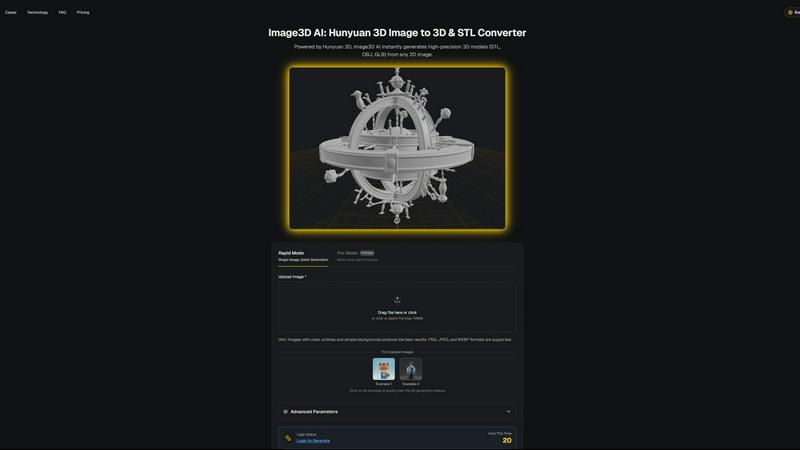
Image3D AI
Feature Comparison
Coloring Book Engine
No Subscription, Just Freedom
With CBE, you can use your own API keys or local GPU, letting you create without the pressure of monthly fees. This pay-as-you-go model enables you to maintain full control over your projects and costs while still enjoying all the features.
Batch Workflow Magic
Gone are the days of juggling multiple tools. CBE's optimized batch workflow lets you generate pages, organize projects, and scale your ideas into a full series, all within one user-friendly workspace. It’s like having your own production line for coloring books!
KDP-Ready Publishing
Worried about technical specs? CBE handles all the nuances of KDP (Kindle Direct Publishing) for you. This means you can upload your files confidently, knowing that they meet all the necessary requirements for print, without second-guessing your work.
Turn Pages into Engaging Videos
Create exciting short clips from your book files, perfect for social media platforms. CBE makes it easy to produce professional-looking videos that showcase your coloring pages, helping you engage with your audience and promote your work effectively.
Image3D AI
Blazing-Fast AI Generation
This isn't your grandma's slow 3D software. We're talking "upload, click, and have a coffee" speed. Powered by Hunyuan 3D, the AI crunches your image and delivers a detailed 3D model in about 60 seconds. It's so fast it feels like magic, turning what used to be a days-long process into a quick pit stop in your creative workflow.
Multiple Output Formats (STL, OBJ, GLB)
Your model is useless if it doesn't fit your toolkit. That's why Image3D AI lets you download your creation in all the major file formats. Need an STL for your 3D printer? Got it. Want an OBJ to tweak in Blender or Maya? Done. Gotta have a GLB for a web AR showcase? Easy. It's the ultimate compatibility flex.
Smart Generation Modes (Rapid & Pro)
Not all 3D needs are the same, so we built different modes. Rapid Mode is for when you just need a decent 3D model from a single image, fast. Pro Mode is for the connoisseurs—feed it multiple views of an object for a hyper-accurate, high-precision reconstruction. Choose your own adventure based on your project's vibe.
PBR Material Support & Clean Geometry
We don't just give you a lumpy mesh. The AI generates models with proper PBR (Physically Based Rendering) materials, meaning your textures look legit with realistic lighting in game engines. Plus, the geometry is clean and optimized, whether you're aiming for a low-poly game asset or a smooth, print-ready model.
Use Cases
Coloring Book Engine
Solo Artists Creating Unique Books
As a solo artist, you can turn your individual artistic vision into a full-fledged coloring book. CBE helps you streamline the process from sketching to publishing, making it easier to focus on your creative flow.
Small Publishers Scaling Up
Small publishers can utilize CBE to expand their catalogs quickly. The batch workflow allows for the easy generation of multiple titles, helping to grow your business without sacrificing quality or efficiency.
Educational Content Creation
Teachers and educators can design fun and educational coloring books tailored for their students. With CBE, you can create specialized projects that engage learners while providing an artistic outlet.
Marketing for Brands
Brands looking to promote their identity can use CBE to create branded coloring books or promotional materials. The ability to produce videos and engaging content allows for dynamic marketing campaigns that resonate with audiences.
Image3D AI
For Game Devs & Digital Artists
Staring at a blank screen in Unity or Unreal? Stop it. Toss your character concept art or prop sketch into Image3D AI and get a game-ready 3D asset with PBR textures in under a minute. It's a total game-changer for prototyping, indie devs on a budget, or anyone needing to rapidly fill a scene with custom models.
For 3D Printing & Makers
Got a cool logo or a figurine idea but zero CAD skills? No problemo. Our image-to-STL converter is a maker's dream. Upload a clear image with a good outline, and bam—you get a watertight, printable 3D file ready for your Ender or Prusa. It turns inspiration into a physical object faster than you can say "bed leveling."
For E-Commerce & Product Showcases
Want to absolutely dunk on your competitors? Transform your basic product photos into interactive 3D models or AR previews. Let customers spin, zoom, and visualize your product in their space before buying. It's the ultimate flex for online stores and a surefire way to boost engagement and slash return rates.
For Architects & Designers
Need to quickly visualize a building sketch or a product design? Skip the tedious manual modeling from scratch. Feed your architectural drawing or design sketch to Image3D AI to generate a volumetric 3D model in moments. It's perfect for early-stage concepts, client presentations, or just exploring forms without the software headache.
Overview
About Coloring Book Engine
Coloring Book Engine (CBE) is the ultimate tool for anyone looking to jump into the coloring book biz without the fuss. This all-in-one powerhouse is ideal for solo artists, small publishers, or creative teams who want to transform their artistic ideas into commercial-grade coloring books. CBE streamlines the entire process from ideation to production-ready line art, so you can focus on your creativity rather than getting bogged down by technical details. With features like GPU-accelerated production, the ability to create reusable assets, and even produce promotional videos for platforms like YouTube Shorts and TikTok, it’s a serious game-changer. Plus, with the Bring Your Own Key (BYOK) integration, you have complete control over your costs and privacy, sidestepping those annoying subscription fees. Ultimately, CBE makes your creative journey smoother and more efficient, allowing you to dive deep into your passion for art without any distractions.
About Image3D AI
Alright, listen up. Image3D AI is basically the "right-click, generate 3D" button the internet has been dreaming of. Forget spending weeks in Blender tutorials or dropping a fat stack of cash on a freelance 3D artist. This tool is your instant cheat code for turning any flat, boring 2D pic into a fully-fledged, production-ready 3D model. Powered by Tencent's absolute beast of an engine, Hunyuan 3D, it takes a single photo (or a few from different angles) and spits out a high-fidelity 3D asset in, like, a minute. No cap. Whether you're a 3D printing nerd who needs a perfect STL file, a game dev scrambling for assets before a crunch-time deadline, or an e-commerce store wanting to flex with slick AR product previews, this is your new digital bestie. It cuts out all the complex, technical garbage and hands you a clean, textured 3D model you can actually use right now. No 3D skills required—just your image and a few minutes. It's the ultimate power-up for creators.
Frequently Asked Questions
Coloring Book Engine FAQ
Is Coloring Book Engine a desktop app or a cloud service?
CBE is primarily a desktop application that allows you to work offline, ensuring that your data stays secure and local rather than relying on cloud services.
What exactly does it speed up for coloring book creators?
CBE speeds up the entire process from ideation to production, allowing creators to focus on sketching and coloring while automating the technical aspects of layout and export.
Is this a subscription?
Nope! CBE operates on a pay-as-you-go model. You only pay for the API usage and can use your own keys, eliminating the need for subscription fees.
Can I use this tool without AI?
Absolutely! CBE offers an optional AI-free workflow, allowing you to bring your hand-crafted art and still benefit from a fully packaged coloring book and assets for your commercial projects.
Image3D AI FAQ
What kind of images work best?
For the cleanest 3D models, you want images with high contrast, clear outlines, and simple backgrounds. Think a logo on white, a product shot on a clean backdrop, or a crisp sketch. Avoid blurry pics, super busy backgrounds, or super dark lighting. The AI needs to see the edges, fam!
What's the difference between Rapid Mode and Pro Mode?
Rapid Mode is your speedy, one-and-done option. One image gets you a solid 3D model fast. Pro Mode is for when you need max accuracy, especially for real-world objects. You upload multiple photos (like front, side, top) and the AI uses them all to build a super precise, physically accurate reconstruction. More views, more pow.
Which file format should I download?
Depends on your vibe! .STL is the GOAT for 3D printing. .OBJ is the classic format that works with almost any 3D software like Blender or Maya. .GLB is the modern king for web stuff, AR, and game engines—it packs the model, textures, and everything into one neat file. Choose your fighter.
Is there a free trial or any free uses?
Heck yes! You can test the whole thing without even logging in. Just hit up the "Try Example Images" section on the site and generate 3D models from our pre-loaded samples for free, no credit cost. It's the perfect way to see the magic happen before you commit.
Alternatives
Coloring Book Engine Alternatives
Coloring Book Engine is an all-in-one design toolkit tailored for creatives looking to dive into the coloring book biz. This powerhouse helps you whip up stunning coloring books with ease, offering everything from planning and sketching to promotional video creation. But let’s be real; not every tool fits every vibe. Users often seek alternatives due to factors like pricing, specific features they need, or platform compatibility that better suits their workflow. When hunting for an alternative, keep an eye out for user-friendly interfaces, robust export options, and any additional features that could save you time and hassle. The right choice should complement your creative process and help you bring your artistic visions to life without breaking the bank.
Image3D AI Alternatives
Alright, so you've heard about Image3D AI, the go-to tool for magically turning your 2D pics into legit 3D models without needing a degree in Blender. It's a total game-changer in the design tools space, letting anyone from 3D printing hobbyists to game devs create assets in seconds. But let's be real, no single tool is the perfect fit for everyone. Maybe the pricing doesn't vibe with your budget, or you need a feature it doesn't have. Perhaps you're looking for something that runs on a different platform or integrates with your specific workflow. It's totally normal to shop around. When you're on the hunt for something similar, keep your eyes peeled for a few key things. Check what file formats you can export, because you don't want to get stuck with a model you can't use. See how smart the AI is at generating textures and materials—you want that pro look, not a basic shape. And of course, weigh up the cost against how often you'll actually use it. Finding the right fit is all about matching the tool's strengths to your specific needs.