
CoPilly vs Linkfinder AI
Side-by-side comparison to help you choose the right AI tool.

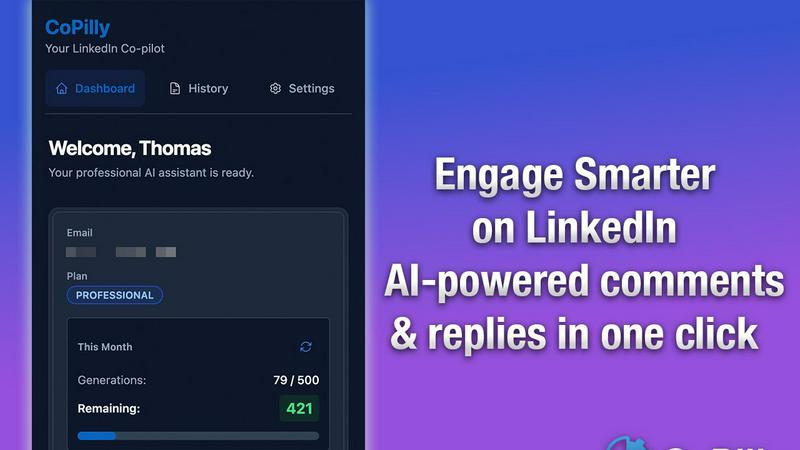
CoPilly is your safe AI sidekick that crafts perfect LinkedIn replies in seconds.
Last updated: February 28, 2026

Linkfinder AI
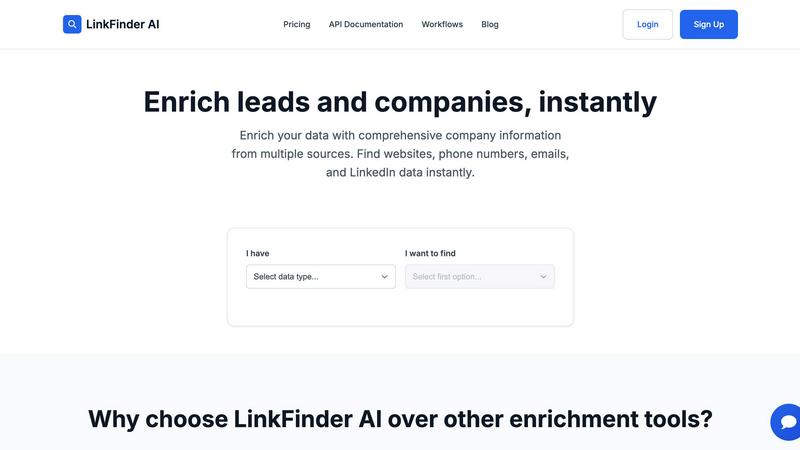
Boost your lead game with Linkfinder AI, instantly scoring complete company info like emails and LinkedIn profiles.
Last updated: February 27, 2026
Visual Comparison
CoPilly
Linkfinder AI
Feature Comparison
CoPilly
All-in-One Engagement Engine
This is your command center for not looking like a ghost on LinkedIn. Stuck on a post? Right-click, generate a fire comment. Got a DM you don't know how to answer? Get reply options in seconds. Need to personalize a connection request? Done. It handles comments, DMs, and invites all in one spot, reading the context so your responses aren't awkward or off-topic. Saves you from that "uhhh..." moment every single time.
Context-Aware & Human AI
Forget the cringey, robotic AI replies that scream "I USED A BOT." CoPilly's AI actually reads the post or message you're looking at and cooks up suggestions that fit the conversation. It can even adapt to your personal style—whether you're all business professional or more chill and casual. It's like having a copywriter in your pocket who gets you and the vibe of the thread.
100% Safe Manual Workflow
This is the flagship feature, the big reason to sleep easy at night. There's ZERO automation. LinkedIn can't detect CoPilly because it doesn't do anything until you tell it to, via a simple right-click context menu. No auto-sending, no auto-posting. It's just a super-powered suggestion tool. You generate, you edit if you want, you copy, you paste. Your hands are on the wheel, so your account stays pristine.
Customizable Personality Tones
One size does NOT fit all on LinkedIn. Talking to a CEO? Flip the switch to "Professional." Networking with a peer in your industry? "Casual" might hit better. CoPilly lets you pick the tone so your generated text matches the situation and your personal brand. It ensures you're always showing up as the best, most appropriate version of yourself.
Linkfinder AI
Multi-Source Data Enrichment
Linkfinder AI doesn't mess around with just one source; it pulls info from LinkedIn, company databases, and public records. This means you get a complete and accurate picture of the company you're eyeing. It's like having a supercharged search engine that does all the heavy lifting for you.
Batch Processing & CSV Upload
Got a massive list of leads? No problem! You can upload thousands of records at once and get enriched data back in mere minutes. This feature is perfect for sales teams and marketing agencies that need to handle large datasets without breaking a sweat.
Real-Time API Integration
Integrate Linkfinder AI into your existing workflows with our powerful API. As leads come in through your forms or CRM, you get instant enrichment, making your entire lead generation process seamless and efficient. No more waiting around—get the data when you need it!
User-Friendly Interface
Say goodbye to complex interfaces that need a PhD to navigate. Linkfinder AI comes with an intuitive design that anyone can use right off the bat! No training or setup is required, so your team can hit the ground running without losing any time.
Use Cases
CoPilly
For Sales Pros & SDRs
You're trying to break the ice and start conversations with potential clients without sounding like a generic sales bot. CoPilly lets you blast through your lead list, generating personalized comment engagements and follow-up DMs in seconds that are actually relevant to what they post. It turns hours of manual research and typing into minutes, helping you book more meetings without the account risk.
For Founders & Content Creators
Building your thought leadership means being everywhere in the comments, adding value. But who has 2 hours a day for that? With CoPilly, you can engage with 10x more posts in your niche with high-quality, insightful comments that boost your visibility. It protects your personal brand from risky tools while making your engagement game strong and consistent.
For Recruiters & Talent Scouts
Sourcing is all about personalization. Sending "I saw your profile" invites is a one-way ticket to being ignored. CoPilly helps you craft unique, compelling connection invites and engaging DMs by referencing a candidate's specific experience or posts, making them way more likely to respond. Do it all at scale without the fear of your recruiting account getting restricted.
For Busy Professionals Networking
You know you should be networking on LinkedIn, but between meetings and actual work, it falls off your plate. CoPilly is your quick-hit solution. Spend 10 minutes a day right-clicking on key posts in your feed to drop smart comments and grow your network authentically. It's the low-effort, high-impact habit for career growth.
Linkfinder AI
Lead Generation for Sales Teams
Sales teams can leverage Linkfinder AI to quickly enrich their leads with accurate company info. This allows them to personalize their outreach strategies, making their pitches more compelling and increasing the chance of closing deals.
Market Research Made Easy
Market analysts can use Linkfinder AI to gather comprehensive data about competitors and industry trends. With easy access to enriched data, they can create better reports and actionable insights that propel their business forward.
Enhanced Outreach Strategies
Marketers can enhance their campaigns by utilizing accurate and up-to-date contact information from Linkfinder AI. This ensures that their email blasts and follow-ups reach the right people, maximizing engagement and conversion rates.
Data Validation and Hygiene
Companies can use Linkfinder AI to validate their existing data and keep their databases clean. By enriching outdated records, businesses can maintain high-quality data, which is crucial for effective decision-making and strategy development.
Overview
About CoPilly
Alright, let's cut through the noise. You wanna level up on LinkedIn but you're low-key terrified of getting your account nuked by some sketchy automation tool. We get it. Enter CoPilly: your new AI wingman for LinkedIn that's all about playing it smart, not risky. This isn't another bot that'll get you banned faster than you can say "ToS violation." CoPilly is a slick Chrome extension that works on a 100% manual trigger workflow—meaning YOU are in the driver's seat. You right-click, it suggests. No behind-the-scenes shenanigans. It's built for the grinders: sales teams hunting for leads, founders building their brand, recruiters sourcing talent, and any pro who's tired of spending hours crafting the perfect comment or DM. Its whole vibe is giving you that 10x speed boost to generate human-like comments, replies, and connection invites that actually sound like you, all while keeping your account safer than a vault. Think of it as the ethical hack to finally dominate LinkedIn without the constant fear of a ban hammer.
About Linkfinder AI
Linkfinder AI is the ultimate tool for anyone looking to boost their data game. Think of it as your personal data assistant that works at lightning speed, gathering all the juicy company and contact info you need to supercharge your outreach efforts. Whether you're part of a sales team, a marketing guru, or a savvy business analyst, this tool is designed to make your life easier. In just minutes, you can enrich your data with accurate information from multiple credible sources like LinkedIn, various databases, and public records. No more manual research wasting your time—Linkfinder AI automates it all. With features like batch processing and real-time API integration, it’s a game-changer for businesses of any size. So if you're ready to level up your lead generation and market research, Linkfinder AI is your go-to solution!
Frequently Asked Questions
CoPilly FAQ
Is CoPilly safe? Will it get my LinkedIn account banned?
Totally safe. This is the core promise. CoPilly uses a manual trigger workflow only—it's a suggestion tool in your browser. You right-click to generate text, then you manually choose to copy and paste it yourself. There is no automation that interacts with LinkedIn's servers for you, which is what gets accounts flagged. It's architecturally impossible for LinkedIn to detect it as a bot.
How fast is it really?
Blazing fast. We're talking under 2 seconds to generate three high-quality, context-aware options for a comment, DM, or connection invite. The slowest part is you deciding which awesome suggestion to use. It turns a 30-minute daily commenting session into a 5-10 minute task.
Can I make the AI sound like me?
Yes, absolutely! While the AI is already smart about context, you can guide its personality. Use the tone selector (Professional, Casual, Friendly) to steer the vibe. You can also easily edit any suggestion before you use it. The goal is to give you a fantastic first draft that you can make perfectly you in seconds.
What's the catch? Is it really free?
You can add the Chrome extension and start using core features for free, which is awesome for trying it out. For unlimited access to all its power (unlimited generations, all tone options, etc.), there are premium plans. No hidden tricks—just a straightforward model to support a tool that saves you hours and protects your account.
Linkfinder AI FAQ
How accurate is the data enrichment?
Linkfinder AI boasts a 95% accuracy rate, ensuring that the data you receive is both comprehensive and validated across multiple sources. You can trust that you're getting reliable info every time!
What types of data can I enrich?
You can enrich various types of data including company names, LinkedIn URLs, lead full names, and much more. The flexibility allows you to tailor your enrichment needs based on your specific goals.
Do you provide API access?
Absolutely! Linkfinder AI offers robust API access, so you can integrate it seamlessly into your existing workflows and get instant data enrichment as leads come in.
Can I process multiple entries at once?
For sure! With batch processing, you can upload thousands of entries in one go. This is perfect for teams working with large datasets and helps save tons of time and effort.
Alternatives
CoPilly Alternatives
So you've heard about CoPilly, the AI sidekick that chills in your Chrome browser and helps you absolutely crush it on LinkedIn. It's basically your hype-man for comments, your ghostwriter for DMs, and your wingman for connection invites, all while keeping your account safe from getting zapped by LinkedIn's rules. It's the go-to tool for anyone trying to level up their marketing and networking game without the sketchy automation. People look for other options for all sorts of reasons. Maybe the price tag doesn't vibe with their budget, or they need something that works on a different browser. Sometimes they're hunting for one specific feature that's a total deal-breaker, or they just wanna shop around and see what else is cookin' in the market. It's totally normal to window-shop. When you're on the hunt, keep your eyes peeled for a few key things. First, make sure it plays nice with LinkedIn's terms—no one wants their account to go poof. Check if it has the specific tools you need, whether that's comment generation, DM help, or something else. And of course, see if the cost makes sense for how much you'll actually use it. Don't just grab the first thing you see.
Linkfinder AI Alternatives
Linkfinder AI is your go-to tool for data enrichment, helping you scoop up all the juicy details about companies, like their emails and LinkedIn profiles, in record time. This bad boy falls under the marketing category, making it super useful for sales teams, marketers, and business analysts looking to level up their lead generation game. But hey, sometimes folks wanna explore other options. Maybe they’re hunting for better pricing, specific features, or compatibility with their existing platforms. When searching for an alternative, keep an eye out for things like user-friendliness, data accuracy, and whether the tool can handle your volume needs. After all, you want something that’ll fit your vibe and amplify your productivity without a hitch.