
Coursebricks vs Playwriter
Side-by-side comparison to help you choose the right AI tool.

Coursebricks
Coursebricks is your all-in-one sidekick for running a training business without the chaos.
Last updated: March 1, 2026

Playwriter
Take full control of your Chrome with Playwriter, the CLI and extension that lets agents browse with all your logins and tools intact.
Last updated: March 18, 2026
Visual Comparison
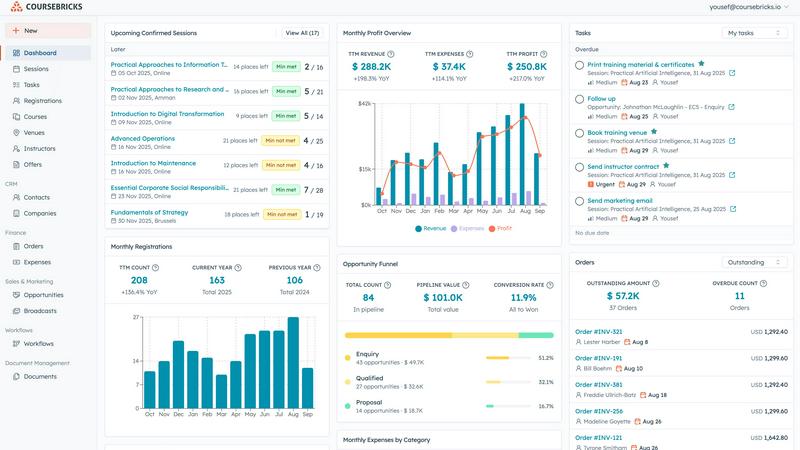
Coursebricks
Playwriter

Feature Comparison
Coursebricks
The All-Seeing Course Scheduler
Ditch the spreadsheet tetris. This is your unified command center for your entire course calendar. Assign instructors, book venues, and attach training materials to each session—all in one spot. It tracks availability and manages conflicts so you're not double-booking your star trainer. Finally, keep your whole team synced without a million Slack pings and calendar invites. It's scheduling, but make it smooth.
Your Built-In, Pro Website & Storefront
Stop paying extra for a clunky website plugin or a separate store. Coursebricks hooks you up with a free, professional website to showcase and sell your courses directly. Accept registrations and payments (cards or invoices) through a sleek checkout, and all that customer info flows right into your CRM. No more copying and pasting from PayPal receipts. It’s your 24/7 salesperson that never sleeps.
Set-It & Forget-It Automations
Automate all the tedious chatter so you don't have to be a robot. Send automated confirmation emails, share pre-course materials, fire off payment reminders, distribute surveys, and deliver certificates the millisecond someone completes a course. You set up the workflow once, and it runs on autopilot, with full tracking so you know what's been sent and who's opened it. Get your time back, one automated email at a time.
Killer Email Marketing & Broadcasts
This isn't your grandma's boring email blast. Use smart filters to send hyper-targeted promotions to the right people. Got a last-minute seat to fill? Ping your local leads. Want to upsell advanced courses? Target your recent graduates. Boost your fill rates and generate more leads with campaigns that actually convert because they're personalized, not spammy.
Playwriter
Real Browser Access
Playwriter lets your agents use your actual browser, meaning they can access all your saved logins, cookies, and extensions. No more fresh Chrome instances or limited tools—just pure functionality right where you need it.
Full Automation API
With Playwriter, you get the full Playwright API through a single execute tool. This means you can run any Playwright code without dealing with wrappers or additional complexities, making it easy to integrate into your workflow.
Collaborative Browsing
Collaboration is a breeze with Playwriter. You can see everything your agent does in real-time, so when it hits a snag, you’re there to jump in and help. It's like tag-teaming a project, where the agent handles the boring stuff and you tackle the tricky bits.
Debugger and Live Editing
Playwriter comes with an integrated debugger that allows you to set breakpoints and edit code on the fly. This means you can tweak your scripts in real time, making it easier to troubleshoot and improve your automation efforts.
Use Cases
Coursebricks
The Solo Coach Going from Hustle to Scale
You're killing it as a solo coach, but your "system" is a mess of Calendly links, Stripe invoices, and manual Gmail threads. Coursebricks becomes your entire back office. It handles bookings from your website, takes payments, sends automatic confirmations and reminders, and even delivers certificates. You look mega-professional while freeing up hours each week to actually coach, not admin.
The Boutique Training Firm Getting Organized
Your small team is growing, but you're still managing clients in a spreadsheet and venues over text. Coursebricks centralizes everything. Schedule all your courses, manage instructor and venue availability, track leads in the CRM, and run targeted email campaigns to fill seats. Everyone's on the same page, operations are smooth, and you can finally scale without the growing pains.
The Corporate Team Rolling Out Mandatory Training
You need to deploy compliance or onboarding courses to hundreds of employees. Coursebricks lets you schedule sessions, manage bulk registrations, handle internal invoicing, and automatically track completions and issue certificates. The reporting gives you crystal-clear analytics to prove ROI, and the access control keeps everything secure. It's enterprise-level management without the enterprise-level headache.
The Webinar Host Monetizing Their Expertise
You run live webinars but collecting sign-ups and payments is a fragmented nightmare. Coursebricks bundles it all. Create your webinar "course," promote it through built-in email campaigns, sell tickets directly on your site, and automate all the comms—from the confirmation to the replay link. You get a seamless attendee experience and one dashboard to rule it all.
Playwriter
Streamlined Testing
If you're a developer or tester, Playwriter can automate your testing process by controlling your browser and running tests on your web applications in real-time, ensuring everything works as it should.
Data Extraction
Need to scrape data from websites? Playwriter makes it easy to automate that process without the hassle of logging in or dealing with bot detection, saving you time and effort in gathering information.
Captcha Solving
When your agent hits a captcha, you can step in and solve it right there. This collaborative approach means you won't get stuck, and your automation can continue smoothly after you've handled the hiccup.
Real-Time Monitoring
Set up Playwriter to monitor web activity and gather insights as it happens. You can keep an eye on changes, performance, and user interactions in real-time, making it a powerful tool for data-driven decisions.
Overview
About Coursebricks
Alright, let's cut through the noise. Coursebricks is the ultimate sidekick for anyone who runs training, period. It's that glorious "aha!" moment when you realize you can ditch the 15 different apps, janky spreadsheets, and manual chaos you've been calling a "system." This is your all-in-one command center for the entire training biz, built to make you look pro and give you your time back. Think of it as the Swiss Army knife that replaces your spoon, can opener, and that weird gadget you bought for one job and never used again.
Who's it for? Solo coaches dreaming of scaling up, boutique firms tired of admin hell, and big organizations rolling out courses and webinars without wanting to lose their minds. The core vibe is simple: stop drowning in the boring stuff (manually chasing payments, sending a billion confirmation emails, updating three different calendars) and start focusing on what actually matters—creating killer learning experiences. It bundles everything: scheduling, a free website, registrations, payments (with zero platform fees, so you keep all your cash), CRM, email marketing, automations, and reports that don't require a PhD to understand. It's the no-BS platform that lets you scale without the chaos.
About Playwriter
Playwriter is your new best friend in the world of automation and browser control. Forget the days of clunky bots that can’t navigate the web properly. With Playwriter, you can give your AI agents access to your actual browser session, complete with all your logins, extensions, and cookies. It's like getting a VIP pass to the web for your agents, allowing them to interact with sites just like you would. The standout feature? A Chrome extension that connects seamlessly, paired with a powerful CLI that lets you run Playwright code directly in your existing browser. It's perfect for developers, testers, or anyone looking to streamline their web interactions. Plus, it's open-source and MIT licensed, so you can tweak it to fit your needs. Say goodbye to the limitations of headless browsing and hello to a more efficient way to automate your web tasks.
Frequently Asked Questions
Coursebricks FAQ
Do I need to be a tech wizard to use this?
Nope, not at all. Coursebricks is built for trainers, not coders. The interface is intuitive and drag-and-drop simple. If you can schedule a meeting online and send an email, you've got the skills to run this. Plus, they have a help center if you ever get stuck. No tech degree required.
Can I really use my own website?
Absolutely, and it's a game-changer. You get a free, professional website from Coursebricks that you can fully customize with your branding. Want to use your own custom domain (like courses.yourcompany.com)? You can do that too. It's all built-in, so everything stays perfectly in sync—no more manual updates.
What about transaction fees on payments?
This is the best part: there are ZERO Coursebricks platform fees on payments. They use Stripe for processing, so you just pay Stripe's standard card processing fees. Every other dollar from your course sales goes straight into your pocket. They don't take a cut of your revenue.
Is my data safe if the system has a hiccup?
Totally. Your data is secure and protected. They use enterprise-grade cloud infrastructure with regular backups. So even in the super rare event of an issue, your information and your access are safe. No spreadsheets lost to a coffee spill or a laptop crash here.
Playwriter FAQ
How does Playwriter connect to my browser?
Playwriter connects through a Chrome extension that establishes a WebSocket to a local relay, allowing your agents to communicate directly with your existing browser session.
Is Playwriter secure to use?
Yes! Your data never leaves your machine, and all connections are local. You don’t need to worry about remote servers or accounts, ensuring your browsing sessions remain private and secure.
Can I use Playwriter with other tools?
Absolutely! Playwriter works with any MCP client like Cursor, Claude, or VS Code, giving you flexibility in how you integrate it into your existing workflow.
Is Playwriter really open source?
Yes! Playwriter is open source and MIT licensed, meaning you can check out the code, modify it, and contribute to its development if you want to.
Alternatives
Coursebricks Alternatives
Coursebricks is that all-in-one Swiss Army knife for training pros, sitting squarely in the productivity and management software world. It’s the command center that smashes your chaos of apps into one system to run your entire training biz. But hey, no single tool is everyone’s perfect match. Folks might peek at alternatives for all sorts of reasons—maybe the budget’s tight, they need a hyper-specific feature we don’t have, or their platform needs are just built different. It’s all about finding your vibe. When you’re on the hunt, think about what actually kills your flow. Do you need a slick, built-in website? Zero fees on payments? Automation that actually works? Focus on what will give you back your time and let you scale without the admin hell.
Playwriter Alternatives
Playwriter is a rad automation tool that lets you control Chrome with AI through a Command Line Interface (CLI) or a more user-friendly Model Control Protocol (MCP). It's all about giving your AI agents a real browser experience, so they can work with your actual logged-in sessions, extensions, and all that good stuff. This means better performance and fewer headaches when it comes to bot detection. Users often start searching for alternatives because they might be looking for better pricing, specific features that fit their workflow, or compatibility with their favorite platforms. When diving into the world of alternatives, it's crucial to consider factors like ease of use, the range of features offered, support for your preferred environment, and of course, the price tag. Finding the right fit can make all the difference in your automation journey!