
Blueberry vs DescribeAI
Side-by-side comparison to help you choose the right AI tool.

Blueberry
Blueberry is your AI-native Mac workspace that merges your editor, terminal, and browser so your AI sees everything.
Last updated: February 28, 2026

DescribeAI
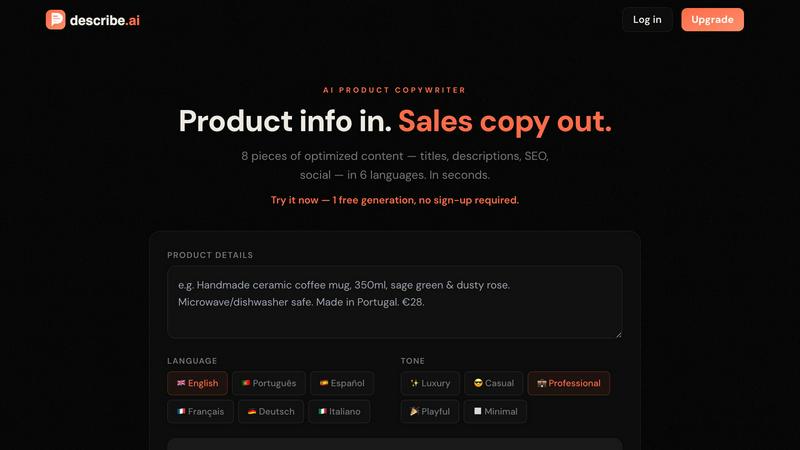
Turn messy product notes into 8 pieces of sales copy in 6 languages instantly, no login needed.
Last updated: February 28, 2026
Visual Comparison
Blueberry

DescribeAI
Feature Comparison
Blueberry
The All-in-One Focused Workspace
This is the main event. Blueberry kills app-switching fatigue by giving you a legit code editor, a fully functional terminal, and a live preview browser all in one tidy, draggable window. It's not just them slapped together; they're designed to feel like they were always meant to be one tool. You get full syntax highlighting, multi-cursor editing, find/replace, and Git integration in the editor—no compromises. The terminal runs your models and commands, and the browser shows a real-time preview of your app. It's your entire dev loop, unified.
Blueberry MCP (Full Context for Your AI)
This is the secret sauce that makes the AI in Blueberry actually useful. The built-in MCP (Model Context Protocol) server is a game-changer. It lets your connected AI (Claude, Codex, etc.) see and interact with your entire workspace context live. We're talking the code you have open, the output in your terminal, what's currently rendering in the preview browser, and even your pinned apps. Your AI assistant finally has the full picture, so you can ask "how does this route work?" or "why is this button broken?" without manually feeding it a million snippets.
Pinned Apps for Constant Context
Why stop at just dev tools? Blueberry lets you dock your other essential apps—like GitHub, Linear, Figma, or PostHog—right inside your workspace. They load up with your project and, crucially, share their context with your AI via MCP. Need your AI to reference a specific Linear ticket or a Figma frame? It's already there, in the loop. It turns your workspace into the central hub for everything related to your product, not just the code.
Visual Context with Screenshot & Element Select
Sometimes you need to show, not tell. Blueberry's preview browser comes with built-in tools to give your AI visual context. You can capture screenshots of your app or, even cooler, directly select specific HTML elements from the preview. This means you can point at a busted component and ask your AI to fix it, and it knows exactly what you're talking about. It bridges the gap between the visual front-end and the code in a way that feels like magic.
DescribeAI
8 Content Types in One Click
Forget using ten different apps. DescribeAI pumps out a full content suite for each product with a single click. You get a catchy product title, a compelling short and long description, SEO keyword clusters, meta titles and descriptions for your site, plus ready-to-post Instagram captions and Facebook ad copy. It's the whole marketing package, done before your coffee gets cold.
Native-Quality in 6 Languages
This ain't your grandma's janky translation tool. DescribeAI crafts original, natural-sounding copy in English, Portuguese, Spanish, French, German, and Italian. It writes directly in the language you choose, ensuring it resonates with local customers and doesn't have that awkward, robotic feel. Go global without the cringe.
5 Brand Tones to Match Your Vibe
Your brand has a personality, and your copy should too. Whether you're selling high-end watches (✨ Luxury) or funky skateboards (😎 Casual), you can lock in the perfect tone. Choose from Luxury, Casual, Professional, Playful, or Minimal. Get content that actually sounds like you wrote it, every single time.
CSV Export for Bulk Uploads
Hate manual copy-pasting? Same. DescribeAI lets you export all the generated content for a product into a clean CSV file. This is a game-changer for uploading dozens of products to platforms like Shopify, WooCommerce, or Etsy in one go. It's bulk-upload magic, saving you hours of tedious data entry.
Use Cases
Blueberry
Rapid Prototyping & Iteration
You're building an MVP and need to move at light speed. With Blueberry, you can write a component in the editor, see it update live in the preview browser, debug an error in the terminal, and ask your AI to refactor the logic—all without leaving the window. The tight feedback loop and constant AI context turn hours of work into minutes, letting you experiment and iterate on ideas before your coffee gets cold.
AI-Powered Debugging & Pair Programming
Hit a gnarly bug or a confusing error message? Instead of scouring Stack Overflow alone, you can have your AI model, armed with the full context of your running app, terminal logs, and relevant code files, help you diagnose it in real-time. It's like having a senior engineer looking over your shoulder who never gets tired and has perfect memory of your entire codebase.
Streamlined Full-Stack Development
Working on a full-stack web app means constantly context-switching between server code, client code, and the database. Blueberry simplifies this by keeping your API route code, your frontend component, and the resulting web page preview visible simultaneously. You can run your backend server in one terminal tab, your frontend dev server in another, and see how they interact live, making API integrations and data flow way easier to reason about.
Cross-Device Preview & Responsive Design
Building a modern app means it has to look good on every screen. Blueberry's preview browser has desktop, tablet, and mobile viewports built right in. You can instantly see what your users will see on different devices without needing to grab your phone or open a separate emulator. It makes responsive design checks a seamless part of your regular coding flow.
DescribeAI
Launching a New Product Line
Got 50 new products to list? The thought of writing all that copy is a nightmare. With DescribeAI, you can blast through your entire inventory in an afternoon. Paste the specs, generate perfect, on-brand descriptions in multiple languages, export to CSV, and upload. Launch faster and beat your competitors to the punch.
Optimizing Old Listings for SEO
Those product pages you made two years ago? They're probably SEO ghosts. Use DescribeAI to revitalize them. Feed in the old info, generate fresh content with new, optimized keywords, meta tags, and titles. Give your old listings a major glow-up to rank higher and attract more organic traffic from search.
Running International Social Ads
Planning a Facebook or Instagram ad campaign in Spain or Germany? Instead of struggling with translations, use DescribeAI to generate native-language ad copy and captions directly. Get culturally relevant, engaging social content that connects with your audience and drives clicks, without needing to hire a translator.
Maintaining a Consistent Brand Voice Across Markets
Selling in both the US and Italy? Keeping your "cool and casual" tone consistent is tough with translators. DescribeAI solves this. Generate your English copy in the "Casual" tone, then switch to Italian and generate again using the same "Casual" setting. Your brand voice stays unified everywhere, building stronger global recognition.
Overview
About Blueberry
Alright, let's break it down. Blueberry is that one app you didn't know you needed until you try it and then you can't imagine your workflow without it. It's basically a super-powered, AI-native workspace built specifically for macOS that smashes your code editor, terminal, and live preview browser into one single, focused window. No more frantic Alt-Tabbing between a dozen different apps, losing your train of thought, or wasting brain cycles on window management. It's built for the modern product builder—the devs, founders, and indie hackers who are shipping web apps and need to move fast without the tooling friction. The core vibe? Stop copy-pasting context for your AI. Blueberry connects to your favorite models (Claude, Gemini, Codex, you name it) via MCP and gives them a live feed of your entire project: your open files, your terminal output, and even what's rendering in the browser preview. It's like giving your AI pair programmer a super-high-resolution screen share of your mind. And the best part? It's 100% free during the beta. So if you're tired of the juggle, this is your invite to a smoother, more integrated way to build.
About DescribeAI
Alright, let's cut the fluff. You're running an online store, and writing product descriptions is the absolute worst. It's a soul-sucking, time-eating monster that keeps you from doing the stuff that actually makes money. Enter DescribeAI, your new robotic copywriter BFF. This tool is built for one thing: turning your basic product info (seriously, even a messy bullet list from your supplier) into fire, ready-to-sell content in seconds. It's for every e-commerce hustler, from the Shopify newbie to the seasoned Amazon warrior, who's tired of staring at a blank page. The main vibe? You paste your deets, pick a language and tone (like "luxury" or "casual"), and bam—you get eight different pieces of optimized content. We're talking product titles, descriptions, SEO keywords, meta tags, and even social media captions. It supports six major languages natively, so you can crush it in multiple markets without sounding like a bad Google Translate meme. Stop writing, start generating.
Frequently Asked Questions
Blueberry FAQ
Is Blueberry really free?
Heck yes! Blueberry is 100% free during its beta period. The team is focused on building an amazing tool and getting it into the hands of builders. There's no credit card required to download and use it. Just grab it and start building.
What AI models does Blueberry work with?
Blueberry is super flexible. It can connect to any AI model that supports the Model Context Protocol (MCP). This includes popular ones like Anthropic's Claude, Google's Gemini, and OpenAI's Codex. You're not locked into one ecosystem; you can use the model that works best for you and your project.
Is Blueberry only for web development?
While it's optimized for building web applications (thanks to the integrated live preview browser), the core workflow of an editor, terminal, and AI with full context is useful for many types of software development. However, its sweet spot is definitely developers and product builders working on web-based projects.
Is it available for Windows or Linux?
Not yet, fam. Currently, Blueberry is a macOS-only application. It's built as a native Mac app to deliver the best possible performance and integration. The team might consider other platforms in the future, but for now, you'll need a Mac to join the party.
DescribeAI FAQ
How is this different from ChatGPT?
ChatGPT is a generalist chatbot; you have to be a prompt wizard to get decent product copy, and it takes a lot of back-and-forth. DescribeAI is a specialized tool built only for e-commerce. You just paste product info and hit go—it's instantly formatted into 8 specific, platform-ready content types (like meta tags & Instagram captions) that are optimized to sell. No prompt engineering required.
Are the translations actually good?
For real, yes. We don't just translate word-for-word, which sounds robotic. DescribeAI generates original, natural-sounding copy directly in the target language (English, Portuguese, Spanish, French, German, Italian). It's native-quality, written to sound like a local marketing pro wrote it, not a machine. Good enough for your high-stakes product pages and ads.
Can I use this with Shopify / WooCommerce / Etsy?
Absolutely! The CSV export feature is your best friend here. Generate all your content with DescribeAI, export the clean CSV file, and then bulk import it directly into Shopify, WooCommerce, Etsy, or pretty much any other platform. It's the fastest way to populate your store. Plus, a direct Shopify integration is coming soon for auto-magic descriptions.
What counts as a "generation"?
One "generation" is when you paste your product info and click the generate button once. For that single click, you receive all 8 pieces of content (title, descriptions, SEO, social, etc.) for one product in your chosen language and tone. So, one product = one generation, but you get a whole toolkit of copy from it.
Alternatives
Blueberry Alternatives
So you've heard the buzz about Blueberry, the slick Mac app that smashes your editor, terminal, and browser into one hyper-focused workspace. It's basically the ultimate power-up for devs and AI tinkerers, letting you connect models like Claude or Codex so they can see your entire workflow at a glance. No more frantic alt-tabbing or copy-pasting context—just pure, unadulterated flow. But let's be real, the hunt for the perfect tool is a whole vibe. Maybe you're not on macOS and need something that plays nice with your Windows or Linux setup. Perhaps the feature set doesn't quite match your specific grind, or you're just curious what else is cooking in this space. It's all good—exploring your options is how you find your perfect match. When you're scouting for something similar, keep your eyes peeled for a few key things. First, check what platforms it runs on. Then, dig into how it handles AI integration—can you plug in your favorite model? Finally, scope out the workflow: does it genuinely unify your tools, or is it just another window manager in a fancy jacket? Your stack deserves the best fit.
DescribeAI Alternatives
So you've heard about DescribeAI, the go-to AI tool for whipping up product copy in a flash. It's basically your hype-man for e-commerce content, spitting out titles, descriptions, and ad copy in six different languages without even needing you to sign up. It lives in that sweet spot of AI copywriting tools, perfect for store owners drowning in product listings. People shop around for other options for all the usual reasons. Maybe the price point isn't a perfect fit for a bootstrapped side hustle, or you need a tool that plays nice with your specific e-commerce platform like Shopify or WooCommerce. Sometimes you just want a different vibe, more language options, or a feature set that's more tailored to your niche. When you're on the hunt for something else, keep your eyes peeled for a few key things. Think about what you actually need: is it just product blurbs, or do you need blog posts and emails too? Check the language support and how many pieces of content you get per click. And of course, always scope out the pricing—see if it's a subscription, pay-as-you-go, or has a generous free tier to test the waters.