
FineVoice vs Glossa
Side-by-side comparison to help you choose the right AI tool.

FineVoice
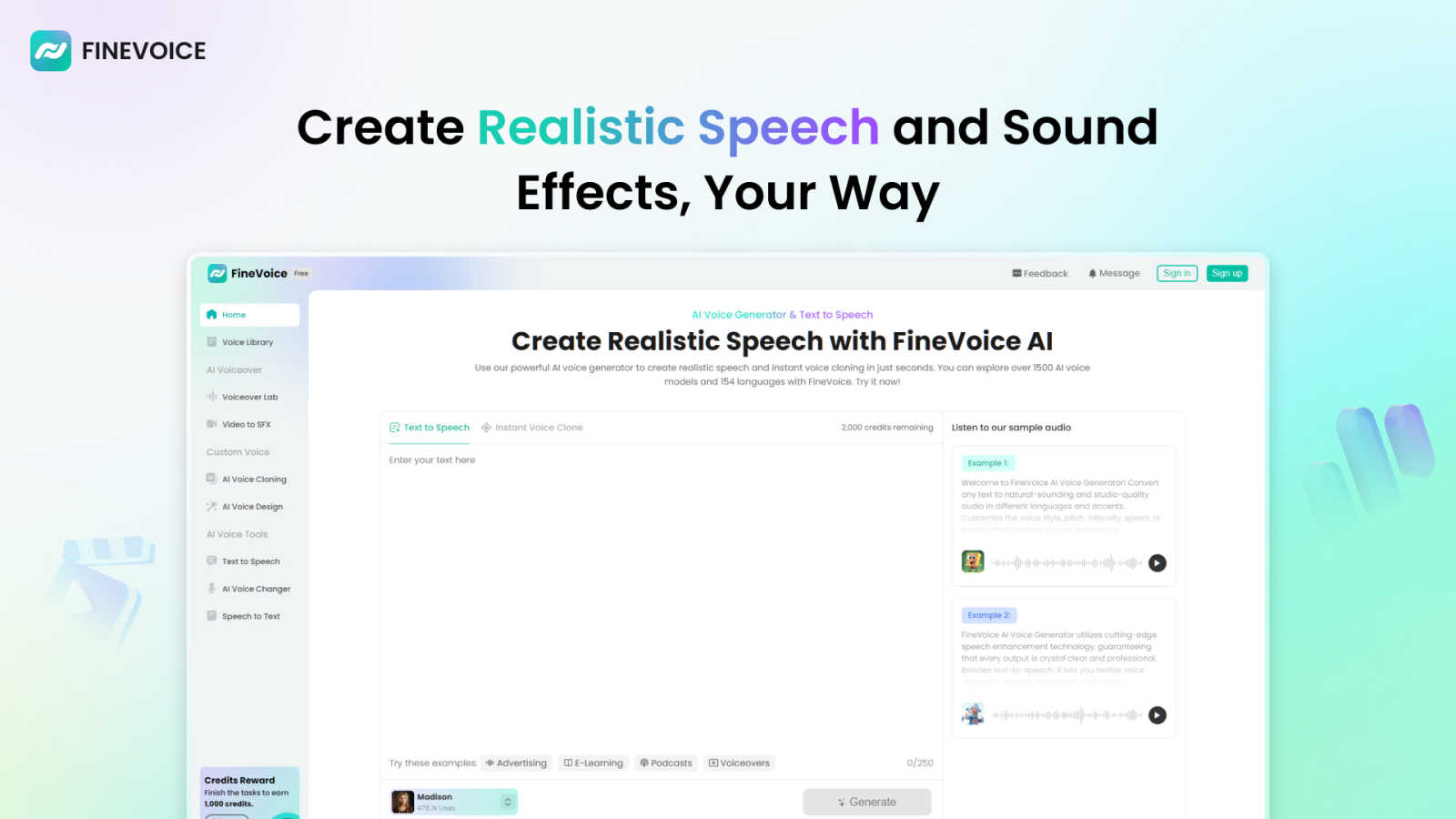
FineVoice is your AI sidekick for instantly cloning voices and creating fire audio for videos, podcasts, and more.
Last updated: March 1, 2026

Break language barriers with Glossa's fast AI translations for your church services in over 100 languages, no hardware.
Last updated: February 28, 2026
Visual Comparison
FineVoice
Glossa

Feature Comparison
FineVoice
Hyper-Realistic Text-to-Speech
This is your bread and butter. Type in any script, and FineVoice will spit out audio that sounds like a real human said it, not a robot from a 90s movie. We're talking a massive library of over 2,000 voice models in all sorts of styles—friendly, dramatic, you name it. You can tweak the emotion, speed, and tone across 154+ languages and accents to get the perfect vibe for your project, whether it's a spicy ad read or a chill e-learning module.
Instant AI Voice Cloning
Got a voice you love? Maybe it's your own, or a famous one, or even your grandma's. With FineVoice's cloning feature, you can replicate it in seconds. Just feed it a short sample, and boom, you've got a digital double ready to read your scripts or transform your live voice. It's perfect for keeping a consistent brand voice across all your content or creating unique character voices without hiring a whole cast of actors.
AI Sound Effects & BGM Generator
Need a "swoosh" for your transition or some epic background music for your vlog? Instead of digging through sketchy free sound websites, just tell FineVoice what you need. Describe a sound with text or even upload a video, and it'll generate unique, royalty-free sound effects and music tracks for you. This means no more copyright strikes or licensing drama, just pure creative freedom.
All-in-One Voice Changer & Toolkit
FineVoice is stacked with practical tools that go beyond just generating speech. The AI voice changer lets you morph your live or recorded voice into something else entirely in real-time. Plus, there's speech-to-text for transcription, custom voice design where you can build a voice from scratch using text prompts, and more. It's a whole suite of audio power tools in one neat platform.
Glossa
Real-Time Translations
With Glossa, translations happen in real-time, so there's no waiting around. As your pastor speaks, the service automatically transcribes and translates speech into the preferred languages of your congregation. It's like magic, but it's just cutting-edge AI technology working its charm!
Voice Cloning
Want your translations to sound familiar? Glossa offers voice cloning, which means the translations can be delivered in your pastor's very own voice! This feature adds a personal touch that makes the service feel more intimate and relatable for attendees.
Ultra-Low Latency
Nobody likes awkward pauses during a sermon. Glossa boasts ultra-low latency that keeps translations in sync with the speaker, ensuring that everyone hears the message as it happens. Say goodbye to lag and hello to seamless worship experiences!
Easy Setup
Setting up Glossa is a breeze! You don’t need to be a tech genius or have special equipment. Just connect your existing audio system or microphone to Glossa, and you can launch your multilingual service in less than 10 seconds. Seriously, it's that easy!
Use Cases
FineVoice
YouTube & Social Content Creation
For creators drowning in the algorithm, FineVoice is a lifesaver. Generate engaging voiceovers for your videos, create attention-grabbing ad reads, or design unique character voices for your animations. The ability to clone your own voice means you can "narrate" videos without actually recording, saving you hours of editing and re-takes. Make your content pop and keep your audience hooked with pro-level audio.
E-Learning & Educational Materials
Teachers and course creators, listen up! Turn dry textbooks into engaging audio lessons with natural, friendly AI voices. You can create content in multiple languages and accents to reach a global student base. The emotional control feature is key here—add the right tone of excitement or seriousness to make the material more relatable and easier to digest for learners of all ages.
Podcasting & Audiobooks
Level up your podcast production without a fancy studio. Use FineVoice to generate intro/outro segments, create ads, or even produce an entire episode with AI co-hosts using different cloned voices. For audiobooks, you can create consistent character voices and narrate long chapters without vocal fatigue. It's like having a full production team at a fraction of the cost.
Game Development & Animation
Indie game devs and animators, this one's for you. Quickly generate voices for a whole cast of characters, from heroes to villains, using the voice cloning and design features. Create immersive soundscapes with custom sound effects for spells, environments, and UI interactions. It massively speeds up production and lets you prototype audio ideas without waiting on voice actors or sound designers.
Glossa
Multilingual Worship Services
Glossa is perfect for churches with diverse congregations where members speak different languages. It allows everyone to enjoy the service in their preferred language, making worship a truly inclusive experience.
Community Events
Hosting an event outside of Sunday service? No problem! Glossa can be used for any church gathering, ensuring that language doesn't become a barrier when connecting with the community during special occasions.
Bible Study Groups
Enhance your Bible study sessions with Glossa. Whether you're diving into deep theological discussions or just having casual chats, Glossa's real-time translations help everyone understand the material, regardless of their language.
Conferences and Workshops
Planning a church conference or workshop? Glossa can provide real-time translations for attendees from various linguistic backgrounds, ensuring that everyone can engage fully and take away valuable insights from the event.
Overview
About FineVoice
Alright, let's break it down. FineVoice isn't just another AI voice tool; it's basically your new creative sidekick for anything audio. Think of it as the ultimate digital sound studio that lives in your browser. Whether you're a YouTuber trying to make your videos slap, a podcaster looking for that perfect intro voice, a game dev needing unique character sounds, or just someone who wants to prank their friends with a flawless celebrity impression, FineVoice has your back. Its main flex is making pro-level voice and sound creation stupidly easy and accessible for everyone, no fancy degrees or tech skills required. With over 10 million users worldwide, it's clearly doing something right. The platform lets you generate hyper-realistic AI voices from text, clone any voice in like a minute, change your voice in real-time, and even cook up custom sound effects and background music. It's the all-in-one audio playground you didn't know you needed, helping you elevate your content from "meh" to "must-watch" without the headache.
About Glossa
Glossa is the ultimate game-changer for churches that want to break down language barriers and connect with their diverse congregations. Imagine a Sunday service where anyone, regardless of their native language, can fully engage and feel included. Glossa does just that! This real-time AI translation service captures your pastor's words as they speak, instantly transcribing and translating them into over 100 languages. It's like having a personal translator in your pocket! The best part? Attendees can simply tune in through their smartphones and earbuds without the hassle of expensive equipment or volunteer translators. Whether you're a cozy immigrant church or a mega international ministry, Glossa ensures everyone can participate in worship and absorb the message in their heart language. It's affordable, efficient, and designed with the church community in mind, making sure no one feels left out.
Frequently Asked Questions
FineVoice FAQ
Is FineVoice really free to use?
Kinda, but there's a catch. FineVoice offers a free trial that lets you test the waters, usually with a limited number of characters for text-to-speech (like 250 to start). To unlock the full power—like unlimited generation, access to all 2000+ voices, and premium features like advanced cloning—you'll need to jump on one of their paid plans. It's free to try, but pro features cost.
Can I use the voices I create for commercial projects?
Totally! One of the biggest Ws with FineVoice is that the audio you generate is royalty-free for you to use. That means you can slap those voices and sound effects into your YouTube videos, podcasts, ads, or video games and monetize them without worrying about paying extra fees or getting hit with copyright claims. Just create and profit.
How accurate and fast is the voice cloning?
It's scarily fast and pretty accurate. The "Instant Clone" tech claims to clone a voice from a short sample in just seconds. The quality depends on the clarity and length of the sample you provide, but for most purposes—like narration or basic voiceovers—it gets super close. It's perfect for maintaining a consistent voice across your content without needing the original speaker present every time.
Does FineVoice work on mobile or just desktop?
While they have dedicated desktop apps for a smoother, more powerful experience (especially for real-time voice changing), you can absolutely access the core FineVoice platform online through your web browser on both computers and mobile devices. So you can brainstorm and create audio ideas on the go from your phone or tablet.
Glossa FAQ
How does Glossa ensure the accuracy of translations?
Glossa leverages advanced AI technology trained on biblical texts, which helps it provide accurate translations that respect the context and vocabulary used within church settings.
Do I need special equipment to use Glossa?
Nope! Glossa is designed to work with your existing audio setup. Just connect your microphone or audio system, and you are good to go—no expensive hardware required!
Can Glossa handle music and silence during services?
Absolutely! Glossa only counts the time when you are speaking for translation hours, so any silence or music doesn’t impact your usage or charges. This means you pay only for the active translation time!
Is there a free trial available?
Yes! Glossa offers 4 hours free for new users, so you can test out the features without any commitment. It's a great way to see how it fits into your church’s needs before making a decision.
Alternatives
FineVoice Alternatives
Alright, so you've heard the buzz about FineVoice, the AI voice wizard that's all about turning your text into hyper-realistic speech and cloning your own voice in like, a minute. It's a major player in the audio and music tool scene, letting creators, streamers, and basically anyone add some serious sonic flair to their projects without needing a studio. But hey, maybe it's not your exact vibe. People hunt for alternatives for all sorts of reasons—maybe the price tag has you side-eyeing your budget, or you need a specific feature it doesn't have. Sometimes you just want something that works natively on your phone or integrates directly with your favorite editing software. It's all about finding the right tool for your specific creative hustle. When you're on the hunt for a different option, think about what really matters for your workflow. Is it all about voice quality and naturalness, or are you deep in the voice-changing meme game? Do you need a massive library of pre-made voices, or is a powerful cloning feature your non-negotiable? Getting clear on your non-negotiables will help you sift through the noise and find your audio soulmate.
Glossa Alternatives
Glossa is an awesome AI translation tool specifically designed for churches with multilingual congregations. It translates sermons into over 100 languages in real-time, letting everyone vibe with the message in their own language. But hey, sometimes folks are on the lookout for alternatives. Reasons could range from pricing to platform compatibility or even specific features that might be a better fit for their unique needs. When searching for alternatives, consider what features matter most to you—like language support, ease of use, or how well it syncs with your setup. Also think about your congregation's size and tech-savviness, since some solutions might have steeper learning curves or require more gear. Finding the right fit can make a world of difference in creating a welcoming and inclusive worship experience for everyone.