
FineVoice vs Hush Touch | Voice-to-Text for MacOS
Side-by-side comparison to help you choose the right AI tool.

FineVoice
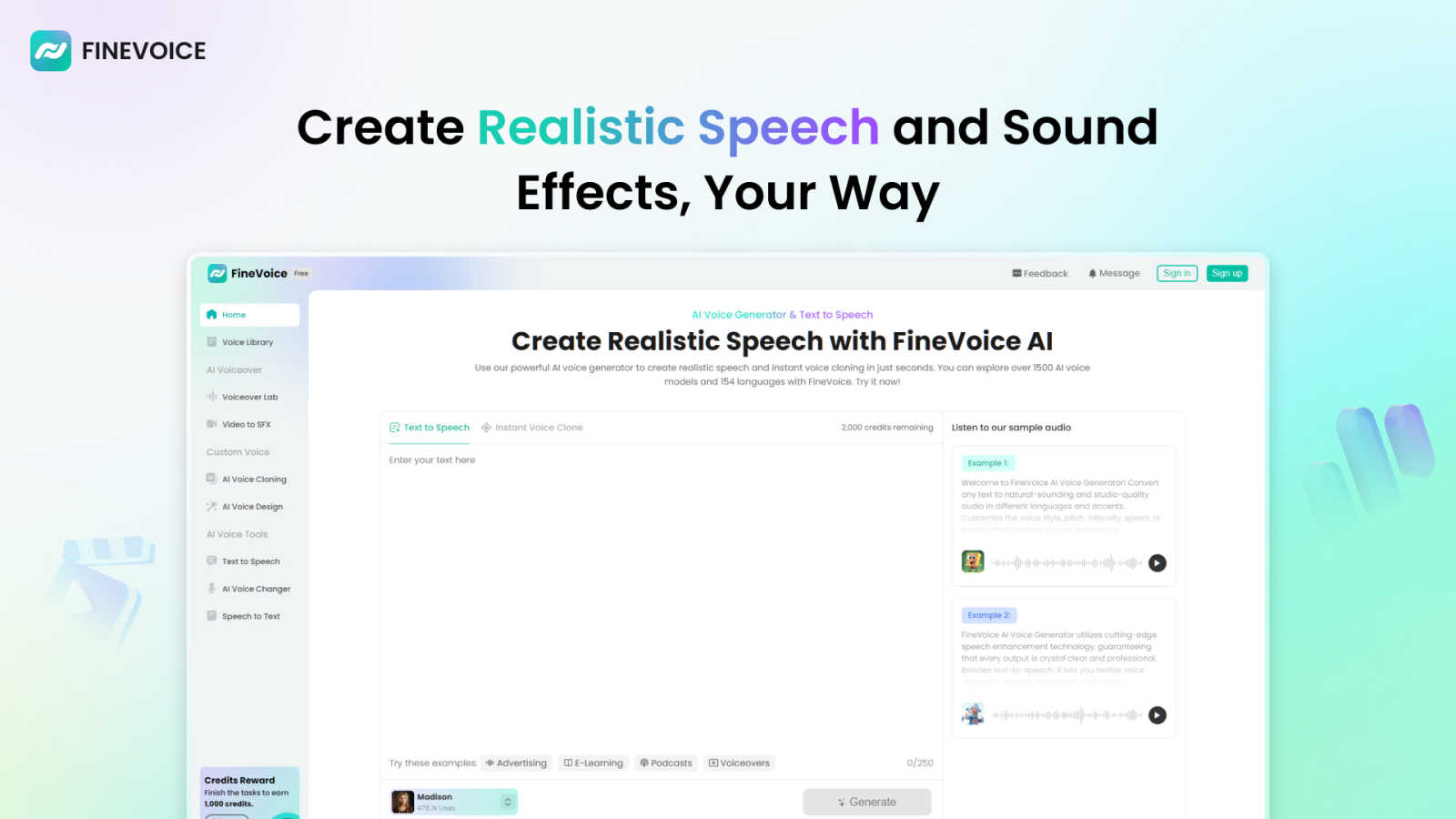
FineVoice is your AI sidekick for instantly cloning voices and creating fire audio for videos, podcasts, and more.
Last updated: March 1, 2026

Hush Touch | Voice-to-Text for MacOS
Hush Touch turns your voice into text on Mac, learning your lingo offline for a flawless, no-subscription dictation.
Last updated: February 28, 2026
Visual Comparison
FineVoice
Hush Touch | Voice-to-Text for MacOS

Feature Comparison
FineVoice
Hyper-Realistic Text-to-Speech
This is your bread and butter. Type in any script, and FineVoice will spit out audio that sounds like a real human said it, not a robot from a 90s movie. We're talking a massive library of over 2,000 voice models in all sorts of styles—friendly, dramatic, you name it. You can tweak the emotion, speed, and tone across 154+ languages and accents to get the perfect vibe for your project, whether it's a spicy ad read or a chill e-learning module.
Instant AI Voice Cloning
Got a voice you love? Maybe it's your own, or a famous one, or even your grandma's. With FineVoice's cloning feature, you can replicate it in seconds. Just feed it a short sample, and boom, you've got a digital double ready to read your scripts or transform your live voice. It's perfect for keeping a consistent brand voice across all your content or creating unique character voices without hiring a whole cast of actors.
AI Sound Effects & BGM Generator
Need a "swoosh" for your transition or some epic background music for your vlog? Instead of digging through sketchy free sound websites, just tell FineVoice what you need. Describe a sound with text or even upload a video, and it'll generate unique, royalty-free sound effects and music tracks for you. This means no more copyright strikes or licensing drama, just pure creative freedom.
All-in-One Voice Changer & Toolkit
FineVoice is stacked with practical tools that go beyond just generating speech. The AI voice changer lets you morph your live or recorded voice into something else entirely in real-time. Plus, there's speech-to-text for transcription, custom voice design where you can build a voice from scratch using text prompts, and more. It's a whole suite of audio power tools in one neat platform.
Hush Touch | Voice-to-Text for MacOS
Dual-Engine Recognition
Hush Touch uses a dual-engine system that combines DictationTranscriber and SFSpeechRecognizer. This dynamic duo handles the natural flow of your speech and boosts custom vocabulary recognition. The result? You get a transcription that’s not only accurate but also understands the lingo you actually use, whether it’s technical jargon or casual slang.
Custom Vocabulary
Tired of apps butchering your specific terms? Hush Touch lets you set up to 500 custom vocabulary terms with auto-learning from corrections. If you regularly dictate complex phrases or brand names, this feature adapts over time, ensuring your voice gets the recognition it deserves, every time.
Smart Text Processing
Say goodbye to filler words and awkward pauses. Hush Touch processes your speech in real time, removing unnecessary fillers and auto-correcting common mistakes. Whether it's detecting that pesky "actually" or formatting lists, this feature keeps your dictation neat and polished without breaking your flow.
Context Modes & Hands-Free Options
Switch it up with four different context modes tailored for General, Email, Code, and Notes. Feeling hands-free? Just say "Hey Siri, start touch," and let the app take over. It auto-inserts text after a brief pause, so you can focus on what you want to say without worrying about hitting buttons.
Use Cases
FineVoice
YouTube & Social Content Creation
For creators drowning in the algorithm, FineVoice is a lifesaver. Generate engaging voiceovers for your videos, create attention-grabbing ad reads, or design unique character voices for your animations. The ability to clone your own voice means you can "narrate" videos without actually recording, saving you hours of editing and re-takes. Make your content pop and keep your audience hooked with pro-level audio.
E-Learning & Educational Materials
Teachers and course creators, listen up! Turn dry textbooks into engaging audio lessons with natural, friendly AI voices. You can create content in multiple languages and accents to reach a global student base. The emotional control feature is key here—add the right tone of excitement or seriousness to make the material more relatable and easier to digest for learners of all ages.
Podcasting & Audiobooks
Level up your podcast production without a fancy studio. Use FineVoice to generate intro/outro segments, create ads, or even produce an entire episode with AI co-hosts using different cloned voices. For audiobooks, you can create consistent character voices and narrate long chapters without vocal fatigue. It's like having a full production team at a fraction of the cost.
Game Development & Animation
Indie game devs and animators, this one's for you. Quickly generate voices for a whole cast of characters, from heroes to villains, using the voice cloning and design features. Create immersive soundscapes with custom sound effects for spells, environments, and UI interactions. It massively speeds up production and lets you prototype audio ideas without waiting on voice actors or sound designers.
Hush Touch | Voice-to-Text for MacOS
Drafting Emails
Whether you’re responding to a colleague or firing off a quick note to a friend, Hush Touch makes email drafting a breeze. Just speak your mind, and the app will turn your thoughts into well-structured text, ready to send in seconds.
Taking Notes in Class
Students will love how easy it is to take notes during lectures. Just start dictating your thoughts, and Hush Touch will capture everything accurately. No more scribbling down notes while trying to keep up with the professor; just talk, and you’re good to go.
Creating Content for Blogs
Writers can unleash their creativity by dictating blog posts or articles hands-free. Hush Touch captures your ideas as they flow, making the writing process feel more natural and less like a chore. You can focus on your creative flow without the stress of typing.
Recording Meeting Minutes
In professional settings, capturing meeting minutes can be a hassle. With Hush Touch, you can record discussions as they happen. Just dictate what’s being said, and the app will handle the transcription, ensuring you never miss a detail.
Overview
About FineVoice
Alright, let's break it down. FineVoice isn't just another AI voice tool; it's basically your new creative sidekick for anything audio. Think of it as the ultimate digital sound studio that lives in your browser. Whether you're a YouTuber trying to make your videos slap, a podcaster looking for that perfect intro voice, a game dev needing unique character sounds, or just someone who wants to prank their friends with a flawless celebrity impression, FineVoice has your back. Its main flex is making pro-level voice and sound creation stupidly easy and accessible for everyone, no fancy degrees or tech skills required. With over 10 million users worldwide, it's clearly doing something right. The platform lets you generate hyper-realistic AI voices from text, clone any voice in like a minute, change your voice in real-time, and even cook up custom sound effects and background music. It's the all-in-one audio playground you didn't know you needed, helping you elevate your content from "meh" to "must-watch" without the headache.
About Hush Touch | Voice-to-Text for MacOS
Hush Touch is your new best friend for voice-to-text dictation on macOS, designed for those who crave speed, privacy, and a natural speaking experience. No more waiting for cloud processing or dealing with awkward misunderstandings. This app runs entirely on your device, ensuring your voice stays private while delivering spot-on transcription. It combines two powerful Apple transcription engines with a final touch from Apple Intelligence, making your text cleaner and more accurate than ever. With a lightweight footprint of just 5.5 MB, it seamlessly integrates into your daily writing routine, whether you're drafting emails, taking notes, or even coding. Plus, you can kick it off with a hotkey or just ask Siri to get started. Whether you’re a student, a busy professional, or just someone who loves to jot down ideas hands-free, Hush Touch is built just for you. Embrace a new way of writing that feels as natural as speaking, all without a subscription tether.
Frequently Asked Questions
FineVoice FAQ
Is FineVoice really free to use?
Kinda, but there's a catch. FineVoice offers a free trial that lets you test the waters, usually with a limited number of characters for text-to-speech (like 250 to start). To unlock the full power—like unlimited generation, access to all 2000+ voices, and premium features like advanced cloning—you'll need to jump on one of their paid plans. It's free to try, but pro features cost.
Can I use the voices I create for commercial projects?
Totally! One of the biggest Ws with FineVoice is that the audio you generate is royalty-free for you to use. That means you can slap those voices and sound effects into your YouTube videos, podcasts, ads, or video games and monetize them without worrying about paying extra fees or getting hit with copyright claims. Just create and profit.
How accurate and fast is the voice cloning?
It's scarily fast and pretty accurate. The "Instant Clone" tech claims to clone a voice from a short sample in just seconds. The quality depends on the clarity and length of the sample you provide, but for most purposes—like narration or basic voiceovers—it gets super close. It's perfect for maintaining a consistent voice across your content without needing the original speaker present every time.
Does FineVoice work on mobile or just desktop?
While they have dedicated desktop apps for a smoother, more powerful experience (especially for real-time voice changing), you can absolutely access the core FineVoice platform online through your web browser on both computers and mobile devices. So you can brainstorm and create audio ideas on the go from your phone or tablet.
Hush Touch | Voice-to-Text for MacOS FAQ
Is my data safe with Hush Touch?
Absolutely! Hush Touch processes everything on-device, meaning there’s no cloud dependency or data collection. Your voice remains private and secure, giving you peace of mind.
Can I customize my vocabulary?
Yes! Hush Touch allows you to set up to 500 custom terms that it learns from corrections you make. This means it gets better at recognizing your specific language and jargon over time.
What devices support Hush Touch?
Hush Touch is specifically designed for macOS. Just download the app on your Mac, and you’re ready to start dictating without any hassle.
How much does Hush Touch cost?
You can get a lifetime license for just $20. No subscriptions, no monthly fees. Just one payment, and you’re set for life with a powerful dictation tool.
Alternatives
FineVoice Alternatives
Alright, so you've heard the buzz about FineVoice, the AI voice wizard that's all about turning your text into hyper-realistic speech and cloning your own voice in like, a minute. It's a major player in the audio and music tool scene, letting creators, streamers, and basically anyone add some serious sonic flair to their projects without needing a studio. But hey, maybe it's not your exact vibe. People hunt for alternatives for all sorts of reasons—maybe the price tag has you side-eyeing your budget, or you need a specific feature it doesn't have. Sometimes you just want something that works natively on your phone or integrates directly with your favorite editing software. It's all about finding the right tool for your specific creative hustle. When you're on the hunt for a different option, think about what really matters for your workflow. Is it all about voice quality and naturalness, or are you deep in the voice-changing meme game? Do you need a massive library of pre-made voices, or is a powerful cloning feature your non-negotiable? Getting clear on your non-negotiables will help you sift through the noise and find your audio soulmate.
Hush Touch | Voice-to-Text for MacOS Alternatives
Hush Touch | Voice-to-Text for MacOS is your go-to app for turning speech into text without the hassle of being online. It’s in the AI Assistants category and is designed to make dictation as smooth as butter. Users often seek alternatives for various reasons, like wanting different pricing options, feature sets, or compatibility with other platforms. Sometimes, folks just want something that vibes better with their workflow or personal preferences. When you’re on the hunt for an alternative, consider the main features that matter to you—like whether it works offline, how it handles punctuation, or if it learns your style over time. Also, think about how user-friendly it is and if it fits into your daily routine without a ton of setup.