
Fusedash vs Threat Watch
Side-by-side comparison to help you choose the right AI tool.

Fusedash transforms your raw data into slick dashboards and charts, making insights easy to spot and act on fast.
Last updated: March 4, 2026

Threat Watch
Get the 411 on your cyber health and spot threats before they become a major oof.
Last updated: March 1, 2026
Visual Comparison
Fusedash

Threat Watch
Feature Comparison
Fusedash
Flexible Views
Fusedash lets you customize how your data is presented, catering to the needs of different teams. Whether it's a dashboard, chart, map, or narrative report, you can tailor layouts, filters, and time ranges to make sure stakeholders get exactly what they need without endless back and forth.
AI Chart Generator
Generate stunning visuals from your data in just minutes! Fusedash's AI chart generator takes your CSVs or API data, helps you choose the right chart type, and lets you add comparisons and clear labels. This means your charts will not only look good but also tell the right story.
Dashboard Software
Combine monitoring with context in one sleek workspace. Fusedash allows you to create dashboards that track KPIs while also providing narrative reports to explain changes and their significance. This storytelling feature keeps everyone aligned and reduces confusion, ensuring that everyone knows what’s up.
AI Chat
Not sure where to start? No worries! Fusedash's Smart Chat lets you ask questions in plain language and get immediate suggestions for metrics, charts, and breakdowns. This feature makes it easy to turn insights into shareable dashboard views, speeding up the decision-making process.
Threat Watch
Real-Time Threat Intel Flex
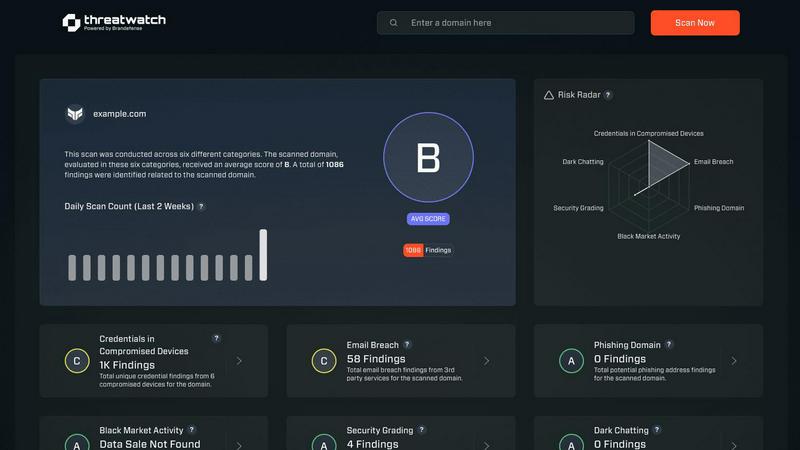
This isn't your grandma's weekly security report. Threat Watch is plugged into the matrix, serving up live, actionable insights on vulnerabilities and exposures as they happen. It's like having a direct feed to the cybersecurity underground, so you're never caught slippin'. You get instant alerts and a dashboard that updates faster than your social feed, keeping you in the know and ready to act.
Automated Cyber Health Scan
Say goodbye to manual, soul-crushing security checks. With one click on "Start my free scan," Threat Watch goes to work, automatically assessing your critical security categories. It's a full-system diagnostic that uncovers your cyber health fast, checking everything from compromised devices to leaked credentials, so you don't have to lift a finger. Get your results quicker than a TikTok deep dive.
Dark Web & Breach Detective
Threat Watch doesn't just look at the surface web; it dives deep into the sketchy corners of the internet. It actively hunts for your company's breached accounts, exposed credentials, and phishing addresses lurking on the dark web. This feature is your early warning system, letting you know if your data is being traded in digital back alleys before it's used against you.
Priority Risk Roadmap
Drowning in security alerts? Threat Watch cuts through the chaos. It doesn't just list problems; it analyzes and prioritizes risks based on what could actually hurt your business. It gives you a clear, actionable roadmap showing exactly what to fix first and how to mitigate it, turning overwhelming data into a simple to-do list for becoming cyber-strong.
Use Cases
Fusedash
Marketing Campaign Tracking
Keep tabs on your marketing campaigns by utilizing Fusedash to create dashboards that show real-time performance metrics. You can visualize data trends and quickly adjust strategies based on what's working and what's not.
Sales Performance Monitoring
Sales teams can leverage Fusedash to track performance metrics across different regions or products. With customizable dashboards, you can visualize sales numbers, compare them against KPIs, and quickly identify areas for improvement.
Operational Efficiency Analysis
Operations teams can utilize Fusedash to monitor key performance indicators in real-time. By using storytelling features, you can provide context to the data, helping teams understand operational successes and challenges.
Financial Reporting
Finance departments can streamline their reporting processes with Fusedash. Create comprehensive dashboards that pull from multiple data sources, ensuring that stakeholders have access to accurate financial insights without the headache of manual reporting.
Threat Watch
The Startup Launchpad
You're a tech-savvy startup moving at light speed. Threat Watch is your co-pilot, providing automated, continuous security monitoring without needing a huge IT budget or team. It helps you build a secure foundation from day one, ensuring investor data and your killer app code are protected while you scale, so you can focus on disrupting the market, not putting out security fires.
The SMB Security Glow-Up
Running a small or medium biz means you wear all the hats, and "Chief Security Officer" probably wasn't one you signed up for. Threat Watch acts as your outsourced cyber expert, giving you enterprise-grade insights without the enterprise-grade complexity or cost. It's the perfect tool to proactively find and fix vulnerabilities before a hacker targets you as an easy mark.
The Corporate Compliance Check
For larger organizations, proving you're secure is just as important as being secure. Threat Watch delivers the comprehensive, real-time evidence and reporting you need to show auditors and board members that you're on top of your cyber health game. It simplifies compliance by continuously tracking assets and exposures across the entire digital estate.
The IT Team's Force Multiplier
Even if you have a dedicated IT squad, they're likely swamped. Threat Watch automates the tedious work of vulnerability discovery and initial assessment, freeing your experts to do what they do best: strategize and solve complex problems. It's like giving your team a super-powered sidekick that handles the scouting, so they can plan the winning battle strategy.
Overview
About Fusedash
Fusedash is like that magical toolbox you always wanted for your data! It's an AI-driven data visualization platform that helps teams convert their connected data into clear, actionable insights. Whether you're in marketing, operations, or leadership, Fusedash is designed to make your life easier by eliminating those frustrating manual reporting cycles and conflicting data stories. Imagine a unified workspace where you can whip up decision-ready dashboards, interactive charts, detailed maps, and narrative reports without the hassle of piecing together different tools. With Fusedash, you set your key metrics and KPIs once, and then use those definitions across all views and reports, ensuring everyone in your organization is on the same page with the same trusted numbers. It's not just about monitoring what's happening; it's about understanding why it's happening. Thanks to integrated AI features like natural language data chat and smart visualization assistance, Fusedash makes data exploration and reporting not just faster, but also way more accessible. Turn your raw data into a shared source of truth that drives alignment and action. Say goodbye to chaos and hello to clarity!
About Threat Watch
Yo, welcome to the digital dojo! Threat Watch is your ultimate cybersecurity hype-man, designed to cut through the noise and give you the real-time lowdown on your organization's cyber health. Think of it as your personal digital bodyguard that's always on patrol, 24/7. This tool is for anyone with a digital footprint - from the solo entrepreneur grinding in their home office to the massive corporate squad managing a global empire. Its main flex? Giving you a crystal-clear, no-BS picture of your security status in a snap. It automates the boring, complex assessment stuff so you can spot risks faster than a viral meme spreads. By keeping a watchful eye on your assets, vulnerabilities, and shady exposures, it helps you identify what needs your attention right now and how to shut down those sneaky threats before they become a major headache. It's all about leveling up your defense game and getting that peace of mind, so you can focus on your grind without worrying about digital drama.
Frequently Asked Questions
Fusedash FAQ
How does Fusedash ensure data consistency?
Fusedash allows you to define your key metrics and KPIs once, which can then be reused across all views and reports. This ensures that every team in your organization is looking at the same trusted numbers, eliminating conflicting reports.
Can I integrate my existing data sources with Fusedash?
Absolutely! Fusedash lets you upload CSVs, connect APIs, and even enrich your datasets with public data. This flexibility means you can combine various data sources without having to rebuild your reports from scratch.
Is Fusedash user-friendly for non-technical users?
Definitely! Fusedash is designed to be intuitive and accessible. With features like the AI Chat, even those without a technical background can easily explore data, generate charts, and create dashboards without feeling overwhelmed.
What kind of support does Fusedash offer?
Fusedash provides various resources including demos, tutorials, and a knowledge base to help users get started. Their customer support team is also available to assist with any questions or issues you might encounter along the way.
Threat Watch FAQ
How fast is the "fast" scan?
Super fast, like "microwave-burrito" fast. Our automated assessment engine is optimized to give you a comprehensive overview of your critical security categories in minutes, not days. You'll get actionable insights from your free scan almost instantly, so you can start leveling up your cyber health without the wait.
What exactly does Threat Watch monitor?
We keep our eyes on all the important (and sketchy) stuff! We scan for compromised devices on your network, credentials that have been breached and leaked online, phishing addresses targeting your domain, and any of your company's sensitive info popping up in dark web forums. It's a full 360-view of your digital exposure.
Do I need to be a cybersecurity expert to use this?
Absolutely not! Threat Watch is built for everyone. We translate complex cyber threats into simple, easy-to-understand insights and priority actions. The dashboard is intuitive, and the reports are clear—no PhD in hacking required. We hand you the info you need to make smart decisions, period.
Is there really a free version?
Yes, for real! You can start with our free scan to uncover your core cyber security health. It gives you a legit snapshot of your key risk areas. If you want the full, continuous protection suite with real-time alerts and deeper monitoring, we have upgraded plans to match your needs and budget.
Alternatives
Fusedash Alternatives
Fusedash is an AI-powered data visualization platform that transforms your raw data into slick dashboards and charts, making sure your squad can act on insights like a boss. It falls under the Analytics & Data and Business Intelligence categories, catering to teams that want to ditch the hassle of manual reporting and conflicting data stories. Users often search for alternatives when they feel like Fusedash might not fit their budget, lack specific features they need, or require compatibility with certain platforms. When hunting for an alternative, keep an eye out for pricing structures that align with your budget, essential features that meet your unique needs, and compatibility with your existing tools. It's all about finding a solution that keeps the vibe flowing and the insights rolling in without a hitch.
Threat Watch Alternatives
So, you've heard about Threat Watch, the cybersecurity sidekick that's all about giving you that real-time intel on your digital health. It's a Business Intelligence tool that basically acts like your personal cyber bouncer, spotting vulnerabilities and dark web drama before it crashes your party. It's a solid pick for getting your security game on point. But hey, one size doesn't fit all in the tech world, right? People start hunting for alternatives for all sorts of reasons. Maybe the price tag is doing a number on your budget, or you need a feature that's just not in the current lineup. Sometimes it's about platform compatibility—you need something that vibes perfectly with your existing tech stack. When you're scrolling through the options, keep your eyes peeled for a few key things. You'll wanna check if the tool gives you that real-time, actionable intel, how slick the automation is (because nobody has time for manual checks), and whether it covers your specific worries, like phishing scams or dark web surveillance. It's all about finding that perfect match for your team's vibe and needs.