
Interhubz vs Playwriter
Side-by-side comparison to help you choose the right AI tool.

Interhubz
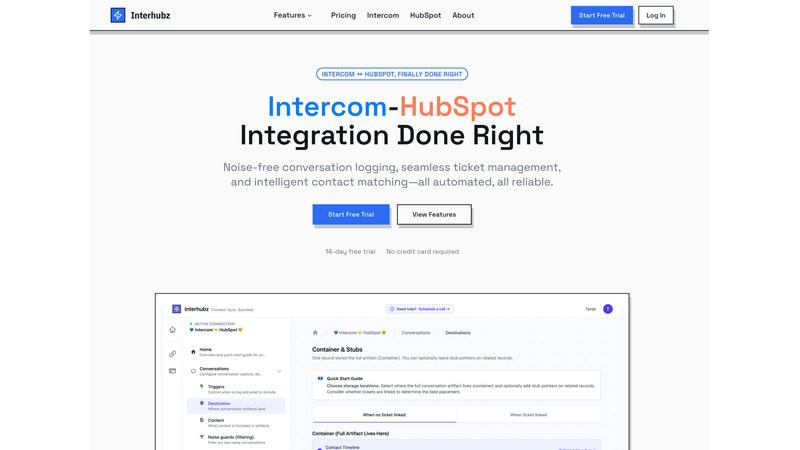
Interhubz syncs Intercom chats to HubSpot cleanly, turning chaos into clarity with smart matching and simple ticketing.
Last updated: February 28, 2026

Playwriter
Take full control of your Chrome with Playwriter, the CLI and extension that lets agents browse with all your logins and tools intact.
Last updated: March 18, 2026
Visual Comparison
Interhubz
Playwriter

Feature Comparison
Interhubz
One Note Per Conversation
With Interhubz, every conversation in Intercom is transformed into a single, rich note in HubSpot. This means no more sifting through countless entries to find the context you need. Each note includes a full transcript, summary, and any attachments, making it super easy for your sales team to understand the conversation without drowning in clutter.
Intelligent Contact Matching
Interhubz takes the guesswork out of contact management. It intelligently matches contacts between Intercom and HubSpot using email, phone numbers, and even custom properties. Say goodbye to duplicates and welcome a clean, organized database that ensures your team is always on the same page.
One-Click Ticket Creation
Need to create a ticket from Intercom? Interhubz makes it a breeze with one-click ticket creation. Plus, it keeps everything in sync, so any changes in ticket status or ownership are reflected in real-time across both platforms. This means no more manual updates and no more ticket chaos—just seamless ticket management.
Noise Guards
Interhubz comes equipped with smart noise guards that automatically filter out irrelevant conversations, like bot interactions or spam. You can customize these filters to block low-value chats, ensuring that only meaningful interactions make it to your HubSpot timeline. Keep your data clean and your focus sharp!
Playwriter
Real Browser Access
Playwriter lets your agents use your actual browser, meaning they can access all your saved logins, cookies, and extensions. No more fresh Chrome instances or limited tools—just pure functionality right where you need it.
Full Automation API
With Playwriter, you get the full Playwright API through a single execute tool. This means you can run any Playwright code without dealing with wrappers or additional complexities, making it easy to integrate into your workflow.
Collaborative Browsing
Collaboration is a breeze with Playwriter. You can see everything your agent does in real-time, so when it hits a snag, you’re there to jump in and help. It's like tag-teaming a project, where the agent handles the boring stuff and you tackle the tricky bits.
Debugger and Live Editing
Playwriter comes with an integrated debugger that allows you to set breakpoints and edit code on the fly. This means you can tweak your scripts in real time, making it easier to troubleshoot and improve your automation efforts.
Use Cases
Interhubz
Streamlined Support and Sales Workflows
Imagine your support team handling inquiries in Intercom while your sales team accesses all the relevant conversation history in HubSpot without any hassle. Interhubz ensures that both teams have the same context, making collaboration smoother and more effective.
Efficient Ticket Management
With the one-click ticket creation feature, support agents can turn conversations into tickets instantly. This helps to track issues more efficiently and allows sales teams to follow up on resolved issues without any manual effort. It’s all about saving time and improving response rates.
Enhanced Customer Insights
By syncing conversations with rich notes, your team gains deeper insights into customer interactions. This means your sales team can tailor their pitches based on previous conversations, leading to better engagement and higher conversion rates.
Clean and Organized CRM
No more timeline pollution! Interhubz helps maintain a clean CRM by consolidating conversations into one note and filtering out the noise. This organization allows teams to focus on high-value interactions and drive results without getting lost in the clutter.
Playwriter
Streamlined Testing
If you're a developer or tester, Playwriter can automate your testing process by controlling your browser and running tests on your web applications in real-time, ensuring everything works as it should.
Data Extraction
Need to scrape data from websites? Playwriter makes it easy to automate that process without the hassle of logging in or dealing with bot detection, saving you time and effort in gathering information.
Captcha Solving
When your agent hits a captcha, you can step in and solve it right there. This collaborative approach means you won't get stuck, and your automation can continue smoothly after you've handled the hiccup.
Real-Time Monitoring
Set up Playwriter to monitor web activity and gather insights as it happens. You can keep an eye on changes, performance, and user interactions in real-time, making it a powerful tool for data-driven decisions.
Overview
About Interhubz
Interhubz is the ultimate game-changer when it comes to connecting Intercom and HubSpot without the usual chaos. This innovative integration tackles the major pain points of syncing conversations, ensuring that support teams using Intercom can keep everything in sync with sales and customer success teams in HubSpot. Say goodbye to the clutter of 8+ timeline entries per conversation that leave your team scrambling for information. Instead, Interhubz delivers a single, clean, and formatted note that captures the entire conversation, complete with transcripts and attachments. Built for teams that thrive on seamless communication and organization, Interhubz enables operators to maintain a tidy CRM, automatically filter out noise, and streamline ticket management. With intelligent contact matching and automated processes, it’s designed for those who want to focus on what matters—building relationships and closing deals.
About Playwriter
Playwriter is your new best friend in the world of automation and browser control. Forget the days of clunky bots that can’t navigate the web properly. With Playwriter, you can give your AI agents access to your actual browser session, complete with all your logins, extensions, and cookies. It's like getting a VIP pass to the web for your agents, allowing them to interact with sites just like you would. The standout feature? A Chrome extension that connects seamlessly, paired with a powerful CLI that lets you run Playwright code directly in your existing browser. It's perfect for developers, testers, or anyone looking to streamline their web interactions. Plus, it's open-source and MIT licensed, so you can tweak it to fit your needs. Say goodbye to the limitations of headless browsing and hello to a more efficient way to automate your web tasks.
Frequently Asked Questions
Interhubz FAQ
How does Interhubz improve timeline organization?
Interhubz drastically reduces timeline clutter by consolidating all conversation entries into a single, formatted note. This means your team can quickly access the information they need without wading through multiple entries.
Can Interhubz handle duplicate contacts?
Absolutely! Interhubz uses intelligent matching algorithms to ensure that contacts are matched based on email, phone, and custom properties, effectively eliminating duplicates from your database.
Is it easy to set up Interhubz?
Yes! Setting up Interhubz takes just minutes. With a one-click OAuth connection and straightforward configuration options for matching and noise filtering, you'll be syncing conversations in no time.
What types of noise can Interhubz filter out?
Interhubz offers advanced noise guards that automatically block bot conversations, spam, and low-value interactions based on customizable thresholds. This keeps your CRM focused on meaningful customer engagements only.
Playwriter FAQ
How does Playwriter connect to my browser?
Playwriter connects through a Chrome extension that establishes a WebSocket to a local relay, allowing your agents to communicate directly with your existing browser session.
Is Playwriter secure to use?
Yes! Your data never leaves your machine, and all connections are local. You don’t need to worry about remote servers or accounts, ensuring your browsing sessions remain private and secure.
Can I use Playwriter with other tools?
Absolutely! Playwriter works with any MCP client like Cursor, Claude, or VS Code, giving you flexibility in how you integrate it into your existing workflow.
Is Playwriter really open source?
Yes! Playwriter is open source and MIT licensed, meaning you can check out the code, modify it, and contribute to its development if you want to.
Alternatives
Interhubz Alternatives
Interhubz is like your trusty sidekick that syncs Intercom chats to HubSpot, creating smooth, clean, and organized timeline entries. If you've ever felt overwhelmed by a barrage of messages cluttering your CRM, you're not alone. Users often seek alternatives when they hit roadblocks with pricing, features that don’t quite fit the bill, or when they need integration with different platforms altogether. Finding the right alternative means looking for something that ticks all your boxes—like ease of use, smart features, and that sweet, sweet integration magic. When searching for a solid alternative, keep an eye out for essential features that will keep your workflow seamless. You wanna make sure it can handle intelligent contact matching, reduce noise, and let you create tickets without breaking a sweat. It’s all about finding that perfect fit for your team's vibe and needs, so you can keep doing what you do best without all the extra hassle.
Playwriter Alternatives
Playwriter is a rad automation tool that lets you control Chrome with AI through a Command Line Interface (CLI) or a more user-friendly Model Control Protocol (MCP). It's all about giving your AI agents a real browser experience, so they can work with your actual logged-in sessions, extensions, and all that good stuff. This means better performance and fewer headaches when it comes to bot detection. Users often start searching for alternatives because they might be looking for better pricing, specific features that fit their workflow, or compatibility with their favorite platforms. When diving into the world of alternatives, it's crucial to consider factors like ease of use, the range of features offered, support for your preferred environment, and of course, the price tag. Finding the right fit can make all the difference in your automation journey!