
Looktara vs poseup
Side-by-side comparison to help you choose the right AI tool.

Looktara
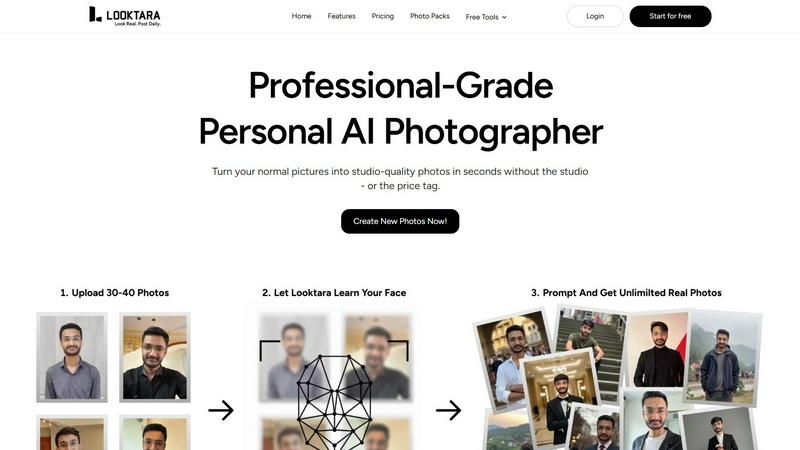
Upload your pics once and your private AI chef cooks up pro photos for any vibe.
Last updated: February 28, 2026

poseup
PoseUp uses AI to instantly elevate your photos with perfect posture, composition, and style for every shot.
Last updated: March 2, 2026
Visual Comparison
Looktara
poseup

Feature Comparison
Looktara
Your Private AI Model
This isn't some generic filter slapped on a random face. You feed Looktara around 30 pics of yourself, and it trains a unique, encrypted AI model that knows you and only you. Your data is locked down and never mixed with anyone else's, so every photo it generates is built from your specific vibe and features. It's like having a digital twin that actually looks like you, not some weird, generic avatar.
Text-to-Photo Magic
No more awkward posing or hunting for the right background. You're the creative director. Just type what you want into the prompt box—think "confident tech founder in a sleek modern office" or "friendly smile in a sunny park." Hit go, and in about 5 seconds, Looktara whips up a brand new, high-resolution photo matching your description. It's instant content creation without the hassle of an actual photoshoot.
Authentic, Studio-Grade Quality
Looktara is engineered to dodge the classic AI photo fails. We're talking no plastic-smooth skin, no dead-eyed stares from the uncanny valley. Instead, it delivers photos with realistic skin texture, natural-looking light and shadows, and genuine expressions. The results are so good they pass for professional studio shots, giving you that polished, legit look for any platform.
Platform-Perfect Styling
Different apps, different vibes. Looktara gets it. You can tailor your prompts to generate the perfect photo for any channel. Need a sharp, authoritative headshot for LinkedIn? Done. A more casual, creative shot for Instagram? Easy. A warm and friendly pic for a newsletter? You got it. It's one authentic you, styled flawlessly for wherever you're posting, so your personal brand stays consistent and on-point.
poseup
One-Click Pose Enhancement
Say goodbye to awkward angles and unflattering stances! With PoseUp's one-click feature, you can instantly improve your photo poses. This smart tech analyzes your image and suggests enhancements that make you look fabulous with minimal effort.
AI Posture Correction
No more slouching or stiff poses! PoseUp’s advanced AI posture correction technology helps you stand tall and proud in your photos. It automatically evaluates your body alignment and suggests adjustments for that perfect shot.
Composition Optimization
Good composition is key to great photography, and PoseUp nails it! The tool intelligently optimizes your photo's layout, ensuring that every element is placed perfectly for maximum visual appeal. You'll look like you hired a professional photographer!
Multi-Format Support
Worried about photo formats? Don’t be! PoseUp supports JPG, PNG, WEBP, and HEIC files, allowing you to upload images up to 5MB. No matter where your pics come from, PoseUp is ready to work its magic!
Use Cases
Looktara
For the Job Seeker & LinkedIn Pro
Stop using that grainy, cropped photo from your cousin's wedding on your LinkedIn profile. With Looktara, you can generate a suite of professional, industry-appropriate headshots that scream "hire me." Need a formal shot for your resume, a smart-casual one for your bio, and a confident speaking pose for your featured section? Generate them all in minutes without leaving your desk, making your profile look effortlessly polished and current.
For the Content Creator & Solopreneur
Consistently showing up online is key, but you can't afford a photographer for every new idea or campaign. Looktara is your infinite content buddy. Need a "day-in-the-life" cafe shot for Stories, a serious "behind-the-work" desk pic for a Reel, and a celebratory "launch day" photo for Twitter? Just describe it and generate. Keep your feed fresh, authentic, and engaging without ever repeating the same background or outfit.
For the Founder & Startup Team
Building a brand means putting a face to the name, especially for early-stage startups. Use Looktara to generate cohesive, high-quality team photos for your "About Us" page, press kits, and investor decks. Everyone can get a consistent style of professional photo without the logistical nightmare and cost of organizing a real photoshoot. It ensures your team looks unified, professional, and ready for business.
For the Dating App User
First impressions on apps like Tinder or Hinge are everything, and your photos are your main currency. Ditch the blurry selfies and awkward group pics. Use Looktara to generate a few great solo shots that show off your personality—a friendly smile, a shot of you with a hobby, a sharp casual look. Get photos that actually look like you on your best day, helping you stand out and attract better matches.
poseup
Selfies That Slay
Whether you’re capturing a quick selfie or planning a stylish portrait, PoseUp ensures you always look your best. With its one-click enhancements, your selfies will go from basic to bomb in seconds!
Family Photos Made Easy
Who doesn’t love a good family portrait? With PoseUp, you can arrange everyone in the perfect poses, ensuring everyone looks great together. Say goodbye to awkward family photos and hello to Instagram-worthy shots!
Professional Headshots
Need a killer headshot for LinkedIn or your portfolio? PoseUp has got you covered! Its AI technology enhances your posture and composition, making sure you come across as confident and professional.
Fitness and Wellness Shots
Show off your gains or yoga poses with pride! PoseUp helps you capture your fitness journey in the best light, optimizing your poses to showcase your hard work and dedication. Get ready to inspire your followers!
Overview
About Looktara
Looktara is your personal AI photographer, permanently on-call in your pocket. Forget the stress of last-minute photoshoots or shelling out cash every time you need a fresh pic. Here's the vibe: you upload about 30 photos of yourself just once. In roughly 10 minutes, it cooks up a private, encrypted AI model that learns your face, your unique energy, and nothing else—your data stays yours. Once your model is trained, you're in total control. Need a new photo? Just type a prompt like "professional headshot with a confident smirk" or "chilling at a cafe with a latte," and boom. In about 5 seconds, Looktara generates a studio-quality solo photo that is undeniably, authentically YOU. It cuts through the cringe of most AI gens that give you plastic skin and those dead, uncanny valley eyes. You get real texture, natural lighting, and the exact mood you need: authority for LinkedIn, approachable warmth for a client reel, a crisp studio look for a keynote, or a casual behind-the-scenes moment. It's built for anyone who puts themselves out there online—creators, founders, professionals, job seekers—who are absolutely tired of recycling the same three photos from 2019. With over 18 million photos created, it's the go-to for getting a flawless pic that matches your personal brand, on-demand.
About poseup
Hey there, photo lovers! If you've ever taken a snap and thought, "Ugh, my pose is so off," then let me introduce you to PoseUp, your new best friend in the world of photography. This nifty little AI sidekick is here to revolutionize how you capture moments. PoseUp specializes in enhancing photo poses, correcting your posture, and optimizing composition, which means you don’t have to be a pro to look like one. Perfect for everyone from casual selfie-takers to seasoned photographers, this tool takes the guesswork out of striking the perfect pose. With PoseUp, you can transform ordinary photos into stunning masterpieces with just a click. Whether you're snapping pics with friends, capturing family memories, or curating those Instagram-ready shots, PoseUp ensures you look fabulous every time. Plus, who doesn’t want to join a community of fellow enthusiasts and snag 50 free credits to get started? Trust us, your followers will be begging to know your secret!
Frequently Asked Questions
Looktara FAQ
How many photos do I need to upload?
You'll need to upload around 30 photos of yourself for the AI to properly learn your face and features. The key is variety: use different angles, expressions, and lighting conditions (but all should clearly be you!). This helps the model understand you in 3D, so it can generate new, accurate photos from any prompt you give it later.
Are my photos and AI model private?
Absolutely. Your privacy is a big deal. The photos you upload are used to train your own personal, encrypted AI model. This data is not used to train any general public model and is not mixed with other people's photos. Your unique model and your generated photos are for your eyes only, unless you decide to share them.
How long does it take to generate a photo?
Once your personal AI model is trained (which takes about 10 minutes after you upload your initial photos), generating a new image is super fast. Just type your prompt and you'll get your studio-grade photo in about 5 seconds. It's literally faster than trying to set up a ring light for a selfie.
Can I control the style and background of the photos?
Yes, 100%! You are the creative director. The magic is in the text prompt. You describe exactly what you want, including the setting (e.g., "modern office," "coffee shop," "beach at sunset"), your expression, the vibe, and even clothing hints. Looktara's AI interprets your description to create a photo tailored to your specific request, giving you full creative control.
poseup FAQ
How does PoseUp enhance my photos?
PoseUp uses advanced AI technology to automatically analyze and enhance your photos. It improves poses, corrects posture, and optimizes composition, making your images look professional with just one click.
Can I use PoseUp for different types of photos?
Absolutely! PoseUp is versatile and works for various photo types, including selfies, family portraits, professional headshots, and even fitness shots. No matter the occasion, PoseUp has your back.
Is there a limit on the file size I can upload?
Yes, you can upload images up to 5MB in size. PoseUp supports multiple image formats, including JPG, PNG, WEBP, and HEIC, so you can use your favorite photos without any hassle.
Do I need to be a professional photographer to use PoseUp?
Not at all! PoseUp is designed for everyone, from casual users to professional photographers. Its user-friendly interface and one-click enhancements make it easy for anyone to achieve stunning results without any prior experience.
Alternatives
Looktara Alternatives
Looktara is your personal AI photographer, letting you generate pro solo pics from a text prompt after training a private model on your face. It sits in the generative art and AI photo creation space, basically giving you a digital twin on demand. People hunt for alternatives for all the usual reasons. Maybe the price point isn't right for them, or they need features for group photos or different art styles. Sometimes it's about platform access—like needing a web version instead of just an app. When you're scouting other options, keep your non-negotiables front of mind. Think about data privacy—is your face model kept locked down? Check the output quality to avoid the creepy uncanny valley. And see if the vibe matches your needs, whether that's ultra-professional headshots or more creative, off-the-wall generations.
poseup Alternatives
PoseUp is your go-to AI-powered tool for transforming your photos into eye-catching masterpieces. Specializing in enhancing poses, correcting posture, and optimizing composition, it's perfect for anyone who wants to step up their photo game, whether you're just snapping selfies or capturing family moments. Users often look for alternatives to PoseUp due to various reasons like pricing, specific feature requirements, or compatibility with different platforms. When choosing an alternative, consider factors like ease of use, the effectiveness of AI enhancements, and whether it meets your specific photography needs. You want a tool that not only enhances your pics but also fits seamlessly into your creative workflow.