
Looktara vs Seedream 5.0 AI
Side-by-side comparison to help you choose the right AI tool.

Looktara
Upload your pics once and your private AI chef cooks up pro photos for any vibe.
Last updated: February 28, 2026

Seedream 5.0 AI
Seedream 5.0 AI turns text into stunning 2K images and videos, making your creative visions a reality in no time.
Last updated: February 28, 2026
Visual Comparison
Looktara
Seedream 5.0 AI

Feature Comparison
Looktara
Your Private AI Model
This isn't some generic filter slapped on a random face. You feed Looktara around 30 pics of yourself, and it trains a unique, encrypted AI model that knows you and only you. Your data is locked down and never mixed with anyone else's, so every photo it generates is built from your specific vibe and features. It's like having a digital twin that actually looks like you, not some weird, generic avatar.
Text-to-Photo Magic
No more awkward posing or hunting for the right background. You're the creative director. Just type what you want into the prompt box—think "confident tech founder in a sleek modern office" or "friendly smile in a sunny park." Hit go, and in about 5 seconds, Looktara whips up a brand new, high-resolution photo matching your description. It's instant content creation without the hassle of an actual photoshoot.
Authentic, Studio-Grade Quality
Looktara is engineered to dodge the classic AI photo fails. We're talking no plastic-smooth skin, no dead-eyed stares from the uncanny valley. Instead, it delivers photos with realistic skin texture, natural-looking light and shadows, and genuine expressions. The results are so good they pass for professional studio shots, giving you that polished, legit look for any platform.
Platform-Perfect Styling
Different apps, different vibes. Looktara gets it. You can tailor your prompts to generate the perfect photo for any channel. Need a sharp, authoritative headshot for LinkedIn? Done. A more casual, creative shot for Instagram? Easy. A warm and friendly pic for a newsletter? You got it. It's one authentic you, styled flawlessly for wherever you're posting, so your personal brand stays consistent and on-point.
Seedream 5.0 AI
Text-to-Image Generation at 2K Resolution
This feature is straight-up magic. You can type any visual concept, and Seedream will generate stunning portraits, product shots, or landscapes at a whopping 2048x2048 resolution. The detail is mind-blowing, and you'll feel like a pro photographer even if you’re just starting out.
Image-to-Image Editing with Natural Language
Ever wanted to tweak your images without diving into complex software? With this feature, you can upload an image and describe exactly what you want changed—like style transfer, object removal, or background swaps—all in plain English. It's like having a conversation with your AI buddy who just gets you.
Multi-Subject Composition with Individual Control
Get ready to create scenes that are packed with action. Want to throw three or more distinct subjects into one image? No problem! Each subject retains their unique traits and spatial relationships, so your compositions look natural and dynamic, just like a scene from your favorite movie.
Native Style Control Across Visual Aesthetics
Whether you’re vibing with photorealism, anime, or even watercolor styles, Seedream lets you control the aesthetic through text or reference images. This means you can switch from a gritty cyberpunk look to a soft oil painting style with just a few words. The creative possibilities are endless!
Use Cases
Looktara
For the Job Seeker & LinkedIn Pro
Stop using that grainy, cropped photo from your cousin's wedding on your LinkedIn profile. With Looktara, you can generate a suite of professional, industry-appropriate headshots that scream "hire me." Need a formal shot for your resume, a smart-casual one for your bio, and a confident speaking pose for your featured section? Generate them all in minutes without leaving your desk, making your profile look effortlessly polished and current.
For the Content Creator & Solopreneur
Consistently showing up online is key, but you can't afford a photographer for every new idea or campaign. Looktara is your infinite content buddy. Need a "day-in-the-life" cafe shot for Stories, a serious "behind-the-work" desk pic for a Reel, and a celebratory "launch day" photo for Twitter? Just describe it and generate. Keep your feed fresh, authentic, and engaging without ever repeating the same background or outfit.
For the Founder & Startup Team
Building a brand means putting a face to the name, especially for early-stage startups. Use Looktara to generate cohesive, high-quality team photos for your "About Us" page, press kits, and investor decks. Everyone can get a consistent style of professional photo without the logistical nightmare and cost of organizing a real photoshoot. It ensures your team looks unified, professional, and ready for business.
For the Dating App User
First impressions on apps like Tinder or Hinge are everything, and your photos are your main currency. Ditch the blurry selfies and awkward group pics. Use Looktara to generate a few great solo shots that show off your personality—a friendly smile, a shot of you with a hobby, a sharp casual look. Get photos that actually look like you on your best day, helping you stand out and attract better matches.
Seedream 5.0 AI
Character Design for Games and Animation
Game developers and animators can use Seedream 5.0 AI to create detailed character designs in seconds. Instead of spending hours sketching, you can generate unique characters with just a few prompts, saving time and boosting creativity.
Product Marketing and Branding
Need stunning visuals for your product launches? Seedream can whip up high-quality product shots that make your items look irresistible. Whether it's for social media, websites, or print, you’ll have eye-catching images ready to go in no time.
Concept Art for Films and TV
Directors and producers can leverage Seedream to create breathtaking concept art that helps visualize scenes. From epic landscapes to intricate character designs, this tool can bring your script to life visually, making it easier to pitch your projects.
Social Media Content Creation
Influencers and content creators will love how easy it is to generate fresh visuals for their feeds. With Seedream 5.0 AI, you can create unique images that stand out, keeping your content fresh and engaging without needing design skills.
Overview
About Looktara
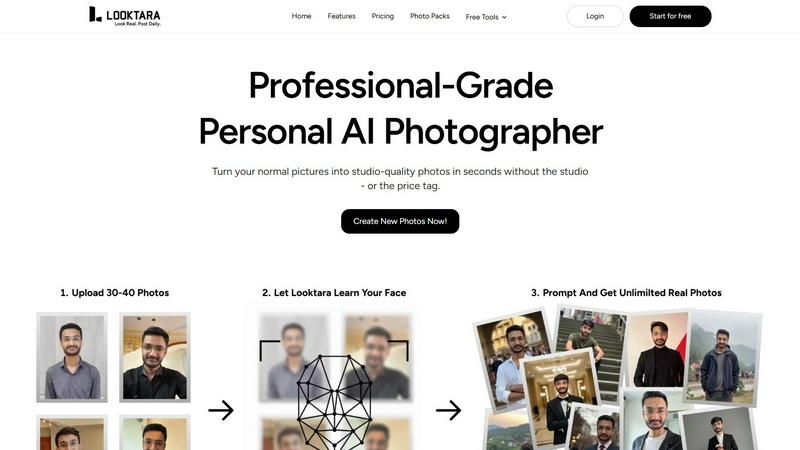
Looktara is your personal AI photographer, permanently on-call in your pocket. Forget the stress of last-minute photoshoots or shelling out cash every time you need a fresh pic. Here's the vibe: you upload about 30 photos of yourself just once. In roughly 10 minutes, it cooks up a private, encrypted AI model that learns your face, your unique energy, and nothing else—your data stays yours. Once your model is trained, you're in total control. Need a new photo? Just type a prompt like "professional headshot with a confident smirk" or "chilling at a cafe with a latte," and boom. In about 5 seconds, Looktara generates a studio-quality solo photo that is undeniably, authentically YOU. It cuts through the cringe of most AI gens that give you plastic skin and those dead, uncanny valley eyes. You get real texture, natural lighting, and the exact mood you need: authority for LinkedIn, approachable warmth for a client reel, a crisp studio look for a keynote, or a casual behind-the-scenes moment. It's built for anyone who puts themselves out there online—creators, founders, professionals, job seekers—who are absolutely tired of recycling the same three photos from 2019. With over 18 million photos created, it's the go-to for getting a flawless pic that matches your personal brand, on-demand.
About Seedream 5.0 AI
Seedream 5.0 AI is like your new best friend in the creative world, especially if you're a designer, artist, or anyone who needs to whip up stunning visuals in a flash. Think of it as a next-level image generation tool that can take your wildest ideas and turn them into jaw-dropping images in just seconds. Whether you're crafting a cyberpunk cityscape, dreamy landscapes, or product shots that pop, this fifth-generation diffusion transformer model has got your back. With its ability to create high-resolution 2K images that rival professional photography, Seedream 5.0 AI is all about pushing the limits of creativity. The cherry on top? It's currently offering a rad 50% discount for a limited time, so you can dive into the world of high-quality visuals without breaking the bank. Get ready to unleash your imagination and explore endless possibilities with Seedream 5.0 AI.
Frequently Asked Questions
Looktara FAQ
How many photos do I need to upload?
You'll need to upload around 30 photos of yourself for the AI to properly learn your face and features. The key is variety: use different angles, expressions, and lighting conditions (but all should clearly be you!). This helps the model understand you in 3D, so it can generate new, accurate photos from any prompt you give it later.
Are my photos and AI model private?
Absolutely. Your privacy is a big deal. The photos you upload are used to train your own personal, encrypted AI model. This data is not used to train any general public model and is not mixed with other people's photos. Your unique model and your generated photos are for your eyes only, unless you decide to share them.
How long does it take to generate a photo?
Once your personal AI model is trained (which takes about 10 minutes after you upload your initial photos), generating a new image is super fast. Just type your prompt and you'll get your studio-grade photo in about 5 seconds. It's literally faster than trying to set up a ring light for a selfie.
Can I control the style and background of the photos?
Yes, 100%! You are the creative director. The magic is in the text prompt. You describe exactly what you want, including the setting (e.g., "modern office," "coffee shop," "beach at sunset"), your expression, the vibe, and even clothing hints. Looktara's AI interprets your description to create a photo tailored to your specific request, giving you full creative control.
Seedream 5.0 AI FAQ
How does Seedream 5.0 AI understand my prompts?
Seedream uses advanced AI algorithms to comprehend complex descriptions, including spatial layouts, lighting, and artistic styles. This means you can describe your vision in detail, and the AI will interpret it accurately.
Can I edit images after they are generated?
Absolutely! With the image-to-image editing feature, you can upload generated images and request specific changes using natural language. It’s as simple as telling the AI what you want to adjust.
What types of styles can I choose from?
You can explore a variety of styles, including photorealism, anime, cyberpunk, watercolor, oil painting, and 3D rendering. The flexibility allows you to experiment and find the look that best fits your project.
Is there a trial version available?
While the current offer includes a 50% discount, there may not be a free trial specifically mentioned. However, you can dive right into the experience at a reduced price and unlock its full potential for your creative needs.
Alternatives
Looktara Alternatives
Looktara is your personal AI photographer, letting you generate pro solo pics from a text prompt after training a private model on your face. It sits in the generative art and AI photo creation space, basically giving you a digital twin on demand. People hunt for alternatives for all the usual reasons. Maybe the price point isn't right for them, or they need features for group photos or different art styles. Sometimes it's about platform access—like needing a web version instead of just an app. When you're scouting other options, keep your non-negotiables front of mind. Think about data privacy—is your face model kept locked down? Check the output quality to avoid the creepy uncanny valley. And see if the vibe matches your needs, whether that's ultra-professional headshots or more creative, off-the-wall generations.
Seedream 5.0 AI Alternatives
Looking to dive into the world of image generation? Seedream 5.0 AI is your go-to tool for creating jaw-dropping visuals from simple text prompts. This fifth-generation diffusion transformer model is all about turning your ideas into photorealistic 2K images that’ll leave you and your audience speechless. But let’s be real; sometimes, you gotta explore your options. Many users seek alternatives for a variety of reasons like pricing, specific features, or even platform compatibility. When scouting for an alternative, consider what you really need. Are you looking for something budget-friendly, or do you want a tool that specializes in certain styles? Check if the alternative offers similar high-resolution capabilities, and whether it can interpret your prompts as accurately as you’d like. Finding the right fit for your creative flow can make all the difference, so keep your eyes peeled for features that resonate with your artistic vision.