
LuxSign vs Phishly
Side-by-side comparison to help you choose the right AI tool.

Get your docs signed with EU-legal e-signatures that are low-key fire and hosted in Luxembourg.
Last updated: February 28, 2026

Phishly
Stop phishing scams in your inbox with AI that sniffs out sketchy emails in one click.
Visual Comparison
LuxSign

Phishly
Feature Comparison
LuxSign
Luxembourg Lockdown Hosting
This is the big one. Every single document you upload is stored on secure servers physically located in Luxembourg. This isn't just about speed; it's the ultimate privacy move. By keeping everything within the country's borders, LuxSign guarantees full compliance with GDPR and Luxembourg's own strict data protection laws right out of the gate. Your sensitive contracts aren't bouncing around the global internet; they're chilling in a digital fortress in the heart of the EU. It's peace of mind you can't put a price on.
eIDAS SES Legally Valid Signatures
Stop worrying if your digital signature will hold up in court. LuxSign provides Simple Electronic Signatures that comply with the EU's eIDAS regulation (910/2014). This means your signed contracts are legally admissible and valid for most business transactions across all 27 EU member states. It's the legal muscle behind the digital pen, making your online agreements as binding as the old wet-ink version, but without the hassle.
Drag, Drop, and Send Workflows
Signing is stupid simple. Upload your PDF or Word doc, then literally drag and drop signature, date, and initial fields exactly where you need them. Need four people to sign? Add them all. You can choose if they sign all at once (parallel) or in a specific order (sequential). Hit send, and the platform automatically fires off personalized email invites to each signer. You can just kick back and track the progress in real-time as everyone does their part.
All-Access Audit Trail
For compliance nerds and detail-oriented bosses, this feature is a godsend. Every action on a document is meticulously logged. We're talking timestamps, IP addresses, and full signer info for every view, click, and signature. This creates a tamper-proof record of the entire signing journey. If anyone ever questions the process, you have a crystal-clear, verifiable paper trail (a digital one, obviously) to prove exactly what happened and when.
Phishly
One-Click Gmail Scan
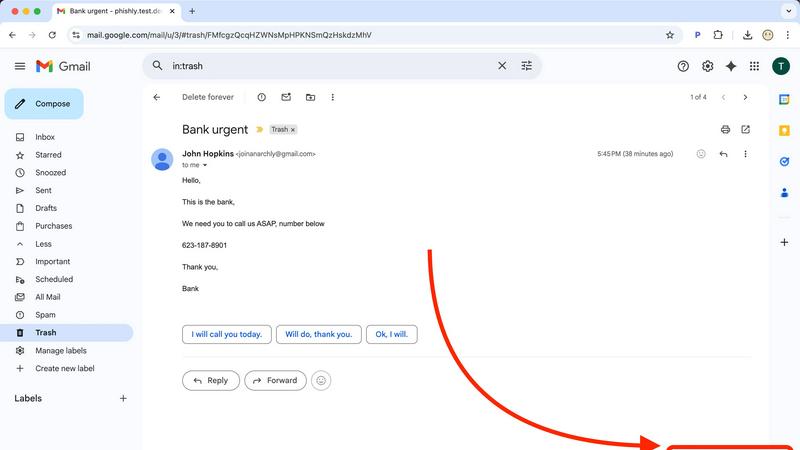
This is the bread and butter. With the Chrome extension installed, you never have to leave your inbox to get protection. Just open any email that gives you the heebie-jeebies, look for the "Scan with Phishly" button, and give it a click. It's like having a security expert on speed dial, right there in your browser. No downloading, no forwarding, no fuss—just instant AI analysis without breaking your workflow.
Web-Based Email Paste Tool
Not a Gmail user? Got a sketchy email in your Outlook, Yahoo, or work account? No sweat. Just head over to the Phishly website, copy the entire suspicious email (headers and all if you can), and paste it into their web tool. It's the same powerful AI engine, just in a handy web wrapper. Perfect for those times you're checking mail on a different device or browser.
Clear-Cut Risk Assessment with Breakdown
Phishly doesn't just give you a scary red "DANGER" sign and leave you hanging. It delivers a super clear, easy-to-understand verdict: Safe, Medium Risk, or High Risk. Then, it breaks down the "why" in plain English. It'll point out the specific red flags it found, like "Suspicious Domain Detected," "Urgent Language Used," or "Sender Spoofing Attempt." This way, you learn what to look for next time.
Privacy-First, On-Demand Scanning
Your inbox is your business. Phishly gets that. Unlike some security tools that scan every single email automatically (which can feel creepy), Phishly only analyzes the emails you explicitly choose to scan. You are in complete control. It's an on-demand bodyguard, not a constant surveillance camera. This approach keeps your private conversations private while still protecting you from active threats.
Use Cases
LuxSign
Freelancer Closing Deals Fast
You're a designer, consultant, or developer. You just finished a killer proposal for a new client. Instead of attaching a PDF and hoping they print-sign-scan-email it back (lol, never happens), you drop it into LuxSign. Drag a signature field to the bottom, send it via email, and boom—they can sign on their phone in 30 seconds. You look professional, you get paid faster, and you avoid the endless email ping-pong. It's a solo-preneur game changer.
HR Onboarding New Team Members
HR folks, feel the pain of onboarding paperwork no more. Offer letters, NDAs, policy agreements—you can bundle them all into a seamless digital packet. Set up a sequential workflow where the candidate signs the offer first, then HR signs, then it's automatically filed. Everything is encrypted, legally sound, and stored securely in your LuxSign workspace. No more lost forms or chasing down physical signatures on day one.
Small Business Managing Client Contracts
Running a small agency or firm? You're constantly sending out service agreements, project scopes, and approval forms. With LuxSign's Premium plan, you can save these as templates. Next time you need a contract, just fill in the client's details, add signature fields, and send it to multiple stakeholders at once. The audit trail keeps everything above board, and the Luxembourg hosting keeps your clients' data super secure, which is a major trust signal.
Enterprise Legal & Compliance Teams
For larger companies, especially in regulated industries, compliance is non-negotiable. LuxSign's Business tier offers the heavy artillery: full API access and an SDK for baking e-signatures directly into your existing CRM, document management, or ERP systems. Add custom branding so every signing experience screams your company name, and use collaboration workspaces to manage complex, multi-departmental signing processes with strict access controls and a unified audit log.
Phishly
The "Is This Really From My Boss?" Panic
You get an email from your boss (or someone claiming to be them) asking you to buy gift cards or send sensitive info ASAP. The signature looks right, but something feels off. Instead of stressing out or falling for it, you hit "Scan with Phishly." It can analyze the sender's actual email address against the display name and check for subtle spoofing tricks, giving you the confidence to either reply or report it.
Verifying Sketchy "Account Alert" Emails
Your heart drops when you get an "Urgent: Your account will be closed!" email from PayPal, Netflix, or your bank. Before you click any link or enter any info, scan it. Phishly will check if the links go to legitimate domains or fake lookalike sites and if the language matches classic phishing scare tactics. It turns a moment of panic into a moment of clarity.
Screening Invoices and Payment Requests
Freelancers and small business owners get tons of emails with attachments and payment details. A fake invoice from a "vendor" with a malicious attachment is a common attack. Pasting the email into Phishly's web tool can help verify the legitimacy of the request before you open anything or send any money, protecting your business from financial loss.
Teaching Digital Literacy (To Yourself & Others)
Every time you use Phishly, you get a mini-lesson in phishing detection. By reading the breakdown of why an email was flagged, you start to internalize the red flags. It's a fantastic tool for parents to check emails with their kids, or for office managers to demonstrate safe practices to their team, building everyone's scam-spotting skills.
Overview
About LuxSign
Alright, let's break it down. LuxSign is your new digital signing sidekick, but with the security creds of a Swiss bank (well, a Luxembourgish one). It's a cloud-based platform that lets you get documents signed online in minutes, without all the old-school printing, scanning, and "did you get my email?" chaos. But here's the main flex: it's built and hosted entirely in Luxembourg. This isn't just a random choice—it means all your docs are encrypted end-to-end and stored exclusively within the EU, making it fully GDPR compliant by default. No data sneaking off to servers in who-knows-where. It's perfect for businesses in Europe, or anyone dealing with European clients, who need their contracts to be legally valid (thanks to eIDAS SES standards) and their data privacy on lock. Whether you're a freelancer sending a single proposal or a massive enterprise needing custom workflows, LuxSign cuts through the red tape. You get drag-and-drop signing fields, automated email nudges to signers, and the ability to have multiple people sign at once or in a specific order. It's basically giving your paperwork a first-class, ultra-secure ticket to Doneville.
About Phishly
Ever get that icky feeling in your gut when an email hits your inbox? You know the one. It's from "Your Bank" but the email address looks sus, or it's screaming "URGENT ACTION REQUIRED" about a package you don't remember ordering. That's your spidey-sense tingling for phishing scams, and Phishly is here to be your AI-powered sidekick. It's basically a scam-sniffing superhero that lives right in your Gmail. Think of it as that super skeptical friend who reads every email over your shoulder and goes, "Hmm, I don't trust it." But instead of a friend, it's a genius AI that's trained to spot all the sneaky tricks phishers use. You just open any sketchy email and hit the "Scan with Phishly" button in your Chrome extension, or copy-paste the email text right on their website. Within seconds, it gives you the real talk: a clear "Safe," "Medium Risk," or "High Risk" verdict with a breakdown of exactly why it's shady—like spotting fake sender addresses, weird domains, panic-inducing language, and other social engineering mind games. It's built for regular folks, freelancers, and small biz teams who want top-tier protection without the headache (or cost) of some giant, complicated enterprise security suite. Plus, it respects your privacy big time; it only scans the emails you specifically tell it to. No tech degree required, it's free to use, and it gives you instant peace of mind. Stop guessing and start knowing.
Frequently Asked Questions
LuxSign FAQ
Is a LuxSign signature really legal?
For real! LuxSign provides eIDAS-compliant Simple Electronic Signatures (SES). Under EU Regulation 910/2014, these signatures are legally admissible and valid for the vast majority of business and personal transactions across the entire European Union. Think sales contracts, NDAs, service agreements—you're totally covered. For super high-stakes stuff like property transfers, you might need a Qualified signature, but for 99% of biz, you're golden.
Where exactly is my data stored?
This is the core of LuxSign's vibe. Your documents are stored exclusively on secure servers located within Luxembourg. They never leave the country. This isn't just about good security; it's the key to guaranteeing automatic compliance with GDPR and Luxembourg's own top-tier data protection laws. Your data gets a Luxembourg passport and never has to travel.
Can multiple people sign the same document?
Absolutely, and you get to call the shots on how it goes down. You can add up to 4 signers per document on the Premium plan. Need everyone to sign at the same time? Use parallel signing. Need the CEO to sign before the intern? Set up a sequential workflow. The platform guides each signer through their part automatically with email notifications, so you don't have to play project manager.
What if I need to sign something on my phone?
No sweat! LuxSign is fully mobile and tablet-ready. The interface is optimized for touch, so you can easily draw your signature with your finger or stylus. Whether you're commuting, between meetings, or just away from your desk, you can review and sign documents securely from anywhere. Getting documents signed doesn't have to wait until you're back at your computer.
Phishly FAQ
Is Phishly really free?
Heck yes, it's really free! There's no catch, no hidden fees, and no premium tier you're forced into (at least for now). The team built it to provide essential phishing protection to everyone. You can use the Chrome extension and the web tool without spending a dime. It's a legit free lunch in the cybersecurity world.
Does Phishly read all my emails?
Absolutely not! That's a major privacy win. Phishly is not constantly monitoring your inbox. It only springs into action when you specifically click the "Scan" button on an email or paste text into the website. You have to explicitly ask it to look at something. Your private emails stay private.
What makes Phishly different from my email provider's spam filter?
Great question! Your built-in spam filter is like a bouncer at the club door, trying to stop obvious junk from getting in. Phishly is like the friend inside who points out the sketchy person trying to scam you. It analyzes the content, context, and clever tricks inside the emails that already made it to your inbox, catching the more sophisticated phishing attempts that bypass basic filters.
Do I need to be a tech expert to use it?
Nope, not at all! If you can click a button or copy and paste text, you can use Phishly. It's designed for total beginners. The results are in simple, straightforward language. There's no configuration, no complex settings—just instant, understandable answers to the question "Is this email a scam?"