
Mailopoly vs Phishly
Side-by-side comparison to help you choose the right AI tool.

Mailopoly
Mailopoly turns your chaotic inbox into a breeze, organizing emails, extracting info, and writing replies in your style.
Last updated: February 28, 2026

Phishly
Stop phishing scams in your inbox with AI that sniffs out sketchy emails in one click.
Visual Comparison
Mailopoly

Phishly
Feature Comparison
Mailopoly
Cleanbox - Only the Emails that Matter
Mailopoly's Cleanbox feature ensures that only the important emails land in your view. It intelligently filters out the noise, so you can focus on what truly matters. No more sifting through irrelevant messages; just your essential communications, neatly organized and ready for action.
Instant Information Extraction
Forget opening every email to find what you need. Mailopoly automatically extracts crucial details like invoice amounts, booking info, dates, times, and attachments. With everything summarized and visible at a glance, you can make decisions quickly and efficiently, freeing up time for more important tasks.
AI-Powered Replies in Your Voice
Typing out replies is so last year. With Mailopoly, replies are drafted for you in your unique style, so you sound just like yourself without lifting a finger. Multiple suggestions are available, allowing you to choose the best response in seconds. It's perfect for personal and professional emails alike.
Poly - Your AI Life Assistant
Meet Poly, your new go-to for managing life’s little details. Need to know what bills to pay this week or upcoming flights? Just ask Poly. This built-in AI assistant not only helps with email management but can also tackle tasks across your entire life admin. It's like having an executive assistant who knows you better than anyone else.
Phishly
One-Click Gmail Scan
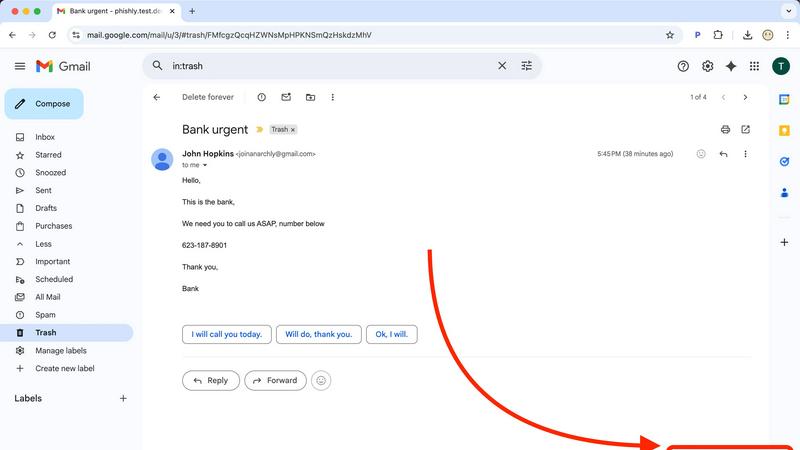
This is the bread and butter. With the Chrome extension installed, you never have to leave your inbox to get protection. Just open any email that gives you the heebie-jeebies, look for the "Scan with Phishly" button, and give it a click. It's like having a security expert on speed dial, right there in your browser. No downloading, no forwarding, no fuss—just instant AI analysis without breaking your workflow.
Web-Based Email Paste Tool
Not a Gmail user? Got a sketchy email in your Outlook, Yahoo, or work account? No sweat. Just head over to the Phishly website, copy the entire suspicious email (headers and all if you can), and paste it into their web tool. It's the same powerful AI engine, just in a handy web wrapper. Perfect for those times you're checking mail on a different device or browser.
Clear-Cut Risk Assessment with Breakdown
Phishly doesn't just give you a scary red "DANGER" sign and leave you hanging. It delivers a super clear, easy-to-understand verdict: Safe, Medium Risk, or High Risk. Then, it breaks down the "why" in plain English. It'll point out the specific red flags it found, like "Suspicious Domain Detected," "Urgent Language Used," or "Sender Spoofing Attempt." This way, you learn what to look for next time.
Privacy-First, On-Demand Scanning
Your inbox is your business. Phishly gets that. Unlike some security tools that scan every single email automatically (which can feel creepy), Phishly only analyzes the emails you explicitly choose to scan. You are in complete control. It's an on-demand bodyguard, not a constant surveillance camera. This approach keeps your private conversations private while still protecting you from active threats.
Use Cases
Mailopoly
Juggling Multiple Email Accounts
Are you overwhelmed with managing emails from different accounts? Mailopoly connects seamlessly to various providers, like Gmail and Outlook, letting you view everything in one place without the hassle of constant switching. It's the perfect solution for busy professionals or anyone with multiple email addresses.
Managing Personal Finances
Say goodbye to missed payments and late fees. With Mailopoly, you can easily track your bills, invoices, and financial deadlines. The instant information extraction feature keeps your financial commitments front and center, helping you stay on top of your finances effortlessly.
Streamlining Event Planning
Planning events can be chaotic, but not with Mailopoly. Use the integrated event manager to send out custom invitations and keep track of responses with just a click. Never miss an RSVP again while ensuring your social calendar stays organized and stress-free.
Boosting Productivity for Side Hustlers
If you're juggling a side hustle along with your main gig, Mailopoly is your secret weapon. It helps you manage tasks, deadlines, and important communications, allowing you to focus on what you love without the traditional email overwhelm. Balance work and passion projects like a pro.
Phishly
The "Is This Really From My Boss?" Panic
You get an email from your boss (or someone claiming to be them) asking you to buy gift cards or send sensitive info ASAP. The signature looks right, but something feels off. Instead of stressing out or falling for it, you hit "Scan with Phishly." It can analyze the sender's actual email address against the display name and check for subtle spoofing tricks, giving you the confidence to either reply or report it.
Verifying Sketchy "Account Alert" Emails
Your heart drops when you get an "Urgent: Your account will be closed!" email from PayPal, Netflix, or your bank. Before you click any link or enter any info, scan it. Phishly will check if the links go to legitimate domains or fake lookalike sites and if the language matches classic phishing scare tactics. It turns a moment of panic into a moment of clarity.
Screening Invoices and Payment Requests
Freelancers and small business owners get tons of emails with attachments and payment details. A fake invoice from a "vendor" with a malicious attachment is a common attack. Pasting the email into Phishly's web tool can help verify the legitimacy of the request before you open anything or send any money, protecting your business from financial loss.
Teaching Digital Literacy (To Yourself & Others)
Every time you use Phishly, you get a mini-lesson in phishing detection. By reading the breakdown of why an email was flagged, you start to internalize the red flags. It's a fantastic tool for parents to check emails with their kids, or for office managers to demonstrate safe practices to their team, building everyone's scam-spotting skills.
Overview
About Mailopoly
Mailopoly is not your average email client. It's a game-changer designed to streamline your digital life by transforming your inbox into a smart personal assistant. With Mailopoly, you can say goodbye to email overwhelm and hello to organization. This innovative tool automatically extracts the vital info from your emails, meaning you hardly have to read through them. Notifications and inbox clutter are drastically reduced, giving you more mental space to focus on what really matters. But it doesn't stop there! Mailopoly also features an integrated AI chatbot named Poly that can answer questions about your life, manage your personal finances, keep track of events, and even monitor shipments. It's like having a digital sidekick that knows you inside and out. Whether you're a busy professional, a side hustler, or just someone trying to keep life together, Mailopoly is here to help you conquer the chaos of your inbox and beyond.
About Phishly
Ever get that icky feeling in your gut when an email hits your inbox? You know the one. It's from "Your Bank" but the email address looks sus, or it's screaming "URGENT ACTION REQUIRED" about a package you don't remember ordering. That's your spidey-sense tingling for phishing scams, and Phishly is here to be your AI-powered sidekick. It's basically a scam-sniffing superhero that lives right in your Gmail. Think of it as that super skeptical friend who reads every email over your shoulder and goes, "Hmm, I don't trust it." But instead of a friend, it's a genius AI that's trained to spot all the sneaky tricks phishers use. You just open any sketchy email and hit the "Scan with Phishly" button in your Chrome extension, or copy-paste the email text right on their website. Within seconds, it gives you the real talk: a clear "Safe," "Medium Risk," or "High Risk" verdict with a breakdown of exactly why it's shady—like spotting fake sender addresses, weird domains, panic-inducing language, and other social engineering mind games. It's built for regular folks, freelancers, and small biz teams who want top-tier protection without the headache (or cost) of some giant, complicated enterprise security suite. Plus, it respects your privacy big time; it only scans the emails you specifically tell it to. No tech degree required, it's free to use, and it gives you instant peace of mind. Stop guessing and start knowing.
Frequently Asked Questions
Mailopoly FAQ
How does Mailopoly reduce my email volume?
Mailopoly intelligently filters and only shows you the emails that matter, significantly cutting down on clutter and unwanted notifications. You’ll see less junk and more important communications right away.
Is Mailopoly secure?
Absolutely! Mailopoly is designed with security in mind. It is SOC 2 certified and follows a privacy-first approach, ensuring your data remains safe and secure.
Can I use Mailopoly with my existing email accounts?
Yes! Mailopoly works with all major email providers, including Gmail, Outlook, Yahoo, and others. You can connect multiple accounts without any hassle and enjoy a unified inbox experience.
What if I don’t like the AI-generated replies?
No worries! You have full control over the replies. You can edit any AI-drafted response to better fit your style before sending, ensuring that every message reflects your voice perfectly.
Phishly FAQ
Is Phishly really free?
Heck yes, it's really free! There's no catch, no hidden fees, and no premium tier you're forced into (at least for now). The team built it to provide essential phishing protection to everyone. You can use the Chrome extension and the web tool without spending a dime. It's a legit free lunch in the cybersecurity world.
Does Phishly read all my emails?
Absolutely not! That's a major privacy win. Phishly is not constantly monitoring your inbox. It only springs into action when you specifically click the "Scan" button on an email or paste text into the website. You have to explicitly ask it to look at something. Your private emails stay private.
What makes Phishly different from my email provider's spam filter?
Great question! Your built-in spam filter is like a bouncer at the club door, trying to stop obvious junk from getting in. Phishly is like the friend inside who points out the sketchy person trying to scam you. It analyzes the content, context, and clever tricks inside the emails that already made it to your inbox, catching the more sophisticated phishing attempts that bypass basic filters.
Do I need to be a tech expert to use it?
Nope, not at all! If you can click a button or copy and paste text, you can use Phishly. It's designed for total beginners. The results are in simple, straightforward language. There's no configuration, no complex settings—just instant, understandable answers to the question "Is this email a scam?"