
MeetingMind vs Project20x
Side-by-side comparison to help you choose the right AI tool.

MeetingMind
MeetingMind auto-records and AI-summarizes your Zoom calls so you never miss the deets.
Last updated: March 1, 2026

Project20x
Project20x is your go-to AI tool for hassle-free governance that keeps your policies fresh, compliant, and totally on.
Last updated: March 4, 2026
Visual Comparison
MeetingMind
Project20x

Feature Comparison
MeetingMind
Automatic Zoom Detection
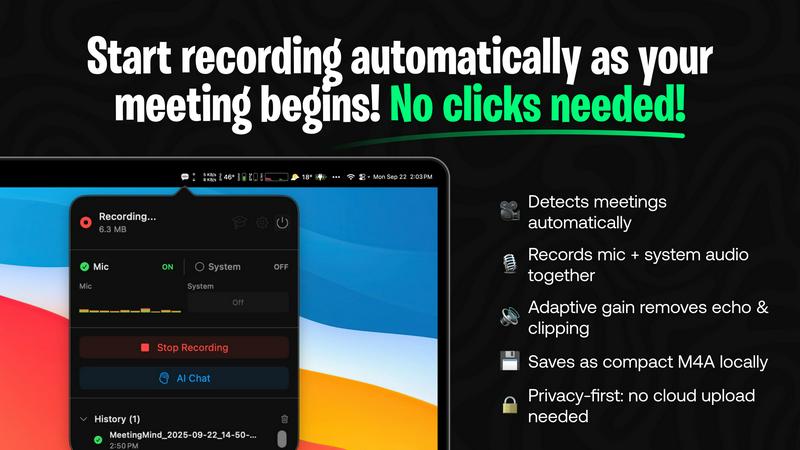
This is the set-it-and-forget-it magic. MeetingMind chills in your menu bar, silently watching. The second you launch or join a Zoom meeting, it auto-detects the session and starts recording. No fumbling for a record button, no "oh shoot I forgot to hit record." It's like having a meeting guardian angel that's always on duty, making sure you never miss a single word, quote, or brilliant idea that gets dropped.
Dual Audio Capture with Adaptive Gain
Ever tried to record a meeting where one person is loud and clear and another sounds like they're in a wind tunnel? MeetingMind solves that. It records both your microphone audio AND the system audio (that's the sound coming from your computer, like shared videos or other participants) simultaneously. Its adaptive gain tech balances the levels in real-time, so the final recording is crisp and even. No more "can you repeat that?" during playback.
Your Choice of AI Brain
Want total privacy or maximum power? You choose. MeetingMind lets you pick between a local AI (using Ollama) that processes everything directly on your Mac, keeping your data 100% offline. Or, you can connect to cloud AI via OpenRouter for potentially more advanced summaries and insights. It's like choosing between a fortified bunker or a supercomputer for your meeting notes - both are awesome.
Markdown Export & Menu Bar Stealth
After the meeting, you get the goods delivered in the universal language of productivity nerds: Markdown. Transcripts, summaries, and action items are beautifully formatted and ready to drop into Obsidian, Notion, or any other app. And the whole time, MeetingMind lives quietly as a menu bar icon. It's there when you need it, invisible when you don't. No clunky windows, no distractions. Pure, elegant utility.
Project20x
Governance Layer
This is where the magic begins! The Governance Layer employs a ten-step AI methodology that dissects legislative texts. It helps lawmakers craft precise policies by ensuring clarity and spotting any potential conflicts, making the whole process way more straightforward and efficient.
Management Layer
Once the policies are set, it's time to get down to business. The Management Layer turns those approved policies into functional code using "Rules as Code." This means we automate workflows that streamline government operations, cutting down the red tape and speeding things up like never before.
Interface Layer
Meet the Interface Layer, your new BFF for all things public service. This layer provides citizens with 24/7 access to AI agents trained on the codified policies. No more waiting in lines or being stuck on hold; just straight-up answers and assistance whenever you need it.
Transparency and Accountability
Project20x is all about keeping it real. Our platform ensures that every government action is traceable and quantifiable. We prioritize transparency and security, making sure that citizens can trust the system while keeping everything under rigorous human oversight.
Use Cases
MeetingMind
The Overbooked Project Manager
Juggling five project syncs, three client check-ins, and a team retrospective before lunch? MeetingMind is your co-pilot. It captures every detail from every call automatically. After your meeting marathon, you have perfect transcripts to reference and AI-generated action item lists to delegate from, making you look impossibly organized and ensuring nothing slips through the cracks.
The Freelancer & Solopreneur
When you're your own boss, every client call is crucial. You need to be fully present to build rapport and solve problems, not buried in a notepad. MeetingMind handles the documentation, giving you searchable records of scope discussions, feedback, and agreements. It's like having a business partner who's amazing at note-taking, so you can be amazing at everything else.
The Remote Team Member
Working from home with roommates, dogs, or street noise? Missed a key point because the Wi-Fi glitched? With MeetingMind recording both sides of the conversation, you can always go back. It's the ultimate safety net for distributed teams, ensuring perfect alignment and providing a single source of truth for what was actually said in that crucial planning session.
The Student in Virtual Lectures or Study Groups
Trying to actively participate in a seminar while also scribbling notes is a losing battle. Let MeetingMind be your lecture capture. Record the session, get a transcript to highlight and annotate later, and use the AI summary to grasp the core concepts. For study groups, it captures the collective brainpower, so you can focus on the debate instead of writing everything down.
Project20x
Streamlined Policy Creation
Lawmakers can utilize Project20x to streamline the policy creation process, using the Governance Layer to ensure clarity and alignment in regulations. This leads to quicker and more effective law-making, benefiting everyone involved.
Automated Workflow Management
Government agencies can implement automated workflows through the Management Layer. This drastically cuts down on the time and effort required to translate policies into action, allowing staff to focus on serving the public rather than getting bogged down in bureaucracy.
24/7 Citizen Support
Citizens can interact with AI agents via the Interface Layer for questions about policies or governmental services. This means no more waiting around for office hours; help is always just a click away, making public services more accessible than ever.
Enhanced Public Engagement
By bridging the gap between policymakers and the public, Project20x boosts engagement. Citizens can easily understand the policies that affect them and provide feedback, ensuring that government actions reflect the needs of the community.
Overview
About MeetingMind
Alright, let's cut through the noise. MeetingMind is that low-key genius in your menu bar that makes you look like an absolute productivity god without any of the usual effort. Think of it as your personal meeting scribe, but one that's powered by AI and has zero interest in gossip. It's built specifically for your Mac and lives to do one thing: automatically handle the boring stuff in your Zoom meetings so you can actually, you know, pay attention.
Here's the vibe: you hop on a Zoom call. MeetingMind senses it instantly (no button pressing, we're not savages) and starts recording everything - your voice, the other person's voice, even the audio from that dope presentation someone is sharing. All of it stays on your computer, 100% private. When you're done, it doesn't just hand you a messy audio file. Oh no. It serves up a full transcript, a crisp AI summary, and a list of action items, all formatted in clean Markdown ready for your notes app. It's for anyone who has ever left a meeting thinking "wait, what did we just decide?" - freelancers, managers, remote teams, students, you name it. Its main flex? Giving you your brain and your focus back. Stop taking notes, start dominating meetings.
About Project20x
Yo, welcome to Project20x, the dope AI-powered platform that's flipping the script on how government works. Imagine taking those super complicated laws and regulations and turning them into something even your grandma can understand. That's what we're all about! Project20x is designed to help government agencies, lawmakers, and everyday citizens connect the dots between the policies being made and how they impact real life. We roll deep with three layers: Governance, Management, and Interface. The Governance Layer uses a slick ten-step AI process to help lawmakers shape clear policies while spotting any conflicts. The Management Layer transforms those policies into actionable code, thanks to our "Rules as Code" magic, which automates workflows like a breeze. And the cherry on top? The Interface Layer connects citizens with AI agents that are always ready to help, giving you access to the info you need 24/7. With a strong focus on transparency and accountability, Project20x ensures everything is traceable and secure while keeping a human touch in the mix. It's like giving a turbo boost to public service!
Frequently Asked Questions
MeetingMind FAQ
Is this really 100% private?
For real, yes. If you use the local Ollama AI option, the entire process - recording, transcribing, summarizing - happens directly on your Mac. Your meeting audio and data never leave your device to some random server. It's the digital equivalent of having a conversation in a soundproof room. The app is also distributed via the Mac App Store, which adds another layer of security and trust.
How does the 60 free minutes per day work?
It's our way of letting you fully test-drive the car, not just sit in the lot. Every day, you get a fresh 60-minute timer for automatic recording. Perfect for your daily stand-up, a few client chats, or a lecture. Once you hit the limit, recording stops for the day (it resets at midnight). It's genuinely free forever, no credit card needed. Upgrade to Unlimited only if you're having long strategy sessions or back-to-back marathons.
What's the deal with the one-time purchase?
We hate subscriptions as much as you do. The "Unlimited" version is a single, one-time payment through the Mac App Store. You own it. You get all future updates for free. No monthly fees, no surprise charges. It's a classic "buy it, use it forever" model. The price is listed on the App Store page and might vary by region or during sales.
Do I have to tell people I'm recording?
ABSOLUTELY. This is non-negotiable and on you. MeetingMind is a powerful tool, but you are 100% responsible for following the law and being ethical. Always, always inform every participant that you are recording the conversation and get their consent before starting. The app includes a disclosure reminder because being a decent human is the most important feature.
Project20x FAQ
How does Project20x ensure security and transparency?
Project20x is built with a focus on security and transparency. All governmental activities are traced and quantifiable, allowing for oversight and accountability. Plus, we keep a robust human oversight mechanism in place to ensure everything runs smoothly.
Who can benefit from using Project20x?
Project20x is tailored for government agencies, lawmakers, and citizens. Whether you're a policymaker looking to streamline processes or a citizen wanting quick answers, this platform has got you covered.
What makes Project20x different from other platforms?
Unlike other platforms, Project20x combines AI technology with a deep understanding of governmental processes. It doesn't just automate; it empowers lawmakers and engages citizens, creating a full-circle solution for modern governance.
Can citizens access Project20x at any time?
Absolutely! Thanks to the Interface Layer, citizens can access information and AI support 24/7. No more waiting for business hours; your government is just a click away, anytime you need it.
Alternatives
MeetingMind Alternatives
So you've heard the buzz about MeetingMind, the AI-powered sidekick that auto-records, transcribes, and summarizes your Zoom meetings right on your Mac. It's a top-tier player in the productivity and meeting management game, designed to make you look like the most organized person in the (virtual) room. But let's be real, the quest for the perfect app is a journey. Maybe you're on a strict budget, need features beyond Mac and Zoom, or just want to see what else is out there before you commit. It's totally normal to shop around. The key is knowing what's non-negotiable for your workflow. When you're scouting for other options, think about your non-negotiables. Is rock-solid privacy and on-device processing a must? Do you need support for other platforms like Windows or Google Meet? How important are real-time features versus post-meeting summaries? Getting clear on your vibe check list will help you find the tool that actually fits your life.
Project20x Alternatives
Project20x is your go-to AI governance guru, designed to make the lives of government agencies, lawmakers, and citizens a whole lot easier. It simplifies the maze of regulations into practical, easy-to-follow processes, so everyone can get in on the action. However, folks often find themselves on the hunt for alternatives, whether it’s due to budget constraints, specific feature sets, or compatibility with their existing systems. When scouting for alternatives, consider what features matter most to you, like user-friendliness, the depth of AI support, or how well it integrates with your current tools. Also, keep an eye out for pricing models that fit your budget and whether the platform offers solid support and community engagement.