
Phishly vs WA Reminders
Side-by-side comparison to help you choose the right AI tool.

Phishly
Stop phishing scams in your inbox with AI that sniffs out sketchy emails in one click.

WA Reminders
Stop forgetting to text and automate your WhatsApp messages to send themselves, saving you major time and hassle.
Last updated: April 4, 2026
Visual Comparison
Phishly
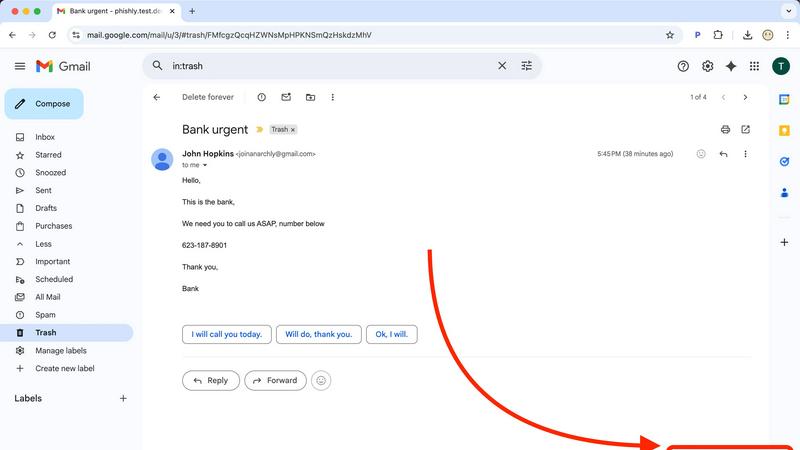
WA Reminders

Feature Comparison
Phishly
One-Click Gmail Scan
This is the bread and butter. With the Chrome extension installed, you never have to leave your inbox to get protection. Just open any email that gives you the heebie-jeebies, look for the "Scan with Phishly" button, and give it a click. It's like having a security expert on speed dial, right there in your browser. No downloading, no forwarding, no fuss—just instant AI analysis without breaking your workflow.
Web-Based Email Paste Tool
Not a Gmail user? Got a sketchy email in your Outlook, Yahoo, or work account? No sweat. Just head over to the Phishly website, copy the entire suspicious email (headers and all if you can), and paste it into their web tool. It's the same powerful AI engine, just in a handy web wrapper. Perfect for those times you're checking mail on a different device or browser.
Clear-Cut Risk Assessment with Breakdown
Phishly doesn't just give you a scary red "DANGER" sign and leave you hanging. It delivers a super clear, easy-to-understand verdict: Safe, Medium Risk, or High Risk. Then, it breaks down the "why" in plain English. It'll point out the specific red flags it found, like "Suspicious Domain Detected," "Urgent Language Used," or "Sender Spoofing Attempt." This way, you learn what to look for next time.
Privacy-First, On-Demand Scanning
Your inbox is your business. Phishly gets that. Unlike some security tools that scan every single email automatically (which can feel creepy), Phishly only analyzes the emails you explicitly choose to scan. You are in complete control. It's an on-demand bodyguard, not a constant surveillance camera. This approach keeps your private conversations private while still protecting you from active threats.
WA Reminders
QR Code WhatsApp Linking
Linking your account is stupid easy. Just scan a QR code with your phone, just like you do for WhatsApp Web. No complicated passwords or logins. In seconds, your account is hooked up and ready to start scheduling. It's the smoothest onboarding process, so you can get to the good stuff (like actually getting paid) faster.
Schedule Directly from Google Calendar
This feature is a total game-changer for the calendar-obsessed. You live in Google Calendar? Cool, stay there. Just add an internationally formatted phone number to any event's title or description, and WA Reminders will automatically schedule a reminder from that event. It's like giving your calendar superpowers to text for you.
Full Contact List Auto-Sync
Stop manually typing in numbers, you're not a robot. When you schedule from the WA Reminders app, it automatically pulls in your full contact list from your phone. This means you can select clients in a tap, avoiding typos and saving you from that "wait, what's their number again?" panic. It's seamless integration.
Recurring Message Scheduling
Got weekly appointments or monthly payment reminders? Set it and forget it. WA Reminders lets you schedule recurring messages for WhatsApp, both from its own app and via recurring Google Calendar events. This is a massive time-saver, automating your most repetitive nudges so your team doesn't have to manually remember every single week.
Use Cases
Phishly
The "Is This Really From My Boss?" Panic
You get an email from your boss (or someone claiming to be them) asking you to buy gift cards or send sensitive info ASAP. The signature looks right, but something feels off. Instead of stressing out or falling for it, you hit "Scan with Phishly." It can analyze the sender's actual email address against the display name and check for subtle spoofing tricks, giving you the confidence to either reply or report it.
Verifying Sketchy "Account Alert" Emails
Your heart drops when you get an "Urgent: Your account will be closed!" email from PayPal, Netflix, or your bank. Before you click any link or enter any info, scan it. Phishly will check if the links go to legitimate domains or fake lookalike sites and if the language matches classic phishing scare tactics. It turns a moment of panic into a moment of clarity.
Screening Invoices and Payment Requests
Freelancers and small business owners get tons of emails with attachments and payment details. A fake invoice from a "vendor" with a malicious attachment is a common attack. Pasting the email into Phishly's web tool can help verify the legitimacy of the request before you open anything or send any money, protecting your business from financial loss.
Teaching Digital Literacy (To Yourself & Others)
Every time you use Phishly, you get a mini-lesson in phishing detection. By reading the breakdown of why an email was flagged, you start to internalize the red flags. It's a fantastic tool for parents to check emails with their kids, or for office managers to demonstrate safe practices to their team, building everyone's scam-spotting skills.
WA Reminders
Reducing Clinic & Therapy No-Shows
For physios, dentists, and therapists, empty slots are a total vibe-killer. Automatically send a WhatsApp reminder 24 hours before an appointment, and another a few hours before. It comes from the clinic's known number, so clients can confirm or reschedule right there. This simple nudge dramatically cuts down on last-minute cancellations and ghosts.
Automating Client Payment Follow-ups
Freelancers and small biz owners, feel the pain of chasing invoices. Schedule polite payment reminder messages to go out a few days after an invoice is sent, and again if it's overdue. Since it's from your personal number, it feels professional but not spammy. Get paid faster without the awkward chase.
Managing Small Shop Appointments
For salons, tattoo parlors, or personal trainers, your day is blocks of time. Sync your booking system (like Calendly) to Google Calendar, and let WA Reminders handle the confirmations and reminders. Clients get a personal touch via WhatsApp, which they're way more likely to see than an email, keeping your schedule packed.
Streamlining Team Reminders for Managers
If you manage a small team of providers or field staff, use WA Reminders to send out shift reminders, meeting times, or important daily task lists via WhatsApp groups or individual messages. It ensures everyone is on the same page, directly on the app they use all day anyway.
Overview
About Phishly
Ever get that icky feeling in your gut when an email hits your inbox? You know the one. It's from "Your Bank" but the email address looks sus, or it's screaming "URGENT ACTION REQUIRED" about a package you don't remember ordering. That's your spidey-sense tingling for phishing scams, and Phishly is here to be your AI-powered sidekick. It's basically a scam-sniffing superhero that lives right in your Gmail. Think of it as that super skeptical friend who reads every email over your shoulder and goes, "Hmm, I don't trust it." But instead of a friend, it's a genius AI that's trained to spot all the sneaky tricks phishers use. You just open any sketchy email and hit the "Scan with Phishly" button in your Chrome extension, or copy-paste the email text right on their website. Within seconds, it gives you the real talk: a clear "Safe," "Medium Risk," or "High Risk" verdict with a breakdown of exactly why it's shady—like spotting fake sender addresses, weird domains, panic-inducing language, and other social engineering mind games. It's built for regular folks, freelancers, and small biz teams who want top-tier protection without the headache (or cost) of some giant, complicated enterprise security suite. Plus, it respects your privacy big time; it only scans the emails you specifically tell it to. No tech degree required, it's free to use, and it gives you instant peace of mind. Stop guessing and start knowing.
About WA Reminders
Alright, let's break it down. WA Reminders is basically your new bestie for not getting ghosted by clients. It's a slick app that lets you schedule WhatsApp messages to go out later, like setting a timer for your most important texts. Think of it as your personal time-travel assistant for customer communication. You can set it up from their own app or, get this, straight from your Google Calendar. Just pop a phone number into an event and bam, reminder scheduled. It works with both your regular WhatsApp and WhatsApp Business, so no need to switch up your whole vibe. The magic is that messages go out from YOUR actual phone number, so the convo stays personal and you can jump right back in. This is the ultimate tool for solo hustlers, clinics, therapists, and small shops who run on appointments and are tired of no-shows blowing up their schedule. If your time is money and you're done with people forgetting, this app is your plug.
Frequently Asked Questions
Phishly FAQ
Is Phishly really free?
Heck yes, it's really free! There's no catch, no hidden fees, and no premium tier you're forced into (at least for now). The team built it to provide essential phishing protection to everyone. You can use the Chrome extension and the web tool without spending a dime. It's a legit free lunch in the cybersecurity world.
Does Phishly read all my emails?
Absolutely not! That's a major privacy win. Phishly is not constantly monitoring your inbox. It only springs into action when you specifically click the "Scan" button on an email or paste text into the website. You have to explicitly ask it to look at something. Your private emails stay private.
What makes Phishly different from my email provider's spam filter?
Great question! Your built-in spam filter is like a bouncer at the club door, trying to stop obvious junk from getting in. Phishly is like the friend inside who points out the sketchy person trying to scam you. It analyzes the content, context, and clever tricks inside the emails that already made it to your inbox, catching the more sophisticated phishing attempts that bypass basic filters.
Do I need to be a tech expert to use it?
Nope, not at all! If you can click a button or copy and paste text, you can use Phishly. It's designed for total beginners. The results are in simple, straightforward language. There's no configuration, no complex settings—just instant, understandable answers to the question "Is this email a scam?"
WA Reminders FAQ
Do you offer a free plan?
Nah, we don't have a free plan, but hear us out. Running servers to reliably send your messages on time costs real money. Instead of a janky free tier, we offer a solid 14-day money-back guarantee on all plans. If it's not your thing, just ask for a refund, no drama, no questions. It's a risk-free way to test the whole shebang.
Can I send reminders directly from Google Calendar?
Yes, 100%! This is one of our killer features. Just add a phone number (with the country code, like +1...) to the title or description of any Google Calendar event. Our system will spot it and schedule a WhatsApp reminder based on that event time. You literally never have to leave your calendar workflow.
Do you have a Calendly integration?
For sure! We integrate with Calendly through Google Calendar. Just connect your Calendly to your Google Calendar (which it does easily). Then, when an appointment is booked, it creates a calendar event. WA Reminders will see that event and can send the reminder. It's a perfect, automated duo.
How will my WhatsApp reminder messages look?
The messages come directly from your linked WhatsApp number, so they look exactly like any other message you send personally. There's no "Sent via WA Reminders" label or anything sketchy. It's your name, your profile pic. The client gets it and can reply straight back to you, keeping the conversation natural.