
Phishly vs Zovo
Side-by-side comparison to help you choose the right AI tool.

Phishly
Stop phishing scams in your inbox with AI that sniffs out sketchy emails in one click.

Zovo is 20+ privacy-first browser tools for devs and writers, all unlocked with one sub from a solo dev.
Last updated: February 28, 2026
Visual Comparison
Phishly
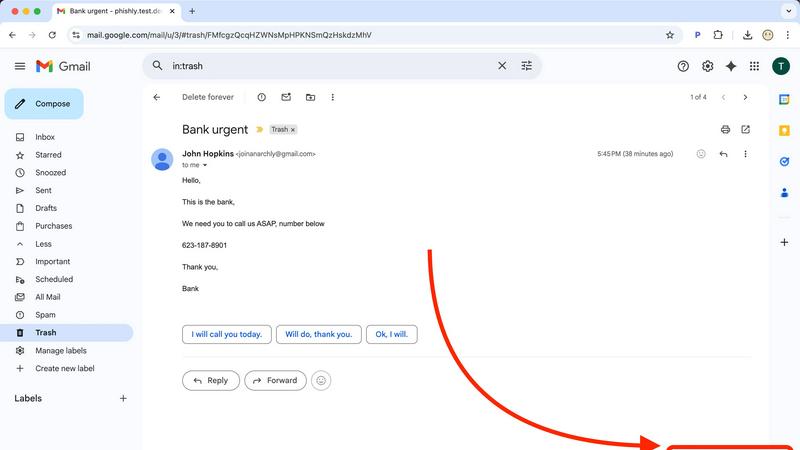
Zovo

Feature Comparison
Phishly
One-Click Gmail Scan
This is the bread and butter. With the Chrome extension installed, you never have to leave your inbox to get protection. Just open any email that gives you the heebie-jeebies, look for the "Scan with Phishly" button, and give it a click. It's like having a security expert on speed dial, right there in your browser. No downloading, no forwarding, no fuss—just instant AI analysis without breaking your workflow.
Web-Based Email Paste Tool
Not a Gmail user? Got a sketchy email in your Outlook, Yahoo, or work account? No sweat. Just head over to the Phishly website, copy the entire suspicious email (headers and all if you can), and paste it into their web tool. It's the same powerful AI engine, just in a handy web wrapper. Perfect for those times you're checking mail on a different device or browser.
Clear-Cut Risk Assessment with Breakdown
Phishly doesn't just give you a scary red "DANGER" sign and leave you hanging. It delivers a super clear, easy-to-understand verdict: Safe, Medium Risk, or High Risk. Then, it breaks down the "why" in plain English. It'll point out the specific red flags it found, like "Suspicious Domain Detected," "Urgent Language Used," or "Sender Spoofing Attempt." This way, you learn what to look for next time.
Privacy-First, On-Demand Scanning
Your inbox is your business. Phishly gets that. Unlike some security tools that scan every single email automatically (which can feel creepy), Phishly only analyzes the emails you explicitly choose to scan. You are in complete control. It's an on-demand bodyguard, not a constant surveillance camera. This approach keeps your private conversations private while still protecting you from active threats.
Zovo
Privacy-First, Local-Only Processing
This is the non-negotiable core of Zovo. Every single extension runs 100% locally on your device. Your data—your clipboard history, your browsing sessions, your JSON files—never gets sent to a cloud server. It's the digital equivalent of a Faraday cage for your browser activity. No tracking, no telemetry, no chance of a data breach because the data never leaves home.
User-Powered Roadmap & Direct Dev Access
Forget shouting into a void of support tickets. With Zovo, you submit feature requests and the dev, Michael, actually reads them. The community votes on what gets built next, so the most-wanted features jump the queue. Got a problem? You email a human directly. No bots, no endless ticket queues. It's software development as a conversation, not a corporation.
Suite-Wide Pro Subscription
One price, one payment, unlock everything. For a single lifetime fee, you get all the Pro features across the entire growing suite—current and future. This means Focus Mode in Tab Suspender, unlimited history in Clipboard Pro, cross-device sync, and every powerful tool that ships down the line. No nickel-and-diming per extension.
Constantly Evolving Toolkit
Zovo is not a static product. New extensions ship every month, with members getting early access. The "Recently Shipped" log is constantly updating with new tools like Regex Tester Pro, Web Scraper Lite, and major upgrades like adding 80 languages to BeLikeNative. It's a living toolkit that grows with your needs.
Use Cases
Phishly
The "Is This Really From My Boss?" Panic
You get an email from your boss (or someone claiming to be them) asking you to buy gift cards or send sensitive info ASAP. The signature looks right, but something feels off. Instead of stressing out or falling for it, you hit "Scan with Phishly." It can analyze the sender's actual email address against the display name and check for subtle spoofing tricks, giving you the confidence to either reply or report it.
Verifying Sketchy "Account Alert" Emails
Your heart drops when you get an "Urgent: Your account will be closed!" email from PayPal, Netflix, or your bank. Before you click any link or enter any info, scan it. Phishly will check if the links go to legitimate domains or fake lookalike sites and if the language matches classic phishing scare tactics. It turns a moment of panic into a moment of clarity.
Screening Invoices and Payment Requests
Freelancers and small business owners get tons of emails with attachments and payment details. A fake invoice from a "vendor" with a malicious attachment is a common attack. Pasting the email into Phishly's web tool can help verify the legitimacy of the request before you open anything or send any money, protecting your business from financial loss.
Teaching Digital Literacy (To Yourself & Others)
Every time you use Phishly, you get a mini-lesson in phishing detection. By reading the breakdown of why an email was flagged, you start to internalize the red flags. It's a fantastic tool for parents to check emails with their kids, or for office managers to demonstrate safe practices to their team, building everyone's scam-spotting skills.
Zovo
The Multitasking Power User
You've got 50+ tabs open for research, coding, and planning. Zovo's Tab Suspender Pro frees up your RAM, Session Manager Pro auto-saves your setup, and Clipboard History Pro keeps every copied snippet handy. It turns browser chaos into a streamlined, efficient workflow without crashing your machine.
The Developer & QA Engineer
You're knee-deep in code and APIs. JSON Formatter Pro makes messy data readable in a click, Regex Tester Pro lets you build and test patterns on the fly, and API Testing Lite helps you fire off requests directly from the browser. All your dev tools are integrated right where you work.
The Non-Native English Writer
Whether you're writing emails, social posts, or reports, BeLikeNative is your secret weapon. Highlight any clunky text, hit a key, and get it rewritten to sound natural and fluent in English (or 79 other languages). It's like having a native-speaking editor perched on your browser.
The Privacy-Conscious Professional
You handle sensitive data and can't risk it being leaked or harvested. Zovo's entire suite operates locally. Form Filler Pro generates test data without sending it online, Cookie Manager gives you control, and every tool's open-source code can be audited. You get powerful features without the privacy trade-off.
Overview
About Phishly
Ever get that icky feeling in your gut when an email hits your inbox? You know the one. It's from "Your Bank" but the email address looks sus, or it's screaming "URGENT ACTION REQUIRED" about a package you don't remember ordering. That's your spidey-sense tingling for phishing scams, and Phishly is here to be your AI-powered sidekick. It's basically a scam-sniffing superhero that lives right in your Gmail. Think of it as that super skeptical friend who reads every email over your shoulder and goes, "Hmm, I don't trust it." But instead of a friend, it's a genius AI that's trained to spot all the sneaky tricks phishers use. You just open any sketchy email and hit the "Scan with Phishly" button in your Chrome extension, or copy-paste the email text right on their website. Within seconds, it gives you the real talk: a clear "Safe," "Medium Risk," or "High Risk" verdict with a breakdown of exactly why it's shady—like spotting fake sender addresses, weird domains, panic-inducing language, and other social engineering mind games. It's built for regular folks, freelancers, and small biz teams who want top-tier protection without the headache (or cost) of some giant, complicated enterprise security suite. Plus, it respects your privacy big time; it only scans the emails you specifically tell it to. No tech degree required, it's free to use, and it gives you instant peace of mind. Stop guessing and start knowing.
About Zovo
Tired of browser extensions that are basically spyware in a trench coat? Welcome to Zovo, the ultimate power-up for your Chrome browser, built different from the ground up. This ain't some faceless corporate suite; it's 20+ killer extensions crafted by one solo dev, Michael Lip, who's banked over $400K on Upwork with a flawless record. The vibe? Your data stays on your machine, period. No creepy data harvesting, no investor pressure to monetize your every click—just pure, unadulterated utility. The flagship tool, BeLikeNative, helps over 3,300 users smash language barriers and write like a pro in 80 languages with a single keystroke. But that's just the start. You also get Tab Suspender Pro, JSON Formatter Pro, Clipboard History Pro, and a whole arsenal of tools that actually respect you. New stuff drops monthly, and the roadmap is shaped by user votes, not some boardroom. Want the tools but not ready to pay? Many are free online. Zovo is for anyone who's done with bloated, privacy-invading software and wants a curated toolkit that puts power and privacy back in their hands.
Frequently Asked Questions
Phishly FAQ
Is Phishly really free?
Heck yes, it's really free! There's no catch, no hidden fees, and no premium tier you're forced into (at least for now). The team built it to provide essential phishing protection to everyone. You can use the Chrome extension and the web tool without spending a dime. It's a legit free lunch in the cybersecurity world.
Does Phishly read all my emails?
Absolutely not! That's a major privacy win. Phishly is not constantly monitoring your inbox. It only springs into action when you specifically click the "Scan" button on an email or paste text into the website. You have to explicitly ask it to look at something. Your private emails stay private.
What makes Phishly different from my email provider's spam filter?
Great question! Your built-in spam filter is like a bouncer at the club door, trying to stop obvious junk from getting in. Phishly is like the friend inside who points out the sketchy person trying to scam you. It analyzes the content, context, and clever tricks inside the emails that already made it to your inbox, catching the more sophisticated phishing attempts that bypass basic filters.
Do I need to be a tech expert to use it?
Nope, not at all! If you can click a button or copy and paste text, you can use Phishly. It's designed for total beginners. The results are in simple, straightforward language. There's no configuration, no complex settings—just instant, understandable answers to the question "Is this email a scam?"
Zovo FAQ
Is Zovo really free to start?
Absolutely, zero cap. You can install any extension from the Chrome Web Store right now, no account needed. Core features like tab suspension, basic clipboard history, and JSON formatting work completely free, forever. The Pro upgrade is for unlocking the supercharged features like sync and advanced tools, but the free tier is legit and fully functional.
How does the "user-voted roadmap" actually work?
It's simple democracy. As a member (especially a Pro user), you can submit feature requests and vote on existing ones in the community. The developer, Michael, prioritizes building the features with the most votes and community buzz. Your input directly shapes what gets coded and shipped next.
What does "100% local" mean for features like cross-device sync?
Great question! Even for Pro features like cross-device sync, the principle holds. Sync is handled using your own Google Drive or Dropbox account—Zovo's servers are never in the middle holding your data. The extension encrypts and manages the data transfer between your own trusted cloud storage, keeping the chain private.
Are the extensions open source?
Yes! Transparency is key. Many of the core extensions, like Tab Suspender Pro and JSON Formatter Pro, are fully open source. You can check out the code on GitHub to verify there's no funny business. For others, a clear and detailed privacy policy is published so you know exactly what's happening before you install.