
Gomotion vs Postproxy
Side-by-side comparison to help you choose the right AI tool.

Gomotion
Create stunning motion graphics in seconds with Gomotion's AI, turning your words into eye-catching animations.
Last updated: February 28, 2026

Postproxy
Stop the social media API chaos and publish everywhere with one simple, bulletproof call.
Last updated: February 28, 2026
Visual Comparison
Gomotion

Postproxy
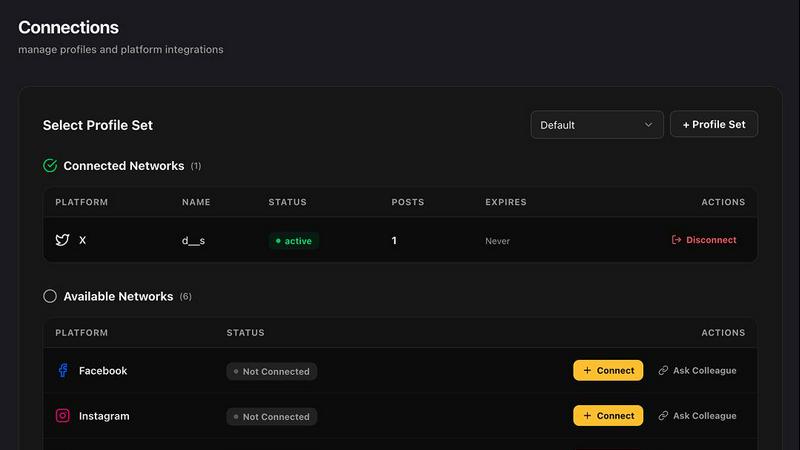
Feature Comparison
Gomotion
Transform Words Into Motion
With Gomotion, animating text is as easy as typing a prompt. Forget about the tedious keyframes; just describe how you want your text to move, and voila! The platform instantly turns your titles, captions, and logos into dynamic animations that boast cinematic flair. Ideal for product demos or creators who want professional results without the hassle, this feature takes your text game to the next level.
Discover the Narrative Mode
Ever wanted to turn your script into a full-blown animated story? With Gomotion’s Narrative Mode, you can do just that! This feature enables you to create engaging ads or short videos in minutes, complete with synced images and videos. It's perfect for marketers looking to produce compelling end-to-end stories that are ready to publish without breaking a sweat.
Design for Any Screen
Your audience is everywhere, so why shouldn't your content be too? Gomotion is designed to create animations that look stunning across all screen sizes—from mobile to desktop. Whether you're crafting a product teaser for Instagram or a TikTok video, Gomotion ensures that your animations are perfectly aligned, no matter where they're viewed.
Complex Animations Made Simple
Need to create complex animations like charts or simulations? Gomotion has got you covered. This feature allows you to transform any data into animated charts, making it perfect for explainers, simulations, and powerful presentations. Now you can deliver intricate information in a visually engaging way that captivates your audience.
Postproxy
The Unified API Endpoint
This is the whole vibe. One single API call to rule them all. You stop worrying about whether Instagram wants a square video or if LinkedIn has a character limit today. You just send your post, pick your platforms (like ["instagram", "linkedin"]), and attach your media. Postproxy takes that and does all the dirty work of talking to each platform in their own special language, so you don't have to learn five different dialects of API nonsense. It's the ultimate simplification.
Automated OAuth & Token Management
The absolute worst part of any integration? The auth dance. App reviews, permission scopes, tokens that expire at 3 AM—it's a bureaucratic hellscape. Postproxy becomes your auth guardian. You connect your social accounts once, and it handles all the token storage, refresh cycles, and re-authentication silently in the background. You just use your Postproxy API key forever. No more midnight panic because a token died.
Built-in Failure Handling & Retries
Social platform APIs are flaky. Rate limits hit you out of nowhere, quotas mysteriously vanish, and posts fail silently. Postproxy is built expecting this chaos. It automatically handles rate limits with smart backoffs, retries failed publishes, and is fully aware of platform quotas. Most importantly, it gives you explicit, clear statuses on what succeeded, what failed, and why. No more manual detective work.
Content Adaptation & Format Conversion
You can't just blast the same raw text and video everywhere. Instagram needs specific aspect ratios, X has a link card thing, YouTube wants a description. Postproxy acts as your content shape-shifter. It automatically transforms and optimizes your post body, titles, and media to match the requirements and best practices of each destination platform, maximizing your chances of a successful publish without you lifting a finger.
Use Cases
Gomotion
For Social Media Managers
Social media managers looking to spice up their posts can leverage Gomotion to create eye-catching animations that stand out in crowded feeds. Whether it’s a promotional video or an engaging story, Gomotion makes it easy to boost engagement and drive more clicks.
For Startups and Entrepreneurs
Startup founders can use Gomotion to create promotional animations that showcase their products or services without needing a design team. It's a perfect tool for making quick, impactful videos that can be shared across various platforms to attract investors and customers alike.
For Marketers
Marketers can harness the power of Gomotion to produce compelling ads that tell a story. With the Narrative Mode, they can whip up full-fledged animated campaigns in minutes, allowing them to focus on strategy rather than getting bogged down by design processes.
For Content Creators
Content creators can elevate their videos with professional-grade animations that add flair and excitement. Whether it’s YouTube content, Instagram reels, or TikToks, Gomotion empowers creators to deliver stunning visuals that keep audiences engaged.
Postproxy
The AI Content Firehose
You've got LLMs or AI agents pumping out brilliant content 24/7, but then the publishing step breaks the whole flow. Postproxy slots right in as the final, reliable delivery layer. Generate your post with AI, send it straight to the Postproxy API, and watch it flow out to all your social channels without you having to manually tweak the format for each one. It turns AI generation into a fully automated publishing pipeline.
Multi-Client/Agency Social Management
Managing posts for a dozen different clients or brand accounts is account sprawl madness. With Postproxy, you connect all those different Facebook Pages, Instagram profiles, and LinkedIn company pages once. Then, from your central dashboard or API, you can publish to any combination of them with a single request, keeping access control and logging clean and centralized. Scaling client work becomes trivial.
n8n/Zapier Automation Workflows
You're building killer automations in n8n or Zapier that trigger on events—like a new blog post, a product update, or a calendar alert. The workflow runs perfectly until the "Publish to Social" step, which requires five different, fragile integrations. Replace that whole tangled mess with one robust Postproxy step. It makes your automations actually reliable from start to finish.
CI/CD for Social Content
For the devs who want to treat content like code. You can store post copy and assets in your repo, and use CI/CD pipelines to schedule and deploy social updates. Postproxy's API fits perfectly into this model, allowing you to trigger publishes via scripts or pipeline jobs. It brings software engineering best practices—version control, rollbacks, and automated deployments—to your social media strategy.
Overview
About Gomotion
Gomotion is your ultimate sidekick for animation, bridging the gap between creativity and technology in a way that's never been easier or more fun. Picture this: you want to create stunning animations but can't afford to spend hours learning complicated software like Adobe After Effects. That's where Gomotion swoops in like a superhero. This AI-powered motion designer lives right in your browser, ready to turn your wild ideas or even the simplest images into breathtaking animations in mere seconds. It's perfect for social media managers, marketers, content creators, and small business owners who crave eye-catching visuals but lack the time or resources to learn complex design tools. Just describe what you want in plain English or upload an image, and watch as Gomotion's intelligent algorithms do the heavy lifting, crafting professional-grade animations that are brand-ready and visually stunning. Say goodbye to the frustration of blank timelines and plugin nightmares; with Gomotion, creating captivating motion graphics is not just accessible—it's a blast!
About Postproxy
Alright, let's cut through the noise. Postproxy is the single API that finally makes social media publishing not a total nightmare. Think of it as the universal translator and bouncer for your content, handling the messy, platform-specific drama so you don't have to. It's built for devs, automators, and anyone who's tired of juggling a dozen different API keys, OAuth flows, and random rate-limit errors from Instagram, Facebook, YouTube, LinkedIn, and X. Instead of writing and maintaining a mountain of custom code for each platform's ever-changing rules, you just send one clean request to Postproxy. It does all the heavy lifting: automates the boring auth stuff, handles rate limits and retries like a champ, magically adapts your content to fit each platform's weird quirks, and gives you clear analytics. It turns the chaotic, unreliable mess of multi-platform posting into predictable, boringly reliable infrastructure. Whether you're building in n8n, Zapier, with LLMs, or in your CI/CD pipeline, Postproxy is the missing piece that makes "set it and forget it" publishing actually possible. Oh, and there's a free plan to get you started. Basically, it's the cheat code for social media automation.
Frequently Asked Questions
Gomotion FAQ
How does Gomotion work?
Gomotion uses advanced AI algorithms to transform your ideas into animations based on simple descriptions or uploaded images. You input what you want, and the AI handles the rest, crafting animations that are both stylish and professional.
Is Gomotion browser-based?
Yes! Gomotion is entirely browser-based, meaning there's no need to download any software. Just hop onto the website, and you can start creating animations right away, making it super accessible for anyone with an internet connection.
Can I use my brand’s colors and fonts?
Absolutely! Gomotion allows you to import your brand assets in one click, ensuring that your videos align perfectly with your brand's identity. This feature is great for maintaining consistency across your content.
What types of animations can I create with Gomotion?
With Gomotion, you can create a wide variety of animations, including text animations, product teasers, ads, and even complex animated charts. Whether it's for social media or presentations, the possibilities are endless!
Postproxy FAQ
What platforms does Postproxy support?
Right now, Postproxy handles the big players where publishing is most complex: Instagram, Facebook, YouTube, LinkedIn, and X (formerly Twitter). The whole idea is to cover the platforms with the most bureaucratic APIs and weird rules, giving you one smooth interface for all of them.
How does Postproxy handle media like images and videos?
You just provide the public URLs to your media files (like from S3, Cloudinary, etc.) in your API request. Postproxy's backend then downloads, processes, and reformats that media as needed for each specific platform's requirements—things like resizing, transcoding video, or generating thumbnails—before uploading it directly to the social network.
Is my data and access secure with Postproxy?
Totally. Postproxy acts as a secure proxy. Your API key and requests are encrypted in transit. For platform access, it uses official OAuth flows, so you're granting permission directly to Postproxy's secure app. It stores only the necessary tokens (encrypted) to perform actions on your behalf and never stores your social account passwords.
What happens if a platform's API changes or breaks?
This is a core part of Postproxy's value. Their team monitors all the supported platform APIs obsessively. When Instagram or LinkedIn rolls out a breaking change, Postproxy updates its internal adapters so your integration stays stable. You maintain one constant API contract with Postproxy, and they deal with the shifting sands of the social platforms for you.
Alternatives
Gomotion Alternatives
Gomotion is the ultimate game-changer in the realm of design tools, specifically tailored for animation lovers who crave quick, eye-catching motion graphics. This browser-based powerhouse uses AI to transform your ideas or static images into high-quality animations in a flash. Users are often on the lookout for alternatives due to factors like pricing, specific feature sets, or compatibility with their preferred platforms. Whether it’s a budget constraint or the need for unique functionalities, exploring alternatives can lead to the perfect fit for diverse creative needs. When searching for a replacement, consider what features matter most to you, like ease of use, customization options, and the ability to generate animations from text or images. Also, think about whether the alternative aligns with your brand’s aesthetic and workflow. Finding the right tool can make all the difference in breathing life into your creative projects.
Postproxy Alternatives
Postproxy is your social media API wingman, part of the design and automation toolkit that helps devs and creators post everywhere at once. It’s the one-stop shop for blasting your content to all the major platforms without getting lost in a maze of different developer portals. People hunt for alternatives for all sorts of reasons. Maybe the pricing doesn’t fit their current hustle, they need a specific niche feature, or they just vibe better with a different UI. It’s all about finding the right tool that clicks with your workflow and budget. When you’re scoping out other options, keep your eyes on the prize. Check what platforms they actually support, how they handle the boring but crucial stuff like auth and errors, and if they play nice with your other tools like n8n or Zapier. Don’t just chase the shiniest logo; make sure it actually solves your headaches.