
PseudoRun vs SchoolGPT
Side-by-side comparison to help you choose the right AI tool.

PseudoRun
Your free, no-ads sidekick for mastering IGCSE pseudocode with instant feedback.
Last updated: March 1, 2026

SchoolGPT
SchoolGPT is your AI teaching sidekick that saves you over 10 hours a week on lesson plans and grading.
Last updated: February 28, 2026
Visual Comparison
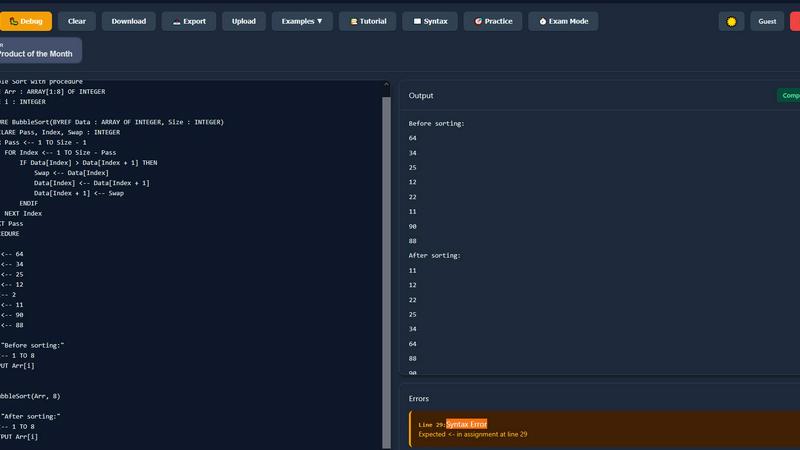
PseudoRun
SchoolGPT

Feature Comparison
PseudoRun
IGCSE Exam-Focused Editor
This isn't some generic coding playground. The editor speaks pure Cambridge IGCSE pseudocode fluently. It's 100% aligned with the official exam specs, so you're practicing the exact syntax and structures the examiners want to see. No more guessing if you're writing it "right." It's like having the exam board's answer key built into your practice, ensuring every line of code you write is building legit exam muscle memory.
Real-Time Validation & Error Checking
Say goodbye to staring at your code for hours wondering why it's broken. PseudoRun's got your back with instant, on-the-fly syntax checking. The moment you typo a keyword or mess up a structure, it gently (or not-so-gently) points it out. It's like having that super-smart friend looking over your shoulder, catching mistakes before they become bad habits, so you can write perfect, exam-ready pseudocode faster.
Step-by-Step Debugger Wizard
This feature is an absolute game-changer for understanding the flow of your algorithms. Hit play and watch your code execute line-by-line in slow motion. You can track how every single variable changes its value, see which path an IF statement takes, and follow loops as they iterate. It turns abstract logic into a visual story, making complex concepts like trace tables and algorithm tracing feel intuitive instead of intimidating.
Free Cloud Storage & IGCSE Practice Bank
Never lose your work again! Save unlimited pseudocode programs directly to the cloud and pull them up on any device, anywhere. Plus, get instant access to a massive vault of 50+ IGCSE-style practice problems and examples. Stuck on arrays? There's a module for that. Struggling with procedures? We've got you. It's your entire revision library, pre-loaded and ready to grind.
SchoolGPT
Educator-Designed Template Library
Say goodbye to prompt engineering forever. SchoolGPT comes packed with 60+ templates that were actually designed by teachers, for teachers. This isn't some generic AI you have to trick into working; it's pre-loaded with workflows for lesson plans, rubrics, quizzes, IEPs, emails, and way more. Just pick your tool, fill in a few details about your topic or standard, and bam—you get a solid, usable draft in seconds. It's like having a whole team of veteran educators in your back pocket, ready to spit out exactly what you need.
Your Voice, AI's Speed
The worst part about most AI tools is that the output sounds like a robot wrote it. Not cool. SchoolGPT is built to generate content that sounds like you. It learns from your inputs to deliver lesson hooks, assignment feedback, and communications that match your teaching style and tone. You get a polished, classroom-ready draft that you can actually use immediately instead of spending an hour rewriting awkward AI jargon. It does the grunt work so you can add your magic touch.
Standards-Aligned & Compliant
This tool isn't playing around. It's built with the real classroom in mind, which means it understands state education standards. When you generate a lesson plan or a quiz, you can align it to your specific requirements right from the start. Plus, it's designed to be FERPA and COPPA compliant, so you can use it with confidence knowing student data and privacy are taken seriously. It's powerful AI that actually knows the rules of the education game.
All-in-One Teacher Workspace
Why juggle ten different apps? SchoolGPT consolidates your biggest time-sucks into one dashboard. Need to level a text for differentiation, generate writing feedback with a custom rubric, and draft a professional email to a parent? You can bounce between all those tools in one place without ever logging into another tab. It's your central command for planning, grading, and communicating, saving you from digital clutter and context-switching headaches.
Use Cases
PseudoRun
Last-Minute IGCSE Exam Cram
The exam is tomorrow, and panic is setting in. Instead of re-reading notes for the 100th time, fire up PseudoRun. Use the Exam Mode Timer to simulate real pressure, run through the practice problems, and use the step-by-step debugger to cement your understanding of tricky algorithms. It's the most effective, high-intensity cram session you can get, turning anxiety into actionable practice.
Building Algorithm Intuition from Scratch
If terms like "bubble sort" sound like a dishwasher setting, start here. PseudoRun lets you experiment fearlessly. Write a simple loop, run it, break it, and see what happens. The real-time feedback prevents frustration, and the visual debugger shows you the "why" behind the code. It's the perfect, low-stakes environment to build that foundational logic brain.
Teachers Creating Interactive Lessons
Educators, stop spending hours creating static pseudocode examples! Use PseudoRun in class to demonstrate algorithms live. Show the step-by-step execution on a projector, let students predict the next variable state, or assign specific practice modules. It transforms passive learning into an engaging, interactive experience that students actually remember.
Perfecting Pseudocode Syntax for Top Marks
You understand the logic, but are you losing marks on formatting? PseudoRun's exam-focused editor is your precision tool. Practice writing procedures, functions, and input/output statements with the exact syntax the mark scheme requires. The validation ensures every OUTPUT and ENDIF is in the right place, securing those easy, often-dropped syntax marks.
SchoolGPT
Conquering the Sunday Scaries (Lesson Planning)
That dreaded Sunday evening lesson planning session? Obliterated. With the Lesson Plan, Unit Plan, and Worksheet Generator tools, you can turn a topic or standard into a fully structured, engaging plan in under a minute. Stuck for a hook? Need differentiated activities? SchoolGPT brainstorms it all, giving you a creative foundation so you can spend your time refining instead of staring at a blank doc. Reclaim your weekend, one generated lesson at a time.
Grading Without the Grief
Grading stacks of essays or projects is a major vibe killer. SchoolGPT's Writing Feedback and Rubric Generator tools are total game-changers. Feed in student work, set your criteria, and get detailed, constructive feedback drafted in seconds. You can generate a custom rubric for any assignment instantly, ensuring your grading is consistent and fair without the manual slog. Turn hours of grading into a focused few minutes.
Communication on Autopilot
Writing the same report card comments or parent emails over and over is the worst kind of busywork. SchoolGPT automates it with heart. The Report Card Comments tool crafts personalized notes highlighting strengths and growth areas. The Email Family tool helps you draft clear, professional, and compassionate messages home for any situation—behavior wins, concerns, or updates. Communicate effectively without the mental drain.
Instant Resource Creation
Need a last-minute quiz, a vocabulary list, or a study guide? No sweat. The Multiple Choice Quiz, Vocabulary List Generator, and Study Guide tools let you create high-quality resources in the time it takes to sip your coffee. Facing a diverse classroom? The Text Leveler tool can adapt any article or passage to fit different reading levels in a click. Be the prepared, resourceful teacher without the late-night scrambling.
Overview
About PseudoRun
Alright, listen up, future coding legends! PseudoRun isn't just another boring study tool; it's your ultimate cheat code for conquering IGCSE Computer Science. Think of it as the ultimate training simulator where you can level up your pseudocode skills without the stress of a real programming language's weird syntax. This is the #1 free, no-BS platform built specifically to smash your IGCSE exams. It's the perfect digital playground for students who are tired of getting wrecked by confusing theory and need a hands-on way to practice. Whether you're a total newbie trying to figure out what a "FOR loop" even is, or you're grinding last-minute revision, PseudoRun gives you a clean, ad-free zone to write, test, and debug IGCSE-specific pseudocode. It bridges the gap between scribbling notes and actually understanding how algorithms run. With real-time feedback and a step-by-step debugger, you can see exactly where your logic goes sideways, turning "aha?" moments into "AHA!" moments. No login walls, no sneaky premium paywalls, just pure, focused practice to make you exam-ready. It's basically your personal IGCSE pseudocode sensei, available 24/7.
About SchoolGPT
Alright, teachers, let's cut the fluff. SchoolGPT is your digital teaching sidekick, the one that actually gets it. Forget wrestling with generic AI chatbots that give you blank-page paralysis and robotic nonsense. This is an all-in-one AI assistant built from the ground up for K-12 educators, by educators. Think of it as your personal planning period on steroids, working at lightspeed to give you your life back. It's not just another tool; it's your new teaching BFF. The magic? It gives you instant access to top AI brains like ChatGPT and Claude through over 60+ ready-to-use, classroom-tested templates. Need a standards-aligned lesson plan, a banger of a rubric, or report card comments that actually sound like a human wrote them? Done. How about whipping up a quiz, an IEP draft, or a parent email in seconds? SchoolGPT's got you. It delivers classroom-ready drafts in your voice, so you can use 'em right away—no tedious prompt engineering required. Join over 10,000 teachers who've finally ditched the Sunday scaries and reclaimed their evenings. Stop working for your paperwork and let your AI handle the heavy lifting.
Frequently Asked Questions
PseudoRun FAQ
Is PseudoRun really completely free?
YES, and we mean actually free. No hidden tiers, no "premium features," and absolutely ZERO ads. Forever. We built this because we hated paywalled learning tools as students. Our mission is IGCSE success, not your wallet. All features, from the debugger to cloud saves, are free for everyone.
Do I need to create an account to use it?
Nope! You can hit "Try Now without Login" and start coding immediately. No email, no password, no hassle. If you want to save your programs to access later on different devices, you can create a free account, but it's totally optional to get started. We keep it simple.
How is this different from a normal Python or Java editor?
Great question! Normal code editors are for writing actual programs. PseudoRun is built for one thing only: Cambridge IGCSE Pseudocode. It uses the specific keywords, structures, and conventions from your syllabus that general editors don't recognize. It validates and runs your exam pseudocode, not a programming language.
Can I use it on my phone or tablet?
Totally! PseudoRun works on any device with a web browser. The interface is designed to be clean and usable on smaller screens. So whether you're on a laptop in the library or on your tablet on the bus, you can squeeze in some quick pseudocode practice anytime.
SchoolGPT FAQ
Is SchoolGPT really free to start?
Absolutely! The Free Forever plan gives you 10 AI generations per month to test drive the platform with no credit card required. It's perfect for seeing how it fits into your workflow. If you're hooked and want unlimited access to all the tools, you can upgrade to the Pro plan.
Why not just use ChatGPT?
Great question! Using generic ChatGPT for teaching is like using a Swiss Army knife to build a house—powerful, but not the right tool for the job. You spend hours on prompt engineering to get semi-decent results. SchoolGPT is the power tools specifically for education. It has pre-built templates that know about standards and classroom contexts, delivering usable drafts instantly. It's ChatGPT, but with a teaching degree and zero prompt hassle.
Is my data and student information safe?
100%. SchoolGPT is built to be FERPA and COPPA compliant. They take data privacy super seriously. You can use the tool with confidence, knowing your information and your students' information is handled with the proper security and care required in educational settings.
How much time will I actually save?
Teachers using SchoolGPT consistently report saving over 10 hours every week. That's time normally spent on lesson planning, creating materials, grading, and drafting communications. It adds up to getting your evenings and weekends back, reducing burnout, and letting you focus on the actual teaching part of teaching.
Alternatives
PseudoRun Alternatives
Yo, so you've found PseudoRun, the ultimate free gym for your IGCSE pseudocode skills. It's that interactive, real-time platform that makes learning to code feel like a game, not a chore, perfect for students and teachers in the education scene. But hey, maybe you're looking for something else. Maybe you need a tool that runs on a different device, or you're hunting for extra features beyond IGCSE, or maybe you just wanna see what else is out there. Totally valid! The search for the perfect coding sidekick is real. When you're checking out other options, keep your eyes peeled for a few key things. Does it vibe with your exam board's style? Can it give you instant feedback when you mess up? Look for a clean, easy-to-use interface that won't make your brain hurt. And, of course, check if it fits your budget—because free is always a major flex.
SchoolGPT Alternatives
Alright, so you've heard the buzz about SchoolGPT, the AI teaching sidekick that's basically a superhero for lesson plans and grading. It's a top-tier player in the AI-for-educators game, designed to give teachers their evenings back by automating the paperwork grind. But hey, we get it—no single tool is a perfect fit for everyone. Maybe the price point isn't in your budget this year, or you're locked into a specific platform like Google Classroom. Perhaps you need a feature it doesn't have, or you just wanna shop around before committing. Totally valid. When you're on the hunt for something similar, keep your eyes peeled for a few key things. Look for tools that actually get the teacher struggle, with templates that don't require a PhD in prompt engineering. Check if they play nice with your existing tech stack and, crucially, if they help you meet those pesky state standards without the extra work. The goal is to find your own digital BFF that makes your job easier, not harder.