
Refbox vs WA Reminders
Side-by-side comparison to help you choose the right AI tool.

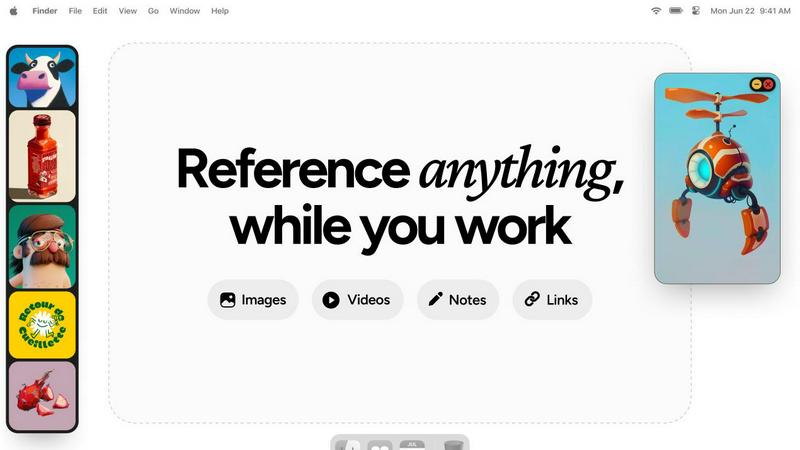
Refbox floats your images and notes above your desktop so you can reference them instantly.
Last updated: February 28, 2026

WA Reminders
Stop forgetting to text and automate your WhatsApp messages to send themselves, saving you major time and hassle.
Last updated: April 4, 2026
Visual Comparison
Refbox
WA Reminders

Feature Comparison
Refbox
Always-On-Top Floating Frames
This is the core magic. Any image, GIF, or video you add lives in its own little resizable window that stubbornly (and wonderfully) stays on top of every other app you're working in. Sketching in Photoshop? The reference stays visible. Coding in your IDE? The design comp is right there. You can minimize them, lock them in place, or auto-hide the whole sidebar. It completely kills the context-switching hell and keeps your focus laser-sharp.
Masonry & Gallery View Modes
Not everyone works the same way, so Refbox doesn't force you to. Cramming for a mood board? Pop into Masonry Mode for that Pinterest-like, cascading grid of all your images and notes—perfect for seeing the big picture. Need to scrutinize details? Switch to Gallery View for a clean, full-screen slideshow experience. It's perfect for multi-monitor setups, letting you dedicate a whole screen to your reference collection without any fuss.
Markdown-Powered Notes & Checklists
Because sometimes you need words, not just pictures. Jot down ideas, paste tutorial links, or create quick to-do lists right inside Refbox. And it's not some basic text box—it supports Markdown, so you can add headers, bold text, lists, and checkboxes to keep your thoughts organized. No more flipping to a separate notes app and breaking your creative trance.
Pro-Level Media Tools
Refbox goes way beyond just displaying pictures. We're talking pro features like frame-by-frame scrubbing for GIFs and videos (a godsend for animators), a built-in color picker to grab hex codes from any media, and the ability to crop images on the fly. You can even paste a website URL and it'll generate a screenshot for you. It's packed with those little touches that feel like secret superpowers and save you hours of fiddling with other apps.
WA Reminders
QR Code WhatsApp Linking
Linking your account is stupid easy. Just scan a QR code with your phone, just like you do for WhatsApp Web. No complicated passwords or logins. In seconds, your account is hooked up and ready to start scheduling. It's the smoothest onboarding process, so you can get to the good stuff (like actually getting paid) faster.
Schedule Directly from Google Calendar
This feature is a total game-changer for the calendar-obsessed. You live in Google Calendar? Cool, stay there. Just add an internationally formatted phone number to any event's title or description, and WA Reminders will automatically schedule a reminder from that event. It's like giving your calendar superpowers to text for you.
Full Contact List Auto-Sync
Stop manually typing in numbers, you're not a robot. When you schedule from the WA Reminders app, it automatically pulls in your full contact list from your phone. This means you can select clients in a tap, avoiding typos and saving you from that "wait, what's their number again?" panic. It's seamless integration.
Recurring Message Scheduling
Got weekly appointments or monthly payment reminders? Set it and forget it. WA Reminders lets you schedule recurring messages for WhatsApp, both from its own app and via recurring Google Calendar events. This is a massive time-saver, automating your most repetitive nudges so your team doesn't have to manually remember every single week.
Use Cases
Refbox
3D Modeling & Texturing
For 3D artists, having concept art, material references, and orthographic views visible at all times is non-negotiable. Refbox lets you float those crucial blueprints and texture photos right over your modeling software like Blender or Maya. Scrub through turntable GIFs frame-by-frame to study details, and keep your color palette notes in a side panel. It streamlines the entire process from blockout to final render.
Digital Illustration & Concept Art
Illustrators and concept artists live and die by their reference libraries. With Refbox, you can assemble a mood board of poses, lighting setups, and color palettes in a Masonry grid without ever leaving your drawing app. Lock a few key reference images in place over your canvas in Clip Studio Paint or Procreate (via Sidecar), and just draw. No more digging through folders mid-stroke.
UI/UX & Web Design
Designing a new interface? Keep your competitor screenshots, style guides, and component libraries in a floating sidebar right next to Figma or Sketch. Use the notes feature to hold user stories and feedback, and quickly screenshot live websites by pasting URLs directly into Refbox. It keeps all your research and inspiration contextual and instantly accessible, making the design iteration cycle way faster.
Animation & Motion Graphics
Animators need precise control. Refbox is a powerhouse here, allowing you to float video reference or animated GIFs over your timeline in After Effects or Toon Boom. The frame-by-frame scrubbing feature is a game-changer for nailing down timing and movement. You can also keep storyboards and shot lists in markdown notes, creating a centralized hub for your entire scene planning.
WA Reminders
Reducing Clinic & Therapy No-Shows
For physios, dentists, and therapists, empty slots are a total vibe-killer. Automatically send a WhatsApp reminder 24 hours before an appointment, and another a few hours before. It comes from the clinic's known number, so clients can confirm or reschedule right there. This simple nudge dramatically cuts down on last-minute cancellations and ghosts.
Automating Client Payment Follow-ups
Freelancers and small biz owners, feel the pain of chasing invoices. Schedule polite payment reminder messages to go out a few days after an invoice is sent, and again if it's overdue. Since it's from your personal number, it feels professional but not spammy. Get paid faster without the awkward chase.
Managing Small Shop Appointments
For salons, tattoo parlors, or personal trainers, your day is blocks of time. Sync your booking system (like Calendly) to Google Calendar, and let WA Reminders handle the confirmations and reminders. Clients get a personal touch via WhatsApp, which they're way more likely to see than an email, keeping your schedule packed.
Streamlining Team Reminders for Managers
If you manage a small team of providers or field staff, use WA Reminders to send out shift reminders, meeting times, or important daily task lists via WhatsApp groups or individual messages. It ensures everyone is on the same page, directly on the app they use all day anyway.
Overview
About Refbox
Alright, let's cut the fluff. Ever been in the creative zone, totally vibing, only to have your flow absolutely murdered by alt-tabbing through a million browser tabs and folders? Yeah, we've all been there. Refbox is here to end that nightmare for good. It's basically your new digital sidekick, a floating reference app that keeps all your inspo—images, GIFs, videos, notes, you name it—right on top of your workspace. No more window juggling. No more getting lost. It just... floats there, exactly where you need it, so you can keep your head in the game.
Built for the pros who can't afford distractions—think 3D artists, animators, UI/UX designers, illustrators, and concept artists—Refbox is the ultimate "stay in the flow" tool. You can pull in media from anywhere: drag-and-drop from your computer, paste a link from the web, or even snag something straight from your clipboard. Organize it all into collections, view it in a slick Pinterest-style layout or a full-screen gallery, and scrub through videos frame-by-frame like a boss. It's not just another app cluttering your dock; it's a legit game-changer that puts your entire inspiration library at your fingertips, literally. Think of it as your second monitor, but way smarter and cooler.
About WA Reminders
Alright, let's break it down. WA Reminders is basically your new bestie for not getting ghosted by clients. It's a slick app that lets you schedule WhatsApp messages to go out later, like setting a timer for your most important texts. Think of it as your personal time-travel assistant for customer communication. You can set it up from their own app or, get this, straight from your Google Calendar. Just pop a phone number into an event and bam, reminder scheduled. It works with both your regular WhatsApp and WhatsApp Business, so no need to switch up your whole vibe. The magic is that messages go out from YOUR actual phone number, so the convo stays personal and you can jump right back in. This is the ultimate tool for solo hustlers, clinics, therapists, and small shops who run on appointments and are tired of no-shows blowing up their schedule. If your time is money and you're done with people forgetting, this app is your plug.
Frequently Asked Questions
Refbox FAQ
Is Refbox just for artists and designers?
Nope! While it's a total game-changer for visual creatives, anyone who works with multiple references can benefit. Writers compiling research, video editors comparing clips, students organizing study materials, or even developers tracking UI bugs—if you're tired of tab chaos, Refbox can bring order to your desktop. It's for anyone who values a focused, clutter-free workflow.
How does the "always-on-top" feature work with multiple monitors?
It works flawlessly! Refbox is designed for multi-monitor warriors. You can drag your entire reference sidebar or individual floating frames to any screen. They'll stay reliably on top of the apps on that specific monitor. This lets you dedicate one screen purely to your Refbox collection while you work freely on another, creating the ultimate focused workspace.
Can I import references directly from websites?
Absolutely, and it's super easy. Just copy the URL of an image, GIF, or video from your browser and paste it directly into Refbox—it'll import it for you. There's even a killer feature where you can paste a regular website link (like a tutorial or article), and Refbox will automatically generate a screenshot of the entire page for you to keep as a visual reference.
What's the deal with the one-time purchase?
You pay once, and you own it forever. No subscriptions, no monthly fees, no "pro" tiers locking features behind a paywall. It's a straightforward, single payment for the complete app and all its current and future features. This model is pretty based and increasingly rare, making it a no-brainer investment for professionals tired of software-as-a-service fatigue.
WA Reminders FAQ
Do you offer a free plan?
Nah, we don't have a free plan, but hear us out. Running servers to reliably send your messages on time costs real money. Instead of a janky free tier, we offer a solid 14-day money-back guarantee on all plans. If it's not your thing, just ask for a refund, no drama, no questions. It's a risk-free way to test the whole shebang.
Can I send reminders directly from Google Calendar?
Yes, 100%! This is one of our killer features. Just add a phone number (with the country code, like +1...) to the title or description of any Google Calendar event. Our system will spot it and schedule a WhatsApp reminder based on that event time. You literally never have to leave your calendar workflow.
Do you have a Calendly integration?
For sure! We integrate with Calendly through Google Calendar. Just connect your Calendly to your Google Calendar (which it does easily). Then, when an appointment is booked, it creates a calendar event. WA Reminders will see that event and can send the reminder. It's a perfect, automated duo.
How will my WhatsApp reminder messages look?
The messages come directly from your linked WhatsApp number, so they look exactly like any other message you send personally. There's no "Sent via WA Reminders" label or anything sketchy. It's your name, your profile pic. The client gets it and can reply straight back to you, keeping the conversation natural.
Alternatives
Refbox Alternatives
Refbox is that goated floating reference app for creatives who need their inspo on deck. It lives in the productivity and workspace management category, basically your digital sidekick for keeping images, videos, and notes pinned above everything else so you can cook without constantly tab-switching. People hunt for alternatives for all the usual reasons. Maybe the price isn't right for their budget, or they need it on a different platform like Linux. Sometimes they're after a super specific feature Refbox doesn't have, or they just want to see what else is out there before committing. When you're shopping around for a different tool, think about your main vibe. Do you absolutely need that always-on-top magic? How do you like to organize your references—simple grids or fancy layouts? Check if it plays nice with your OS and other apps, and of course, make sure the cost doesn't give you sticker shock. The goal is to find something that fits your workflow like a glove.
WA Reminders Alternatives
So you're all about that WA Reminders life – scheduling your WhatsApp messages so your clients don't ghost you. It's a total game-changer for appointment-based hustles, right? But hey, maybe you're scoping out the scene. Totally get it. Sometimes you need different features, a different price point, or a tool that plays nicer with your other apps. The search for the perfect sidekick is real. When you're on the hunt for something new, you gotta know what's non-negotiable for your grind. Think about your budget, obviously. But also, how automated do you need things to be? Does it need to live inside your calendar, or are you cool with a separate app? And crucially, how many "are we still on for today?" messages do you need to fire off without losing your mind? Getting clear on that stuff is key. It's a whole ecosystem of productivity tools out there, from simple schedulers to full-blown CRM beasts. Your mission, should you choose to accept it, is to find the one that fits your workflow like a glove—without overcomplicating things or breaking the bank. Let's be real, you just want fewer no-shows and more hours back in your day.