
Shrinkpad vs Skene
Side-by-side comparison to help you choose the right AI tool.

Shrinkpad
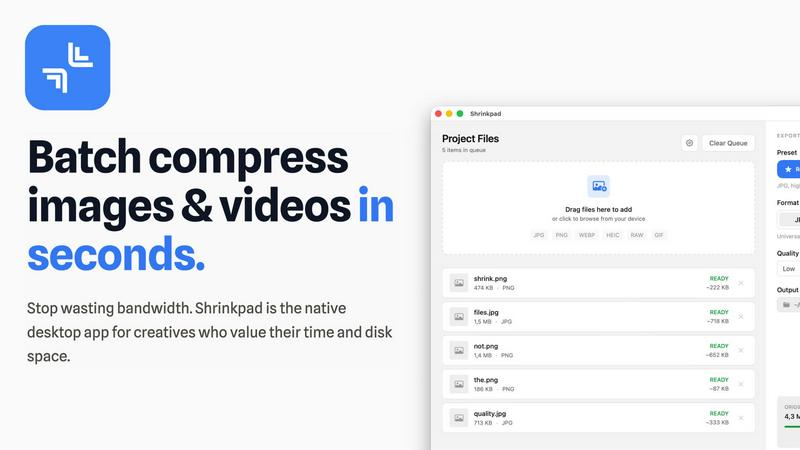
Shrinkpad crushes your bloated media files in bulk, saving you space and time like a boss.
Last updated: February 28, 2026

Stop pasting black box snippets and start shipping growth straight from your code.
Last updated: February 28, 2026
Visual Comparison
Shrinkpad
Skene

Feature Comparison
Shrinkpad
Folder Mode & Smart Detection
Stop dragging files one by one like it's 2005. Just drag your entire messy project folder onto Shrinkpad and watch the magic happen. It instantly auto-detects over 50 different image and video formats—from standard JPGs and PNGs to pro stuff like RAW files and HEIC—and adds them to your batch list. It smartly ignores documents and other non-media files, so you don't have to clean up your folder first. It's the ultimate "I don't have time for this" feature.
Insane Batch Processing
This is where Shrinkpad flexes. We're talking about processing thousands of images and videos in one go without your Mac breaking a sweat or crashing. Unlike flimsy web tools that give up after 20 files, Shrinkpad handles massive queues with ease using multi-threaded compression. You can mix photos and videos in the same batch, and it automatically applies the perfect settings for each file type. Set it up, hit compress, and go grab a coffee.
Auto-Quality & Format Support
Shrinkpad stops the guessing game. It automatically analyzes the visual complexity of each image to apply the perfect compression ratio, aiming for that sweet spot where file size plummets but quality stays looking crisp. No more fiddling with sliders! It also supports a ton of modern formats out of the box, including WEBP, AVIF, MP4, and MOV, so you can compress everything in your arsenal without needing five different apps.
Privacy-First, Local Processing
Your files are your business. Shrinkpad keeps it that way. Every single bit of compression happens right on your Mac using native macOS frameworks. Nothing ever gets uploaded to a cloud server somewhere. This is huge for photographers, designers, or anyone working with client work or sensitive assets. You get speed, security, and peace of mind, all while saving your precious bandwidth.
Skene
Codebase-Powered Signal Detection
Skene doesn't guess what your users are doing; it knows. It dives deep into your repository, reads the code, and automatically detects growth signals and friction points. Think of it as giving your app a full-body MRI to find exactly where the onboarding flow gets clunky or where a killer feature is being ignored. No more manual event tracking or hoping your analytics snippet fired correctly. The insights come straight from the source.
AI Context Layer & Prompt-Driven Growth
This is the secret sauce. Skene builds a live "context layer" of your entire product and user journey. This means you (or your AI coding agent) can just prompt it for growth tasks. Need to improve activation for a new feature? Just ask. It's like having a growth co-pilot in your IDE that understands your product's DNA. You own the logic, version it with Git, and prompt it like you would any other AI tool.
Self-Optimizing User Journeys
Once Skene spots a bottleneck, it doesn't just send you a report and peace out. It takes action. It automatically generates improved versions of user flows (like onboarding steps or feature discovery tours), runs them as experiments, and rolls out the winning variant. It's a set-and-forget growth loop that constantly tunes itself, freeing you from the endless cycle of build-measure-hypothesize manually.
IDE-Native & Developer-First
Skene lives where you live: in your terminal and your IDE (like Cursor). You run it with a simple command like uvx skene-growth analyze . and boom, you're in business. There's no external dashboard to context-switch to (unless you want one). You manage growth infrastructure with the same tools you use for your product code, keeping everything in sync and under your control.
Use Cases
Shrinkpad
The Web Developer's Speed Boost
Trying to get a 90+ score on PageSpeed Insights but your hero images and videos are dragging your site down? Shrinkpad is your secret weapon. Batch compress all your website assets to slash load times and improve those Core Web Vitals (like LCP). It strips metadata and outputs web-friendly formats, so you can deploy a faster site without manually optimizing hundreds of files.
The Content Creator's Storage Savior
If you edit videos or take tons of photos, your storage disappears faster than snacks at a party. Use Shrinkpad to compress your 4K B-roll, final edits, and photo dumps by up to 90% before archiving or sharing. Free up gigabytes of space on your drive or external SSD without losing the visual quality you need for social media or client previews.
The App Developer's Bundle Slimmer
Mobile app bundle size is critical. Every megabyte counts for downloads and updates. Export your app icons and UI assets at 2x/4x resolution from Figma or Sketch, then let Shrinkpad batch optimize and rename them all. Dramatically reduce your final IPA or APK file size, leading to faster downloads and happier users.
The Everyday Mac User's Clean-Up Crew
Your "Downloads" folder is a war zone, and your iPhone photos are syncing full-resolution HEIC files to your Mac. Get your storage under control! Drag your Pictures or Downloads folder into Shrinkpad, compress everything in one click, and reclaim enough space for your next big game or software update. It's digital decluttering made stupidly simple.
Skene
Frictionless Onboarding for Indie Launches
You've just launched your solo dev project on Product Hunt. Traffic spikes, but users are bouncing after 30 seconds. Instead of panicking and manually building tours, you let Skene analyze the fresh codebase. It automatically identifies the confusing first step, generates a slick, contextual tooltip to guide users, and deploys it before your launch day is over. Time-to-value plummets, and conversions soar.
Startup Scaling Without a Growth Team
Your seed-funded startup is gaining traction, but you can't afford a dedicated growth team yet. Skene acts as your automated growth hire. It continuously monitors user activation flows, spots when a new cohort struggles with a recently shipped feature, and creates targeted in-app messages to drive adoption. You get scalable PLG tactics without the headcount.
Killing Legacy Analytics & Tour Bloat
You're fed up with your current stack of six different tools for analytics, user tours, and A/B testing. They're slow, break with every deploy, and cost a fortune. You replace the whole legacy mess with Skene. It consolidates signal detection, experimentation, and journey automation into one code-native package. Performance improves, costs drop, and you finally own your data.
AI-Agent Assisted Growth Hacking
You're deep in the agentic future, using AI to write code. Now, you can task your AI dev agent with growth work too. Because Skene provides a promptable context layer, you can tell your agent, "Hey, optimize the checkout flow for mobile users." The agent uses Skene's understanding of your app to draft, test, and implement the improvement autonomously.
Overview
About Shrinkpad
Alright, let's cut through the noise. Shrinkpad is that one Mac app you didn't know you desperately needed until your storage bar turns red and your project folders are basically digital hoarding. It's your personal media wizard that takes your chonky, oversized photos and videos and shrinks them down to a reasonable size without making them look like they were uploaded to the internet in 1999. Think of it as a compression sidekick for anyone who's ever cursed at a "Disk Full" alert. Built exclusively for macOS, it uses the native power of your Mac (yes, even those slick Apple Silicon chips) to crush file sizes locally. That means your files never leave your computer—no sketchy cloud uploads, no waiting, just pure, private processing power. Whether you're a designer drowning in 4K footage, a developer trying to slim down an app bundle, or just someone whose iPhone photos are slowly consuming their MacBook, Shrinkpad is the "set it and forget it" solution to get your digital life back on track.
About Skene
Alright, let's break it down. Skene is your product-led growth (PLG) wingman, but like, one that's actually useful and doesn't just nod along. It's built for the indie hackers, the scrappy startup squads, and the devs who are tired of the growth grind. You know the vibe: you ship an amazing product, but then you're supposed to also become a data scientist and a UX wizard to get people to actually use it? Nah. Skene automagically handles that whole circus. It's like a self-learning growth engine that plugs directly into your codebase. Instead of you pasting in janky third-party scripts that tank your performance and hide your data in some siloed dashboard you never check, Skene reads your actual code. It figures out where users are getting stuck, where they're bouncing, and then it just... fixes it. It creates better user flows, A/B tests them in the wild, and deploys the winner. So you can stop worrying about building a "growth stack" and get back to building your actual product. Growth becomes just another part of your code, something you own and can prompt, not a black-box SaaS you fight with.
Frequently Asked Questions
Shrinkpad FAQ
Can I use Shrinkpad for free?
Totally! The Free Starter plan lets you get a feel for the app with standard compression for up to 10 files per batch, covering common formats like JPG and PNG. It's perfect for trying it out or handling small, occasional jobs. If you need to crush unlimited files, videos, or use pro formats, you'll want to upgrade to a paid plan.
Does Shrinkpad support video compression?
Yes, and it's awesome! Shrinkpad isn't just for photos. It handles videos like a champ, supporting major formats like MP4 and MOV. You can mix videos and images in the same batch, and it will apply optimized compression to each, often reducing video file sizes by 65% or more while keeping them looking great.
Are my files uploaded to the cloud?
Nope, never, not even a little bit. Shrinkpad is built on a privacy-first principle. All the compression magic happens locally on your Mac. Your files stay on your device the entire time. This means it's super fast (no waiting for uploads/downloads) and 100% secure for your sensitive or client work.
How many files can I process at once?
With the paid Personal or Team plans, you can go nuts—process thousands of files in a single batch. The app is built for heavy-duty, unlimited batching and handles massive queues without crashing. The free version has a limit of 10 files per batch, which is cool for testing but you'll hit that limit fast if you're doing real work.
Skene FAQ
How is Skene different from traditional customer experience software?
Traditional tools are like putting bandaids on the outside of your app. You manually build tours that break with every UI update, and your data is locked in a siloed dashboard. Skene is surgery from the inside. It reads your codebase so it always knows your app's structure, and it generates everything automatically. When you push new code, Skene's flows update themselves. No more brittle UI selectors or manual maintenance.
How long does it take to set up?
Literally 60 seconds, maybe less if your terminal game is strong. You just connect your GitHub/GitLab repo (read-only access is fine) or run the CLI command in your project root. Skene does a lightning-fast analysis of your code and spins up its growth engine. Zero code changes required to start. It's almost suspiciously easy.
Is my code secure?
For sure. We only ever ask for read-only access to your repo. The analysis happens in a secure, isolated environment. Your proprietary code doesn't get used for training models or any funny business. It's just to let Skene understand your app's structure so it can help you grow it. You keep 100% ownership.
What kind of analytics do you provide?
You get a dashboard that shows the real stuff: user progress in real-time, completion rates for key flows, engagement heatmaps, and where bottlenecks are forming. It's all about tracking time-to-value and measuring the impact of the optimizations Skene is running. It's actionable data, not just vanity metrics, so you can see what's actually moving the needle.
Alternatives
Shrinkpad Alternatives
So you've heard about Shrinkpad, the Mac app that's basically a digital Marie Kondo for your photos and videos, helping you batch compress media files to save a ton of space. It's a lifesaver for creatives and regular folks drowning in massive image and video files. But hey, maybe you're on the hunt for something else—maybe the price tag isn't your vibe, you need Windows or Linux support, or you're just curious what else is out there in the optimization universe. When you're scrolling through options, you gotta know what's important to you. Think about whether you need cloud processing or if you're a privacy hawk who wants everything done locally on your machine. Check if it handles all your weird file formats and if the compression is actually smart, not just making your pics look like pixelated potato quality. Your perfect match depends on your specific storage drama and workflow needs. --- FAQ_SEPARATOR--- [
{"question": "What is Shrinkpad?", "answer": "Shrinkpad is a batch compression tool for Mac that lets you quickly reduce the file size of images and videos directly on your computer, saving storage space."},
{"question": "Who is Shrinkpad for?", "answer": "It's perfect for photographers, designers, or any Mac user tired of huge media files slowing down their device and hogging storage."},
{"question": "Is Shrinkpad free?", "answer": "The provided content doesn't specify pricing, so you would need to check the official Shrinkpad website or the Mac App Store for current cost details."},
{"question": "Why choose Shrinkpad?", "answer": "It processes files locally for security, supports over 50 formats, and can reduce sizes by up to 90% without a noticeable loss in quality."}
]
Skene Alternatives
Skene is your automated growth sidekick, a productivity tool that basically runs your product-led growth strategy on autopilot. It's for devs and startups who want to boost user onboarding and retention without building a whole growth team from scratch. People hunt for Skene alternatives for all the usual reasons. Maybe the budget's tight and they need a free plan, or their stack is built on something like Notion and needs a specific integration. Sometimes a team just outgrows the feature set and needs more advanced analytics or customization options. When you're shopping around for a different tool, keep your non-negotiables in mind. Think about your wallet, what platforms you absolutely need it to play nice with, and how much hand-holding you want versus how much control you need to tweak things yourself. The goal is to find something that fits your vibe without killing your productivity.