
Mailopoly vs SupaSidebar
Side-by-side comparison to help you choose the right AI tool.

Mailopoly
Mailopoly turns your chaotic inbox into a breeze, organizing emails, extracting info, and writing replies in your style.
Last updated: February 28, 2026

SupaSidebar
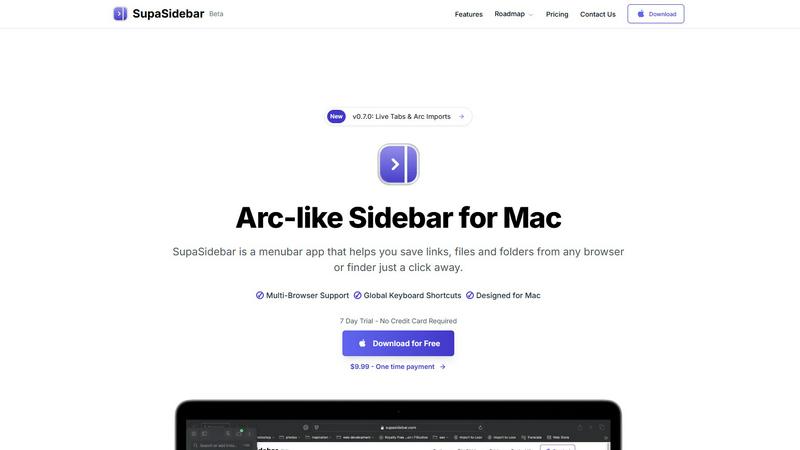
SupaSidebar is your Mac's ultimate hub for links, files, and folders, keeping everything you need just a click away.
Last updated: February 28, 2026
Visual Comparison
Mailopoly

SupaSidebar
Feature Comparison
Mailopoly
Cleanbox - Only the Emails that Matter
Mailopoly's Cleanbox feature ensures that only the important emails land in your view. It intelligently filters out the noise, so you can focus on what truly matters. No more sifting through irrelevant messages; just your essential communications, neatly organized and ready for action.
Instant Information Extraction
Forget opening every email to find what you need. Mailopoly automatically extracts crucial details like invoice amounts, booking info, dates, times, and attachments. With everything summarized and visible at a glance, you can make decisions quickly and efficiently, freeing up time for more important tasks.
AI-Powered Replies in Your Voice
Typing out replies is so last year. With Mailopoly, replies are drafted for you in your unique style, so you sound just like yourself without lifting a finger. Multiple suggestions are available, allowing you to choose the best response in seconds. It's perfect for personal and professional emails alike.
Poly - Your AI Life Assistant
Meet Poly, your new go-to for managing life’s little details. Need to know what bills to pay this week or upcoming flights? Just ask Poly. This built-in AI assistant not only helps with email management but can also tackle tasks across your entire life admin. It's like having an executive assistant who knows you better than anyone else.
SupaSidebar
Instant Saving
No one has time to waste, and SupaSidebar gets that. With a quick keyboard shortcut (CMD CTRL S), you can save or copy URLs in a heartbeat. This means you can keep your research flowing without the hassle of stopping to save links manually. It's all about efficiency, baby.
Recent Tracker
Ever lost track of that one important website you visited two days ago? SupaSidebar’s Recents feature tracks every site you’ve used in the past 48 hours. This nifty tool means you can find what you need in a flash, making your workflow smoother than ever.
Fast Search
Switching between apps can be a drag, but not with SupaSidebar. Just hit CMD CTRL K and start typing to find any file, folder, website, or app instantly. This feature keeps you in the groove and helps you avoid wasting time searching—because we all know time is money.
Pinned Favorites
Opening the same links repeatedly can be a major time sink. SupaSidebar lets you pin your favorite items right at the top of your sidebar, offering quick access whenever you need it. You customize your workspace to fit your flow, making it easy to jump between your most-used resources.
Use Cases
Mailopoly
Juggling Multiple Email Accounts
Are you overwhelmed with managing emails from different accounts? Mailopoly connects seamlessly to various providers, like Gmail and Outlook, letting you view everything in one place without the hassle of constant switching. It's the perfect solution for busy professionals or anyone with multiple email addresses.
Managing Personal Finances
Say goodbye to missed payments and late fees. With Mailopoly, you can easily track your bills, invoices, and financial deadlines. The instant information extraction feature keeps your financial commitments front and center, helping you stay on top of your finances effortlessly.
Streamlining Event Planning
Planning events can be chaotic, but not with Mailopoly. Use the integrated event manager to send out custom invitations and keep track of responses with just a click. Never miss an RSVP again while ensuring your social calendar stays organized and stress-free.
Boosting Productivity for Side Hustlers
If you're juggling a side hustle along with your main gig, Mailopoly is your secret weapon. It helps you manage tasks, deadlines, and important communications, allowing you to focus on what you love without the traditional email overwhelm. Balance work and passion projects like a pro.
SupaSidebar
Researching Like a Pro
If you're knee-deep in research, SupaSidebar is your best friend. With its ability to save links and track recent sites, you can easily gather all your resources in one spot. No more fumbling through countless tabs or losing track of that one insightful article.
Creative Projects
For creators juggling various files, links, and resources, SupaSidebar is a game changer. Its organized sidebar keeps everything you need at your fingertips, allowing you to focus on your creative process without getting sidetracked by disorganization.
Study Buddy
Students, rejoice! SupaSidebar helps you manage study materials and resources efficiently. You can save lecture notes, important links, and reference materials all in one place, making studying a breeze and helping you ace those exams.
Team Collaborations
Collaboration can get messy, but with SupaSidebar, it doesn't have to. Share links and files easily with your team members, keeping everyone on the same page. It’s perfect for brainstorming sessions or project planning, ensuring no idea gets lost in the shuffle.
Overview
About Mailopoly
Mailopoly is not your average email client. It's a game-changer designed to streamline your digital life by transforming your inbox into a smart personal assistant. With Mailopoly, you can say goodbye to email overwhelm and hello to organization. This innovative tool automatically extracts the vital info from your emails, meaning you hardly have to read through them. Notifications and inbox clutter are drastically reduced, giving you more mental space to focus on what really matters. But it doesn't stop there! Mailopoly also features an integrated AI chatbot named Poly that can answer questions about your life, manage your personal finances, keep track of events, and even monitor shipments. It's like having a digital sidekick that knows you inside and out. Whether you're a busy professional, a side hustler, or just someone trying to keep life together, Mailopoly is here to help you conquer the chaos of your inbox and beyond.
About SupaSidebar
SupaSidebar is like that cool sidekick you didn't know you needed for your Mac. It's a sleek, Arc-inspired sidebar that lives in your menu bar, designed to streamline your digital life. Imagine diving into research, juggling multiple tabs, and feeling the chaos creep in. SupaSidebar swoops in to save the day, giving you instant access to your links, files, and folders without breaking a sweat. Built for creators, researchers, and multitaskers, this app helps you maintain a state of flow and focus. Everything stays on your Mac, ensuring your data is private and secure. Plus, it seamlessly integrates with every major browser, so you can keep your game strong without switching apps. Say goodbye to the clutter of a dozen tools and hello to a single, beautiful sidebar that organizes your digital world with ease. With SupaSidebar, you command your digital space effortlessly.
Frequently Asked Questions
Mailopoly FAQ
How does Mailopoly reduce my email volume?
Mailopoly intelligently filters and only shows you the emails that matter, significantly cutting down on clutter and unwanted notifications. You’ll see less junk and more important communications right away.
Is Mailopoly secure?
Absolutely! Mailopoly is designed with security in mind. It is SOC 2 certified and follows a privacy-first approach, ensuring your data remains safe and secure.
Can I use Mailopoly with my existing email accounts?
Yes! Mailopoly works with all major email providers, including Gmail, Outlook, Yahoo, and others. You can connect multiple accounts without any hassle and enjoy a unified inbox experience.
What if I don’t like the AI-generated replies?
No worries! You have full control over the replies. You can edit any AI-drafted response to better fit your style before sending, ensuring that every message reflects your voice perfectly.
SupaSidebar FAQ
Is SupaSidebar a browser extension?
Nope! SupaSidebar is a standalone menubar app designed specifically for Mac users. It works seamlessly with all major browsers but does not require any extensions.
Which browsers does SupaSidebar work with?
SupaSidebar supports all major browsers, including Safari, Chrome, Firefox, and Arc, ensuring you can use it no matter what your browsing preference is.
What macOS version do I need?
To run SupaSidebar, you will need macOS 13 or later. Make sure your system is up to date to enjoy all the features.
Where is my data stored?
All your data stays on your Mac, ensuring privacy and security. SupaSidebar doesn't send your info to the cloud—your data remains under your control, just as it should be.
Alternatives
Mailopoly Alternatives
Mailopoly is an AI-powered email client that's all about leveling up your productivity game. It’s designed to slice your inbox size in half and cut through the noise with features that manage your tasks, finances, and events. With its chatbot assistant, Mailopoly knows your email habits and can whip up replies like a pro, making it a total game changer for anyone drowning in emails. But let’s be real, not everyone vibes with the same tool, and folks often look for alternatives due to things like pricing, specific features they need, or compatibility with their preferred devices. When hunting for the right email client, keep an eye out for user-friendly interfaces, robust features that match your style, and solid customer support, so you can keep your inbox zen and your life organized.
SupaSidebar Alternatives
SupaSidebar is your Mac's ultimate command center, designed to streamline access to links, files, and folders. It falls into the productivity and management category, catering to creators, researchers, and multitaskers who crave a seamless workflow. Users often seek alternatives for various reasons, including pricing, feature sets, or platform compatibility. A good alternative should offer similar functionalities, ease of use, and integration with your preferred apps while keeping your data secure and accessible. When searching for the right alternative, consider what features matter most to you. Look for options that provide intuitive navigation, effective organization tools, and the ability to sync across devices or browsers. Also, think about whether you prefer a free solution or are willing to invest in a premium product for enhanced capabilities. The goal is to find a tool that boosts your productivity without complicating your digital life.