
Playwriter vs The SaaS Ads Studio
Side-by-side comparison to help you choose the right AI tool.

Playwriter
Take full control of your Chrome with Playwriter, the CLI and extension that lets agents browse with all your logins and tools intact.
Last updated: March 18, 2026

The SaaS Ads Studio
Launch profitable Google and Facebook Ads for your B2B SaaS in a weekend without the agency hassle and guesswork.
Last updated: February 28, 2026
Visual Comparison
Playwriter

The SaaS Ads Studio
Feature Comparison
Playwriter
Real Browser Access
Playwriter lets your agents use your actual browser, meaning they can access all your saved logins, cookies, and extensions. No more fresh Chrome instances or limited tools—just pure functionality right where you need it.
Full Automation API
With Playwriter, you get the full Playwright API through a single execute tool. This means you can run any Playwright code without dealing with wrappers or additional complexities, making it easy to integrate into your workflow.
Collaborative Browsing
Collaboration is a breeze with Playwriter. You can see everything your agent does in real-time, so when it hits a snag, you’re there to jump in and help. It's like tag-teaming a project, where the agent handles the boring stuff and you tackle the tricky bits.
Debugger and Live Editing
Playwriter comes with an integrated debugger that allows you to set breakpoints and edit code on the fly. This means you can tweak your scripts in real time, making it easier to troubleshoot and improve your automation efforts.
The SaaS Ads Studio
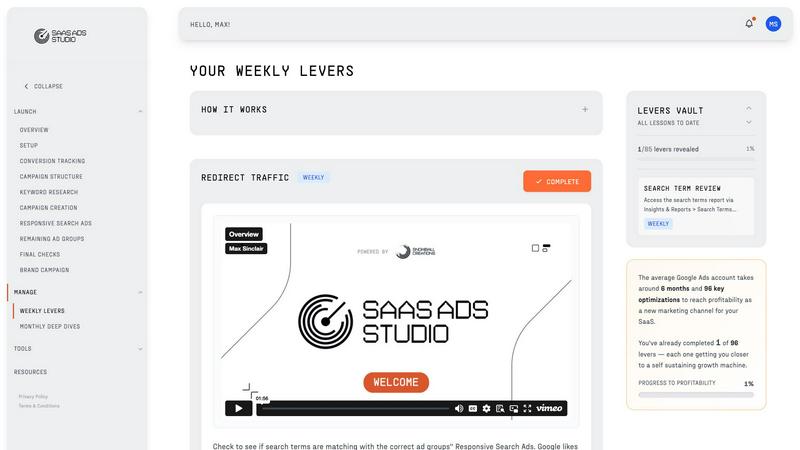
Guided Google + Facebook Ads Builder
This feature walks you through the process of launching your first campaigns with ease. You’ll have access to educational video content and AI-driven tools that leverage your brand’s unique DNA for personalized outputs.
Weekly Optimization Tasks
Each Monday, you’ll receive a straightforward to-do list filled with proven optimization tasks for both Google and Facebook. These bite-sized actions make improving your campaigns simple and manageable, removing the guesswork from the equation.
Brand DNA Analysis
The Studio’s AI dives deep into your website and messaging to create a complete Brand Profile. This profile powers every tool within the platform, ensuring that your campaigns resonate with your target audience effectively.
Data-Driven Keyword Generation
Harnessing insights from your Brand DNA and a massive SaaS ad spend dataset, this feature generates high-intent keyword clusters. It focuses on attracting buyers rather than casual browsers, ensuring your budget is spent wisely.
Use Cases
Playwriter
Streamlined Testing
If you're a developer or tester, Playwriter can automate your testing process by controlling your browser and running tests on your web applications in real-time, ensuring everything works as it should.
Data Extraction
Need to scrape data from websites? Playwriter makes it easy to automate that process without the hassle of logging in or dealing with bot detection, saving you time and effort in gathering information.
Captcha Solving
When your agent hits a captcha, you can step in and solve it right there. This collaborative approach means you won't get stuck, and your automation can continue smoothly after you've handled the hiccup.
Real-Time Monitoring
Set up Playwriter to monitor web activity and gather insights as it happens. You can keep an eye on changes, performance, and user interactions in real-time, making it a powerful tool for data-driven decisions.
The SaaS Ads Studio
Launching New Campaigns
Whether you’re kicking off your first Google Ads campaign or diving into Facebook Ads, The SaaS Ads Studio simplifies the process. Follow the guided setup to create effective ads that resonate with your audience from the get-go.
Continuous Campaign Optimization
Once your campaigns are live, use the weekly optimization tasks to keep improving performance. With each task, you can measure progress and make data-driven decisions that lead to better ROI.
Building Targeted Audiences
Use the platform's tools to create tailored audiences for your ads. This ensures that your messaging hits the right people at the right time, ultimately driving higher conversion rates.
Analyzing Campaign Performance
The Studio’s powerful analytics tools allow you to upload search term reports and get structured insights. Spot waste, identify opportunities, and strategically shift your budget to maximize effectiveness.
Overview
About Playwriter
Playwriter is your new best friend in the world of automation and browser control. Forget the days of clunky bots that can’t navigate the web properly. With Playwriter, you can give your AI agents access to your actual browser session, complete with all your logins, extensions, and cookies. It's like getting a VIP pass to the web for your agents, allowing them to interact with sites just like you would. The standout feature? A Chrome extension that connects seamlessly, paired with a powerful CLI that lets you run Playwright code directly in your existing browser. It's perfect for developers, testers, or anyone looking to streamline their web interactions. Plus, it's open-source and MIT licensed, so you can tweak it to fit your needs. Say goodbye to the limitations of headless browsing and hello to a more efficient way to automate your web tasks.
About The SaaS Ads Studio
Alright, let’s dive into the magic of The SaaS Ads Studio. This platform is not just another tool; it’s your ultimate sidekick for conquering Google and Facebook Ads like a pro. Designed specifically for B2B SaaS founders and growth leads, it’s like having an entire agency at your fingertips, minus the hefty price tag. Tired of throwing cash at confusing campaigns with no results? The SaaS Ads Studio is here to change that. In just one weekend, you can launch a clean, conversion-tracked Google Ads account, complete with a killer playbook that guides you through every step.
The platform is split into two power-packed phases: Launch and Manage. In the Launch phase, you’ll utilize a guided builder and AI toolkit to create a rock-solid ads engine. Then, you transition to the Manage phase, where each week brings you simple, bite-sized optimization tasks to keep your campaigns climbing. No more guesswork, just actionable insights to help you scale your SaaS business effectively. With expertise drawn from the Snowball Creations team, who have managed millions in ad spend, you’re getting top-notch systems tailored for success without the agency costs. It’s time to stop wasting your budget and start seeing real gains.
Frequently Asked Questions
Playwriter FAQ
How does Playwriter connect to my browser?
Playwriter connects through a Chrome extension that establishes a WebSocket to a local relay, allowing your agents to communicate directly with your existing browser session.
Is Playwriter secure to use?
Yes! Your data never leaves your machine, and all connections are local. You don’t need to worry about remote servers or accounts, ensuring your browsing sessions remain private and secure.
Can I use Playwriter with other tools?
Absolutely! Playwriter works with any MCP client like Cursor, Claude, or VS Code, giving you flexibility in how you integrate it into your existing workflow.
Is Playwriter really open source?
Yes! Playwriter is open source and MIT licensed, meaning you can check out the code, modify it, and contribute to its development if you want to.
The SaaS Ads Studio FAQ
How quickly can I expect to see results?
While results can vary based on your specific campaigns and industry, many users start seeing improvements within a few weeks of implementing the platform’s optimization tasks.
Do I need prior experience in Google Ads or Facebook Ads?
Not at all! The SaaS Ads Studio is designed for everyone, from complete newbies to seasoned pros. The guided setup and educational content make it easy to understand and use.
What kind of support is available?
You’ll have access to a wealth of resources, including educational videos and a community of users. Plus, the platform's intuitive design makes it straightforward to navigate.
Can I use The SaaS Ads Studio for multiple brands?
Yes! The SaaS Ads Studio is flexible enough to handle multiple brands, allowing you to create unique campaigns tailored to each brand's specific needs and audience.
Alternatives
Playwriter Alternatives
Playwriter is a rad automation tool that lets you control Chrome with AI through a Command Line Interface (CLI) or a more user-friendly Model Control Protocol (MCP). It's all about giving your AI agents a real browser experience, so they can work with your actual logged-in sessions, extensions, and all that good stuff. This means better performance and fewer headaches when it comes to bot detection. Users often start searching for alternatives because they might be looking for better pricing, specific features that fit their workflow, or compatibility with their favorite platforms. When diving into the world of alternatives, it's crucial to consider factors like ease of use, the range of features offered, support for your preferred environment, and of course, the price tag. Finding the right fit can make all the difference in your automation journey!
The SaaS Ads Studio Alternatives
The SaaS Ads Studio is your go-to platform for mastering Google Ads, specifically tailored for B2B SaaS founders and growth leads. It’s designed to eliminate the headaches of traditional ad campaigns, allowing you to launch profitable campaigns in a weekend without the need for pricey agencies. Users often search for alternatives when they encounter issues like high costs, lack of features that align with their specific needs, or difficulty navigating complex platforms. When hunting for alternatives, look for user-friendly interfaces, comprehensive support, and tools that align with your marketing goals to ensure you’re not just spinning your wheels.