
Dividend Data vs Tradepal
Side-by-side comparison to help you choose the right AI tool.

Dividend Data
Stop copy-pasting stock data and just use a formula to get dividends and financials instantly in your spreadsheet.
Last updated: March 11, 2026

Tradepal
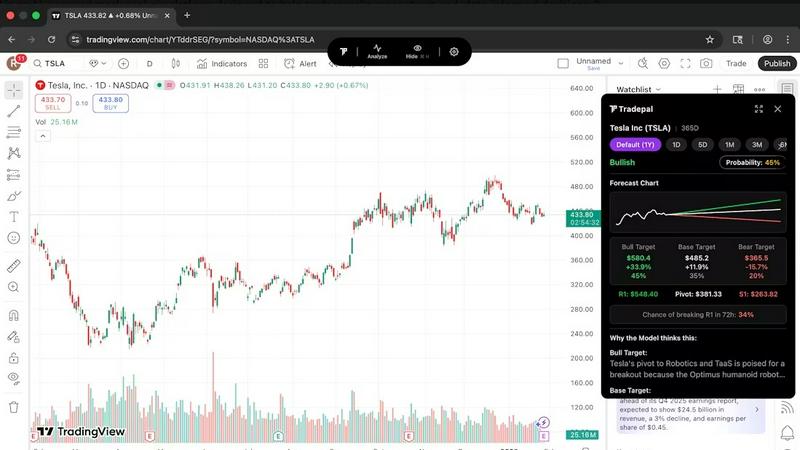
Tradepal is your AI trading sidekick that reads any chart and spits out legit forecasts in seconds.
Last updated: February 28, 2026
Visual Comparison
Dividend Data

Tradepal
Feature Comparison
Dividend Data
Spreadsheet Superpowers
This is the core magic. The add-in gives you a library of custom functions (like DIVIDENDDATA_DIVIDENDS, DIVIDENDDATA_RATIOS, etc.) that work directly in your cells. No more tab-hopping to finance sites. You build your own live, updating financial models and dashboards right inside the comfort of Google Sheets or Excel. It automates the tedious data-grunt work so you can focus on the actual analysis.
Deep Dividend & Fundamental Data Dive
Built for the income-focused crowd, it delivers the specific metrics you crave. Get forward dividends, yields, ex-dates, payout ratios, and dividend growth rates instantly. But it doesn't stop there; you also get the full context with PE ratios, EPS, revenue, balance sheet items, and over 100 other fundamental metrics. It's like having a direct feed from the market's brain into your spreadsheet.
30+ Years of Historical Context
You can't make smart decisions with just today's data. Dividend Data hooks you up with decades of historical data for those 80,000+ tickers. This lets you backtest strategies, analyze long-term trends, calculate compound growth rates, and see how a company performed through different market cycles. It's your financial time machine, no DeLorean required.
AI-Powered Research Assistant (Pro Terminal)
Beyond the spreadsheets, their flagship web app, the Dividend Data Terminal, includes an AI Analyst. This is your on-demand research buddy. Chat with it to get summaries, ask complex questions about stocks, and generate insights without digging through 10-Ks yourself. It supercharges your initial research phase before you even build your spreadsheet model.
Tradepal
Universal Chart Support (Your Chart, Our AI)
Stop worrying about compatibility, fr. Tradepal is the ultimate wingman for your existing setup. Whether you're glued to TradingView, hooked on Thinkorswim, or rocking some other platform, Tradepal's AI can read any U.S. stock chart you throw at it. Just have the chart on your screen and click analyze, or snap a screenshot and upload it through the web app. It's that simple. No exporting data, no complicated imports. Get instant, deep analysis on the charts you're already using without any hassle.
AI Forecasts & Price Cone Projections
Get a literal glimpse into the possible future, my dude. Tradepal doesn't just give you a single price target and call it a day. It uses a blended AI ensemble to generate intraday forecasts for ranges, reversals, and volatility. Then, it slaps these forward-looking "price cones" right onto your chart. You can personalize the view to match your trading style and save it. It's like having a weather map for stock prices, showing you potential storm zones (risk) before the rain starts, so you're never caught off guard.
News & Sentiment Analysis Stream
Forget scrolling through a million Twitter feeds and news sites. Tradepal aggregates market mood from professional trader sources and financial news into one clean, easy-to-scan stream. This lets you see when real conviction is building in the crowd before it turns into a major price move. It's your central hub for the vibe of the market, helping you separate the signal from the endless noise of financial media.
Breakout Signals & Smart Watchlists
Wanna catch those early moves? Tradepal's constantly scanning live sentiment streams, order flow hints, and momentum shifts across the stocks you care about to pick up early signals of strength or weakness. Pair that with smart watchlists where you can set alerts for unusual activity or risk events. It's like having a 24/7 sentry on duty, so you can step away from the screen without FOMO, knowing you'll get pinged when things actually start popping off.
Use Cases
Dividend Data
Building a Dynamic Dividend Dashboard
Create a master spreadsheet that tracks your entire watchlist or portfolio. Use formulas to pull in live dividend yields, next ex-dates, payout ratios, and stock prices. Watch it update automatically, giving you a real-time snapshot of your income investments without manual refreshes. Perfect for tracking your dividend calendar.
Screening for Dividend Aristocrats & Growers
Use the historical data functions to screen for stocks with a proven track record. Build formulas that check for consecutive years of dividend growth, analyze growth rates over 5 or 10 years, and filter by safe payout ratios. You can create a powerful, custom stock screener that lives right in your Sheets or Excel.
Performing Deep-Dive Company Analysis
When you find a interesting stock, go deep. Pull 10 years of income statements, balance sheets, and cash flow statements directly into a sheet to build your own financial models and ratio analysis. Calculate trends in debt, margins, and returns on equity without ever leaving your workbook.
Automating Portfolio Performance Reports
Link your portfolio holdings and use Dividend Data to automatically pull in current prices, dividend amounts, and YTD performance metrics. Combine this with your share counts to calculate total portfolio value, projected annual income, and overall yield. Automate your monthly or quarterly performance review reports.
Tradepal
The Idea Validator
You've been staring at a chart for an hour and think you see a perfect setup forming. But is it just hopium? Instead of second-guessing yourself into a bad trade, let Tradepal be your reality check. Click analyze, and get an objective breakdown of the key levels, patterns, and probable scenarios. It helps you confirm your thesis or, just as importantly, spot the flaws in your plan before you risk any capital.
The Bias-Buster
We've all been there—you're emotionally attached to a stock (looking at you, bagholders) and only see what you want to see. Tradepal acts as your emotional circuit breaker. It delivers cold, hard AI analysis without fear or favor, giving you the bull AND bear cases with confidence scores. This forces you to confront the other side of the trade, helping you make decisions based on data, not desperation or greed.
The Multi-Platform Power User
You use one platform for charting, another for scanning, and a third for execution. Juggling them is a pain. Tradepal cuts through the clutter by working seamlessly on top of any charting platform. You don't have to change your flow. Just keep doing you, and let Tradepal's overlay provide the extra layer of AI insight right where you already are, making your whole multi-app workflow smoother and smarter.
The Prep-Trader
You can't stare at screens all day, but you also don't want to miss a potential setup. With Tradepal, you can quickly scan your watchlist charts in the morning, use the AI to highlight the ones with the strongest signals or most interesting risk/reward cones, and set smart alerts. This lets you efficiently prep for the trading session, focus on the highest-probability plays, and manage your time like a pro.
Overview
About Dividend Data
Alright, let's cut through the Wall Street jargon. Dividend Data is your new bestie for stock analysis, but it lives where you already work: your spreadsheet. Think of it as a magic wand for Google Sheets and Microsoft Excel that summons decades of stock market intel with a simple formula. Done with copying and pasting data from sketchy websites or wrestling with complex API keys? This tool is built for that exact pain point. It's specifically crafted for dividend and fundamental investors who are tired of paying Bloomberg Terminal prices but still want that institutional-grade data. We're talking instant access to dividends, yields, payout ratios, growth rates, full financial statements, earnings, key ratios, price history, and over 100 other metrics. The best part? You just type something like =DIVIDENDDATA_DIVIDENDS("MSFT") and bam, the data appears live. It's got a legit free tier that doesn't ghost you after a trial (2,500 credits monthly, forever), covers over 80,000 tickers with 30+ years of history, and was built by a dividend investor who actually gets what you need. This is for the investor who wants to level up their research game without the institutional price tag or headache.
About Tradepal
Yo, traders! Ever feel like you're drowning in charts, trying to decode squiggly lines while your emotions are screaming at you? Enter Tradepal, your new AI-powered hype man in the chaotic world of trading. Think of it as that super-chill, ridiculously smart friend who glances over your shoulder at your chart and drops pure, unfiltered knowledge. Built by traders who've been in the trenches, Tradepal isn't another clunky platform trying to replace your favorite setup. Nah, it's a lightweight co-pilot that vibes with whatever you're already using—Thinkorswim, TradingView, you name it. Just pop the chart on your screen, hit 'Analyze,' or even upload a screenshot, and boom. Its brain (powered by some of the latest AI models) goes to work, spotting patterns, levels, and momentum shifts you might have missed. It gives you the real talk with clear bull, base, and bear scenarios, complete with confidence scores, so you can make moves without the guesswork and emotional bias. It's your second set of eyes, designed to help you trade with more conviction and less noise. Perfect for the active trader who wants an AI edge without changing their whole workflow.
Frequently Asked Questions
Dividend Data FAQ
Is there really a free plan?
Yes, for real! The free plan gives you 2,500 credits every single month, and it never expires. No credit card needed to start. It's perfect for individual investors doing periodic research. You're not getting a 7-day trial that forces you to pay; you get a permanently useful free tier.
How do I get started? Is it complicated?
Not at all. If you use Google Sheets, just install the add-on from the Google Workspace Marketplace. For Excel, get it from Microsoft AppSource. Once installed, a sidebar will appear, and you can start typing the =DIVIDENDDATA... formulas directly into your cells. No coding, no API key setup.
What's the difference between the Spreadsheet add-in and the Pro Terminal?
The Spreadsheet add-in is about getting data into your existing workflow (Sheets/Excel). The Pro Terminal is their full web application with advanced data visualizations, the AI Analyst for chat-based research, and automated portfolio tracking tools. They complement each other; many users start with the spreadsheets and upgrade to the Terminal for deeper analysis.
What counts as a "credit"?
A credit is typically used each time you call a formula that fetches new data. For example, using =DIVIDENDDATA_QUOTE("AAPL", "price") might cost 1 credit. Pulling a longer history might cost a few more. The system is designed so the 2,500 free credits are plenty for substantial individual use.
Tradepal FAQ
How do I use Tradepal?
Super simple. After you sign up for your free trial, you can download the slick desktop app for macOS or Windows. It chills on your screen while you trade. When you've got a U.S. stock chart up on ANY platform, just click the 'Analyze' button in the Tradepal app. It'll instantly snap a pic and serve up the AI insights. Not feeling a download? No sweat. You can also just go to the web app, upload a screenshot of your chart, and get the same fire analysis right in your browser.
Is Tradepal financial advice?
ABSOLUTELY NOT. Let's be crystal clear: Tradepal is an analysis tool, not your financial advisor. It's like a super-powered microscope for your charts. We give you the data, patterns, and scenarios, but the final decision to buy, sell, or hold is 100% on you. We're here to inform your process, not tell you what to do. Always do your own research and consider your risk tolerance.
What charts are compatible with Tradepal?
Tradepal is basically the Switzerland of trading tools—it's neutral and works with everyone. If you can see a chart of a U.S.-listed stock on your screen, Tradepal can analyze it. This includes major platforms like TradingView, Thinkorswim, Webull, Schwab, Fidelity, and more. Desktop, web browser, it doesn't matter. Just show it the chart.
Do I need trading experience to use Tradepal?
While Tradepal is built for traders, it's designed to be useful at different skill levels. Newer traders can use it to learn how to spot key patterns and levels, using the AI's breakdown as a teaching tool. Experienced traders use it to speed up analysis and challenge their biases. So whether you're a rookie or a vet, there's value. But remember, it's a tool to assist your journey, not a magic money printer that replaces knowledge.
Alternatives
Dividend Data Alternatives
So you've heard about Dividend Data, the tool that slaps 30+ years of stock market intel for 80k+ tickers straight into your Sheets or Excel. No API keys, no coding, just simple formulas. It's basically the cheat code for dividend and fundamental investors who want deep data without the Wall Street price tag. People hunt for alternatives for all the usual suspects. Maybe the pricing feels off, they need a feature that's missing, or their workflow lives on a different platform entirely. It's all about finding the right fit for your specific investing grind. When you're scoping out other options, keep your non-negotiables front of mind. Think about your budget (free tiers are a vibe), the specific data points you absolutely need, whether it plays nice with your spreadsheet of choice, and if the historical data goes back far enough for your strategy. Don't sleep on the user experience either—if it's clunky, you just won't use it.
Tradepal Alternatives
So you're vibing with the idea of Tradepal, that slick AI that reads your stock charts like a meme page? It's basically your trading wingman, a pure analysis tool in the fintech space that gives you the deets on bullish or bearish setups from a simple screenshot. No trades, just straight-up chart intel. People hunt for alternatives for all the usual reasons. Maybe the price tag doesn't fit their current portfolio grind, or they're looking for a specific feature that's not in the mix. Sometimes it's about platform loyalty—needing something that plugs directly into their broker or favorite charting software without the screenshot shuffle. When you're scoping out other options, keep your eyes on the prize. You wanna know: does it play nice with your existing workflow, or is it a whole new app to learn? Check if it gives you that clear, unbiased second opinion to fight off FOMO and hype. And always, always peep the value—does the cost make sense for the clarity and confidence it brings to your trades?