
One More Shot AI vs Ultra Face Swap
Side-by-side comparison to help you choose the right AI tool.

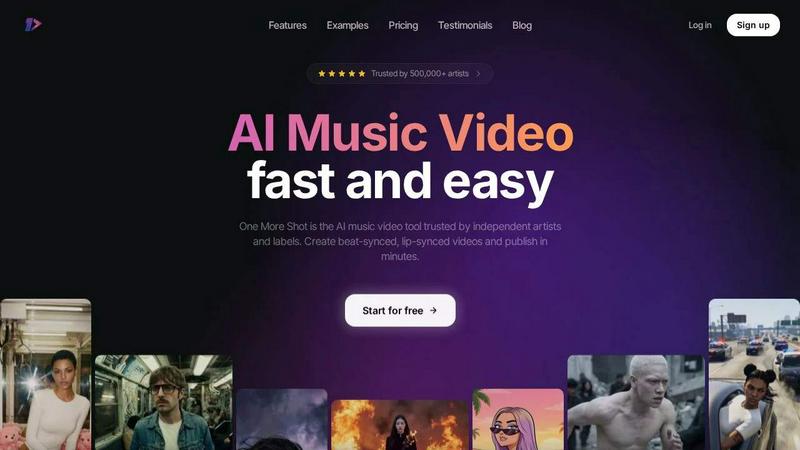
One More Shot AI
Stop stressing about music videos, our AI turns your tracks into fire visuals with perfect lip-sync in minutes.
Last updated: April 4, 2026

Ultra Face Swap
Swap faces in any pic or vid with crazy realistic AI, no watermarks and it's free to start.
Last updated: February 28, 2026
Visual Comparison
One More Shot AI
Ultra Face Swap

Feature Comparison
One More Shot AI
Your AI Artist & Crew
Stop worrying about casting calls or hiring actors. This feature lets you create a virtual artist straight from a photo or even just a text description. Once you've got your digital star, the platform keeps their look consistent across every scene and every video. It's like having a dedicated, always-available frontperson for your brand. Plus, the "Auto Videos" mode acts like your AI production crew, taking your song and a photo and handling the entire video creation process from start to finish, no micromanaging needed.
Beat-Synced Visuals & Top-Tier Lip-Sync
Nothing kills a music video faster than visuals that are off-beat or lips that don't match the words. One More Shot AI's core tech analyzes your track's audio waveform to generate visuals that pulse, cut, and transition in perfect sync with the rhythm. And for those crucial singing scenes? They host the best lip-syncing model around (they just dropped Seedance 2.0 for even better sync) to make sure every syllable matches perfectly. It looks so natural, your fans will swear it was filmed live.
Precise Project Mode Editing
For the control freaks and creative visionaries, Auto Mode is just the start. Dive into Project Mode for granular, frame-by-frame control. Want to change a specific shot, adjust the timing of a transition, or tweak the AI prompt for just one scene? This is your playground. You can start from a blank slate or take an auto-generated video and remix it to perfection. It’s the perfect balance of AI speed and human creative direction.
Multi-Format Output for the Feed
The internet is a fragmented place. One platform wants vertical, another wants square, your YouTube wants horizontal. Creating separate videos for each is a nightmare. One More Shot AI bakes that flexibility right in, letting you export your final video in vertical (9:16), horizontal (16:9), or square (1:1) formats from the same project. Shoot once, publish everywhere. It's the ultimate tool for dominating your social media feed and music promotion across all channels.
Ultra Face Swap
Browser-Based Powerhouse
Ditch the downloads and sketchy software. Ultra Face Swap runs on pure cloud magic right in your web browser. This means you get insane AI processing power without it eating up your phone storage or laptop memory. It works on practically any device, so you can create pro-level face swaps from your couch, your desk, or even while waiting in line for coffee. No install, no hassle, just instant access to Hollywood-grade VFX.
Multi-Face Swapping Chaos Mode
Why stop at one face when you can swap the whole squad? This isn't your average single-face tool. Ultra Face Swap's AI can intelligently detect, track, and seamlessly replace up to EIGHT faces in a single image, GIF, or video clip. Group photos, party videos, meme templates—nothing is safe. It handles everyone individually, making sure each swap looks natural and doesn't create a glitchy, nightmare-fuel mess.
High-Fidelity, Artifact-Free Blending
This is where the magic gets real. The AI doesn't just plop a face on; it performs a deep fusion. It analyzes and matches lighting, skin tone, texture, and even micro-expressions from your target face to the source material. The result? Fewer weird edges, no creepy halos, and blends so natural you'll have to double-check it's actually a swap. It's the detail that makes the difference between a viral hit and a cringe fail.
All-Format Dominator (Photo, GIF, Video)
Ultra Face Swap doesn't play favorites. It has one slick, unified pipeline that crushes face swapping across photos, animated GIFs, and full HD videos. Whether you're fixing a blink in a group selfie, inserting yourself into a trending meme GIF, or creating a full-on deepfake skit for YouTube Shorts, the tool handles it all with the same scary-good precision and speed.
Use Cases
One More Shot AI
The Independent Artist's Visual Debut
You're an indie musician with a fire new track on Suno or Udio, but zero budget for a video. This tool is your golden ticket. Upload your song, a cool pic for vibe reference, and get a professional, engaging music video in minutes. It lets you compete with major label visuals and gives your song a fighting chance to get noticed on streaming platforms and social media, all without breaking the bank.
Social Media Content Machine
Artists need to feed the algorithm constantly. Use One More Shot AI to create a ton of visual content from a single track. Make a vertical clip for TikTok/Reels, a horizontal version for YouTube, and square snippets for Instagram. You can even generate short, hook-focused videos for promotion or behind-the-scenes style clips featuring your AI artist, keeping your audience engaged and your content fresh daily.
Lyric Video & Visualizer on Steroids
Static lyric videos are so 2010. Transform your MP3 into a dynamic, AI-generated visual experience that reacts to the music. It's the perfect middle ground between a simple audio visualizer and a full narrative video. Great for showcasing your songwriting on platforms like YouTube or for creating immersive background content for live performances or listening parties.
Building a Consistent Artist Brand
Creating a recognizable look is key. Use the AI Artist feature to build a virtual persona that appears in all your visuals, from music videos to social posts. This builds brand identity and makes your work instantly recognizable in a crowded feed. It's like having a digital mascot or alter-ego that represents your sound and aesthetic 24/7.
Ultra Face Swap
Go Viral on Social Media
Want millions of views? This is the secret sauce. TikTok creators, Instagram Reel makers, and YouTube Shorts hustlers use Ultra Face Swap to insert themselves into celebrity interviews, movie scenes, or trending meme formats overnight. One user got 3.2M views swapping into a famous interview clip. It's the ultimate tool for creating endless, shareable content that stops the scroll and blows up your feed.
Fix & Perfect Group Photos
That one epic group photo is always ruined by someone blinking or making a weird face. Ultra Face Swap is your group photo savior. Instantly fix everyone's faces in one click—swap in a better smile from another shot, perfect for weddings, reunions, or friend hangouts where the lighting was tragic. No more begging everyone for a re-take or needing Photoshop skills.
Create Pro Headshots Instantly
Need a fire LinkedIn photo or a professional actor headshot but don't have time or cash for a photoshoot? Ultra Face Swap has you covered. Just swap your face onto a high-quality, professionally lit portrait. Recruiters and clients will see you at your absolute best. One marketer reported landing 40% more client calls after updating their profile pic with this tool.
Unleash Your Creative (or Unhinged) Side
Dream of meeting your celebrity crush? Want to see your friend as a Marvel superhero? Or just create the most hilarious, unhinged content for the group chat? This tool is for pure, unadulterated fun. Experiment with cross-gender or age transformations, create fantasy scenarios, or bring historical figures to life in your videos. The only limit is your imagination (and maybe your dignity).
Overview
About One More Shot AI
Yo, what's good? Let's talk about the biggest headache for any musician or creator: making a dope music video. Traditional production? That's a whole circus - crews, budgets, timelines that drag on forever. It's enough to kill your vibe. Enter One More Shot AI, your new digital production squad. This ain't just another filter app; it's a full-blown web and mobile platform that uses AI to turn your tracks into straight-up visual fire. Think of it as your personal AI director, editor, and VFX team rolled into one.
Built for the grinders - independent artists, content creators, and music marketers - it's all about skipping the boring, expensive stuff and getting to the magic. You feed it a song, and its brain analyzes the rhythm, energy, and mood. Then, whether you just wanna hit "go" with a reference pic and a prompt, or get deep in the weeds with scene-by-scene control, it cooks up a full music video faster than you can say "encore." With over half a million artists already trusting it, this tool is the secret weapon for getting pro-looking, beat-synced, lip-synced videos out into the world (TikTok, Instagram, YouTube, you name it) without selling a kidney. It's your one more shot to stand out.
About Ultra Face Swap
Alright, listen up. Ultra Face Swap is that one AI tool you didn't know you needed until you try it and your mind gets absolutely blown. Forget the clunky, sketchy apps that leave weird ghosting around your chin. This is next-level, Hollywood-grade face swapping that runs right in your browser—no downloads, no "pro" skills required. It's your pocket VFX artist, letting you seamlessly (and we mean seamlessly) replace faces in photos, GIFs, and videos with scary-good realism. The magic? You can swap one face OR go full chaos mode and swap up to EIGHT faces in a single group pic or video clip. It's built for the content grind, period. Whether you're a TikTok creator chasing the next viral trend, a marketer who needs 50 variations of a model shot by yesterday, or just you and the group chat wanting to see what you'd all look like as the Avengers, this is your weapon. Stupidly easy to use: upload, click, and get pro-level results in seconds. Plus, they hook you up with free daily credits and no watermarks, so you can test-drive the madness. Your data's safe (encrypted and auto-deleted), so you can get weird without worry. Join over 100K creators who are already using it to absolutely blow up their feeds.
Frequently Asked Questions
One More Shot AI FAQ
Do I need video editing skills to use this?
Nope, zero skills required! The whole point is to democratize video creation. The Auto Video mode is designed to be a one-click wonder - just add your song and a reference image. If you wanna get fancy, the more advanced controls are intuitive and built for musicians, not Hollywood editors. You'll be making vids in no time.
How good is the AI lip-sync really?
It's legit. They specifically host what they call "the best lip-syncing model available," and with the recent Seedance 2.0 update, it's even more precise. It analyzes the vocal track and animates the mouth movements to match, making singing scenes look natural and in-sync. It's one of their flagship features for a reason.
Can I use it with my music from anywhere?
Totally. It works seamlessly with AI music platforms like Suno and Udio, but you can also upload your own MP3s from any source - whether you made it in FL Studio, Ableton, exported from Spotify (if you own it), or recorded it in your closet. If it's an audio file, it can probably become a video.
What's the catch? Is there a free plan?
They have a "Start for free" option, which is common for these tools. This usually means you can test the core features with some limitations, like a watermark, shorter video length, or lower resolution. To get the full, unlimited, watermark-free experience with all the pro features, you'd move to a paid plan. Always check their latest pricing page for the exact deets.
Ultra Face Swap FAQ
Is Ultra Face Swap really free?
Yes, and it's actually a legit free tier! You get free daily credits just for checking in, which you can use to generate face swaps. The best part? Results from these free credits come with NO WATERMARK. You can test drive the full power of the AI and download your creations without any annoying logos plastered on them.
How does it handle multiple faces in a video?
The AI is a tracking beast. It doesn't just detect faces in the first frame; it intelligently locks onto and follows each face throughout the entire video sequence. This ensures stable, consistent swaps without the face drifting off, jittering, or creating visible artifacts, even when people are moving around in a complex group scene.
What about my privacy and uploaded photos?
Your data's safe, fam. Ultra Face Swap uses encryption for your uploads and, crucially, automatically deletes your source images and generated results from their servers after processing. This means your photos and videos aren't just sitting around or being used to train other models without your consent. You can get creative without the worry.
What kind of source photo works best for the best swap?
For the cleanest, most realistic results, use a clear, high-quality photo of the target face looking straight at the camera with good, even lighting. Avoid heavy shadows, sunglasses, or faces turned too far to the side. The clearer the input, the more flawlessly the AI can blend all the fine details like skin texture and lighting.
Alternatives
One More Shot AI Alternatives
So you've heard about One More Shot AI, the tool that lets artists and creators whip up AI music videos from their tracks. It's a total game-changer in the AI content creation space, letting you skip the whole expensive, time-consuming video shoot and just vibe with an AI that gets your song's mood and rhythm. But hey, maybe the price point isn't your jam, or you need a feature it doesn't have yet. Maybe you're just a curious cat who wants to see what else is cookin' in the AI video kitchen. That's totally valid. People shop around for all sorts of reasons—budget, specific creative needs, or just wanting to test different platforms. When you're on the hunt for something similar, think about your non-negotiables. Do you need insane lip-sync accuracy? How much control do you want over each scene? Is it for quick social clips or a full-blown visual project? Getting clear on your own workflow will help you find the perfect fit.
Ultra Face Swap Alternatives
Alright, so you've heard about Ultra Face Swap, the go-to AI tool that lets you swap faces in pics and vids with crazy realism, no watermarks, and it's free to start. It's a straight-up powerhouse in the AI face-swapping game, perfect for creators who need quality fast. But hey, maybe you're scrolling through the options, wondering what else is out there. People hunt for alternatives for all sorts of reasons. Maybe you've burned through your free credits and need a different pricing model, or you're looking for a specific feature Ultra Face Swap doesn't have. Sometimes it's about platform—needing a dedicated mobile app instead of a browser, or wanting software that integrates directly with your editing suite. The search is totally normal. When you're weighing your options, think about what matters most to you. Is it the quality of the blend? The number of faces you can swap at once? How they handle videos versus just images? Don't forget the practical stuff, too, like cost, ease of use, and what happens to your data after you upload. Finding the right fit is all about matching the tool's strengths to your specific vibe and needs.