
HeyVid vs Vibrantsnap
Side-by-side comparison to help you choose the right AI tool.

HeyVid is your one-stop AI studio that turns your wildest ideas into pro videos and images in seconds, no cap.
Last updated: April 4, 2026

Vibrantsnap
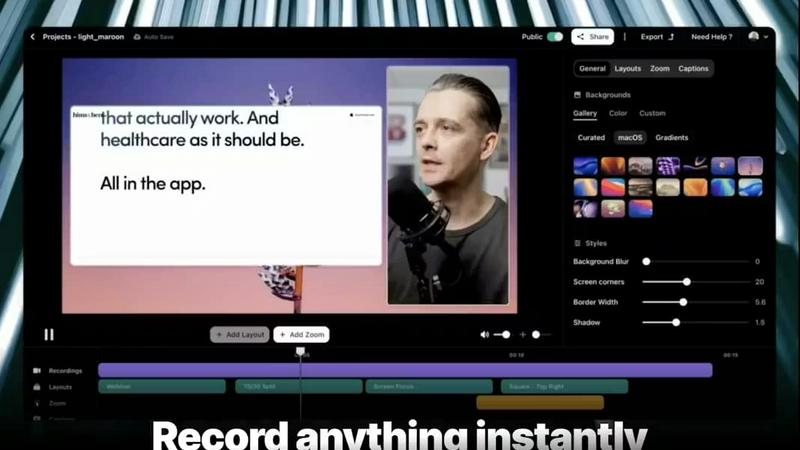
Stop editing for hours, just record your screen and let AI instantly polish it into a pro video that converts.
Last updated: February 28, 2026
Visual Comparison
HeyVid

Vibrantsnap
Feature Comparison
HeyVid
All-in-One Model Hub
Yo, why hunt for the best AI model when HeyVid's got the whole squad? This is the main attraction. You get instant access to the GOATs of video gen like Veo 3.1, Sora 2, Kling, and Runway, plus image legends like Midjourney, Flux, and DALL-E. It's like having the ultimate creative toolkit where you can pick the perfect tool for the job without ever leaving the app. Want cinematic quality? Hit Veo. Need something trendy and fast? Kling's your guy. Total game-changer.
Text-to-Everything Magic
This is where the wizardry happens. Got a wild idea in your head? Just type it into the prompt box. Describe your scene, mood, or style, and watch HeyVid's AI bring it to life as a video or an image. You can get super detailed with prompts up to 10,000 characters, tweak the aspect ratio for Reels or YouTube, and even let it auto-translate if your prompt isn't in English. It's the ultimate "idea to reality" button.
Pro-Grade Customization Controls
HeyVid ain't just a one-click wonder. For the real pros who wanna fine-tune, it's got the goods. You can control the resolution (720p, 1080p, or crispy 4K), set a specific "seed" number to recreate a style, and even add a custom watermark. It gives you the control to make your content truly unique and branded, so your stuff stands out in the algorithm soup.
Image Transformation Station
Already have a photo or graphic? Level it up big time. Upload any image and HeyVid can either animate it into a video (image-to-video) or use it as a starting point to create a completely new, stylized image (image-to-image). It's perfect for breathing life into old product shots, creating consistent character art, or just making your existing visuals 10x more engaging without starting from scratch.
Vibrantsnap
Magic Edit (Auto-Cut + Auto-Layout)
This is the brain of the whole operation, your one-click magic wand. Hit record, then let the AI work its sorcery. It automatically scans your raw screen recording and cuts out all the dead air, "ums," and awkward pauses. No more manual timeline scrubbing. On top of that, it slaps on a professional, clean layout to make your video look like it was edited by a pro, not slapped together in a panic. Two clicks, and you go from messy recording to polished, ready-to-ship content. It's the ultimate time-saver for anyone who hates editing.
Built-in Video Analytics & CTAs
Forget posting a video and praying. Vibrantsnap gives you the receipts. You get built-in analytics that show you exactly who watched, how many times they watched, and – the real gold – where their attention dropped off. This isn't just vanity metrics; it's actionable intel to make your next video even more killer. Plus, you can embed direct call-to-action buttons like "Buy Now" or "Visit Website" right into the video player, turning passive viewers into active leads without them ever leaving the video. Track views and clicks in real-time.
AI Voiceover Enhancement
Worried your recording sounds like you're in a tin can or just need a voiceover? Vibrantsnap has your back. Its AI can clean up and enhance your existing voice audio to sound crisp and professional. Even better, if you don't want to use your voice at all, you can generate a clean, professional-sounding AI voiceover to narrate your demo. This means you can create perfect, polished tutorial videos without ever hitting record on your mic. Perfect for async comms or scaling content creation.
Instant Sharing & High-Quality Export
Once your video is magically polished, you need to get it out there, stat. Vibrantsnap lets you share your video instantly with a link or embed it anywhere – your website, a sales email, a tweet, you name it. No waiting for uploads to third-party platforms. You can also export your masterpiece in gorgeous 2K resolution up to 60fps, ensuring it looks buttery smooth and professional on any screen, from a phone to a boardroom monitor. Creation to distribution in minutes.
Use Cases
HeyVid
Social Media Content Grind
Trying to feed the never-ending beast that is Instagram, TikTok, and YouTube? HeyVid is your content meal prep. Whip up eye-catching short-form videos, design thumbnails that actually get clicks, and create podcast clips that go viral—all in a fraction of the time. Stop stressing about posting schedules and start pumping out bangers that grow your following.
Startup & Entrepreneur Hustle
Pitching to investors or launching a new product? You gotta look legit. HeyVid lets you create slick pitch videos, hype-building launch trailers, and authentic brand story videos without needing a Hollywood budget. Make your crowdfunding campaign pop with pro visuals that build trust and get people to open their wallets. First impressions are everything, fam.
Marketing & Ad Agency Power
Digital agencies, listen up. Need to create 50 different ad variants for a client by tomorrow? No sweat. HeyVid streamlines creating entire ad campaigns, social media assets, email marketing videos, and landing page content. It scales your creative output so you can take on more clients and deliver fire results faster. Your clients will think you've got a secret army of editors.
Education & Course Creation
Online educators and course creators, this one's for you. Ditch the boring slideshows. Use HeyVid to transform your lessons into engaging video content, animated tutorials, and dynamic presentations. Explain complex topics with clear, custom visuals. It makes creating top-tier course material so easy, you can focus on teaching instead of tech headaches.
Vibrantsnap
Product Demos & Onboarding
Ditch the long, confusing feature lists. Record a quick, 90-second walkthrough of your app's core magic, let Vibrantsnap polish it, and drop it on your homepage or in your welcome email. New users will grasp the value instantly, reducing frustration and boosting activation rates. It's the fastest way to show, not tell, why your product rocks.
Sales & Outreach Sequences
Stop sending bland "check out my website" emails. Record a personalized screen video addressing a prospect's specific pain point, use the AI to make it look pro, and embed a direct "Book a Call" CTA. This personal touch cuts through inbox noise, builds trust way faster than text, and gives you analytics to see who's actually interested. Game-changer for cold outreach.
Customer Support & Tutorials
Tired of writing the same support article over and over? Record the solution once. Vibrantsnap will trim the fluff, add clear captions, and let you export a concise tutorial. Share the link directly with customers or build a library of help content. It's faster for you and easier for customers to follow than a wall of text.
Async Team Updates & Pitch Decks
Need to update your remote team or investors? A Vibrantsnap video is way more engaging than a giant Slack text dump or a static slide deck. Record your screen going through metrics, a new feature, or a deck, add a quick voiceover, and share the link. It feels more personal, ensures clarity, and saves everyone a meeting.
Overview
About HeyVid
Alright, so you're trying to make fire content but editing software makes you wanna yeet your laptop out the window? We feel you. Enter HeyVid, your new creative sidekick. Think of it as the ultimate AI content factory where you can cook up literally any visual media you need. Stuck on an idea? Just type some text. Got a mid image? Upload it. Boom. HeyVid spits out a pro-level video or stunning image in minutes, no cap. It's built for everyone from the solo creator grinding on TikTok to big marketing teams needing to pump out ads. The main flex? It puts ALL the top AI models like Sora 2, Veo 3.1, Midjourney, and Kling AI under one roof. No more jumping between ten different apps and subscriptions. Whether you need a viral short, a product launch video, or a slick image for your blog, HeyVid handles the heavy lifting so you can focus on the big picture. It's fast, stupidly simple, and gets you results that don't look AI-generated (in a good way).
About Vibrantsnap
Alright, let's cut through the noise. You've got a killer product, but your website visitors are bouncing faster than a dropped call. Walls of text and boring screenshots just ain't cutting it anymore. Enter Vibrantsnap – your secret weapon for turning "huh?" into "hell yes!" in under a minute. This ain't your grandma's video editor. It's a hyper-focused tool built for founders, creators, and SaaS hustlers who need to make their product's value crystal clear, fast. The whole vibe is "record once, look pro, convert hard." You just hit record on your screen, and Vibrantsnap's AI does the heavy lifting: chopping out awkward silences, applying slick layouts, and even polishing your voice. The end result? Short, snackable, high-converting videos that don't just show features but drive action – think "Book a Call" or "Start Trial" buttons baked right in. No more spending your life in editing software. This is about getting back to building your business while looking 10x more credible. It's the ultimate cheat code for turning casual clicks into committed customers.
Frequently Asked Questions
HeyVid FAQ
What AI models does HeyVid actually have?
HeyVid's got the ultimate roster. For video, you're talking heavy hitters like Kling AI, Veo 3.1, Sora 2, Runway, and Pika. For images, you get access to Midjourney, Flux AI, DALL-E, and Stable Diffusion, among others. It's basically a VIP pass to all the best AI generators without needing separate accounts for each one.
Do I need any video editing skills to use this?
Nope, zero, zilch, nada. That's the whole point! If you can type a sentence or upload a picture, you can use HeyVid. The platform is built to be super intuitive. You just describe what you want, pick a few settings if you feel fancy, and let the AI do its thing. It's designed for total beginners but has enough depth for pros too.
Can I use HeyVid for commercial projects?
Absolutely! The content you generate is meant to be used. Whether you're making ads for clients, videos for your business, or images for your online store, you can use what you create. It's a tool for professionals to make real, commercial-grade content. Just check the specific terms for the model you use regarding rights.
How fast do I get my video or image?
Speed is a major flex for HeyVid. For many tasks, you're talking minutes, not hours or days. Simple image generations can be almost instant. More complex, high-quality videos might take a few minutes to render. It's way faster than traditional editing or waiting on a freelancer. You get a "fast" option on models like Veo 3.1 if you really need to move quick.
Vibrantsnap FAQ
Do I need any video editing skills to use Vibrantsnap?
Absolutely not, and that's the whole point! Vibrantsnap is built for people who want results, not a new career in video editing. You just need to know how to record your screen. The AI (Magic Edit) handles all the complex trimming, layout, and polishing automatically. If you can click "record" and then "export," you're already a pro.
What kind of analytics do I get with my videos?
You get the good stuff – actionable data, not just fluff. The built-in analytics dashboard shows you total views, unique viewers, and average watch time. The killer feature is the engagement graph that shows you exactly where in your video people are dropping off or rewatching. You also track clicks on your embedded Call-to-Action buttons in real-time, so you know what's actually converting.
Can I use Vibrantsnap if I don't want to use my own voice?
100% yes! The AI Voiceover feature has you covered. You can either let the AI enhance and clean up your existing recording, or you can type out a script and have a professional-sounding AI voice narrate the entire video for you. This is perfect for creating scalable tutorial content or if you're just not feeling your voice that day.
How does Vibrantsnap compare to tools like Loom?
Think of Loom as a fantastic, simple recorder. Vibrantsnap is like Loom's cousin who went to film school and got a degree in marketing. While both let you record your screen, Vibrantsnap adds the automatic AI editing to make your videos polished, provides built-in CTAs and conversion analytics, and focuses heavily on the end goal: turning viewers into customers. It's built for growth, not just communication.
Alternatives
HeyVid Alternatives
So you're looking for something like HeyVid, huh? We get it. HeyVid is that all-in-one AI tool that churns out videos and images, basically your one-stop shop for whipping up visual content without needing a film degree. It's a solid pick in the productivity and management game for creators, marketers, and anyone trying to level up their content fast. But let's be real, sometimes you gotta shop around. Maybe the price tag is giving you sticker shock, or you need a specific feature it doesn't have. Perhaps you're a hardcore Discord user and want a bot, or you're all about a different workflow. It's totally normal to scope out the competition to find your perfect match. When you're on the hunt, think about what really matters for your vibe. Is it all about the budget, or are you chasing the highest quality outputs? Do you need a ton of customization, or just something stupid simple to use? Nail down your non-negotiables first, and you'll filter out the noise to find the tool that actually fits your life.
Vibrantsnap Alternatives
Vibrantsnap is your go-to wingman for whipping up slick product demos and screen recordings without the editing headache. It lives in the productivity and management space, basically turning your raw screen cap into a pro-level explainer video with AI magic. It’s all about showing, not just telling, to boost those sign-up rates. But hey, no single app is everyone’s perfect match. Maybe the price tag feels steep for your startup budget, or you need a specific feature it doesn’t have. Some folks might be locked into a different ecosystem or just want to shop around before committing. It’s totally normal to scope out the competition. When you’re on the hunt for something else, think about your non-negotiables. Do you need more advanced editing controls, or is dead-simple automation the dream? Check the platform compatibility, peek at the pricing tiers, and see if the vibe of the tool matches your workflow. The goal is to find your video creation soulmate.