

ButterKit
ButterKit makes it stupid easy to create killer App Store screenshots and metadata for every language, boosting your conversions.
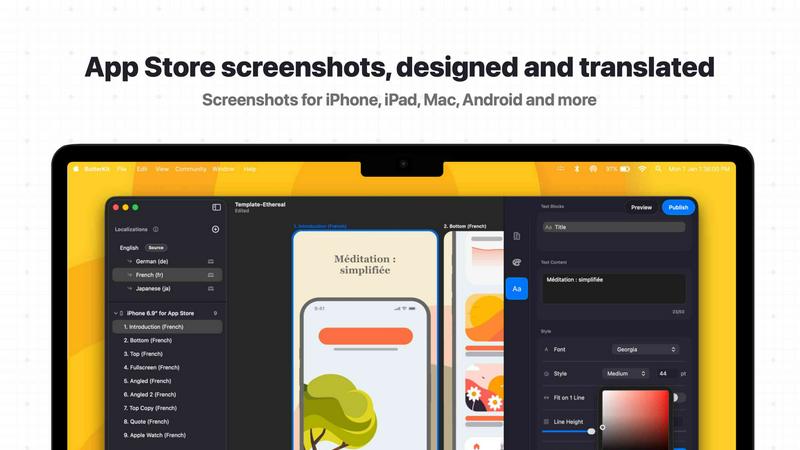
About ButterKit
ButterKit is basically the ultimate cheat code for Apple developers who are tired of the soul-crushing grind that is App Store publishing. We all know the pain: you've built this sick app, but then you gotta deal with taking screenshots, putting them in fancy frames, translating your metadata into a million languages, and then uploading everything without messing up the order. It's a whole vibe killer. ButterKit is a native macOS app that was built by a solo developer who totally gets the struggle. It lets you capture screenshots directly from the Xcode Simulator, slap them into photorealistic 3D device frames that look absolutely fire, and then translate all your app metadata into every single one of the 50 App Store Connect languages using some next-level AI. No more hiring translators or doing that boring manual copy-paste. The real kicker is that it hooks directly into the App Store Connect API, so you can upload all your polished screenshots and metadata with, like, one click. It even plays nice with your CI/CD pipelines and Fastlane workflows by letting you link entire folders for input and output. Whether you're a solo dev, part of a design studio, or running a marketing agency, ButterKit is that tool that makes you wonder how you ever lived without it. It's all about getting your app in front of more users without losing your sanity.
Features of ButterKit
Capture Screenshots Like a Pro
Forget messing around with clunky web tools or taking screenshots on your phone and cropping them like it's 2010. ButterKit lets you drag and drop your PNG or JPG screenshots directly onto 3D device models, and it just works. But the real flex is the Capture Tool for Xcode Simulator. It integrates directly with Xcode, so you can capture screenshots straight from the Simulator without any extra steps. This saves a ton of time and lets you rapidly iterate on your designs until they look absolutely perfect. You can even link a whole folder of images from Fastlane or Xcode UI tests, and ButterKit will handle the whole batch like a champ.
Design With Real 3D Devices and Pro Tools
ButterKit isn't just some basic image editor. It's a full-on 3D rendering engine built on Metal, which means everything runs buttery smooth at up to 120fps. You get access to photorealistic 3D devices that you can spin around and adjust to get that perfect look that makes your screenshots pop. The pro editing tools are no joke either. You can span those 3D devices across multiple artboards and create seamless panoramic backgrounds that tie your whole story together. Plus, you've got full control over fonts, gradients, and backgrounds. And if you're not feeling creative, there are professionally designed templates bundled right in, with a whole community marketplace for even more templates and add-ons.
Instant Translation to 50 Languages
This is where ButterKit really flexes its AI muscles. You can translate your screenshots and all your app metadata into every single one of the 50 App Store Connect localizations in seconds. No joke. The designs stay perfectly synced across all languages, so you don't have to manually update each one when you make a change. This is a massive time saver and a huge boost for your app's reach. It's like having a personal translator that works 24/7 and never complains about the workload.
One-Click Upload to App Store Connect
Once you've got everything looking fire and translated into a billion languages, the last thing you want is to manually upload each screenshot in the correct order. ButterKit integrates directly with the App Store Connect API, so you can batch export your images or upload your entire design set directly to the store with a single click. Everything is in the correct order, ready to go. It also has an App Store preview feature so you can see exactly how your app's story will look on every device and in every language before you hit that publish button. No more nasty surprises.
Use Cases of ButterKit
Solo Indie Developers Crushing It
You're a solo dev, you've got a killer app idea, and you're wearing all the hats. The last thing you need is to spend hours on App Store publishing. ButterKit lets you focus on what you do best (coding) while it handles the boring stuff. Capture screenshots from your Simulator, apply a dope template, translate to a few key languages, and upload. You can go from "I need screenshots" to "my app is live in 10 countries" in under an hour. It's the ultimate sidekick for the one-person army.
Design Studios and Marketing Agencies
If you're managing multiple apps for different clients, you know the pain of keeping everything consistent and on-brand. ButterKit is a game changer for agencies. You can create a master template with your client's branding, then use the folder linking feature to batch process screenshots from Fastlane. The AI translation means you can offer localization as a service without hiring a team of translators. It makes you look like a hero to your clients and lets you bill for way more value.
Teams Using Fastlane and CI/CD
For teams that have their shit together and use automated workflows, ButterKit fits right in. You can link a folder of screenshots generated by your Fastlane or Xcode UI tests. Every time your CI/CD pipeline runs, it spits out new screenshots, and ButterKit automatically updates your designs. No manual intervention needed. This keeps your App Store listing fresh with every build, which is huge for A/B testing and keeping users engaged.
App Localization Experts
If your whole gig is helping apps go global, ButterKit is the tool you've been waiting for. Translating app metadata into 50 languages manually is a nightmare, and keeping all those screenshots synced is even worse. ButterKit's AI handles the heavy lifting, and the synced design system means you can update your English screenshots and have all 49 other language versions update automatically. It's the difference between a sustainable business and a burnout machine.
Frequently Asked Questions
Can I use ButterKit if I don't use Xcode or Fastlane?
Absolutely. While ButterKit has some killer integrations for Xcode Simulator and Fastlane, you can totally use it by just dragging and dropping your PNG or JPG screenshot images directly onto the 3D devices. It's designed to work however you work. You can also manually design everything from scratch using the pro editing tools and templates. No coding required.
How does the AI translation work and is it accurate?
ButterKit uses advanced AI models to translate your app metadata and any text on your screenshots into all 50 App Store Connect localizations. The translations are generally very accurate and context-aware, but like any AI tool, it's always a good idea to do a quick review, especially for critical marketing copy. The huge upside is that it saves you hours of manual work and lets you get your app into new markets in minutes instead of days.
Does ButterKit work with the latest macOS and Xcode versions?
Yes, ButterKit is a native macOS application that is actively maintained and updated to work with the latest versions of macOS and Xcode. The developer is a solo dev who uses the tool himself, so he's always on top of compatibility. If Apple drops a new OS or Xcode update, you can expect ButterKit to be updated quickly to keep everything running smooth.
Can I create my own templates and share them with my team?
For sure. ButterKit comes with a bunch of high-quality templates built in, but you can also create your own custom designs from scratch and save them as templates. There's even a growing community marketplace where you can share and download templates and add-ons. This is perfect for teams that want a consistent brand look across all their apps, or for designers who want to sell their creations.
Similar to ButterKit

Ecommerce Data API
Amazon product, keyword and market data via REST API and MCP for developers and AI agents.

SightRadar
Face recognition API, a drop-in replacement for AWS Rekognition. Index, search, compare and detect faces, billed per photo with no subscription.


Luminus Tools
A fast, privacy-first suite of online calculators, financial desks, health trackers, and developer utilities running completely in your browser withou

Sprite Sheet Maker
A free browser-based toolkit for creating, cutting, converting, and previewing sprite sheet animations.

Forms Plugin
The #1 Native Form Builder Plugin for Framer - No Code, No Embeds, No External Platforms.

